Computer Vision Engineer Roadmap: What to Learn First
There is no shortage of things to learn in computer vision. The risk is learning them in the wrong order, spending months on theory with nothing built, or the opposite: copying notebooks without understanding why they work.
This roadmap is based on what the job tends to require in production: getting a model to work on real cameras, reliably, on real hardware. The author has more than three years of production computer vision experience, so the order below reflects that kind of work. It is one view, not the only valid path. Adjust it to your goals.
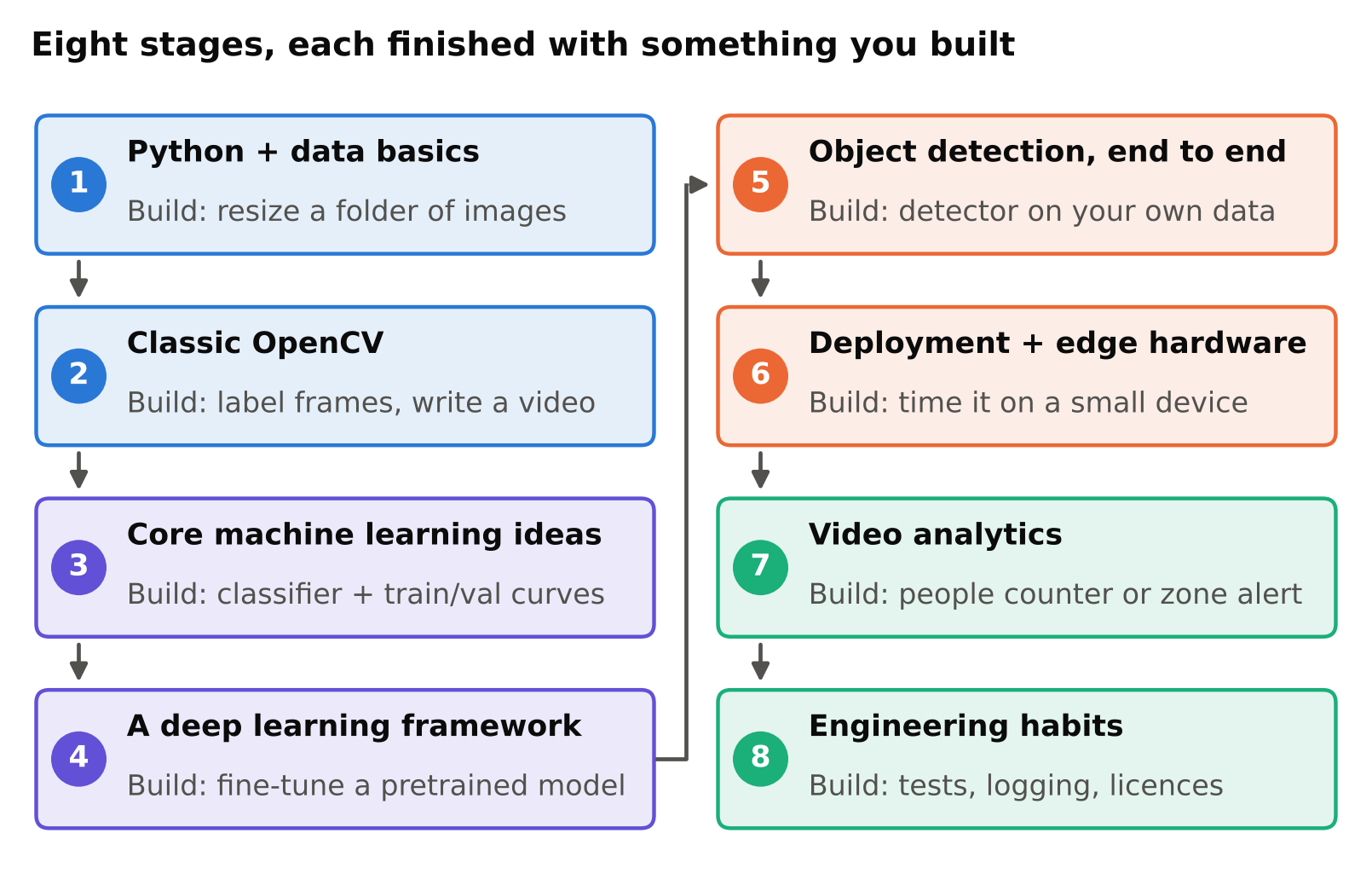
Stage 1: Python and the basics of working with data
You need to be comfortable with Python before anything else. Focus on:
- Functions, classes, modules, virtual environments and reading error messages.
- NumPy arrays: shapes, indexing, slicing and broadcasting. An image is an array, so this is the base of everything.
- File handling, JSON and CSV.
- Git for version control.
- The command line.
Build: a script that loads a folder of images, prints their sizes, and saves resized copies. Set up a clean environment as described in setting up a clean Python environment for computer vision.
Stage 2: classic image handling with OpenCV
Learn how images and video are represented and manipulated: colour spaces, resizing, cropping, drawing, thresholding, contours and geometric transforms. This is not glamorous, but you will use it in every project, and it teaches you what a pixel array actually is.
Build: a script that reads a video, draws a rectangle and a text label on each frame, and writes a new video. The functions you need are listed in OpenCV essentials every computer vision engineer needs.
Stage 3: core machine learning ideas
You do not need a full degree's worth of mathematics to start, but you do need the ideas:
- Training, validation and test sets, and why they must be separate.
- Overfitting and underfitting.
- Loss functions and gradient descent, at an intuitive level.
- Metrics: precision, recall and why accuracy alone can mislead.
- Learning rate, batch size and epochs.
A little linear algebra, probability and calculus help when you read papers. Learn them as you need them, in small doses, rather than as a gate you must pass first.
Build: train a small image classifier on a public dataset, and plot training and validation curves. Explain to yourself why the two curves differ.
Stage 4: a deep learning framework
Pick PyTorch, which is widely used in research and industry. Learn tensors, datasets and data loaders, models, the training loop, saving and loading weights, and moving work to a GPU. Write a training loop by hand at least once. You will understand later tools much better.
Build: fine-tune a pretrained classification model on your own small dataset. The concept is covered in fine-tuning YOLO and transfer learning, and the same idea applies to classifiers.
Stage 5: object detection, end to end
Now do what most real projects need: detect objects. Learn the pieces in this order:
- What the task is and how it differs from classification and segmentation. See classification vs detection vs segmentation.
- How detectors work at a high level. See what is YOLO.
- IoU, non-maximum suppression and how to read mAP. See IoU and NMS and mAP, precision and recall.
- Collecting and labelling data, and the mistakes that ruin it. See annotation mistakes that quietly ruin your model.
- Training on a custom dataset and reading the results. See train YOLO on a custom dataset.
- Diagnosing problems: overfitting, class imbalance, small objects, data leakage.
Data work is where most of the real improvement comes from. Expect to spend more time on data than on model choice.
Build: a detector for something you can photograph yourself, with at least a few hundred labelled images. Split train and validation by scene, not randomly by image. Write down what fails and why.
Stage 6: deployment and edge hardware
A model in a notebook is not a product. Learn to:
- Export models, for example to ONNX, and run them with ONNX Runtime. See export YOLO to ONNX.
- Measure speed correctly. See measuring FPS and latency correctly.
- Understand what runs well on a small board, a GPU box or the cloud. See running YOLO on a Raspberry Pi 5.
- Use containers for repeatable deployment.
- Know the basics of optimisation such as TensorRT and quantisation.
A Raspberry Pi 5 is a cheap way to learn about edge limits, because it forces you to care about model size and speed.
Build: take your detector, export it, run it on a small device or a laptop CPU, and report honest timing from your own measurements.
Stage 7: video analytics
Most commercial work involves video, not single images. Learn:
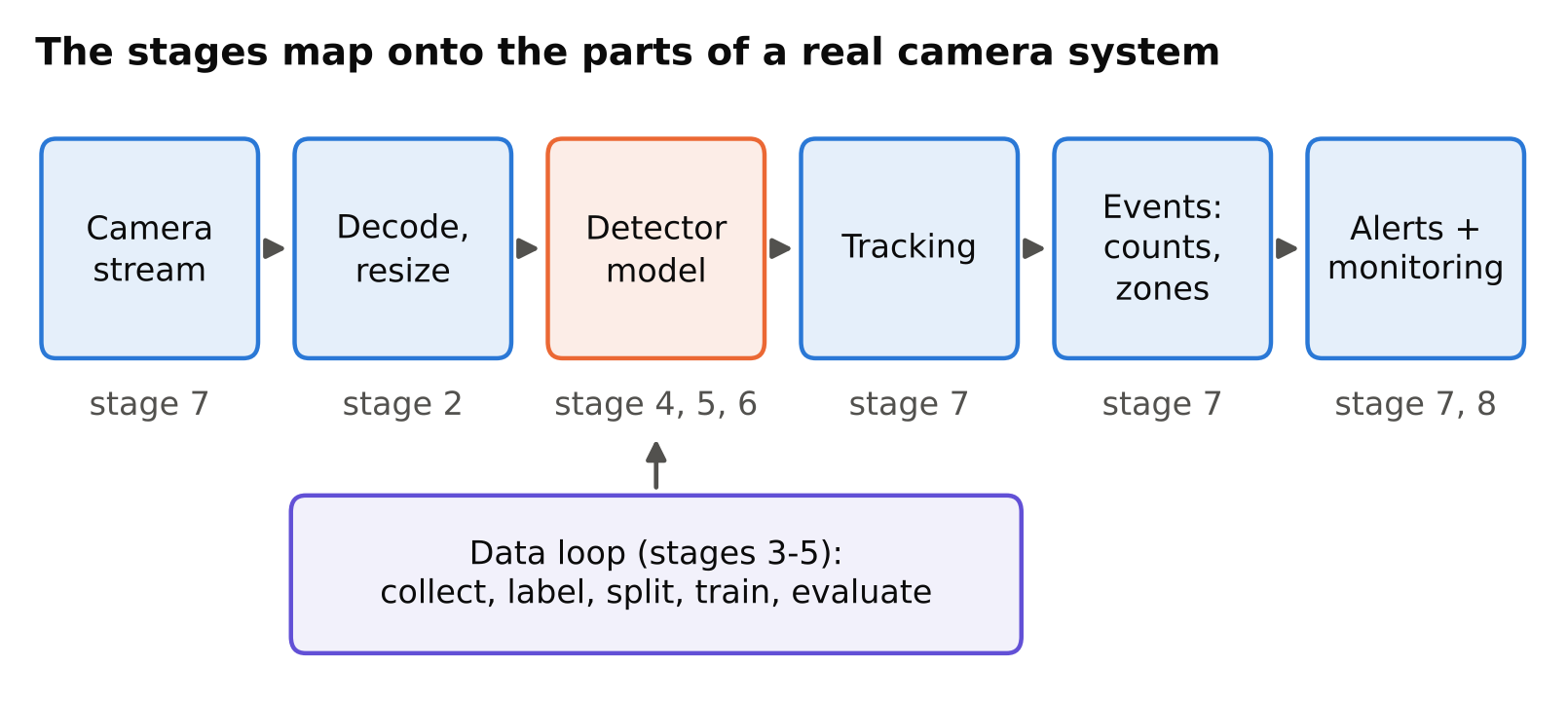
- Reading camera streams and handling failures. See reading RTSP streams with OpenCV and FFmpeg.
- Tracking objects across frames. See object tracking explained.
- Turning detections into events: counting, zones, dwell time and alerts.
- Reducing false alarms and monitoring a running system.
Build: a people counter or zone alert on a recorded video, then on a live stream. Test it as described in a pre-deployment testing checklist for vision models.
Stage 8: engineering habits that make you employable
These are less exciting and make a large difference to how useful you are:
- Write tests for the logic around the model, not just the model.
- Log clearly. Handle errors, so one bad frame does not stop a service.
- Track experiments so results can be reproduced.
- Read licences. Many popular detectors have licence conditions that matter for commercial use. See YOLO licences explained.
- Think about privacy and ethics from the start.
- Write short, clear documentation.
What to skip at first
- Reading every new paper. Most will not change your daily work.
- Building a model architecture from scratch before you can train and evaluate an existing one.
- Chasing the newest model version for small gains before your data is clean.
- Collecting certificates without building anything.
How long does it take?
It depends on your background, how many hours you can give each week, and how much you build. Do not trust anyone who gives you an exact number of months. A better measure is whether you can complete each "Build" step above without copying a tutorial.
Learning resources
A good book or course can give structure, but they do not replace projects. See best books and courses for learning computer vision for how to choose.
Checklist
- Python, NumPy and Git first.
- OpenCV for images and video.
- Core machine learning ideas and metrics.
- PyTorch and one hand-written training loop.
- Detection end to end with your own labelled data.
- Export, measure and deploy to real hardware.
- Video: streams, tracking, events and alerts.
- Engineering habits: testing, logging, tracking, licences, privacy.
- One finished project per stage.
Next steps: best books and courses for learning computer vision, building a portfolio that gets clients.