What Is YOLO? Object Detection Explained Without the Math
YOLO stands for "You Only Look Once". It is a family of object detection models that look at an image one time and return a list of objects, each with a box, a class name and a confidence score. If you have seen a video with coloured rectangles and labels drawn around people or cars, there is a good chance a model like YOLO produced them.
This article explains how it works at a practical level, what the output looks like, and where it fits. There is no maths here. If you can read a spreadsheet, you can follow it.
The problem YOLO solves
Image classification answers one question: what is in this picture? Object detection asks for more. It wants to know what is in the picture, where each thing is, and how many there are. The answer is a set of bounding boxes.
Older detection approaches worked in two stages. First they proposed regions that might contain an object. Then they looked at each region again and classified it. That works, but it repeats a lot of computation and it is slow.
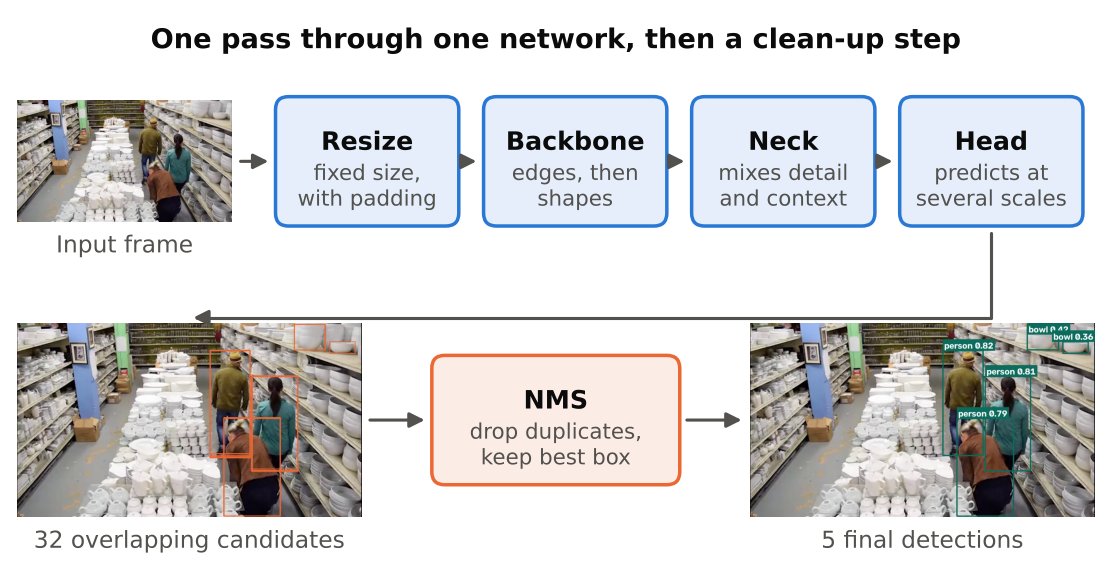
YOLO takes a different route. It runs the whole image through one neural network and predicts boxes and classes directly. That is the "once" in the name. The single pass is why YOLO models became popular for video, robots and small devices, where speed matters.
How a single pass works
You do not need the details to use the model, but a rough picture helps when something goes wrong.
- The image is resized to a fixed input size, often 640 by 640 pixels for current Ultralytics models. Small or large images are scaled, usually with padding so the shape is not distorted.
- A convolutional network, called the backbone, turns the image into feature maps. Early layers pick up edges and textures. Deeper layers pick up shapes and parts of objects.
- A neck combines feature maps from different depths. This lets the model see both fine detail (good for small objects) and wider context (good for large ones).
- A head makes predictions at several scales. At each location on the feature map, it outputs candidate boxes, a score for "is there an object here", and a score for each class.
- The model produces many overlapping candidates. A clean-up step called non-maximum suppression removes duplicates and keeps the best box for each object.
The result is a short list. Each row has a box (position and size), a class and a confidence between 0 and 1.
What the output means
Say you run a model on a street photo. You might get rows like these:
| Class | Confidence | Box (x1, y1, x2, y2) |
|---|---|---|
| person | 0.91 | corner coordinates in pixels |
| car | 0.84 | corner coordinates in pixels |
| car | 0.37 | corner coordinates in pixels |
Three things to keep in mind:
- Confidence is not a probability of being right. It is a score the model produces. A score of 0.9 usually means the model is quite sure, but it does not mean 90 percent of such detections are correct. You find out how reliable it is by testing on your own data.
- You choose a threshold. Detections below the confidence threshold are dropped. A low threshold gives you more detections and more false alarms. A high one gives fewer false alarms and more misses. The article on confidence thresholds covers how to pick one.
- Boxes are rectangles. They include background around the object. Two people standing close together may have overlapping boxes. If you need exact outlines, you want segmentation instead.
The classes a model knows
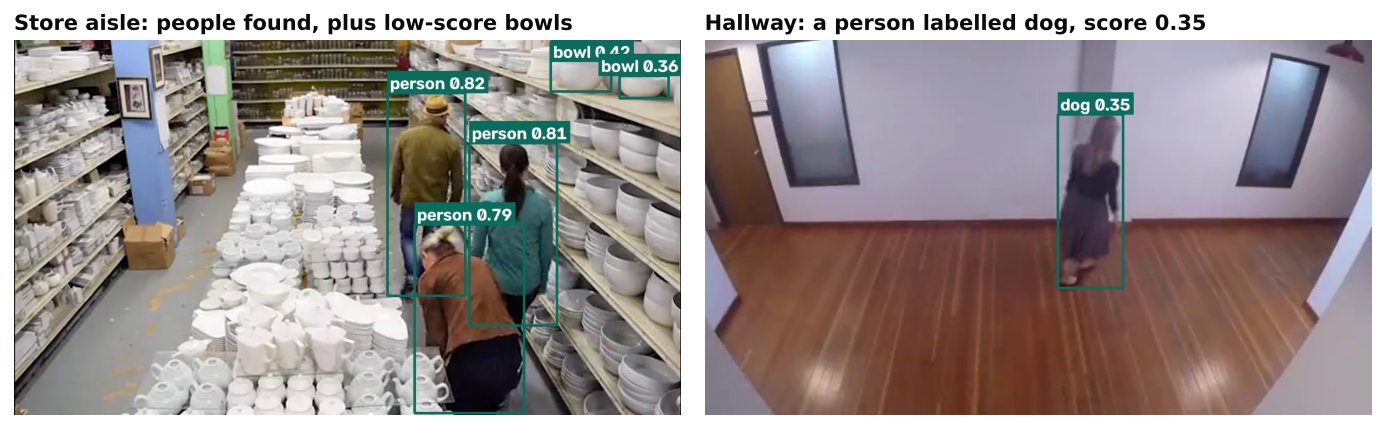
A model only detects what it was trained on. Many pretrained YOLO models are trained on the COCO dataset, which has 80 everyday classes such as person, bicycle, car, dog and chair. If you need hard hats, a specific machine part or a type of waste, the pretrained model will not know it. You collect and label images of those objects and train the model on them, usually starting from pretrained weights. This is called fine-tuning.
This is the most common point where people get stuck. They expect the pretrained model to detect their special object, it does not, and they conclude the model is bad. The model is fine. It just has not been taught that class.
A minimal example
With the Ultralytics package, running a pretrained model takes a few lines:
from ultralytics import YOLO

model = YOLO("yolov8n.pt")  # a small pretrained model
results = model.predict("street.jpg", conf=0.25)

for r in results:
    for box, score, cls in zip(r.boxes.xyxy, r.boxes.conf, r.boxes.cls):
        print(r.names[int(cls)], float(score), box.tolist())
The first run downloads the weights. Each result holds the boxes, scores and class indices for one image. The conf argument is the confidence threshold.
YOLO versions and the name
The name is used loosely. The original YOLO came from research by Joseph Redmon and colleagues. Since then, many people and companies have released models that use the name or build on the idea, and they differ in design, quality and licence. Ultralytics maintains the YOLOv5, YOLOv8 and YOLO11 line that most people use today through the ultralytics Python package. Other groups released versions such as YOLOv7.
Do not assume a higher number is always better for your project. Compare them on your own data. The article on YOLOv5 vs YOLOv8 vs YOLO11 goes through the practical differences.
One more point: licences differ between versions, and they matter if you build a commercial product. The Ultralytics models are released under AGPL-3.0, with a commercial licence available from Ultralytics. Check the current licence before you ship anything. There is more in YOLO Licenses Explained.
Where YOLO fits well
YOLO is a good fit when:
- You need boxes and counts, not pixel-perfect outlines.
- Speed matters, for example live video or limited hardware.
- The objects are reasonably visible and the camera view is fairly consistent.
- You can collect and label examples of what you want to find.
Typical uses include counting people or vehicles, checking whether safety equipment is present, spotting objects on a conveyor, and watching a restricted zone. In production video analytics, the detector is only one part of the system. Around it you need stream handling, tracking, rules and alerts. A good detector with poor surrounding logic still produces a poor product.
Where YOLO is not the right tool
- Whole-image decisions. If the question is "is this part good or bad" and there is one object per image, plain classification is simpler and often more accurate.
- Exact shapes. If you need to measure an area or cut out an object, use a segmentation model. The article on classification, detection and segmentation helps you choose.
- Very tiny objects. Objects that are only a few pixels wide in the input are hard for any detector. You may need higher resolution or tiling.
- Tasks with no visual signal. If a human cannot tell the answer from the image, the model usually cannot either.
How to judge a detector
Do not trust a demo video. Judge a detector with numbers on data it has not seen. The common ones are precision (how many detections were correct), recall (how many real objects were found) and mAP, a summary across thresholds. These are explained in mAP, Precision and Recall. Then look at real failure cases by eye. Numbers tell you how often it fails; images tell you why.
Key points
- YOLO detects objects in one pass and returns boxes, classes and confidence scores.
- The model only knows the classes it was trained on. Custom objects need custom training.
- Confidence is a score, not a guarantee. Pick a threshold using your own test data.
- Boxes are rectangles. Use segmentation if you need outlines.
- Different YOLO versions have different designs and licences. Check the current licence before commercial use.
- Judge a model on unseen data from your real camera, not on a demo.
Next steps: read YOLOv5 vs YOLOv8 vs YOLO11 to pick a version, and IoU and Non-Maximum Suppression to understand the clean-up step.