How Many Images Do You Need to Train an Object Detector?
Everyone asks this early, and everyone wants a number. The honest answer is that no single number is correct. A detector for one clean object on a fixed camera needs far fewer images than a detector for ten similar-looking classes in changing weather. What you can do is build a method that tells you, with evidence, whether you have enough.
This article gives rough starting points, explains what really drives the requirement, and shows a simple way to decide when to stop collecting.
Why there is no fixed number
The count of images is a poor proxy for what the model needs to see. What matters is the variety of examples per class, and how closely your training data matches the footage the model will run on.
Four things push the requirement up or down:
- Number of classes. Each class needs its own set of varied examples. Ten classes need roughly ten times the effort of one.
- Visual similarity between classes. Telling a car from a person is easy. Telling two kinds of safety vest, or two kinds of packaging, is much harder and needs more examples of each.
- Variation in the scene. Lighting, camera angle, distance, weather, motion blur, occlusion and background clutter all multiply the cases the model must handle.
- Object size. Small objects carry fewer pixels, so the model gets less signal per example. See Class Imbalance and Small Objects: Practical Fixes.
Also count instances, not just images. One image with twenty labelled boxes is more training signal for that class than one image with a single box. A dataset of 500 images can be rich or poor depending on how many objects per class it contains.
Rough starting points
These are working rules of thumb from general practice, not guarantees. Treat them as a first target to reach before your first real test, not as a promise of quality.
| Situation | Starting target | Notes |
|---|---|---|
| One class, fixed camera, stable scene | A few hundred images | Variety across time of day still matters |
| A few classes, one site | Several hundred per class | Cover each lighting condition |
| Many classes or similar-looking classes | Often a thousand or more per class | Hard classes need more |
| Multiple sites and cameras | Add data from every site | Do not assume one site generalises |
Pretrained weights change the picture. Starting from a model trained on a large public dataset means you are adjusting an existing detector, not teaching one from nothing. That is why a few hundred images can give a usable first result. See Fine-Tuning YOLO: Transfer Learning Explained.
Collect for variety, not volume
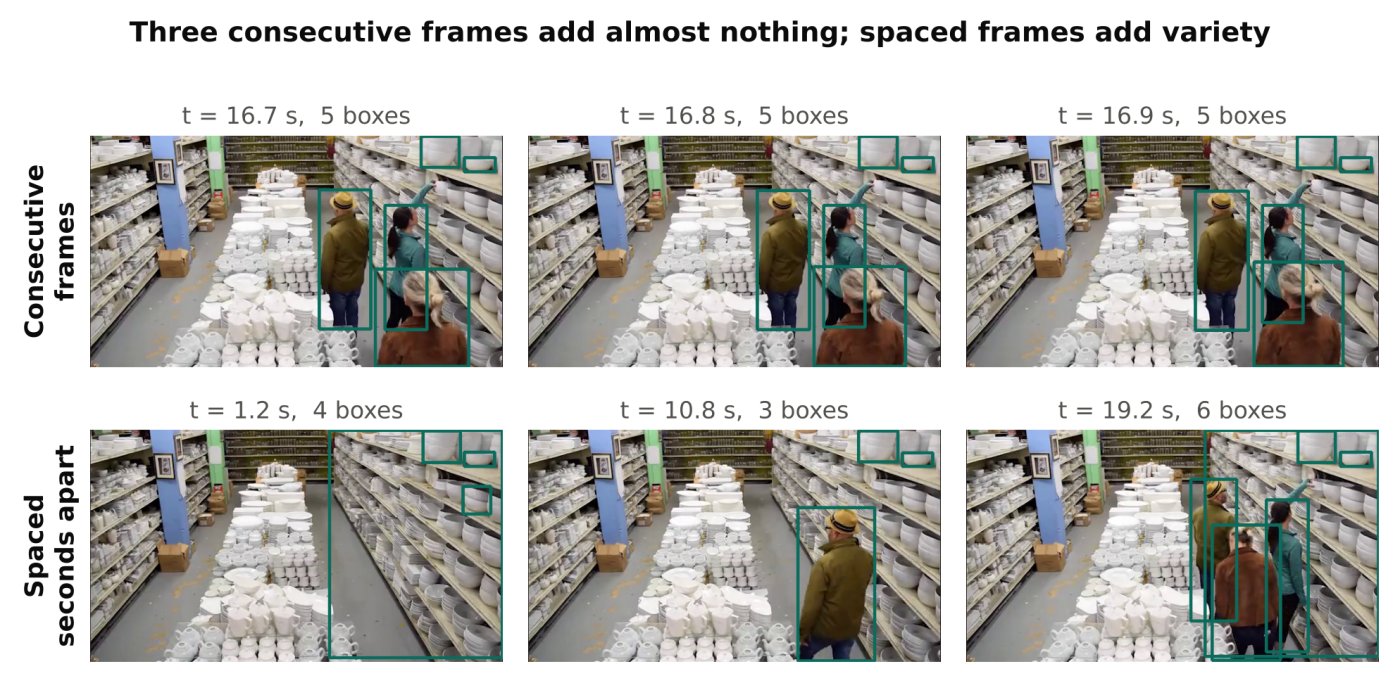
A thousand frames from the same ten seconds of video are worth little more than ten frames. Consecutive video frames are nearly identical. If you extract every frame, you inflate the count without adding information, and you also risk leaking near-duplicates into your validation set.
Better habits:
- Sample frames at intervals, not continuously. Pick an interval long enough that the scene visibly changes.
- Collect across time: morning, midday, evening, night, different weather, different days of the week if activity changes.
- Collect across cameras and sites if the model will run on more than one.
- Deliberately include hard cases: partial occlusion, objects at the edge of the frame, crowded scenes, blur.
- Include images with no target objects at all. These background images teach the model what not to detect and help reduce false alarms.
In production video analytics, a common problem is a model that works well on the footage it was trained on and degrades on a new camera. The fix is almost always more varied data from the new setting, not more of the old data.
How to decide when to stop: learning curves by data size
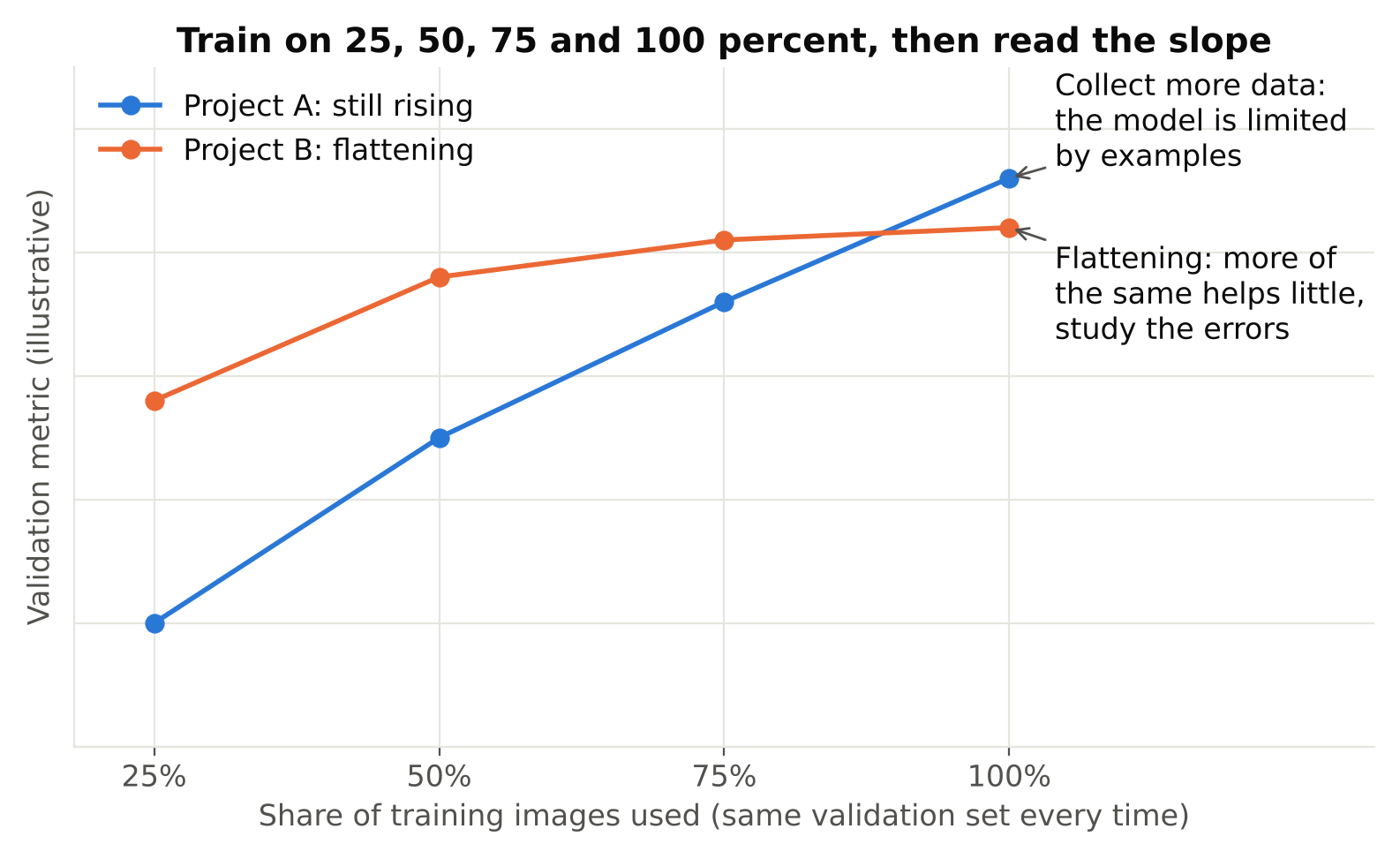
The most reliable method is empirical. Train on increasing fractions of your data and watch the validation result.
- Fix a validation set first, and never train on it.
- Train on 25 percent of your training images. Record the validation metric you care about.
- Repeat with 50 percent, 75 percent and 100 percent. Keep every other setting identical.
- Plot metric against dataset size.
Read the curve:
- Still rising steeply at 100 percent. You need more data. The model is limited by examples.
- Flattening. More of the same data will help little. Look at the errors instead.
- Flat, with a big gap between training and validation results. This is overfitting, and more varied data or stronger regularisation helps. See How to Spot Overfitting in Object Detection.
This costs a few extra training runs, but it replaces guessing with a measurement. For how to interpret the metric itself, read mAP, Precision and Recall: How to Read Detection Results.
Look at errors, not only the score
A single mAP value hides where the model fails. After each training run, open the validation images with predictions drawn and sort the mistakes into groups:
- Missed objects of one class: collect more of that class.
- Misses in one condition, such as night: collect more from that condition.
- False detections on a recurring background object: add background images containing it.
- Boxes that are loose or inconsistent: the problem may be annotation quality, not quantity. See Annotation Mistakes That Quietly Ruin Your Model.
Targeted collection beats blanket collection. Fifty images that fix a known failure are usually worth more than five hundred random ones.
Getting more from less
When collecting is expensive, these help:
- Start from pretrained weights. This is the biggest single gain for small datasets.
- Use augmentation. Flips, scale changes and colour shifts expand the effective variety, as long as they are realistic for your scene. See Data Augmentation for Object Detection: What Helps and What Hurts.
- Use a smaller model. A small model has fewer parameters to fit and can be less prone to memorising a small dataset, though it may cap your accuracy.
- Pre-label with a model. Run a rough model on new footage, then correct its boxes by hand. Correcting is faster than drawing from scratch. Review every box, because the model's mistakes will otherwise be copied into your labels.
- Use public data with care. Public datasets can bootstrap a class, but they often differ from your cameras. Mix them with your own footage and always validate on your own footage. Check the licence of any dataset before commercial use.
Synthetic images can fill gaps for rare cases, but they rarely replace real footage. Always validate on real images.
Common mistakes
- Counting extracted frames as independent images. Near-duplicates inflate the number and the metrics.
- Splitting frames randomly. Frames from the same video end up in both train and validation, which makes results look better than they are. See Train/Validation Split for Video Frames: Avoid Data Leakage.
- Ignoring class balance. A class with a handful of examples will perform badly however large the total is.
- Collecting only easy examples. The model then fails on the first hard day in production.
- Never testing on a fresh camera. Validation on the same site hides generalisation problems.
Checklist
- Define classes clearly and count instances per class, not only images.
- Reach a first target: a few hundred varied images for a simple case.
- Sample frames at intervals, and cover time, weather, cameras and hard cases.
- Add background images with no target objects.
- Hold out a validation set split by video or camera, not by frame.
- Train on 25, 50, 75 and 100 percent of the data and read the curve.
- Review errors by class and condition, then collect to fix specific failures.
- Start from pretrained weights and use realistic augmentation.
Next steps: set up the data layout and run a first training in Train YOLO on a Custom Dataset: A Step-by-Step Guide, then audit your labels with Annotation Mistakes That Quietly Ruin Your Model.