Fine-Tuning YOLO: Transfer Learning Explained
Almost nobody trains a detector from scratch. You start from a model that has already learned to see on a large public dataset, then adapt it to your classes and cameras. This is transfer learning, and fine-tuning is the adaptation step. It is the reason a few hundred images can produce a usable detector.
This article explains why it works, how to do it with Ultralytics, which settings matter, and where it breaks down.
Why pretrained weights help
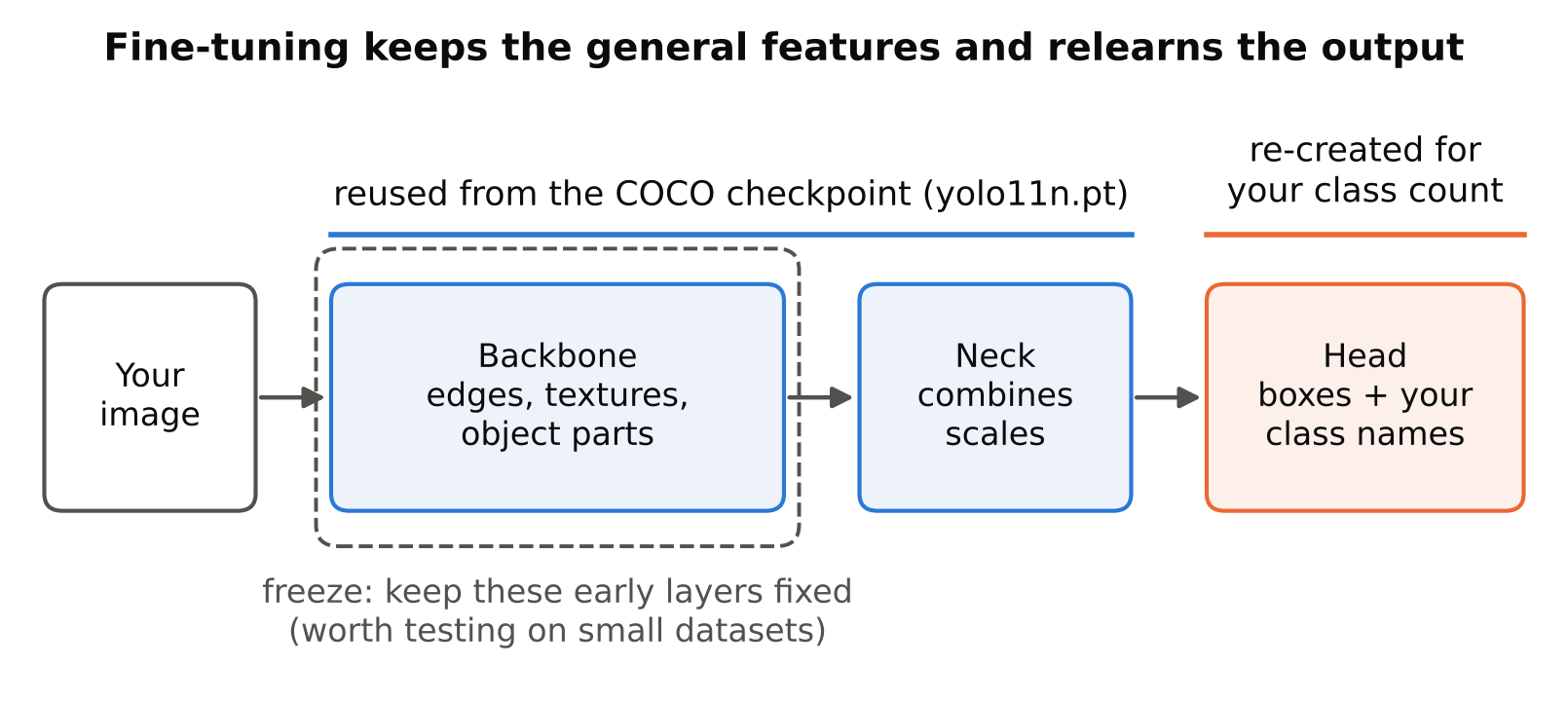
A detector has two broad jobs. The first is to extract visual features: edges, textures, shapes, parts of objects. The second is to turn those features into boxes and class labels.
The feature-extraction part is largely general. Edges and textures are similar whether you detect cats or hard hats. A model trained on a large, varied dataset has already learned good general features. When you fine-tune, you keep that knowledge and mainly teach the model your specific classes and your specific look.
Starting from scratch needs far more data and training time, and with a small dataset it usually gives worse results.
The pretrained checkpoint and its classes
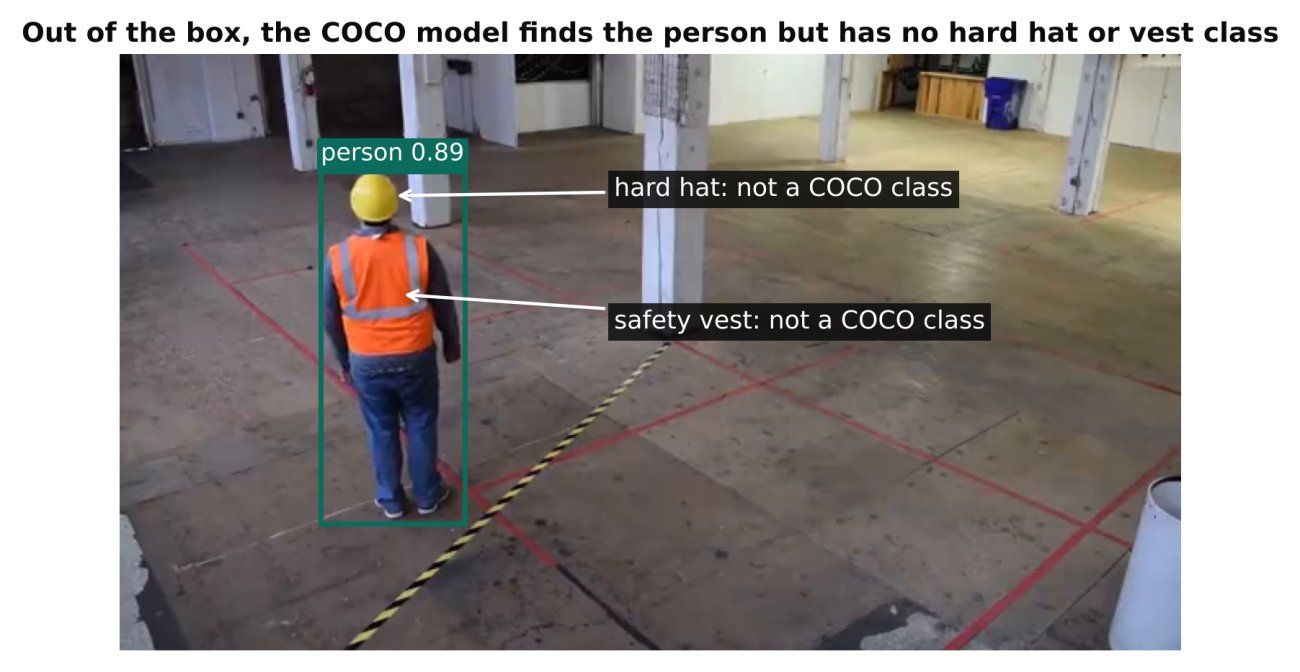
Ultralytics checkpoints such as yolo11n.pt are trained on the COCO dataset, which has 80 common classes. When you train on your own data with different classes, the final prediction layers are re-created to match your class count, while the earlier layers are reused. You do not need to do anything special for this; the library handles it.
Check the current licence of any pretrained weights before commercial use. Ultralytics models are AGPL-3.0 with a commercial licence available. See YOLO Licenses Explained: AGPL, GPL and Commercial Use.
A basic fine-tuning run
from ultralytics import YOLO

model = YOLO("yolo11n.pt")          # pretrained weights
model.train(
    data="data.yaml",
    epochs=50,
    imgsz=640,
)
That is already fine-tuning. Loading a .pt checkpoint means training starts from learned weights. By contrast, loading a model definition file (a .yaml) builds the architecture with random weights. Prefer the checkpoint unless you have a specific reason not to.
For the full dataset setup, see Train YOLO on a Custom Dataset: A Step-by-Step Guide.
Freezing layers
Freezing means keeping some layers fixed so training does not change them. Ultralytics exposes a freeze argument for this, which takes a number of layers (or a list of layer indices). Check the documentation for the exact behaviour in your version.
model.train(data="data.yaml", epochs=50, freeze=10)
Why freeze:
- Small datasets. Fewer trainable parameters means less chance to overfit. The general features stay intact.
- Speed and memory. Less to update per step.
- Stability. Early layers hold generic features that rarely need changing.
Why not freeze:
- Your images differ strongly from COCO. Thermal, infrared, aerial, microscopy or very low-light images have different low-level statistics. Early layers may need to adapt.
- You have plenty of data. With a large dataset, full fine-tuning often gives the best result.
A sensible approach: try full fine-tuning first as a baseline. If you see signs of overfitting on a small dataset, try freezing the early part of the network and compare on validation. Do not assume freezing helps. Test it.
Learning rate and epochs
Fine-tuning generally uses gentler updates than training from scratch, because the weights are already good and large steps can damage them.
- Ultralytics has sensible defaults for the learning rate, warm-up and optimiser. Start with them. Changing the learning rate is a later tuning step, not a first move.
- If training is unstable early, with loss spiking or exploding, lower the initial learning rate.
- If progress is very slow and loss barely moves, you can try a somewhat higher rate, but check the data first.
- Use enough epochs for validation to plateau, and stop when it stops improving. The
patiencesetting supports early stopping. Longer is not better once validation turns. See How to Spot Overfitting in Object Detection.
Warm-up epochs at the start gradually raise the learning rate and help avoid early damage to pretrained weights. This is a default behaviour in Ultralytics; check the docs for current settings.
Choosing the starting point
- Model size. Pick based on hardware and accuracy needs. Larger models fine-tune well but cost more at inference. See Nano, Small, Medium: How to Choose a YOLO Model Size.
- Generation. Newer generations usually have better tooling and export support, but verify against your needs. See YOLOv5 vs YOLOv8 vs YOLO11: Which Should You Use?.
- Your own earlier model. If you already trained a model on similar data, you can use its
best.ptas the start for a new round. This is common when adding new cameras or classes. It works well when the new data is related to the old.
Using fine-tuning to add data over time
A practical production pattern: deploy a first model, collect the cases where it fails on real footage, label them, and fine-tune again from the previous best weights with old and new data combined. Mixing old data in matters. If you train only on new data, the model may drift toward the new conditions and lose performance on the old ones. This is called catastrophic forgetting.
Keep a stable validation set that spans old and new conditions, so you can see if an update improves one situation and harms another.
When fine-tuning fails
- Very different domain with little data. Pretrained features may not match, and a tiny dataset cannot teach new ones. The fix is more data and less freezing.
- Poor labels. Fine-tuning cannot fix wrong ground truth. It will faithfully learn the errors. See Annotation Mistakes That Quietly Ruin Your Model.
- Tiny or unusual objects. If targets are very small, resolution and tiling matter more than weights. See Class Imbalance and Small Objects: Practical Fixes.
- Class definitions that are visually ambiguous. More training will not separate classes that look the same.
- Overfitting to a narrow dataset. The model looks good in validation but fails on new cameras. Add varied data.
- Leaked validation set. Fine-tuning will push the metric up quickly on a leaky split, and the result will be misleading. See Train/Validation Split for Video Frames: Avoid Data Leakage.
- Training for far too long. Late in training the model may fit noise.
Practical recipe
- Fine-tune a small pretrained model with default settings. Record the baseline.
- Inspect validation metrics per class and look at predictions on real footage.
- Fix data problems first.
- If overfitting on a small dataset, test freezing early layers.
- If underfitting, try a larger model or higher resolution.
- Only then adjust learning rate and other fine details.
- Change one thing at a time and keep a log of settings and results.
Checklist
- Start from a pretrained
.ptcheckpoint, not random weights. - Check the model licence for your use.
- Run a default-settings baseline before tuning anything.
- Freeze early layers only when data is small, and test whether it helps.
- Keep the learning rate near defaults; lower it if training is unstable.
- Stop on validation plateau and keep
best.pt. - When updating, combine old and new data and keep a stable validation set.
- Remember that fine-tuning cannot fix bad labels or leaked validation.
Next steps: put this into practice with Train YOLO on a Custom Dataset: A Step-by-Step Guide, and check the result with mAP, Precision and Recall: How to Read Detection Results.