How to Spot Overfitting in Object Detection
An overfit detector has memorised its training images instead of learning the task. It looks excellent on data it has seen and disappoints on anything new. In a detection project this usually shows up as a model that scores well in the lab and fails on the first real camera.
This article explains what overfitting looks like in detection, how to read the curves a training run produces, and what to do about it.
What overfitting means here
A model has a fixed capacity to fit patterns. If the training set is small, narrow or repetitive, the model can use that capacity to remember specific images, backgrounds and even individual lighting conditions, rather than the general shape of the objects.
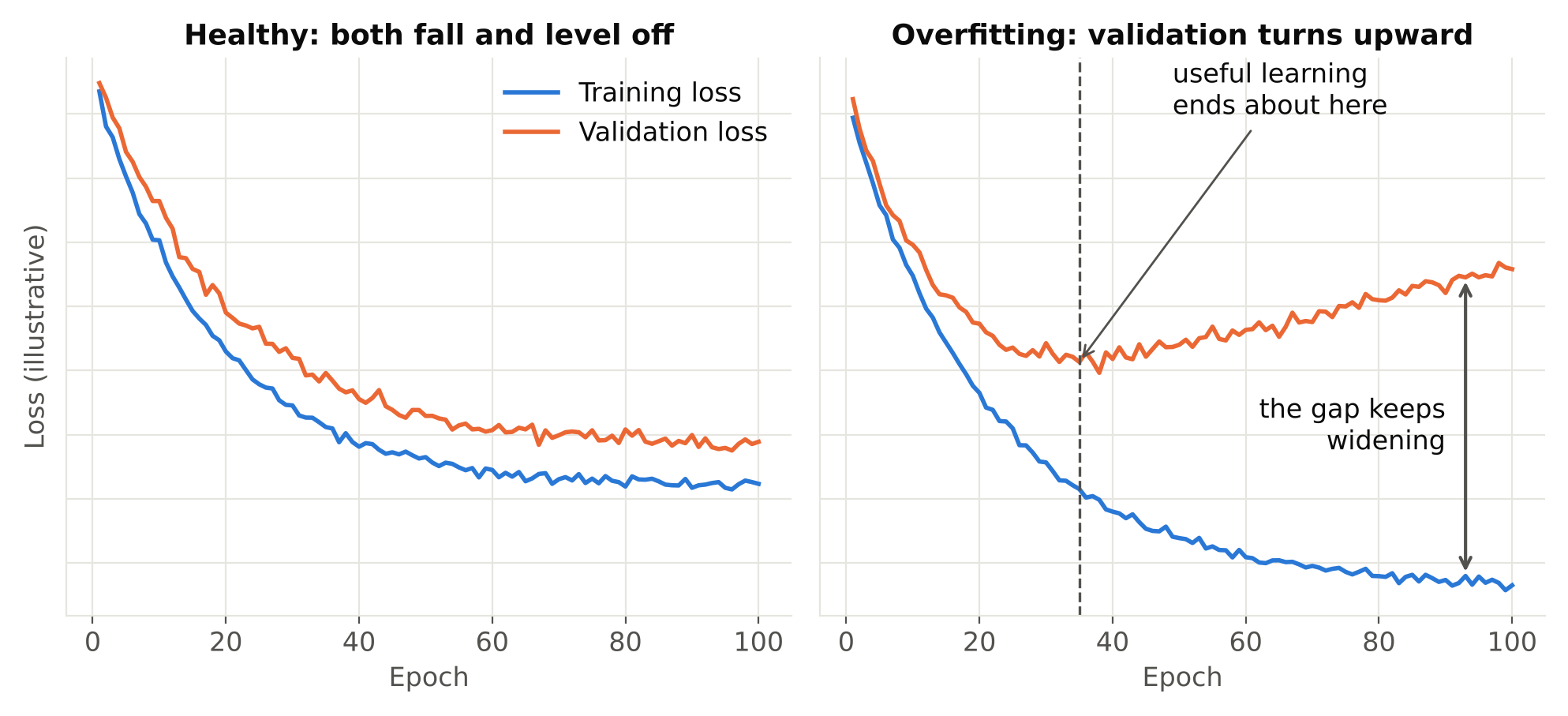
The core symptom is a gap: performance on training data keeps improving while performance on held-out data stalls or gets worse.
Note that there is a related but different problem: data leakage. If your validation set contains near-copies of training images, validation metrics look great even for a badly overfit model. That hides overfitting rather than showing it. Fix the split first. See Train/Validation Split for Video Frames: Avoid Data Leakage.
Where to look
An Ultralytics training run writes results.csv and a results.png plot in the run folder. They contain the numbers you need.
Loss curves
Detection training reports several loss terms, typically for box localisation, classification and an objectness or distribution term depending on the version. Each has a training and a validation curve.
Healthy: both fall together and level off, with a small gap.
Overfitting: training loss keeps falling, validation loss flattens and then rises. The point where the validation curve turns upward is roughly where useful learning ended.
Check each loss term separately. Sometimes the classification loss overfits first while box loss is still fine.
Validation metrics
Plot precision, recall, mAP50 and mAP50-95 per epoch. In a healthy run these rise and settle. In an overfit run they peak and then drift downward or become noisy while training loss keeps improving.
Metrics on a small validation set are noisy. A drop of a small amount between two epochs may be nothing. Look at the trend over many epochs, not single points.
Training-set metrics vs validation metrics
For a direct check, evaluate the final model on a sample of the training images and on the validation images, using the same settings. A large gap, such as near-perfect on training and clearly worse on validation, is the clearest sign.
Qualitative signs
Numbers can miss what your eyes catch. Run the model on footage it has never seen and watch for:
- Strong results on the original camera, poor results on a new one.
- Detections that depend on a specific background, such as only firing in front of one wall.
- Confident detections of things that merely resemble training backgrounds.
- Misses when lighting, weather or angle differs from the training data.
If performance collapses with small changes in conditions, the model has learned the dataset, not the task.
Overfitting or something else?
Not every poor result is overfitting. Use this table to separate causes.
| Observation | Likely cause |
|---|---|
| Training and validation metrics both low | Underfitting, bad labels, or model too small |
| Training great, validation poor | Overfitting or train/validation mismatch |
| Validation great, real footage poor | Data leakage or unrepresentative validation set |
| One class poor, others fine | Too few examples or ambiguous labels for that class |
| Metrics noisy from epoch to epoch | Validation set too small |
Underfitting is addressed differently: more training, a larger model, better labels. Applying anti-overfitting fixes to an underfit model makes it worse.
Practical fixes
Roughly in order of effectiveness:
1. Add more varied data
This is almost always the best remedy. Add examples from different times, weather, cameras and sites. More images that look the same do little. See How Many Images Do You Need to Train an Object Detector?.
2. Stop at the right time
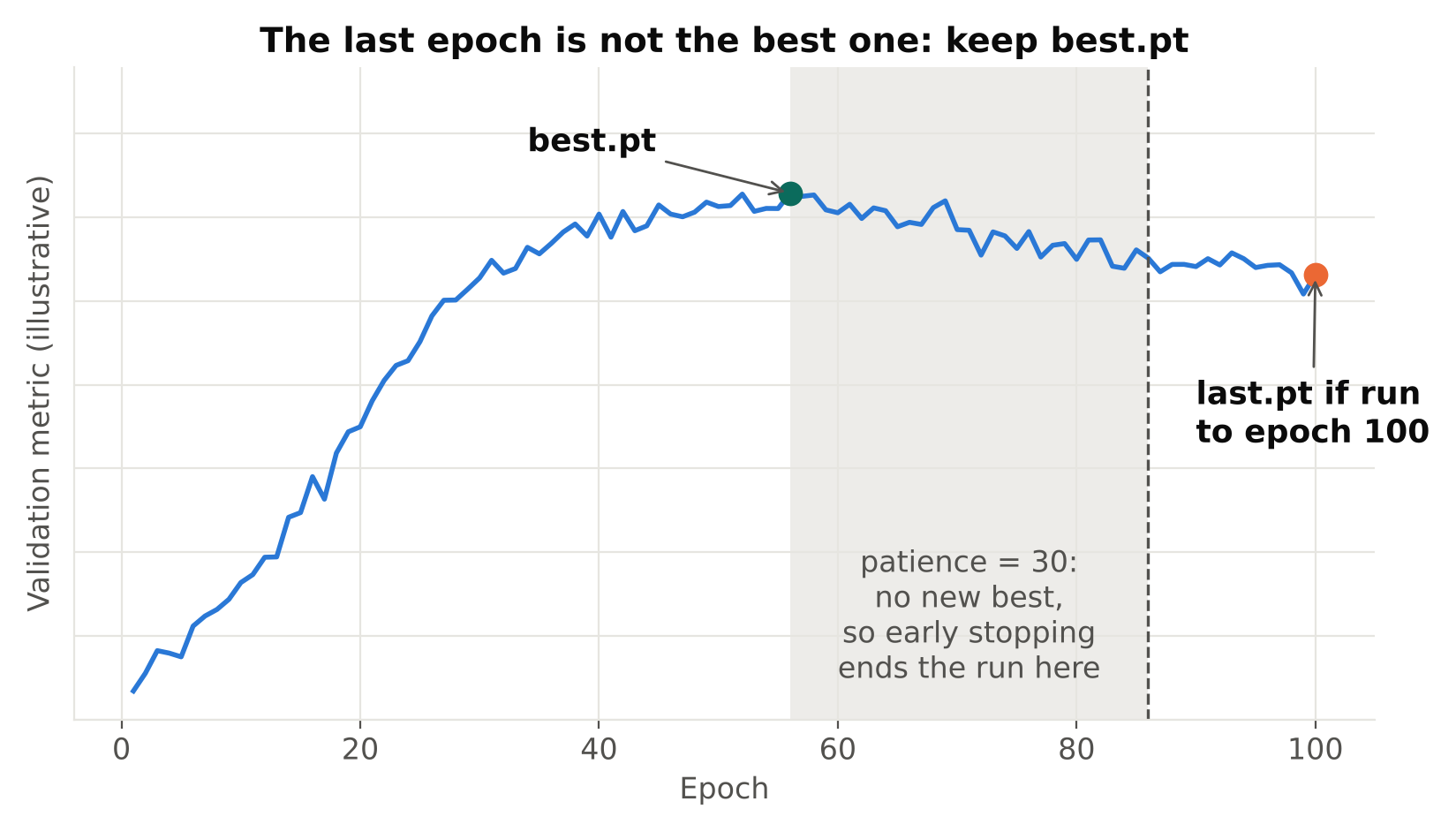
Keep the checkpoint with the best validation result rather than the last epoch. Ultralytics saves best.pt for this. It also supports an early-stopping option called patience, which ends training when validation stops improving. Check the documentation for your version for the exact behaviour.
3. Use realistic augmentation
Augmentation increases the effective variety the model sees. Keep it realistic for your camera. See Data Augmentation for Object Detection: What Helps and What Hurts.
4. Start from pretrained weights and consider freezing
Pretrained weights carry general visual features. With very small datasets, freezing early layers keeps those features stable and reduces what can be overfit. See Fine-Tuning YOLO: Transfer Learning Explained.
5. Use a smaller model
A smaller model has less capacity to memorise. If a nano model matches a medium model on validation, the smaller one is the safer pick and cheaper to deploy. See Nano, Small, Medium: How to Choose a YOLO Model Size.
6. Regularise
Weight decay is applied by default in typical training setups. Increasing it slightly, or using dropout where a framework supports it, can help, but these are weaker tools than more data. Change one at a time and compare.
7. Clean the labels
Noisy or inconsistent labels make memorisation more attractive to the model, since it cannot find a clean rule. Fixing labels often closes the gap more than any hyperparameter. See Annotation Mistakes That Quietly Ruin Your Model.
A simple diagnostic routine
Run through this after any training run:
- Open
results.png. Do validation losses turn upward while training losses keep falling? - Compare metrics from the best epoch with the last epoch. Is the last clearly worse?
- Evaluate on a training sample and the validation set. How large is the gap?
- Look at predictions on a fresh clip from a camera or time period outside the dataset.
- Check the validation set for leakage with the training set.
- If you suspect overfitting, retrain with one fix applied and compare against the baseline.
Common mistakes
- Trusting the training curve. It always improves.
- Using the last checkpoint by default. The best one may be earlier.
- Tuning on the test set. Every time you adjust settings by looking at a set, it leaks into your decisions. Keep a final set you check once.
- Reading noise as signal. On a small validation set, small metric changes mean little.
- Fighting overfitting with a bigger model. That usually makes it worse.
- Declaring victory on the same camera. Always test generalisation on something new.
Key points
- Overfitting is a gap: training gets better, held-out data does not.
- Read loss and metric curves per epoch, and compare best against last.
- Rule out leakage and underfitting before applying fixes.
- More varied data beats every other fix.
- Keep
best.pt, use early stopping, and test on a camera the model has never seen.
Next steps: learn how to read the metrics themselves in mAP, Precision and Recall: How to Read Detection Results, and see how to start from pretrained weights in Fine-Tuning YOLO: Transfer Learning Explained.