Anchor-Free vs Anchor-Based Object Detectors
If you moved from YOLOv5 to YOLOv8, you may have noticed something missing: there are no anchor settings. Older tutorials talk about anchor sizes, autoanchor and anchor ratios. Newer ones do not mention them. This article explains what anchors are, why many detectors dropped them, and what the change means in practice.
What an anchor is
A detector has to output boxes of many sizes and shapes. Predicting a box from nothing is hard. Predicting a small correction to a sensible starting box is easier.
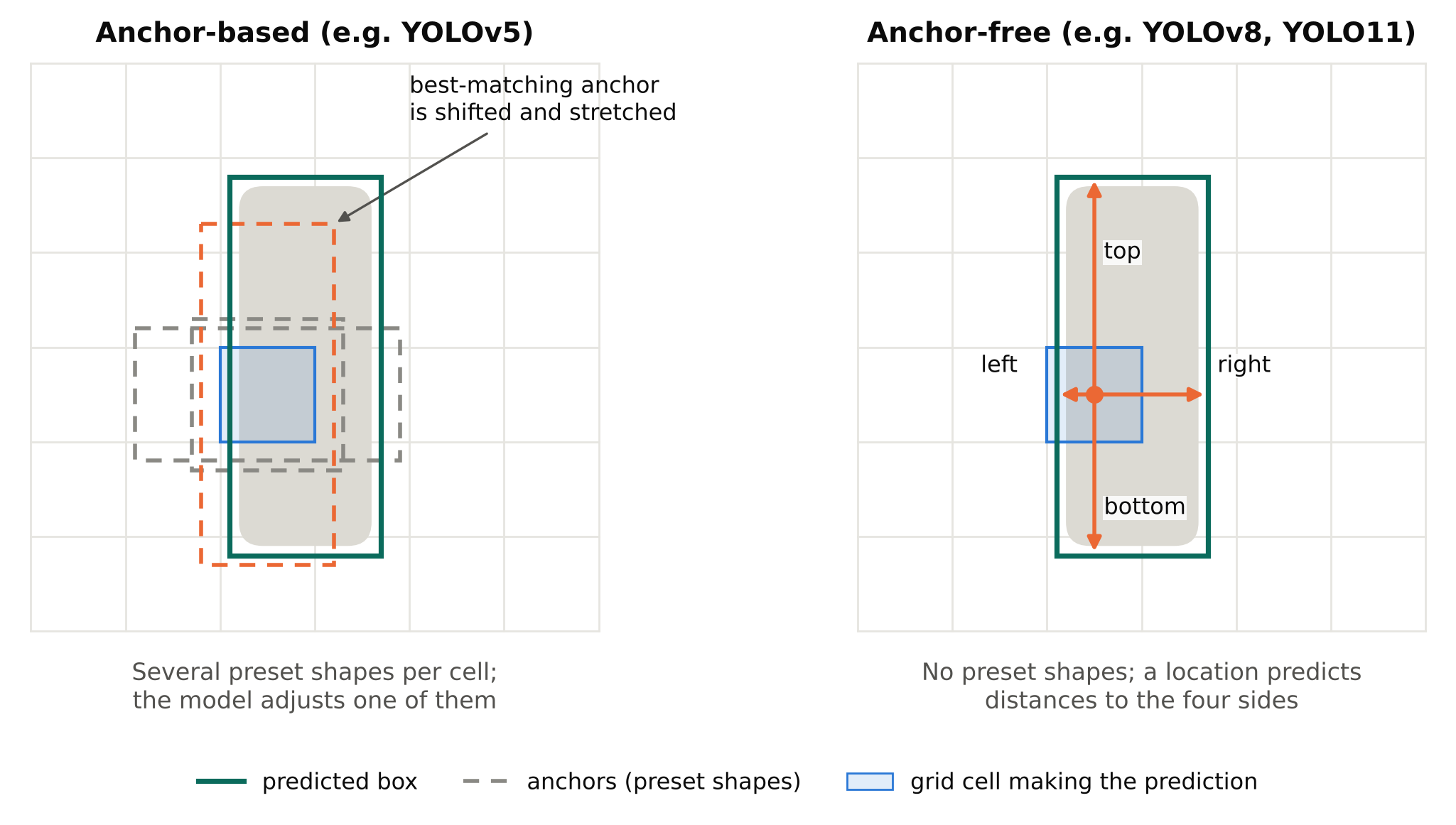
An anchor is that starting box. It is a predefined width and height, placed at every position of a grid over the image. The model does not predict a full box. It predicts how to adjust an anchor: shift it a little, stretch it, and say whether an object is there.
A typical anchor-based detector uses several anchors at each grid cell, with different shapes: a tall narrow one for people, a wide one for cars, and so on. Anchors are usually grouped by scale, because the detector makes predictions at several feature-map resolutions. Fine grids handle small objects, coarse grids handle large ones.
How training uses anchors
During training, each labelled box has to be matched to some anchors. A common rule is that an anchor is responsible for an object if their shapes are similar enough. The matched anchors are trained to predict the object. Anchors with no match are trained to predict "background".
This matching step is where anchor-based design affects results. If your objects have shapes far from every anchor, few anchors match well and learning is poorer.
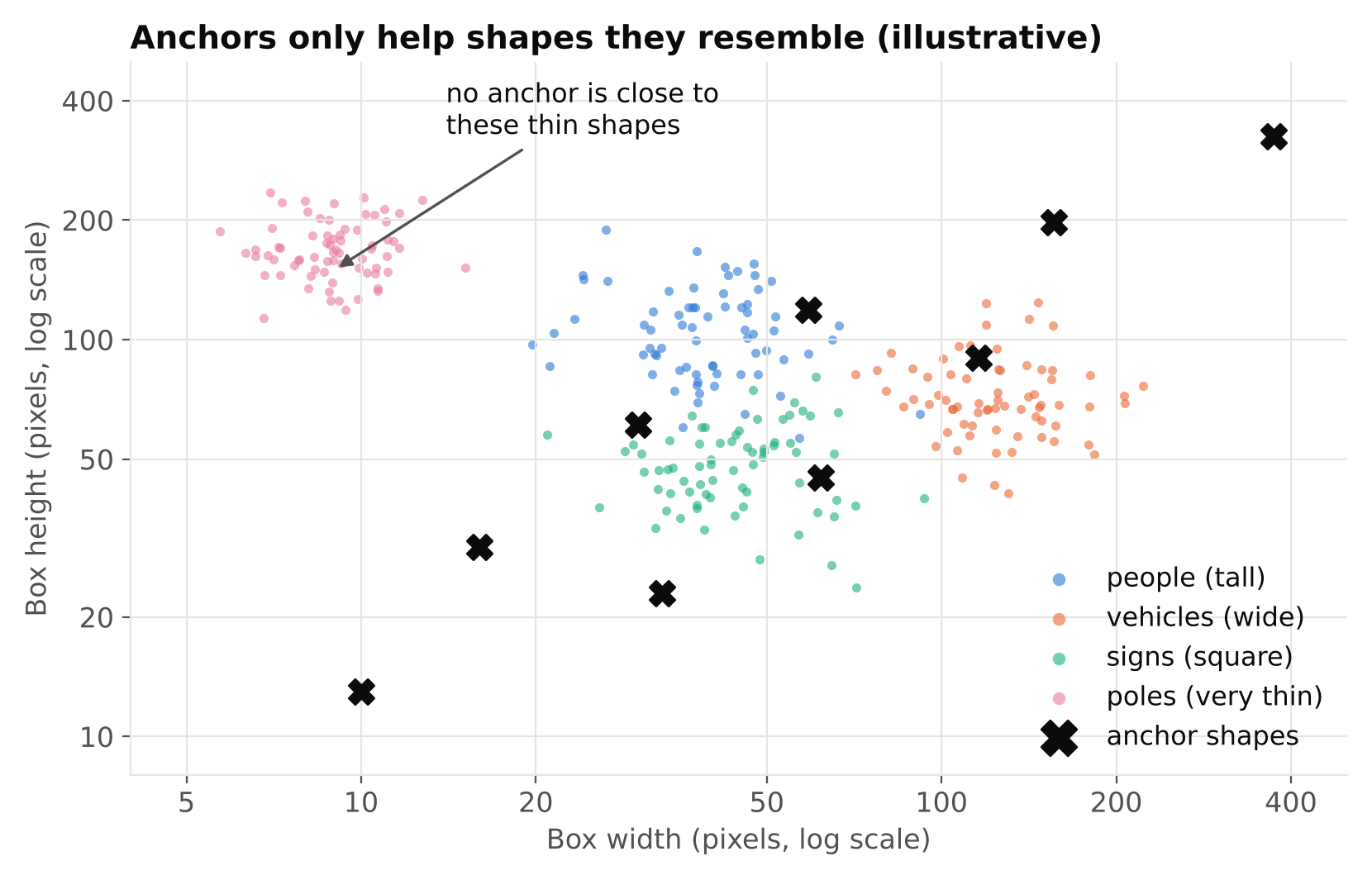
That is why YOLOv5 includes an automatic step that analyses your labels and adjusts the anchors to fit them, using a clustering approach. It was a practical fix for the main weakness of anchors: they are a hyperparameter tied to your data.
The problems with anchors
Anchors work, but they bring costs.
- Extra hyperparameters. The number, sizes and aspect ratios of anchors are choices you must make or let a tool make.
- Dataset dependence. Anchors tuned for one dataset may suit another poorly. Moving from street scenes to close-up parts needs a rethink.
- Many redundant predictions. With several anchors at every location, most are negatives. The imbalance between a few positives and many negatives complicates training.
- Messier post-processing. More candidate boxes means more work for non-maximum suppression. See IoU and Non-Maximum Suppression.
- Awkward for unusual shapes. Very elongated objects, such as poles or cables, can fit poorly into a fixed anchor set.
What anchor-free means
An anchor-free detector skips the predefined boxes. Instead of adjusting an anchor, each location on the feature map predicts the object's box directly, for example as distances from that location to the four sides of the box, or as a centre plus size. Different anchor-free methods use different details, but the principle is the same: no hand-chosen box shapes.
Many anchor-free designs also change how training matches predictions to labels. Rather than a fixed shape-similarity rule, they may use a dynamic assignment that picks the best-fitting predictions for each object based on how well the model is currently doing. The details vary by model, so read the documentation of the version you use rather than assuming.
Ultralytics describes YOLOv8 and later as anchor-free, with a decoupled head that predicts class and box in separate branches. YOLOv5 is anchor-based.
Side by side
| Aspect | Anchor-based (e.g. YOLOv5) | Anchor-free (e.g. YOLOv8, YOLO11) |
|---|---|---|
| Starting box shapes | Predefined anchors | None |
| Anchor tuning | Needed, often automated | Not needed |
| Sensitivity to object shape distribution | Higher | Lower |
| Candidate boxes per location | Several | Typically fewer |
| Output tensor layout | Includes anchor and objectness dimensions | Different layout |
| Custom post-processing code | Written for the older layout | Must be rewritten for the new layout |
The last two rows deserve attention. If you export a model and decode the raw output yourself, the code is specific to the architecture. Decoding code for YOLOv5 output does not work on YOLOv8 output. If you stay with the Ultralytics API for inference, you are protected from this.
What this means for you in practice
Training
With an anchor-free model, you do not tune anchors. That removes a step and one source of poor results on unusual datasets. It does not remove the need for good data. A model with bad labels trains badly either way.
If you still use an anchor-based model, make sure the anchors fit your data. Check that your object sizes are reasonable at your chosen input size, and let the automatic anchor fitting run if your framework has it. Look at the training log to confirm what it did. Read the documentation of your version for how to inspect the result.
Small and unusual objects
Anchor-free is not a magic fix for small objects. Small objects are hard because they cover few pixels. The remedies are more resolution, tiling, or better data, as described in Class Imbalance and Small Objects. Anchor-free design mainly saves you from tuning shapes.
Speed
Do not assume anchor-free means faster. Speed depends on the whole architecture, the input size and the runtime. Measure on your target device. Measuring FPS and Latency Correctly explains how.
Migration
If you move a project from an anchor-based to an anchor-free model:
- Retrain rather than reusing weights. The weights are not interchangeable.
- Keep your dataset and split the same, so you can compare results fairly.
- Check any custom decoding, tracking glue or export code that assumed the old output layout.
- Re-tune the confidence and NMS thresholds. The score distributions are not guaranteed to match.
- Validate on real footage before switching live systems.
A note on history
Anchors became popular because they made training stable and reasonably accurate in the early days of modern detectors, and several well-known detectors relied on them. Anchor-free methods grew in popularity as researchers found ways to get comparable or better accuracy without the extra tuning. The trend in the YOLO family follows that wider shift. It is a design preference with trade-offs, not a proof that anchors were wrong.
Common mistakes
- Treating anchors as the cause of every problem. Poor results usually come from data, labels or resolution before architecture details.
- Copying old decoding code to a new model. The output shapes differ.
- Expecting a free accuracy gain. Changing the detector type does not fix a weak dataset.
- Comparing models unfairly. Use the same data, split and image size. See YOLOv5 vs YOLOv8 vs YOLO11.
Key points
- Anchors are predefined boxes that an anchor-based detector adjusts instead of predicting boxes from scratch.
- They add hyperparameters that depend on your data, which YOLOv5 partly automates.
- Anchor-free detectors predict boxes directly, removing anchor tuning.
- YOLOv5 is anchor-based. YOLOv8 and later Ultralytics models are anchor-free.
- Output layouts differ, so custom decoding code is not portable.
- Anchor-free does not automatically mean faster or better on your data. Test it.
Next steps: YOLOv5 vs YOLOv8 vs YOLO11, How YOLOv7 Gets Real-Time Speed with Re-parameterization and Class Imbalance and Small Objects.