IoU and Non-Maximum Suppression, Explained with Examples
Two small ideas sit behind almost every object detector: Intersection over Union (IoU) and non-maximum suppression (NMS). IoU measures how much two boxes overlap. NMS uses that measure to remove duplicate detections. Once you understand both, many odd behaviours become easy to explain: why two people standing together become one box, why a single object gets two boxes, and why a metric changes when you change a threshold.
Intersection over Union
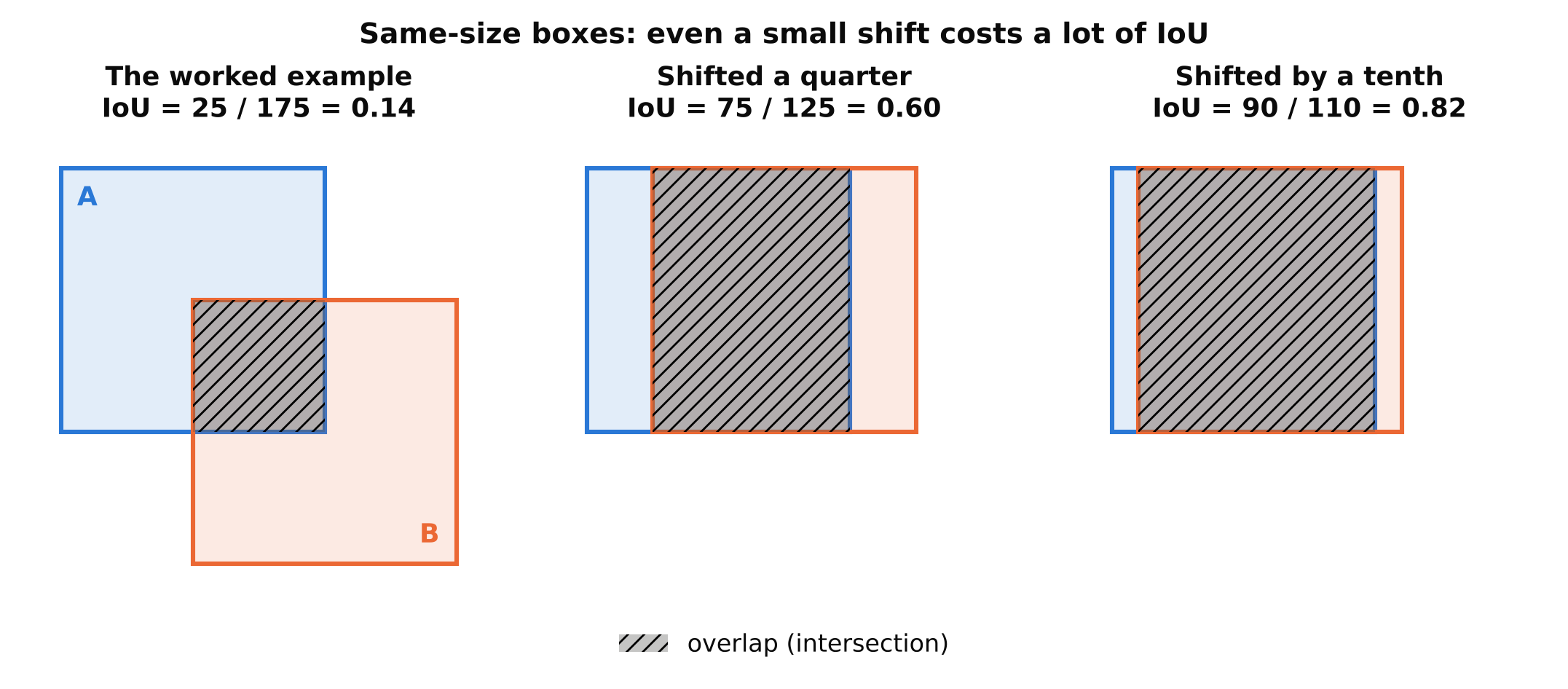
IoU compares two boxes. Take the area where they overlap (the intersection) and divide it by the total area they cover together (the union).
IoU = area of overlap / area of union
The result is between 0 and 1.
- 0 means the boxes do not touch.
- 1 means they are identical.
- Values in between measure how well they agree.
A worked example
Take two boxes in pixel coordinates, written as (x1, y1, x2, y2) for the top-left and bottom-right corners.
- Box A: (0, 0, 10, 10). Its area is 10 x 10 = 100.
- Box B: (5, 5, 15, 15). Its area is also 100.
The overlap is the square from (5, 5) to (10, 10). Its area is 5 x 5 = 25. The union is 100 + 100 - 25 = 175. So IoU = 25 / 175, about 0.14.
Subtracting the overlap once matters. If you add the two areas without subtracting it, you count the overlap twice.
IoU in code
def iou(a, b):
    # boxes are (x1, y1, x2, y2)
    ix1, iy1 = max(a[0], b[0]), max(a[1], b[1])
    ix2, iy2 = min(a[2], b[2]), min(a[3], b[3])
    inter = max(0, ix2 - ix1) * max(0, iy2 - iy1)
    area_a = (a[2] - a[0]) * (a[3] - a[1])
    area_b = (b[2] - b[0]) * (b[3] - b[1])
    union = area_a + area_b - inter
    return inter / union if union > 0 else 0.0

print(iou((0, 0, 10, 10), (5, 5, 15, 15)))  # about 0.143
The max(0, ...) guards matter. Without them, boxes that do not overlap produce a negative width and a wrong answer.
Where IoU is used
IoU appears in at least three places, and it is easy to mix them up:
- Evaluation. A prediction counts as correct only if its IoU with a true box passes a threshold, such as 0.5. See mAP, Precision and Recall.
- Training. Detectors often use an IoU-based term in the loss, and some use it to decide which predictions are matched to which labels.
- NMS. IoU between predictions decides which are duplicates. This is the one we look at next.
The thresholds in these three places are separate settings. Changing one does not change the others.
Why NMS is needed
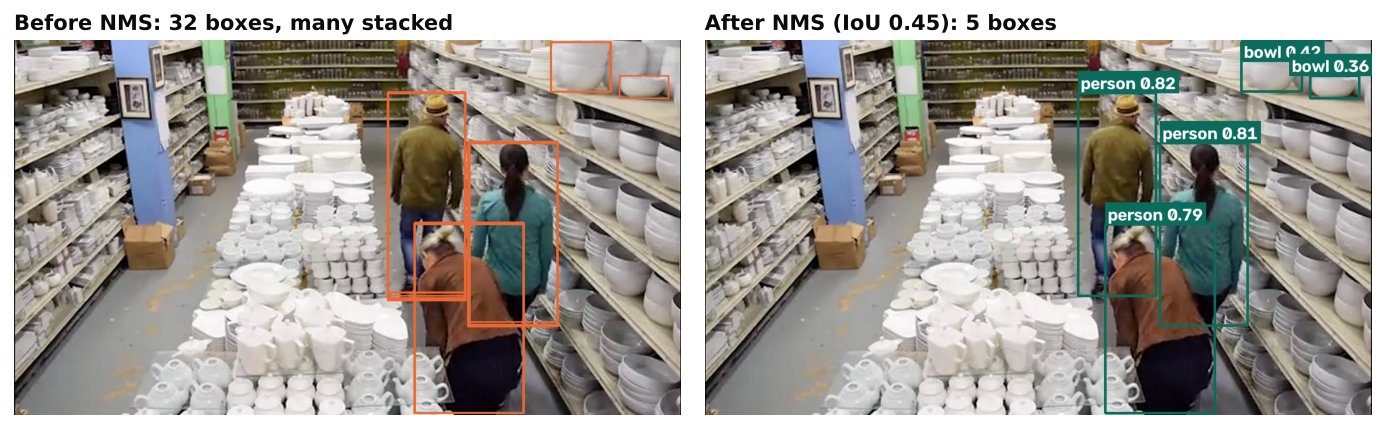
A detector produces many candidate boxes. Several nearby locations in the feature map can all notice the same object, so one dog can end up with five slightly different boxes, each with its own confidence. Showing all five would be wrong. You want one box per object.
NMS keeps the best box and removes the others that overlap it heavily.
NMS step by step
For one class at a time:
- Drop all boxes below the confidence threshold.
- Sort the remaining boxes by confidence, highest first.
- Take the top box. Keep it.
- Compute its IoU with every other remaining box. Remove any box whose IoU is above the NMS IoU threshold.
- Repeat from step 3 with the boxes that are left, until none remain.
A small example
Suppose a model produces three boxes of class "person":
| Box | Confidence | IoU with box 1 |
|---|---|---|
| 1 | 0.92 | - |
| 2 | 0.80 | 0.75 |
| 3 | 0.60 | 0.05 |
With an NMS threshold of 0.5, box 1 is kept first. Box 2 overlaps it by 0.75, which is above 0.5, so it is removed as a duplicate. Box 3 overlaps by only 0.05, so it survives and is treated as a separate person. Result: two detections.
If you had set the threshold to 0.8, box 2 would survive because 0.75 is below 0.8, and you would see a duplicate. This shows the direction of the setting.
Choosing the NMS IoU threshold
The NMS IoU threshold answers: how much overlap do I accept before calling two boxes the same object?
- Lower value (strict). Removes boxes even with small overlap. Fewer duplicates, but real neighbouring objects that overlap can be wrongly merged. In a crowd this hurts recall.
- Higher value (lenient). Keeps more overlapping boxes. Crowded scenes are handled better, but you may see duplicate boxes on single objects.
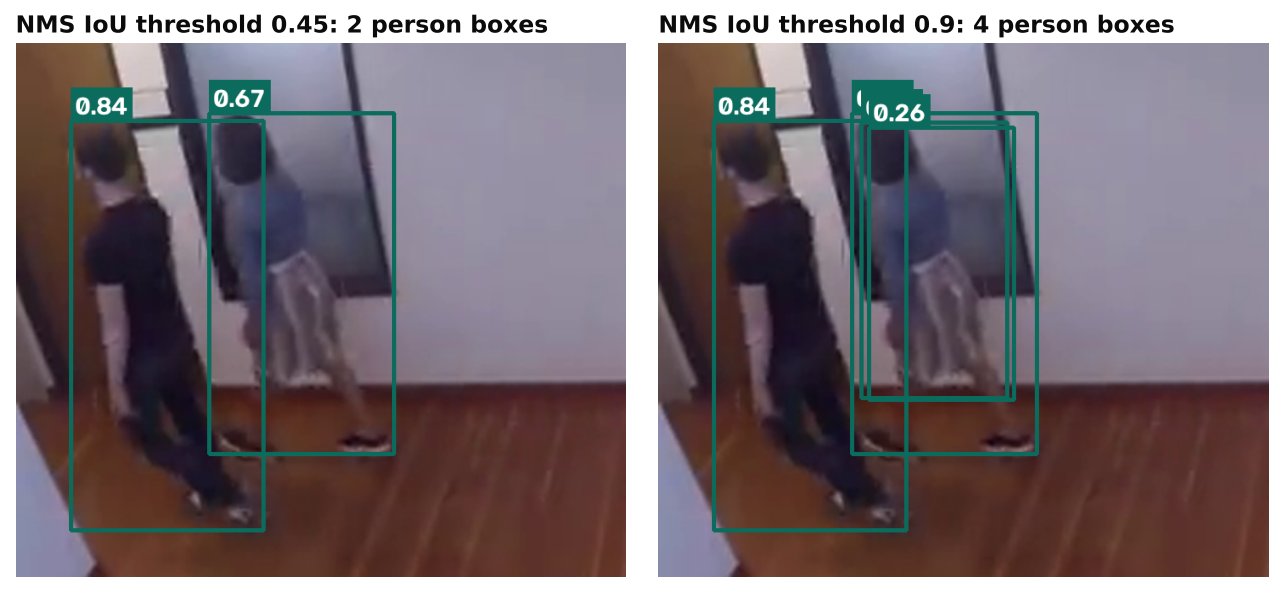
Values in the range of about 0.45 to 0.7 are common starting points, and Ultralytics exposes the setting as iou in prediction and validation. Check the current documentation for the default in the version you use, because it can differ between prediction and validation and between releases.
The right value depends on your scene:
| Scene | Tendency |
|---|---|
| Sparse objects, such as a lone vehicle at a gate | A lower or middle value works well |
| Dense crowds or stacked items | A higher value, tested carefully |
| Large objects with a few close neighbours | Middle value |
Do not tune this on a hunch. Collect clips that show your worst crowding cases, vary the threshold, and count duplicates and merges by eye.
Running NMS in practice
With the Ultralytics package, NMS is already part of prediction:
from ultralytics import YOLO

model = YOLO("yolov8n.pt")
results = model.predict("crowd.jpg", conf=0.25, iou=0.5)
print(len(results[0].boxes))
If you build your own pipeline, for example after exporting to ONNX, you may need to apply NMS yourself. OpenCV has a function for it:
import cv2
import numpy as np

boxes = [[0, 0, 10, 10], [1, 1, 11, 11], [50, 50, 20, 20]]  # x, y, w, h
scores = [0.9, 0.8, 0.7]
keep = cv2.dnn.NMSBoxes(boxes, scores, score_threshold=0.25, nms_threshold=0.5)
print(np.array(keep).flatten())
Notice that cv2.dnn.NMSBoxes expects boxes as x, y, width, height, not corner coordinates. Passing the wrong format is a very common bug, and it produces boxes that are removed or kept for no obvious reason. PyTorch users can use torchvision.ops.nms, which takes boxes as (x1, y1, x2, y2), scores, and an IoU threshold.
Class-aware versus class-agnostic
Standard NMS runs per class, so a "car" box and a "truck" box on the same vehicle can both survive. Sometimes that is what you want. If your classes overlap in meaning, you may prefer class-agnostic NMS, which treats all boxes alike and keeps only the highest-scoring one. Ultralytics has an option for this, called agnostic_nms, in prediction. The choice should follow your definition of the classes.
Common mistakes
- Confusing the two IoU thresholds. The NMS threshold removes duplicates. The evaluation threshold decides what counts as correct. They are different settings.
- Wrong box format. Corner format versus x, y, width, height mistakes silently break results.
- Tuning NMS to hide a different problem. Duplicate boxes can also come from a very low confidence threshold. Fix the cause.
- Forgetting that NMS adds time. With many candidate boxes it costs something. A sensible confidence threshold first reduces the work.
- Ignoring crowded scenes in testing. A threshold that works on sparse test images can merge people in a crowd.
Key points
- IoU is overlap divided by union, from 0 to 1.
- NMS keeps the highest-confidence box and removes boxes that overlap it above the threshold.
- A lower NMS threshold removes more boxes, which can merge close objects. A higher one keeps more, which can leave duplicates.
- The NMS threshold and the evaluation IoU threshold are separate.
- Check box formats whenever you write your own post-processing.
- Tune on footage that includes your crowded cases.
Next steps: Confidence Thresholds: Tuning a Detector to Cut False Alarms, mAP, Precision and Recall and Anchor-Free vs Anchor-Based Object Detectors.