Confidence Thresholds: Tuning a Detector to Cut False Alarms
Almost every detector has a setting called the confidence threshold. Detections with a score below it are discarded. It looks like a minor option. In practice it decides whether your system sends useful alerts or noise, and many projects leave it at the default and wonder why users complain.
This article shows how to pick a threshold with evidence, how to tune it per class, and what to do when a threshold alone cannot fix the problem.
What the threshold does
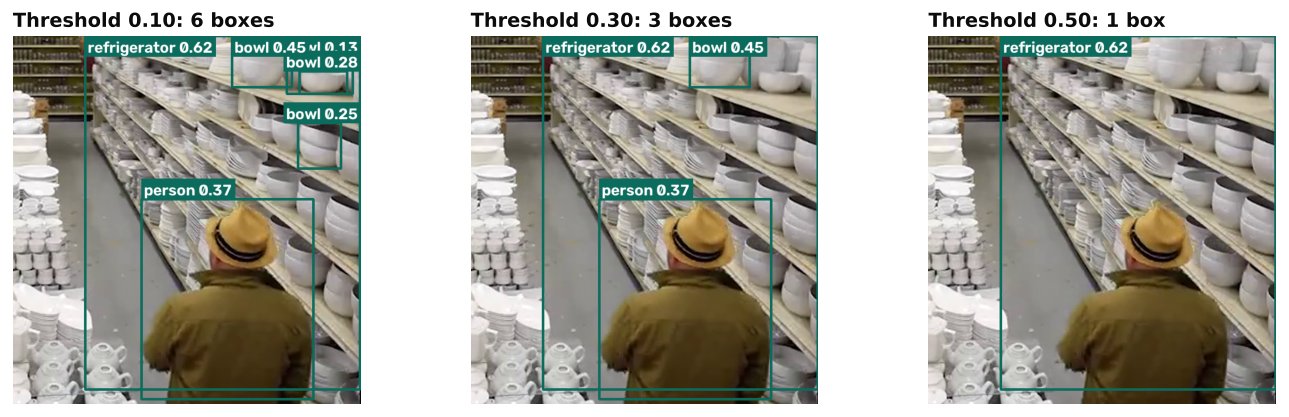
Each detection comes with a confidence score between 0 and 1. The threshold is a cut-off:
- Low threshold: more detections pass. You catch more real objects (higher recall) but also more junk (lower precision).
- High threshold: fewer detections pass. You get fewer false alarms (higher precision) but miss more real objects (lower recall).
There is no setting that gives you both. The task is to find the point on that trade-off that suits your use case. For the definitions of precision and recall, see mAP, Precision and Recall.
One caution: the score is not a calibrated probability. A score of 0.6 does not mean a 60 percent chance of being right. Scores are only meaningful as a ranking: higher is more likely correct, on your data. That is why you must tune on your own footage and not copy a number from a tutorial.
Start with the cost of errors
Before touching numbers, write down what each kind of error costs.
| Error | What happens | Example cost |
|---|---|---|
| False positive | An alert with nothing there | Operators learn to ignore alerts |
| False negative | A real event is missed | A safety event goes unnoticed |
Different projects weigh these differently. A system watching for a rare dangerous event usually tolerates more false alarms in exchange for fewer misses, perhaps with a human verifying. A system that sends messages to staff all day must keep false alarms low or it will be muted. State this priority clearly, because it decides the answer.
The precision-recall curve
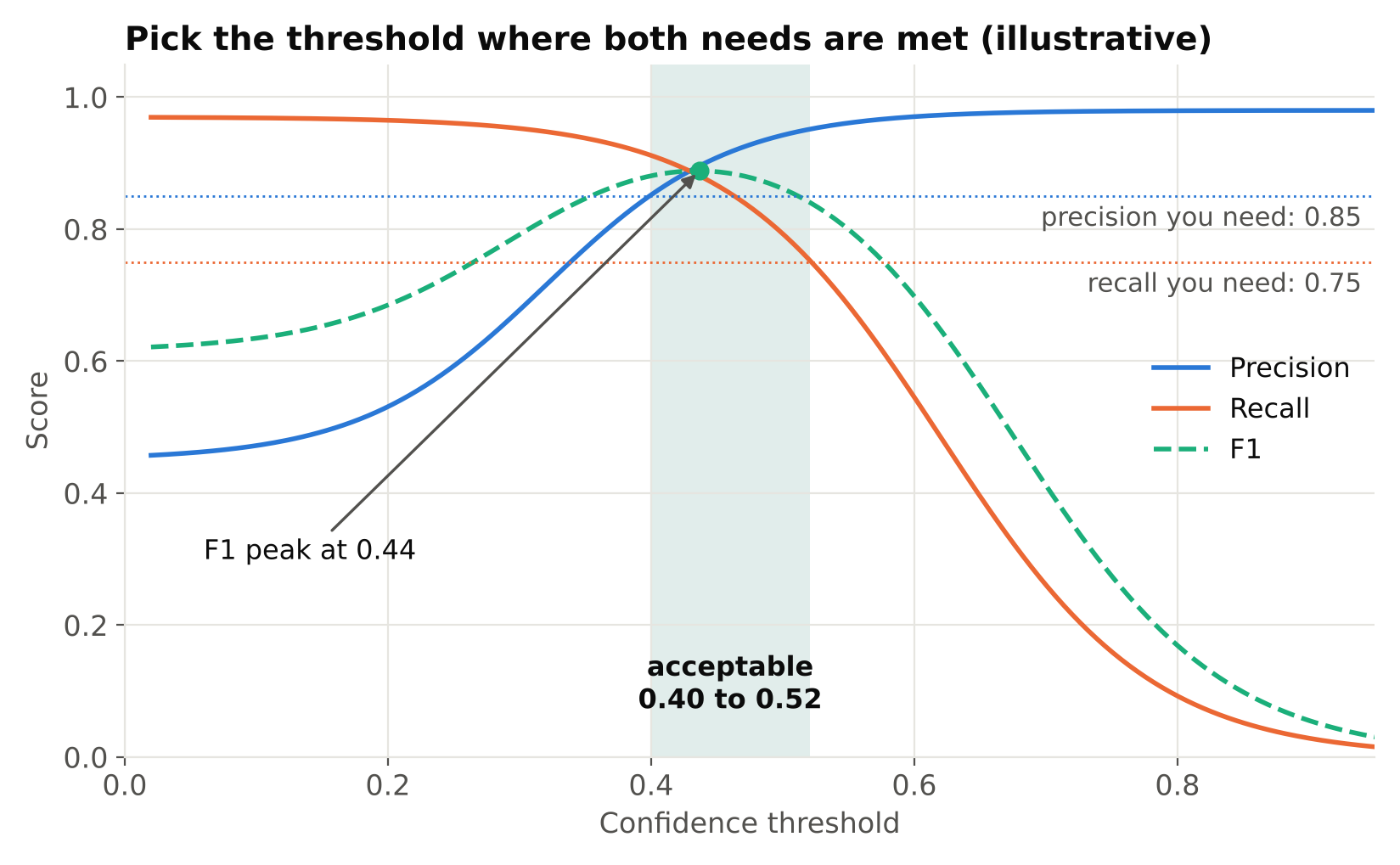
Validation with Ultralytics saves plots, including a precision-recall curve and curves of F1, precision and recall against confidence. Look at the curves for your own run. They show what happens as the threshold moves.
- The precision versus confidence curve rises as confidence rises. Find where it reaches the precision you can accept.
- The recall versus confidence curve falls as confidence rises. Find where it drops below the recall you need.
- The F1 versus confidence curve balances the two and peaks at one threshold. This is a convenient starting point when you have no stronger priority, but F1 treats both errors as equally bad, which is rarely true in a real project.
Your operating threshold is the point where both precision and recall are acceptable. Sometimes no such point exists. Then the threshold is not the fix: the model, the data or the setup needs work.
A practical tuning procedure
- Build an evaluation set from real footage. It must be separate from training, and it should cover your actual conditions: lighting changes, busy and quiet periods, different cameras. For video, split by camera and time rather than by random frames, as explained in Train/Validation Split for Video Frames.
- Run predictions at a deliberately low threshold, such as 0.1 or lower, and save all detections with their scores.
- Sweep the threshold. For each value, count true positives, false positives and false negatives against your labels, then compute precision and recall.
- Plot or tabulate the results. Pick the threshold that meets your priority.
- Check on fresh footage. Run the chosen threshold on a new stretch of video and count real errors. The first set was used for tuning, so it is slightly optimistic.
- Record the decision, with the model version, the data it was tuned on and the numbers.
Here is a small sketch of the sweep using saved scores:
import numpy as np

# scores: confidence of each detection; is_tp: 1 if it matched a real object
def sweep(scores, is_tp, n_real, thresholds):
    scores, is_tp = np.array(scores), np.array(is_tp)
    for t in thresholds:
        keep = scores >= t
        tp = int(is_tp[keep].sum())
        fp = int(keep.sum()) - tp
        precision = tp / max(tp + fp, 1)
        recall = tp / max(n_real, 1)
        print(f"{t:.2f}  precision={precision:.2f}  recall={recall:.2f}")
You need the matching step (deciding which detections are true positives) from your evaluation tooling or your own IoU-based matching. See IoU and Non-Maximum Suppression.
Tune per class
One global threshold is simple and often wrong. Classes differ in how confident the model is when it is right.
- A large, distinctive class may score high when correct, so a high threshold costs little recall.
- A small or ambiguous class may rarely exceed 0.5 even when correct, so the same threshold removes many true detections.
- A class that is often confused with another may need a higher threshold to stay clean.
Ultralytics lets you filter after prediction, so you can apply your own per-class values:
from ultralytics import YOLO

thresholds = {"person": 0.45, "helmet": 0.30, "vest": 0.35}

model = YOLO("best.pt")
results = model.predict("frame.jpg", conf=0.10)  # low base threshold

for r in results:
    for box in r.boxes:
        name = r.names[int(box.cls)]
        if float(box.conf) >= thresholds.get(name, 0.5):
            print(name, float(box.conf), box.xyxy[0].tolist())
Set the base threshold in predict below your lowest per-class value, and then filter. Choose each class value from its own sweep. This takes a little more effort and often removes most of the noise.
Thresholds are not the whole story
If you cannot reach acceptable precision at acceptable recall, change the approach rather than pushing the threshold further.
- Improve the data. False alarms often come from a few repeating patterns: a poster that looks like a person, a reflection, a shadow. Collect those frames, label them as background (images with no objects of that class), and retrain. This is usually the most effective fix.
- Check the labels. Missing or inconsistent labels make correct detections count as errors and bad ones look fine. See Annotation Mistakes That Quietly Ruin Your Model.
- Add temporal logic. A single frame is noisy. Requiring a detection to persist for several frames, or using tracking, removes flickers. This often helps more than the threshold itself.
- Mask irrelevant areas. Ignore regions where an object can never appear or where it does not matter.
- Use zones and rules. Alert only when an object is inside an area or stays beyond a set time. See Reducing False Alarms in Production Video Analytics.
- Raise the model quality. A bigger model or higher resolution may separate the classes better.
Revisit after deployment
Conditions change: seasons, new lighting, camera moves, new clothing or vehicles. A threshold tuned in summer may be wrong in winter. Keep a sample of live detections for review, and track the rate of alerts per camera. A sudden change in that rate is a signal to check the system. Re-tune when the data shows a shift.
Common mistakes
- Using the library default without checking whether it suits your task.
- Reading the score as a probability.
- Tuning on the training data, which produces overconfident results.
- One threshold for every class and every camera.
- Evaluating with a threshold different from the one used in production.
- Trying to fix a data problem with the threshold alone.
Checklist
- Cost of false alarms and misses written down.
- Evaluation set from real footage, separate from training.
- Threshold swept on the evaluation set.
- Per-class values where classes behave differently.
- Chosen values confirmed on fresh footage.
- Temporal filtering and zones considered.
- Plan for monitoring and re-tuning.
Next steps: Reducing False Alarms in Production Video Analytics, mAP, Precision and Recall and Designing Alert Rules.