Annotation Mistakes That Quietly Ruin Your Model
When a detector underperforms, the instinct is to change the model, the learning rate or the architecture. In many projects the real problem is in the labels. A model learns exactly what the annotations tell it, including the mistakes. If the labels are inconsistent, the model learns inconsistency.
This article lists the annotation errors that do the most damage, shows how to find them, and gives a repeatable audit you can run before blaming the model.
Why label errors are hard to notice
Label noise does not crash training. Loss still goes down, metrics still come out, and the model still produces boxes. The symptoms are indirect: a plateau in validation results, boxes that wobble, false detections that look like they should be labelled, and confusion between two classes.
Another problem is that validation labels have the same errors as training labels. If both are noisy in the same way, your metrics look fine while real-world behaviour is poor. Auditing the data is the only way to see it.
The common mistakes
Missing labels
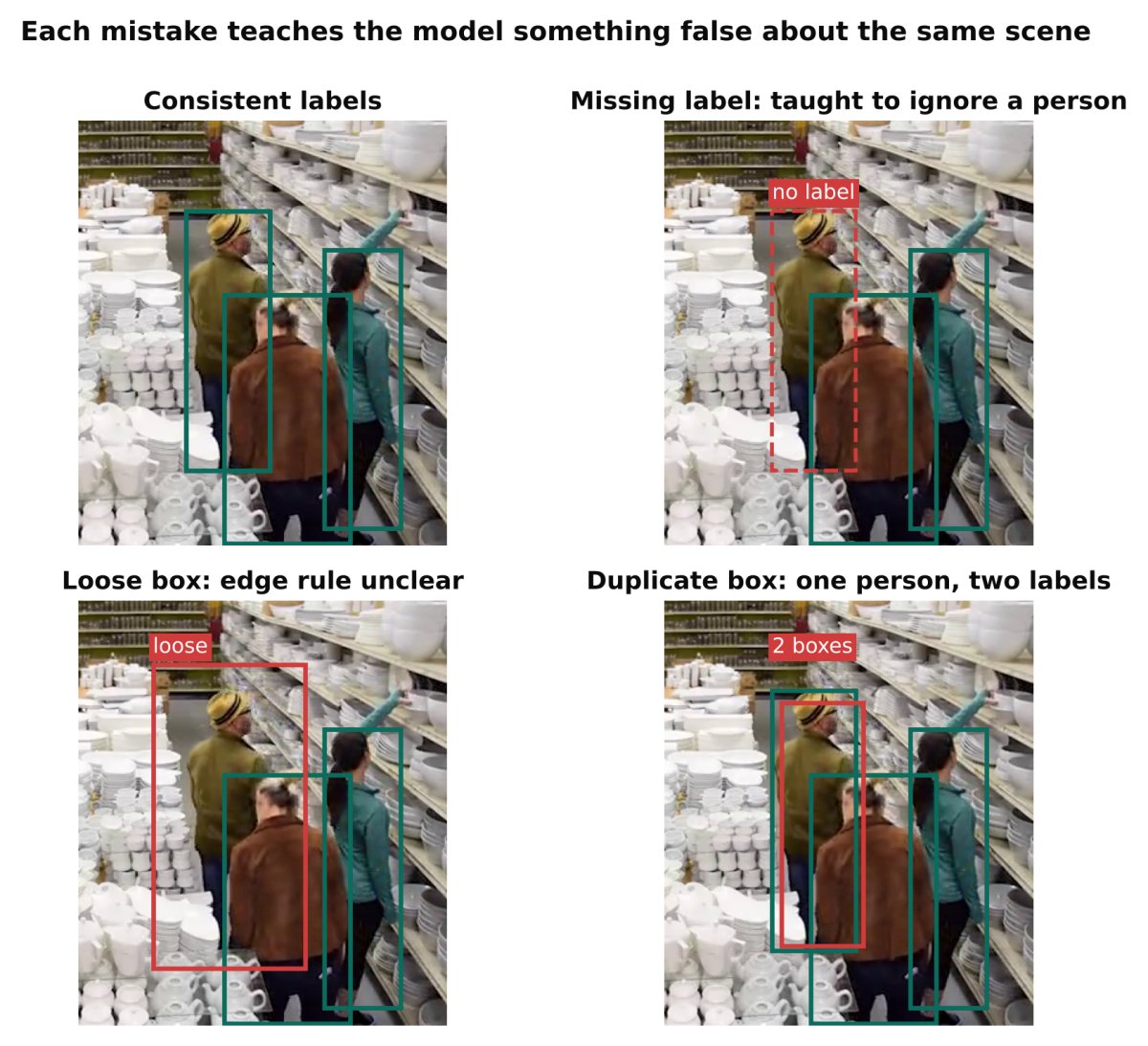
An object is clearly in the image but has no box. For the detector, an unlabelled object is a negative example, so it is taught to ignore something it should find. This is the most damaging mistake because it directly contradicts the true task.
It typically happens when labellers skip small, distant, partially hidden or crowded objects, or when they get tired late in a batch.
Loose or inconsistent boxes
Some boxes hug the object, others leave a wide margin, others cut off a limb. The model cannot learn a single rule for where the edge is, so predictions vary and overlap-based metrics suffer, especially at strict thresholds. Review IoU and Non-Maximum Suppression, Explained with Examples to see why a few pixels matter more than they look, particularly for small objects.
Inconsistent classes
One labeller marks a van as "car", another as "truck". The same helmet appears as "hard hat" in one batch and "helmet" in another, or two classes overlap in definition. The model sees contradictory targets for similar pixels and settles on a muddy average.
Inconsistent treatment of edge cases
Occluded objects, objects cut off by the frame border, reflections, objects in posters or on screens, crowds where individuals cannot be separated. If these cases are sometimes labelled and sometimes ignored, the model has no stable rule. Decide once and apply it everywhere.
Wrong class on a correct box
The box is right, the class is wrong. Often caused by similar-looking classes or by a labeller clicking the wrong hotkey. These errors show up as high-confidence mistakes in the confusion matrix.
Duplicate boxes
Two boxes on one object, usually from a slip while drawing or from merging datasets. The model is taught that one object can be two, which hurts duplicate suppression behaviour.
Format and conversion bugs
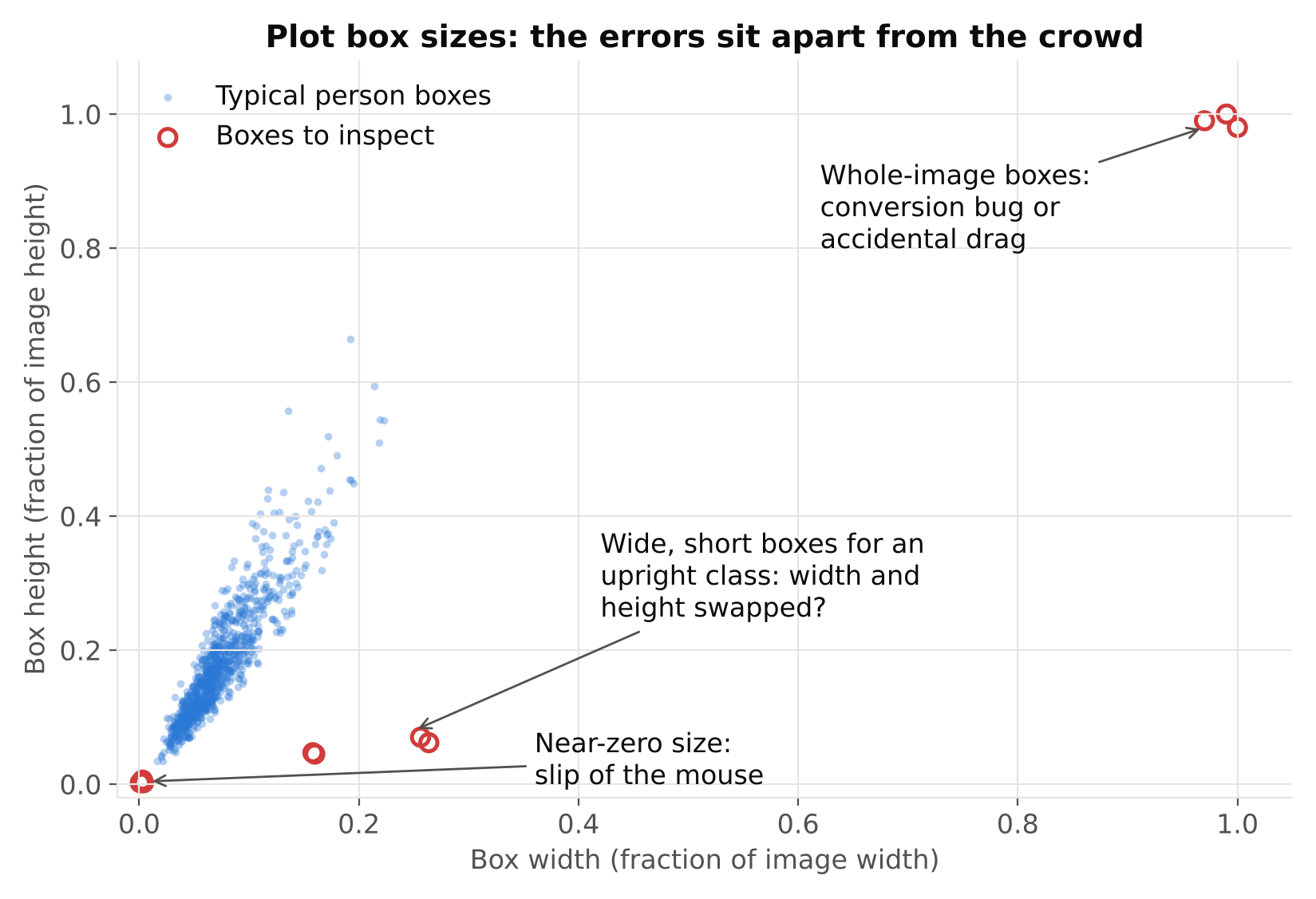
Not an annotation error as such, but common: swapped width and height, boxes in pixels where normalised values are expected, class ids shifted by one after merging datasets, or image resizing that was not applied to the labels. Everything looks plausible and everything is wrong. Always draw the converted labels on a handful of images before training.
Labels that do not match the task
Labelling the "person" when the business need is "person without a helmet" is a definition problem. A detector can only learn what is visually defined. If the target depends on context that is not visible in the image, the label will always look inconsistent.
How to audit a dataset
Run this audit before any serious training, and again whenever you add a large batch.
- Draw and look. Render boxes and class names on a random sample of images. Look at 100 to 200 of them yourself. This single step finds format bugs, missing labels and loose boxes faster than any metric.
- Count per class. Check instance counts and look for classes that are rare or unexpectedly absent. Rare classes need attention. See Class Imbalance and Small Objects: Practical Fixes.
- Check box statistics. Look at the distribution of box widths and heights. Boxes of near-zero size, boxes touching the whole image, or boxes extending outside the image are red flags.
- Look for duplicates. Flag pairs of boxes of the same class with very high overlap in one image.
- Use the model to find errors. Train a first model, run it on the training set, and list places where it confidently disagrees with the label. High-confidence predictions with no matching label point to missing labels. High-confidence predictions with a different class point to wrong labels. Review each by hand and do not auto-correct, because the model may be the one that is wrong.
- Review the confusion matrix. Ultralytics saves a confusion matrix after training. Large off-diagonal cells between two classes usually mean the classes are ill-defined or mislabelled, not that the model is weak.
- Measure agreement. Have two people label the same 50 images independently. Compare. Disagreement shows you which rules are unclear.
How to fix them
- Write down the rules. A one-page guideline: what counts as an object, how tight boxes should be, minimum size to label, how to handle occlusion, truncation, crowds and reflections. Add example images for hard cases.
- Fix the guideline, then the labels. If disagreement shows an unclear rule, change the rule first, then relabel.
- Relabel the worst offenders first. Prioritise classes and conditions where the model performs worst.
- Merge or split classes with care. If two classes are visually indistinguishable, merging them may be more honest than forcing the model to guess. If one class contains very different appearances, splitting may help.
- Use a review step. A second pair of eyes on a sample of each batch catches drift early.
- Keep a fixed class list. Use an ordered list in one file, and generate every export from it.
Do you need perfect labels?
No. Some noise is normal and models tolerate a small amount of it. The goal is consistency, not perfection. Random, rare errors do little harm. Systematic errors, such as always skipping small objects, do real harm because the model learns the pattern.
A useful rule: fix errors that are systematic, concentrated in a rare class, or present in the validation set. Validation errors matter most because they distort every decision you make from the metrics.
Validate the validation set
Check your validation labels with extra care. If they miss objects, your recall will look worse than it is and you might chase a problem that does not exist. If they contain the same mistakes as the training set, your metrics will look better than the real world warrants. Keep the validation set small enough to review completely by hand.
Also make sure the split avoids leakage between near-identical frames. See Train/Validation Split for Video Frames: Avoid Data Leakage.
Checklist
- Draw labels on a random sample and review 100 or more images by eye.
- Write labelling guidelines with example images.
- Use one fixed class list for every export.
- Count instances per class and inspect box size distributions.
- Check for duplicate boxes and out-of-range coordinates.
- Run a first model over the training set and review confident disagreements.
- Read the confusion matrix for ill-defined classes.
- Review every validation label by hand.
- Re-audit after each large new batch.
Next steps: compare tools that support review workflows in CVAT vs Label Studio vs Roboflow: Choosing an Annotation Tool, and learn to read the results afterwards in mAP, Precision and Recall: How to Read Detection Results.