Measuring Label Quality with Annotator Agreement
You can measure a model's accuracy against labels, but who measures the labels? If two careful people would disagree on a tenth of the objects, a model cannot be shown to be better than that, and some of its "errors" on the test set are really label disagreements.
This article shows a practical way to measure label quality by comparing two annotators on the same images, what the results mean, and how to use them to improve both the labels and your reading of model metrics.
The idea
Take a sample of images, have them labelled independently by two people following the same guide, and compare the two sets of labels exactly as you would compare a model's predictions with ground truth. Where they agree, the labels are reliable. Where they disagree, either the guide is unclear, the case is genuinely ambiguous, or someone made a mistake.
This is called inter-annotator agreement. It does not tell you who is right. It tells you how consistent the labelling process is, which is what matters for training and evaluation.
How to set it up
- Choose the sample. A few hundred images is usually enough to see patterns. Sample them across cameras, times and conditions, not only easy daytime frames. Include the hard cases.
- Label independently. Each annotator works without seeing the other's labels. If you use a labelling service, ask for a double-labelled sample explicitly.
- Use the same guide and tool settings. Otherwise you are measuring the difference between instructions. See Writing an Annotation Guide Labellers Can Follow.
- Repeat periodically. Agreement can drift as people get tired, new labellers join or the guide changes.
Matching boxes
Treat annotator A as "ground truth" and annotator B as "predictions", and match boxes of the same class by IoU, for example at IoU 0.5. Then count:
- Matched boxes: both annotators found the object.
- A only: objects B missed or chose not to label.
- B only: objects A missed or chose not to label.
- Class disagreements: boxes that match in position but differ in class.
From these, an agreement score: matched / (matched + A only + B only), which is like an F1 score between the two annotators. Since neither is the reference, swapping A and B gives the same counts with roles reversed, which is a good check of your code.
For matched boxes, also look at the distribution of IoU between the two annotators. Its median says how consistently boxes are drawn.
Small objects disagree more
The same small disagreement in pixels costs small objects far more IoU than large ones. If the second annotator draws each edge two pixels further out, a 128-pixel object keeps an IoU of about 0.94; a 12-pixel object drops to about 0.56, close to the usual matching threshold.
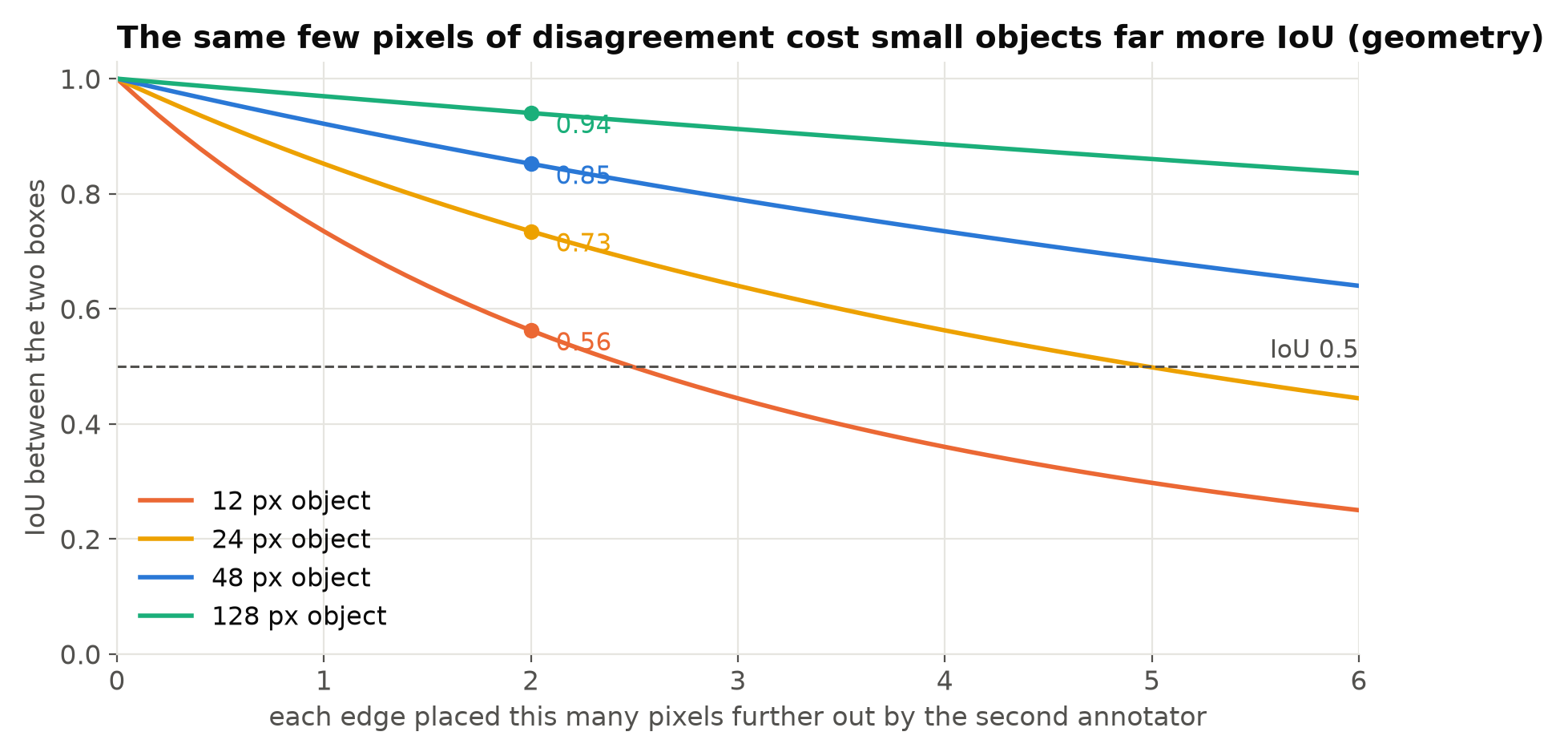
Two consequences follow. First, report agreement separately by object size, or the small objects' poor agreement is averaged away. Second, strict metrics such as mAP50-95 on small objects are partly measuring label noise. If annotators themselves only agree at IoU around 0.6 on tiny objects, a model cannot reliably score well at IoU 0.75 on them. See What mAP Hides.
Reading the results
| Finding | Likely cause | Action |
|---|---|---|
| Many "A only" or "B only" small objects | No clear minimum size rule | Set a minimum size and use ignore regions |
| Many disagreements on occluded objects | Occlusion rule unclear | Add pictured examples to the guide |
| One class often swapped with another | Class boundary unclear, or classes not really distinct | Clarify, merge the classes, or add examples |
| Low IoU on matched boxes | Tightness rule unclear, or tool zoom too low | Show tight boxes; require zooming in |
| One annotator misses far more | Fatigue, speed targets or misunderstanding | Feedback and retraining for that person |
| Agreement falls over time | Drift, new staff, guide changes | Re-run the check regularly |
The first thing to do with a disagreement is look at it. Put the two sets of boxes on the image and ask why. Most disagreements fall into a few groups, and each group is usually one missing sentence or picture in the guide.
Use it to read model metrics
Annotator agreement gives you a rough ceiling for how well a model can be measured on that data. If two annotators agree on 92% of objects, a model whose "recall" is 92% against one annotator may be performing about as well as a second person would. Chasing further gains on that test set may mean fitting one annotator's habits.
This also changes how you treat the test set. For the test set especially, it is worth having disagreements resolved by a third person or by discussion, so the reference is as clean as you can make it. Training data tolerates some noise; test data should not. See Why Your Test Set Flatters You.
For classification and attributes
For image-level labels or attributes, such as "helmet: yes/no" on a person crop, use simple agreement and Cohen's kappa. Kappa corrects for agreement expected by chance, which matters when one answer is much more common than the other: if 95% of people wear helmets, two annotators who always say "yes" agree 95% of the time while learning nothing. Kappa near 0 means chance-level agreement; near 1 means strong agreement.
Common mistakes
- Letting the second annotator see the first's labels. You then measure how often they accept a suggestion.
- Sampling only easy images. Agreement on clear daytime frames says little about night or crowds.
- Reporting one overall number. Break it down by class, size and condition.
- Treating disagreements as one person's errors. Most come from the guide.
- Measuring once. Quality changes as projects run.
Checklist
- Double-label a few hundred images sampled across conditions.
- Label independently, with the same guide and tool.
- Match boxes by IoU and count both-sides misses and class swaps.
- Report agreement by class, object size and condition.
- Look at every disagreement type and fix the guide.
- Resolve disagreements in the test set.
- Repeat the check during long labelling projects.
Next steps: Annotation Mistakes That Quietly Ruin Your Model and Pseudo-Labelling with a Larger Model.