CVAT vs Label Studio vs Roboflow: Choosing an Annotation Tool
Labelling is the slowest part of most detection projects, and the tool you choose shapes how fast it goes and how clean your data ends up. CVAT, Label Studio and Roboflow are three common choices. They overlap, but they are built with different priorities.
This article compares them on the points that matter in practice. Features, plans and prices change often, so check each project's current documentation before committing. I describe the general shape of each tool, not a feature-by-feature scorecard.
What you need from an annotation tool
Before comparing, write down your requirements. For object detection they usually come down to:
- Box drawing speed. You will draw thousands of boxes. Small friction adds up to hours.
- Export formats. You need a format your training code reads. For Ultralytics YOLO that means YOLO-format text files, one per image, with a class id and normalised box centre, width and height.
- Video support. If your data is camera footage, you want to step through frames or interpolate boxes between keyframes.
- Team features. Several labellers, task assignment, review stages and agreement checks.
- Hosting and data control. Whether images may leave your network.
- Model-assisted labelling. Pre-labelling with a model so humans correct instead of draw.
- Cost. Both money and the time to set up and maintain the tool.
CVAT
CVAT was built for computer vision annotation and it shows. It focuses on images and video, with boxes, polygons, polylines, points and tracks.
Strengths:
- Strong video workflow. You can label an object on keyframes and let the tool interpolate between them, then fix the frames where it drifts. For footage of people or vehicles moving through a scene this saves a great deal of time.
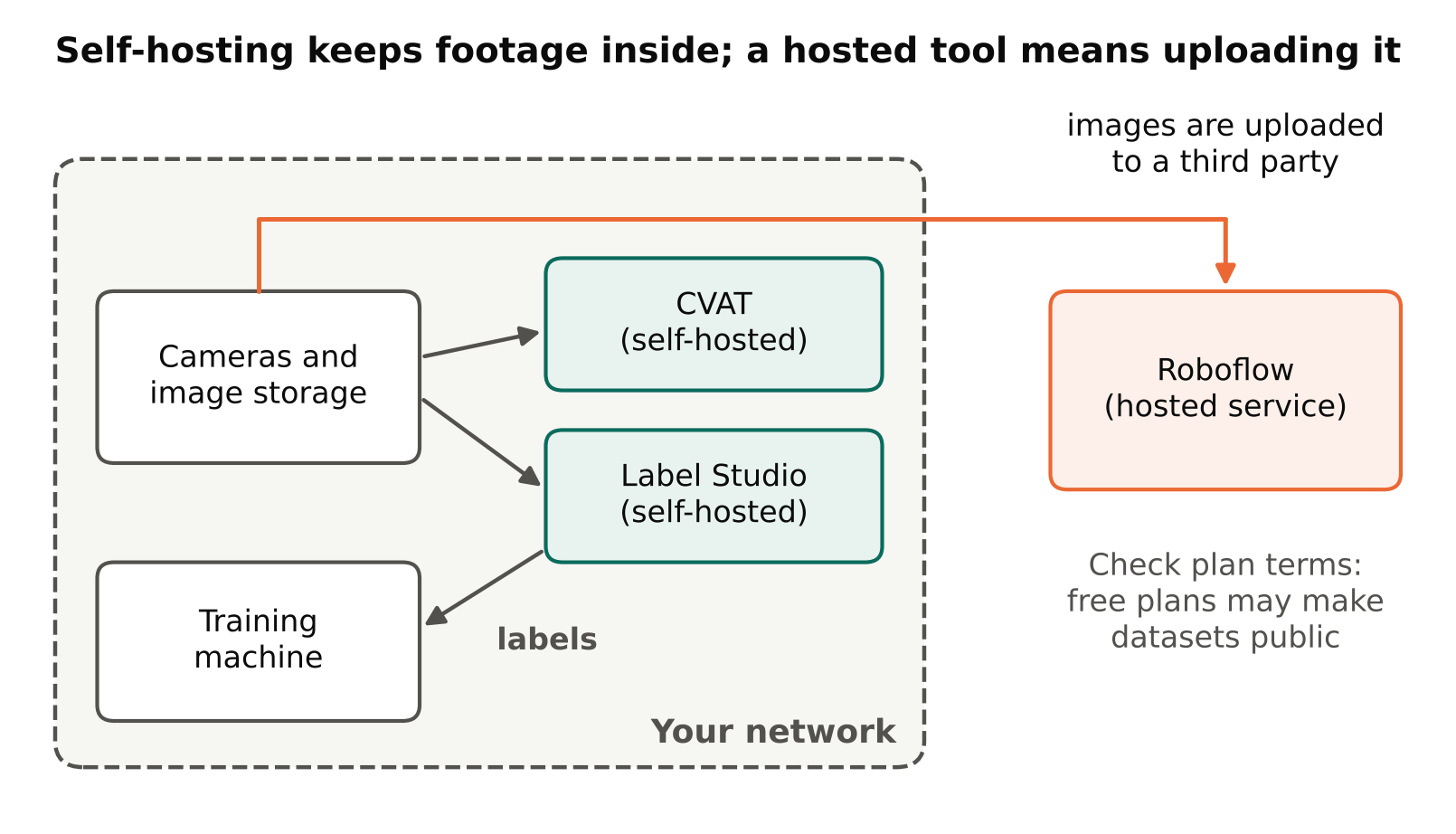
- Open-source core that you can self-host, which suits teams that must keep data on their own servers. A hosted version is also offered; check the current terms.
- Export to many common formats, including YOLO.
- Task and job structure that supports splitting work across labellers and a review step.
- Support for automatic annotation using models, though the setup takes some effort.
Weaknesses:
- Self-hosting means you maintain it: containers, storage, backups, upgrades.
- The interface is dense. New labellers need a short introduction.
- It is focused on vision. If you also need to label text or audio, look elsewhere.
CVAT fits best when your data is video, you want control over where data lives, and you have someone comfortable running a Docker deployment.
Label Studio
Label Studio is a general-purpose labelling tool. Its main idea is a configurable labelling interface, defined by a short template. You can set up image boxes, but also text, audio, time series and more, and combine them.
Strengths:
- Flexible. If your project mixes data types, or you need a custom labelling interface, this is its strength.
- Open-source community edition you can self-host. A paid commercial offering exists with extra team features; check what each edition includes.
- Machine-learning backend support, so a model can supply pre-annotations and you correct them.
- Exports to common detection formats.
Weaknesses:
- Flexibility means more setup. A pure bounding-box project has to configure the interface before starting.
- For video, it is generally less specialised than CVAT. Check the current video features against your needs.
- Some team and review features are tied to paid editions.
Label Studio fits best when your project is not only image boxes, or when you want to design a custom labelling interface and plug in your own model for pre-labelling.
Roboflow
Roboflow is a hosted platform that covers more than annotation. It also manages datasets, versions, preprocessing and augmentation, and can train and deploy models.
Strengths:
- Lowest setup effort. You sign up, upload images and start drawing boxes.
- Dataset versioning and built-in augmentation make it easy to produce a training-ready export in the format you need.
- Assisted labelling features to speed up boxes.
- Good for solo builders and small teams who want a single place for the whole data workflow.
Weaknesses:
- It is a hosted service, so your images are uploaded to a third party. This may rule it out for private or regulated footage.
- Free plans have limits and often require datasets to be public. Read the current plan terms before uploading anything sensitive.
- Cost grows with usage and team size. Check the current pricing.
- Building your pipeline around a platform creates some lock-in, although exports reduce it.
Roboflow fits best for small projects, quick prototypes and people who want to avoid running infrastructure. If you prefer a hosted option, you could also try a hosted annotation platform and compare it with the others on a small pilot batch.
Side-by-side summary
| Factor | CVAT | Label Studio | Roboflow |
|---|---|---|---|
| Main focus | Image and video annotation | General multi-type labelling | Hosted data-to-model workflow |
| Self-hosting | Yes, open-source core | Yes, community edition | No, hosted service |
| Video workflow | Strong, with interpolation | Less specialised | Check current features |
| Setup effort | Medium | Medium to high | Low |
| Custom interfaces | Limited | Strong | Limited |
| Data leaves your network | Not if self-hosted | Not if self-hosted | Yes |
| Best for | Video and private data | Mixed data, custom needs | Fast start, small teams |
How to choose
Ask these questions in order:
- Can the images leave your network? If not, you need CVAT or Label Studio self-hosted.
- Is the data mostly video? If yes, test CVAT's keyframe interpolation first.
- Do you need more than boxes on images? If yes, look at Label Studio.
- Do you have no one to run servers? A hosted tool saves you that work.
- How many labellers? For one person, almost any tool works. For a team, test the review and assignment workflow before choosing.
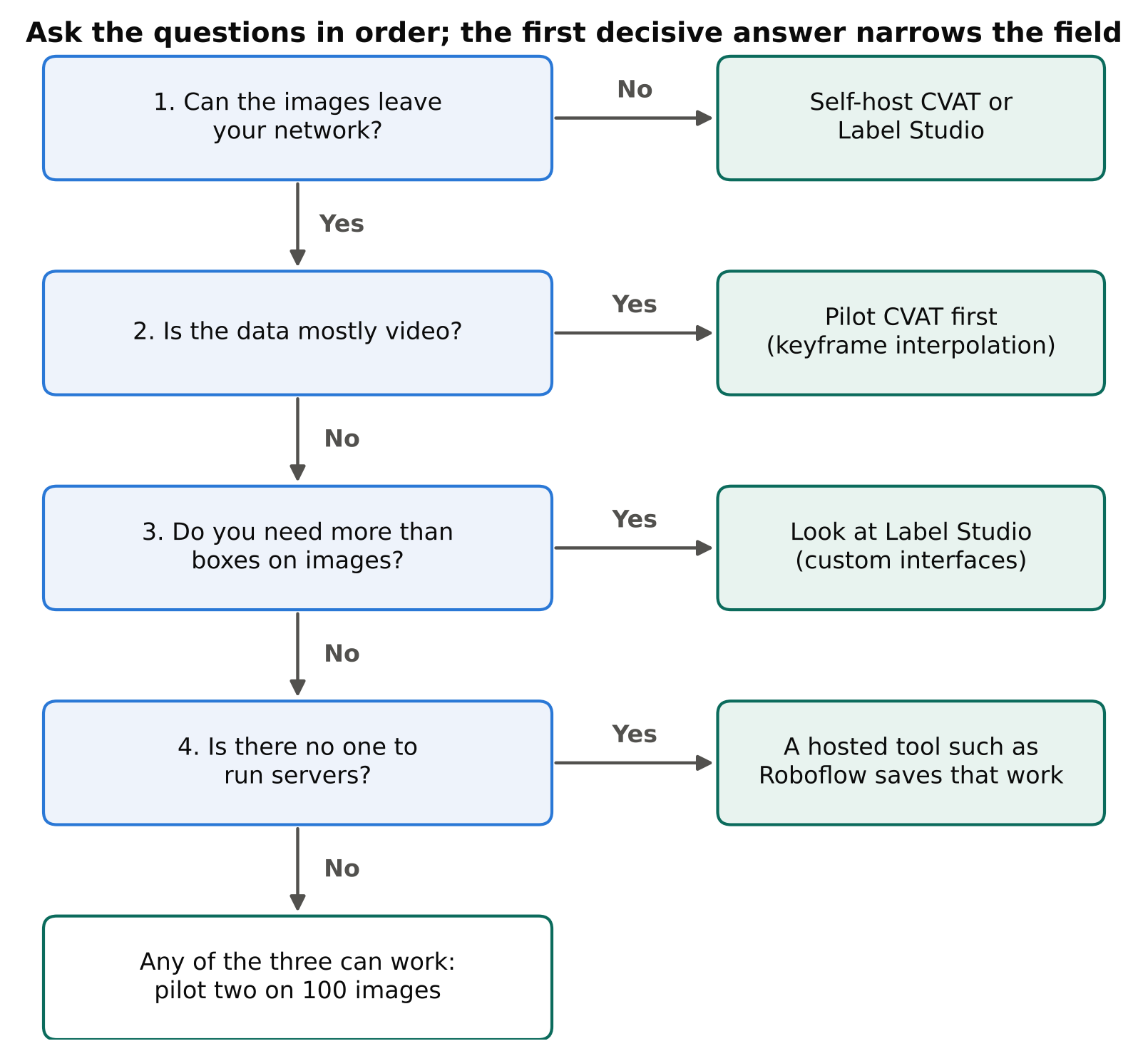
The best test is a pilot. Take 100 images, label them in two tools, and record how long each takes and how easy export is. Then do a trial training run on the exported data to confirm the format loads without conversion bugs.
Habits that matter more than the tool
A good tool cannot rescue unclear rules. Whichever you pick:
- Write labelling guidelines before starting: what counts as an object, how tight the box is, how to treat occluded or cut-off objects, what to do with crowds.
- Have a second person review a sample of each labeller's work.
- Keep class names in a fixed list and never rename them mid-project.
- Export early and train on the first batch, so format problems show up in week one, not week six.
- Back up your annotations separately from the tool.
Loose boxes and inconsistent classes cost more accuracy than any difference between these tools. See Annotation Mistakes That Quietly Ruin Your Model for what to audit.
Checklist
- List requirements: formats, video, team size, privacy, budget.
- Decide whether data may leave your network.
- Pilot two tools on the same 100 images and time them.
- Confirm the export loads in your training code.
- Write labelling guidelines and a fixed class list.
- Set up a review step and back up annotations.
Next steps: read How Many Images Do You Need to Train an Object Detector? to plan the labelling effort, then Train YOLO on a Custom Dataset: A Step-by-Step Guide.