Train/Validation Split for Video Frames: Avoid Data Leakage
If your detector is trained on frames from video, the way you split those frames decides whether your metrics mean anything. A random split looks fair and is the default in many tutorials, yet it can produce validation scores that are far better than real-world performance. The model is not that good. The test is too easy.
This article explains the leak, shows how to split correctly, and gives a short script and checklist.
The problem: near-duplicate frames
Video frames that are close in time are nearly identical. The same people stand in almost the same places, the same lighting, the same background, the same motion blur pattern. If you extract frames from a clip and split them randomly, a frame at second 10 may go to training and the frame at second 11 to validation.
At validation time, the model is shown an image that is almost a copy of something it trained on. It scores well because it has effectively seen the answer. That is data leakage: information from the evaluation set influences training.
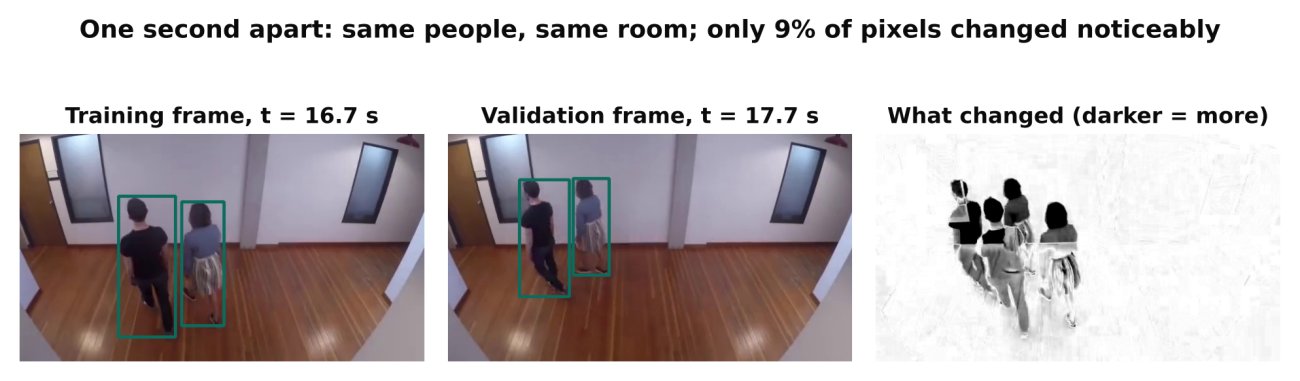
The result is a validation score that tells you how well the model recognises its own training scenes, not how well it will do on a new day, a new camera or a new site. In production video analytics, this is one of the most common reasons a model that looked excellent fails on deployment.
What the unit of splitting should be
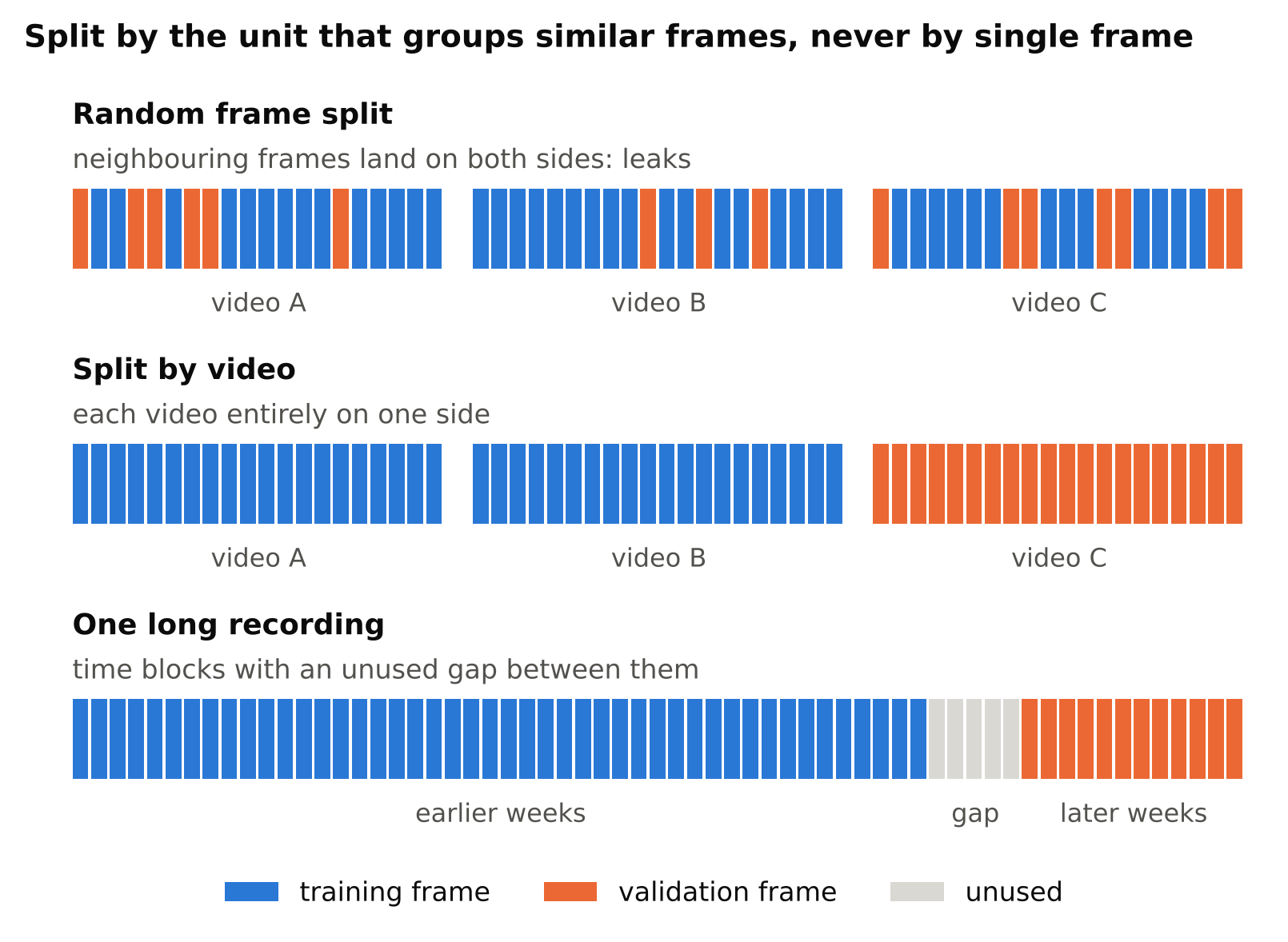
Split by the largest unit that groups similar frames together. From smallest to largest:
- Clip or video file. The minimum acceptable unit. All frames from one video go to the same split.
- Time period. Frames from the same hour, shift or day share conditions. Splitting by day is stronger than splitting by clip.
- Camera. Frames from the same camera share viewpoint and background. If you will deploy on cameras you have not seen, hold out entire cameras.
- Site. If you deploy across locations, hold out a whole site.
Choose the level that matches your deployment. Ask: what will be new when this model runs for real? If the answer is a new camera, validate on a camera that training never saw. If it is a new day on the same camera, split by day.
Typical scenarios
| Deployment | Recommended split |
|---|---|
| Same fixed camera, forever | By time (hold out later days or weeks) |
| Fixed cameras, new cameras added over time | By camera |
| Mobile or dashcam data | By drive or trip |
| Many sites | By site |
| One long recording only | By time block, with a gap between blocks |
For a single long recording, take a block from the end for validation and leave a gap of unused frames between training and validation blocks, so edge frames are not near-copies.
Other leaks to watch for
- Frame sampling before splitting vs after. Decide the split first, then sample frames within each side. Never sample, shuffle and split.
- Augmented copies. If you saved augmented versions of an image, they must stay on the same side as their source. Better still, augment only on the fly, during training.
- Duplicate files. The same image copied under different names, or the same video exported twice.
- Merged public datasets. Different public datasets can contain overlapping or identical images. Check for duplicates when you merge.
- Pre-labelling with a model trained on validation data. If a model used to pre-label images has seen the validation set, errors can be correlated.
- Tuning on the test set. Every time you change settings after looking at a set, you fit to it a little. Keep a final test set that you evaluate once.
Train, validation and test
Use three sets when you can:
- Training: the model learns from this.
- Validation: you use it to make choices, such as which epoch, which threshold, which augmentation.
- Test: you evaluate once at the end for an honest estimate.
All three should follow the same grouped splitting rule. If data is too limited for three sets, keep a clean validation set and be aware that your reported number is slightly optimistic.
Also, balance the split by class where possible. A rare class that appears only in training leaves you with no validation signal for it. A grouped split can make this worse, since you cannot freely move single frames. Check the instance count per class in each split and adjust which videos or cameras go where. See Class Imbalance and Small Objects: Practical Fixes.
A simple grouped split in Python
This script assigns whole videos to splits. It assumes each frame filename starts with its video id followed by an underscore, such as cam3_0412_000123.jpg, where the video id is cam3_0412.
import random
from collections import defaultdict
from pathlib import Path

frames = sorted(Path("frames").glob("*.jpg"))

by_video = defaultdict(list)
for f in frames:
    video_id = f.stem.rsplit("_", 1)[0]
    by_video[video_id].append(f)

videos = sorted(by_video)
random.Random(42).shuffle(videos)

n_val = max(1, int(0.2 * len(videos)))
val_videos = set(videos[:n_val])

train = [f for v in videos if v not in val_videos for f in by_video[v]]
val = [f for v in val_videos for f in by_video[v]]
print(len(train), "train frames,", len(val), "val frames")
Adapt the filename parsing to your naming scheme. For camera-level or time-level splits, group by camera id or date instead of video id. After splitting, copy or link images and their label files into images/train, images/val, labels/train and labels/val.
Then verify. Print the set of group ids in each split and assert they do not intersect. This takes seconds and catches mistakes.
How to detect leakage you already have
If you suspect a leak:
- Compare with a fresh clip. Run the model on footage recorded after the dataset was built. If results are much worse than validation, leakage or a distribution shift is likely.
- Check near-duplicates. Compute a simple image hash, such as a downscaled grayscale thumbnail, for each image and look for validation images whose nearest training image is almost identical.
- Look at the metric. Very high validation scores on a hard problem, reached after just a few epochs, are suspicious.
- Retrain with a grouped split and compare. A large drop in the validation score means the earlier number was inflated, and the new number is the more honest one.
Do not be discouraged by a lower score after fixing the split. A lower honest number is more useful than a high misleading one.
Common mistakes
- Using the default random split from a tool without checking how the images were produced.
- Extracting every frame from every video, which inflates counts and leakage.
- Splitting by frame but reporting results as if they predicted new-camera performance.
- Putting all the hard conditions, such as night, into training only.
- Re-splitting between experiments, which makes runs incomparable. Fix the split and store it as files.
Checklist
- Decide what will be new in deployment: day, camera or site.
- Split by video, time, camera or site, never by random frame.
- Use a gap between blocks when splitting one long recording.
- Keep augmented copies on the same side as their source.
- Check for duplicate files and overlapping public datasets.
- Verify that group ids do not intersect between splits.
- Check per-class counts in every split.
- Keep a test set you evaluate only once.
- Save the split lists so experiments stay comparable.
Next steps: use the clean split in Train YOLO on a Custom Dataset: A Step-by-Step Guide, and learn to recognise the pattern leakage hides in How to Spot Overfitting in Object Detection.