Deduplicating Video Frames Before Labelling
A fixed camera produces tens of thousands of frames an hour, and most of them look almost exactly like the one before. Label them all and you pay to draw the same boxes again and again, while the model learns little from the repeats. Sample naively, say one frame every few seconds, and you waste labels on an empty scene for most of the day and miss the few seconds when something interesting happened.
This article covers practical ways to choose frames for labelling from video: removing near-duplicates, keeping variety, and not losing the rare cases that matter most.
Why duplicates hurt
Near-duplicate frames cost labelling time and add almost no new information. They also distort training: a scene that appears in 500 nearly identical frames gets 500 times the weight of a scene that appears once. The model becomes very good at that one moment and no better at others.
They also cause leakage if they end up on both sides of a train/test split. That problem is solved by splitting by camera and time first, before any sampling. See Train/Validation Split for Video Frames. Deduplication is about efficiency within each split.
Fixed-interval sampling and its problem
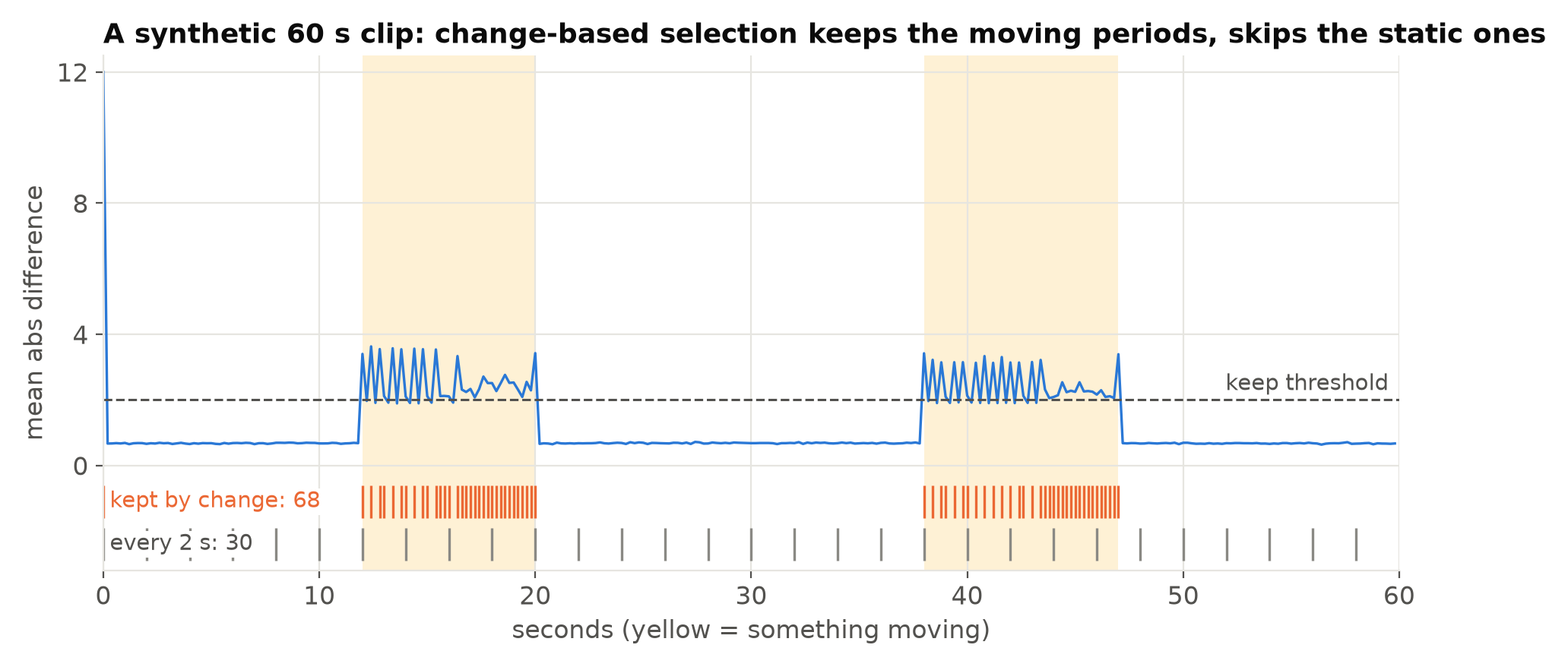
The simplest approach is one frame every N seconds. It is easy and unbiased in time, which is exactly the problem: most time is boring. A loading bay is empty most of the day. Fixed sampling spends most of the budget on empty frames and gets a handful of frames from each busy period.
Method 1: keep a frame when it differs enough
Compare each frame with the last frame you kept, and keep it only if it differs enough. Working on a small, blurred greyscale version makes the comparison cheap and tolerant to noise and compression:
import cv2
import numpy as np

def small(frame):
    g = cv2.cvtColor(frame, cv2.COLOR_BGR2GRAY)
    return cv2.resize(g, (64, 36), interpolation=cv2.INTER_AREA).astype(np.float32)

def select(frames, threshold=4.0, min_gap=1.0):
    """frames: iterable of (timestamp_seconds, frame). Yields frames worth keeping."""
    last, last_t = None, -1e9
    for t, f in frames:
        s = small(f)
        if last is None or (t - last_t >= min_gap and np.abs(s - last).mean() > threshold):
            last, last_t = s, t
            yield t, f
The threshold depends on the camera and lighting; look at a few hours of results and adjust. The minimum gap stops a busy period from producing a frame every 0.2 seconds.
Limitations: slow lighting changes, such as the sun moving, can trigger frames, and a small object in a large view may not change the mean much. For small objects, compare in a region of interest or use a maximum over grid cells instead of the global mean.
Method 2: perceptual hashes
A perceptual hash turns an image into a short fingerprint, such as 64 bits, that changes little for small changes in the image. Two frames are near-duplicates if the Hamming distance between their hashes is small. Difference hashes and DCT-based hashes are common, and small libraries implement them.
Hashes are useful across a whole collection, not only between consecutive frames: they find duplicates between different days, between clips that overlap, or between images someone exported twice. Compute a hash for every candidate frame, group those within a small distance of each other, and keep one or a few per group.
Method 3: embeddings for variety
For larger collections, use a pretrained image model to compute an embedding vector per frame, then cluster the embeddings and sample from each cluster. This groups frames by what they show rather than by pixel differences, so it can spread labels across scene types: empty, busy, night, rain, deliveries.
It costs more compute and some setup, so it pays off on large collections or when you need to balance many conditions. For a few cameras, difference checks and hashes are usually enough.
Do not throw away the rare cases
Aggressive deduplication can remove exactly the frames you most need: the brief moment when a person passes the far end of the view, a vehicle in rain, the one night with fog. Some safeguards:
- Keep event windows. If you know when events happened, from alerts, operator reports or a baseline model, keep frames from those windows more densely.
- Use a baseline detector. Run any reasonable detector and keep frames where it finds objects, especially at low confidence. These often contain the hard cases.
- Balance by condition. After deduplication, check the share of night, day, busy and empty frames, and top up conditions that are under-represented.
- Keep some empty frames. Background frames matter for false positives. Do not let them disappear entirely; see Hard Negative Mining from Production Footage.
Order of operations
- Split footage by camera and time into train, validation and test.
- Within each split, remove near-duplicates.
- Add event windows and detector-selected frames.
- Check balance across cameras and conditions; top up gaps.
- Send to labelling, with pre-labels if useful. See Pseudo-Labelling with a Larger Model.
For the test set, sampling by a fixed rule matters more than efficiency, because the test set should represent reality, including its boring parts. Deduplicate it lightly, if at all. See Why Your Test Set Flatters You.
Record what you did
Store the selection method, thresholds and the list of kept frames with their source clip and timestamp. When you later wonder why the model is weak on a condition, you can check whether that condition was filtered out. See Versioning Datasets and Models Together.
Checklist
- Split by camera and time before sampling.
- Prefer change-based selection to fixed intervals for training data.
- Use a minimum time gap between kept frames.
- Use hashes to find duplicates across the whole collection.
- Consider embeddings and clustering for large collections.
- Keep event windows and detector-selected frames.
- Check and rebalance conditions after deduplication.
- Sample the test set by rule, not for efficiency.
- Record the selection method and parameters.
Next steps: How Many Images Do You Need to Train an Object Detector? and Writing an Annotation Guide Labellers Can Follow.