Versioning Datasets and Models Together
A client reports that the new model misses people near the loading dock. Which images was it trained on? Were the dock cameras in the training set or only in the test set? Which version of the labels? Was it the run with the new augmentation, or the one before? If the answers are "probably" and "I think", you cannot fix the problem with confidence, and you cannot roll back with confidence either.
Code has had version control for decades. Data and models in computer vision projects often have folder names like dataset_final_v2_fixed. This article describes a light system that ties each deployed model to the exact data, labels, code and settings that produced it, without requiring a large platform.
What needs a version
Five things together determine a model:
- The images. Which files, exactly.
- The labels. Labels change more often than images: corrections, new classes, guideline changes.
- The splits. Which images are train, validation and test.
- The code and configuration. Training script, model config, hyperparameters, augmentations, library versions.
- The randomness. Seeds, and the fact that some variation remains even with seeds. See Reproducible Training Runs.
And after training, two more things need to be tracked:
- The model artefacts. Weights, exported files, and the thresholds chosen for deployment.
- Where each model runs. Which site and cameras run which model and thresholds since when.
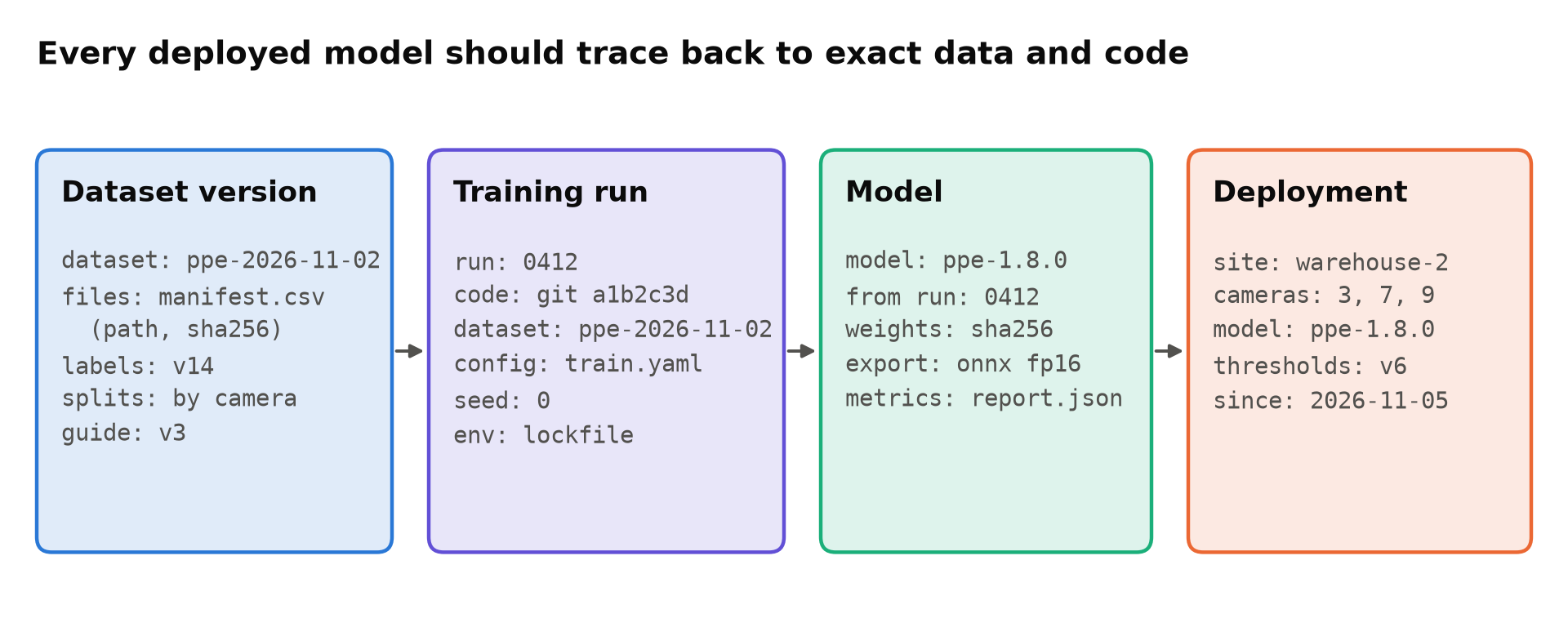
The core idea is simple: each record holds the identifier of the record before it. A deployment names a model version; the model names its training run; the run names a dataset version and a code commit; the dataset version names its exact files and labels.
Version the dataset with a manifest
Images are too large for ordinary Git, but you do not need to store them in Git to version them. You need a precise list.
A manifest is a file that lists every image in a dataset version, with a content hash, its split, and anything else you need, such as the camera and recording date:
path,sha256,split,camera,recorded
cam03/2026-10-01/000123.jpg,9f2c...,train,cam03,2026-10-01
cam07/2026-10-02/004410.jpg,1ab9...,test,cam07,2026-10-02
The manifest is small, so it can live in Git next to the label files. The images live in object storage or on a shared drive, ideally in a layout where files are never changed in place, only added. If an image is in the manifest and its hash matches, you have the right image.
Give each dataset version a name or date, and never change a released version. Corrections create a new version. Tools such as DVC automate this pattern of hashed files tracked from Git; Git LFS, DVC or Object Storage compares the options. A plain manifest is enough to start.
Labels and guidelines
Keep labels in Git if they fit (YOLO text labels and COCO JSON usually do), versioned with the manifest. Also version the annotation guideline, because a label means what the guideline said at the time. If the guideline changed how occluded people are boxed, models trained before and after the change are learning slightly different targets. See Writing an Annotation Guide Labellers Can Follow.
Record every training run
For every run you might keep, record:
- Git commit of the training code, with a note if there were uncommitted changes (better: do not train from uncommitted code).
- Dataset version name.
- The full configuration actually used, saved as a file, not reconstructed later.
- Library versions, ideally a lockfile of the environment. See Setting Up a Clean Python Environment for Computer Vision.
- Seed, hardware, and training time.
- Validation and test results, saved as a file.
Experiment trackers record most of this automatically; Ultralytics also saves the training arguments in each run folder. Experiment Tracking: TensorBoard, Weights & Biases and MLflow compares the tools. The part they cannot do for you is record the dataset version name, so make it a required training argument and log it.
Give models real versions
When a run becomes a candidate for deployment, give its model a version number and register it: a row in a table, a model registry entry, or a folder with a fixed layout. Record:
- Version, source run, and a hash of the weights file.
- Each exported file (ONNX, TensorRT engine and so on) with its precision and export settings.
- The test report.
- The deployment thresholds, since a model is only half-defined without them.
A TensorRT engine is built for one GPU type and TensorRT version, so record those for engine files too. An engine built on one Jetson software release may not load on another.
Record what runs where
Finally, keep a deployment record: which model version and thresholds run on which cameras, from when. A simple change log works:
2026-11-05 warehouse-2 cams 3,7,9 model ppe-1.8.0 thresholds v6 (was ppe-1.7.2 / v5)
This is the record you need when a client asks why alerts changed last Tuesday, and the one you need to roll back. If your deployment tooling can write it automatically, even better. Updating Models on Edge Devices Without Bricking Them covers the rollout side.
What this buys you
- Debugging. When a model misbehaves on the dock cameras, you can check whether those cameras were in training data, which labels were used, and what changed since the last good version.
- Fair comparisons. Two models are only comparable if you know they used the same test set version. See Comparing Two Detectors Fairly.
- Rollback. You can return to the exact previous model and thresholds, not an approximation.
- Handover. A client or colleague can retrain or audit the model. See Handover Documentation for a Computer Vision System.
- Data requests. If someone asks for footage to be deleted, the manifest tells you which dataset versions contain it.
Keep it light
You do not need a full MLOps platform to do this. A manifest file, labels in Git, a required dataset name in the training script, a folder per model version, and a deployment log cover most of it. Add tools when the manual steps start to hurt, not before.
Checklist
- Datasets versioned by manifest with hashes, splits and camera.
- Released dataset versions never changed in place.
- Labels and annotation guide versioned with the dataset.
- Every run records commit, dataset version, config, environment and seed.
- Models registered with weights hash, exports, report and thresholds.
- Engine files recorded with GPU and software versions.
- A deployment log of model and thresholds per camera over time.
Next steps: Reproducible Training Runs and Git LFS, DVC or Object Storage.