Handover Documentation for a Computer Vision System
The model works, the client is happy, the project ends. Six months later the site moves two cameras, alerts double, and the person who now owns the system opens a folder called final with three model files and no explanation. They cannot tell which model is running, how it was trained, or what the thresholds mean. Either they call you, or the system gets switched off.
A vision system is not finished when it works. It is finished when someone else can keep it working. This article lists what a good handover contains and how to make it usable for the person who receives it.
Who will read it
Usually not a computer vision engineer. More often a site IT person, a developer on the client's team, or a successor contractor. Write for someone technical but new to the project, who needs to answer practical questions quickly:
- Is it running? How do I tell?
- An alert looks wrong. Where do I look?
- A camera was replaced. What do I change?
- The model needs retraining. Where is the data and how was it done?
Organise the documentation around those questions, not around how you built it.
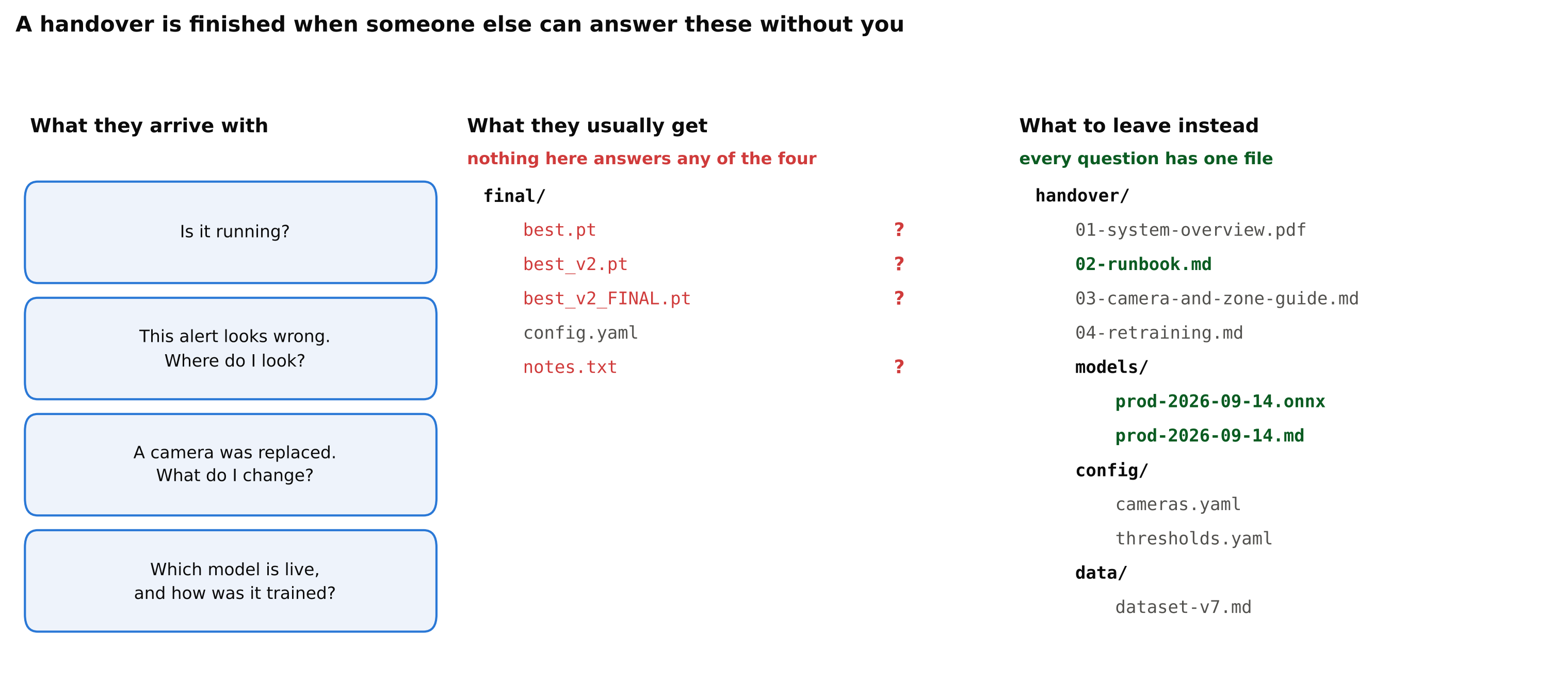
The middle column is not a strawman; it is what most projects actually end with. Three model files with no way to tell which is running, and a notes.txt written for the person who already knows.
The documents
1. System overview (one or two pages)
What the system does, in plain terms, and a diagram of the parts: cameras, the machine that runs analytics, where alerts go, where data is stored. Include the purpose and the limits agreed during the project: "detects people in the loading bay zone on cameras 3 and 7; not designed for the yard at night". Limits written down protect both sides later.
2. Operations runbook
The practical part, and the one that will be read most:
- How to start, stop and restart the system.
- How to check that it is healthy: which dashboard, which log, what normal looks like.
- What each health alert means and what to do about it: camera offline, frozen frames, lens dirty, disk full, device overheating. Detecting a Dirty, Blocked or Moved Camera and Handling RTSP Dropouts describe the checks.
- How to add, remove or replace a camera, including redrawing zones and lines.
- How to change thresholds, schedules and recipients, and where those settings live.
- How to roll back to the previous model.
- Who to contact for what, with the date this list was last checked.
Write each procedure as numbered steps, and test it by having someone else follow it once.
3. Configuration reference
Every setting that affects behaviour, per camera: stream URL format (not passwords), zones, thresholds, schedules, cooldowns, model version. Ideally this is the configuration file itself plus a short explanation of each field. Managing Per-Camera Configuration at Scale covers how to structure it so it can be handed over.
4. Model card
One page per deployed model:
- Version, training date, and where the weights and exports are.
- What it detects, with the class definitions.
- Training data: which cameras, dates and conditions, and the dataset version.
- Test results on the agreed acceptance footage, at the deployed thresholds, with the conditions where it is weaker.
- Known failure modes: "reflections in the north window at sunset", "people pushing tall trolleys".
- Licence of the model architecture and weights. If the model uses a framework under AGPL-3.0 or another licence with obligations, say so plainly. See YOLO Licenses Explained.
5. Retraining guide
How to reproduce the model and train a new one: where the data is, the annotation guide, the training command and configuration, the environment, how to evaluate against the test set, and how to export and deploy. Versioning Datasets and Models Together describes the records that make this possible.
Be honest about effort. "Retraining with new data takes about a day of compute plus labelling time" sets better expectations than "just run train.py".
6. Data and privacy notes
What footage and images are stored, where, for how long, who has access, and how deletion works, including training data and backups. This is often what an auditor or a new data protection officer asks for first. See Privacy and Ethics in Camera Analytics.
The files
Documentation without the artefacts is not a handover. Deliver:
- Source code in a repository the client controls, at the exact commit that is deployed, with a tag.
- The environment definition: lockfile, container image or both. See Dockerize a Computer Vision App.
- Model weights and every exported file in use.
- The dataset manifest, labels and annotation guide, and access to the images.
- The acceptance test footage and results.
- Configuration files for every site and camera.
Hand over credentials through the client's own password management process, never in the documentation itself.
Make it usable
- Keep it next to the code. Documentation in the repository gets updated with the code; a separate document gets forgotten.
- Short beats complete. A ten-page runbook that people read is worth more than a hundred pages nobody opens. Put details in appendices.
- Show normal. Screenshots of a healthy dashboard and typical alert rates per camera help someone recognise abnormal.
- Date everything. Contacts, versions and procedures go out of date. A date tells the reader how much to trust it.
Do a live handover
Schedule a session where the client's person runs through the runbook themselves while you watch: restart the service, find a log, change a threshold on a test camera, roll back a model. Every place they get stuck is a gap in the document. Fix it the same day.
If the contract includes a support period after handover, say what it covers and when it ends, in writing. Freelancing in Computer Vision covers how to scope that.
Checklist
- System overview with diagram, purpose and agreed limits.
- Runbook: start, stop, health checks, camera changes, settings, rollback, contacts.
- Configuration reference per camera.
- Model card with data, results, known failures and licences.
- Retraining guide with data, environment and commands.
- Data storage, retention and access notes.
- Code, environment, weights, exports, dataset manifest and test footage delivered.
- Credentials handed over through a proper channel.
- A live walkthrough with the client's own person.
Next steps: Writing a Results Report a Non-Technical Client Will Read and Agreeing a Measurable Target with a Client.