Managing Per-Camera Configuration at Scale
With five cameras, settings live comfortably in one file, edited by hand. With five hundred, every camera has its own zones, lines, thresholds, schedules, stream address and quirks, and the settings become the largest and most fragile part of the system. A typo in one camera's zone silently disables an alert. A threshold changed "temporarily" for one camera is still there a year later and nobody remembers why.
This article describes a way of organising per-camera configuration that stays manageable as the number of cameras grows.
What configuration includes
For each camera, typically:
- Stream: address, which stream (main or sub), expected resolution and frame rate.
- Geometry: zones, lines, masks, and the reference image they were drawn on.
- Model settings: model version, per-class thresholds, analysis frame rate.
- Rules: which rules apply, with their durations, cooldowns and schedules.
- Site context: time zone, site name, who receives alerts.
- Health-check baselines: sharpness, brightness, reference view. See Detecting a Dirty, Blocked or Moved Camera.
Most of these are the same for most cameras. That is the key to keeping them manageable.
Layer defaults and overrides
Define settings at a few levels, and let each level override only what it needs:
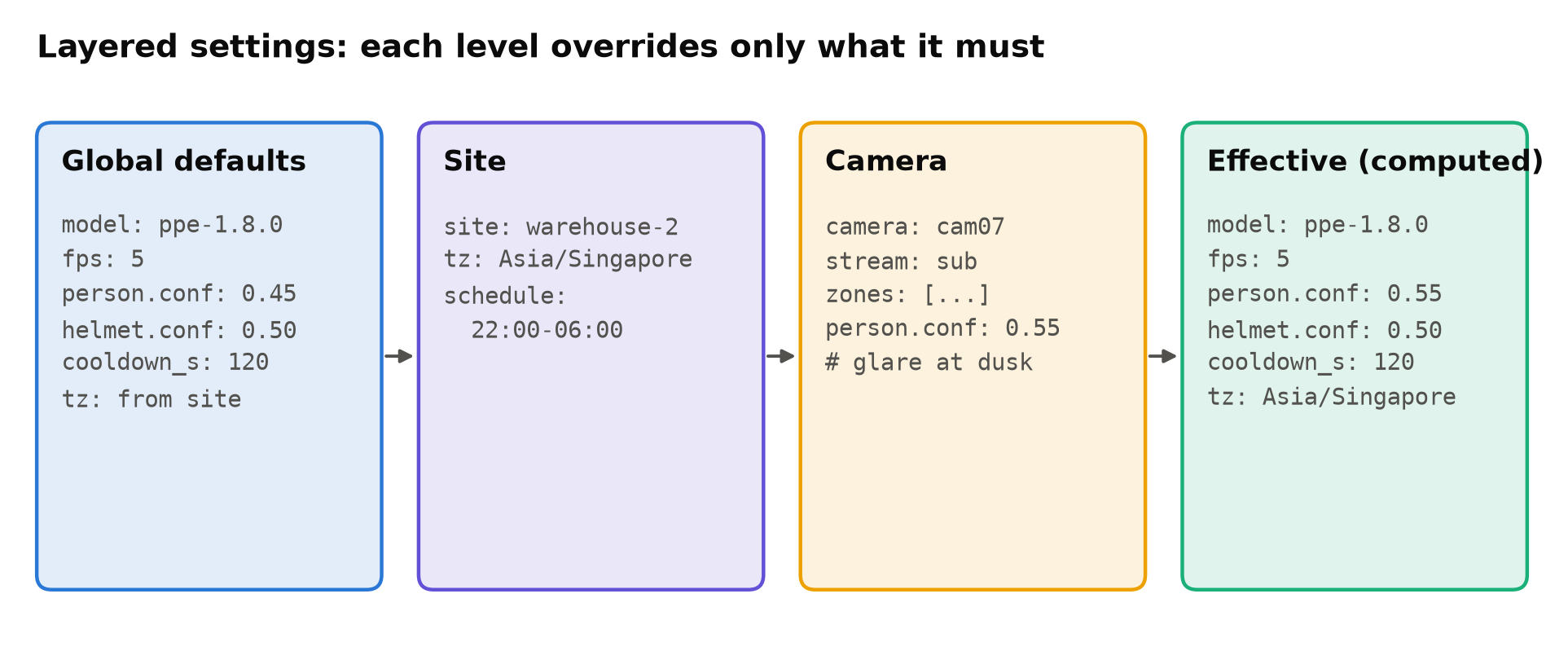
- Global defaults: model version, default thresholds, default frame rate, standard cooldowns.
- Site: time zone, schedules, alert recipients.
- Camera group (optional): all entrance cameras, all yard cameras.
- Camera: zones and lines, stream address, and only the exceptions.
A camera file then contains a handful of lines: its geometry and whatever genuinely differs. When you change a default, every camera that does not override it follows. When you look at a camera file, every line in it is there for a reason.
Write the reason next to each override. person_conf: 0.55 # glare from loading-bay door at dusk, see ticket 112 is maintainable. A bare 0.55 is not.
Compute and log the effective settings
The pipeline should merge the layers at start-up, produce the effective configuration for each camera, and log it (or save it next to the logs). When someone asks "what threshold was camera 7 using last Tuesday?", the answer is in the log, not in a reconstruction from four files and their histories.
Provide a command that prints the effective configuration for a camera. It is the first thing anyone debugging a camera should run.
Validate before it runs
Configuration errors should fail loudly at load time, not silently at 3 a.m. Define a schema and validate every file against it:
from pydantic import BaseModel, Field, field_validator

class Zone(BaseModel):
    name: str
    points: list[tuple[float, float]]           # normalised 0..1 coordinates

    @field_validator("points")
    @classmethod
    def valid_polygon(cls, pts):
        if len(pts) < 3:
            raise ValueError("a zone needs at least 3 points")
        if not all(0 <= x <= 1 and 0 <= y <= 1 for x, y in pts):
            raise ValueError("zone points must be normalised to 0..1")
        return pts

class Camera(BaseModel):
    id: str
    stream: str
    zones: list[Zone] = []
    person_conf: float = Field(0.45, ge=0.05, le=0.95)
    fps: float = Field(5, gt=0, le=30)
Validation catches typos in keys, thresholds outside a sensible range, zones with too few points, unknown rule names, and time zones that do not exist. Run it in CI on every change, and again on the device before applying a new configuration.
Also check cross-references: every rule refers to a zone that exists; every camera's site exists; no two cameras share an ID.
Store geometry in normalised coordinates
Store zone and line points as fractions of the frame width and height (0 to 1), not as pixels. Then switching a camera from the main stream to the substream, or the camera's resolution being changed, does not move every zone. Convert to pixels when frames arrive, using the actual frame size.
Keep the reference image each zone was drawn on, with the zones overlaid. When a camera is moved or replaced, compare the new view with that image to see whether the zones still fit. A view-shift check can flag it automatically.
Version control everything
Keep configuration in Git, separate from the code but versioned the same way:
- Every change is a commit with a message saying why.
- Changes are reviewed, at least for production sites.
- You can see the full history of a camera's settings and roll back.
- The deployment record notes which configuration version each device runs. See Versioning Datasets and Models Together.
Keep secrets out of it. Stream credentials and API keys belong in a secrets store or in device-local files with restricted permissions, referenced from the configuration by name.
Changes made in a UI
Operators often need to adjust zones or schedules through a web interface. That is fine, as long as the interface writes to the same versioned store, records who changed what, and validates before saving. A configuration that exists only in a database edited by hand from a UI loses its history and its review.
Watch for drift
Over time, overrides accumulate. Every few months, list all camera-level overrides and ask whether each one is still needed. A threshold raised to handle glare in winter may be wrong in summer. A mask added during construction work may now hide a real area. Overrides with a date or a ticket reference are much easier to review.
Also detect configuration that no longer matches reality: a stream that now delivers a different resolution or frame rate than the configuration expects, or a camera whose view has shifted from the reference. Both are cheap to check at start-up and on a schedule. See Metrics and Logging for a Vision Service.
Checklist
- Defaults, site, group and camera layers; cameras hold only exceptions.
- A reason recorded next to every override.
- Effective configuration computed, logged and printable.
- Schema validation and cross-reference checks in CI and on device.
- Zones and lines in normalised coordinates, with reference images.
- Configuration in Git, reviewed, with the deployed version recorded.
- Secrets kept out of configuration files.
- UI changes written to the same versioned, validated store.
- Overrides reviewed regularly; mismatches with reality detected.
Next steps: Scaling Video Analytics to Hundreds of Camera Streams and Handover Documentation for a Computer Vision System.