Scaling Video Analytics to Hundreds of Camera Streams
Running one camera on a laptop and running hundreds in production are different engineering problems. The model is the same, but the bottlenecks move. In video analytics at scale, the limiting factors are often decoding, network, memory and operations, not the neural network itself. This article describes the main design decisions and the mistakes that cost the most time. It draws on general production experience with large numbers of live streams, and all capacity figures here are intentionally left to you to measure, because they depend entirely on your hardware, models and settings.
Do the budget before the design
Start with a simple calculation per stream:
- Frames per second you actually need to analyse (not the camera's frame rate).
- Decode cost per stream at the chosen resolution and codec.
- Inference cost per frame for your model at your input size.
- Post-processing, tracking and rule cost.
- Network bandwidth per stream.
Multiply by the number of streams and compare with what one machine can do. You get the machine count, and you learn which resource is the constraint. Measure each cost on your real hardware with a proper method; see Measuring FPS and Latency Correctly. A common surprise is that video decoding of many streams consumes a large part of the CPU before the GPU is even busy.
Reduce the work before adding hardware
The cheapest scaling is doing less:
- Analyse fewer frames. Most rules do not need every frame. Processing a few frames per second per stream may be enough for presence and counting of slow objects. Fast objects need more. Decide from the rule, not from habit.
- Use the sub stream. Lower resolution streams are cheaper to decode and transmit. Use the main stream only where small objects need it.
- Use a smaller model or lower input size where accuracy allows. See Nano, Small, Medium: How to Choose a YOLO Model Size.
- Skip static scenes. A cheap motion check can skip inference when nothing changes, though it adds its own false negatives and must be tested.
- Crop regions of interest so the model processes only the relevant part of the frame.
Skip frames before decoding them fully if you can. With inter-frame codecs, decoding must still process frames in sequence, so the saving is mostly in conversion and inference. Hardware decoders and keyframe-only strategies change this, which is worth investigating for very large installations.
A typical architecture
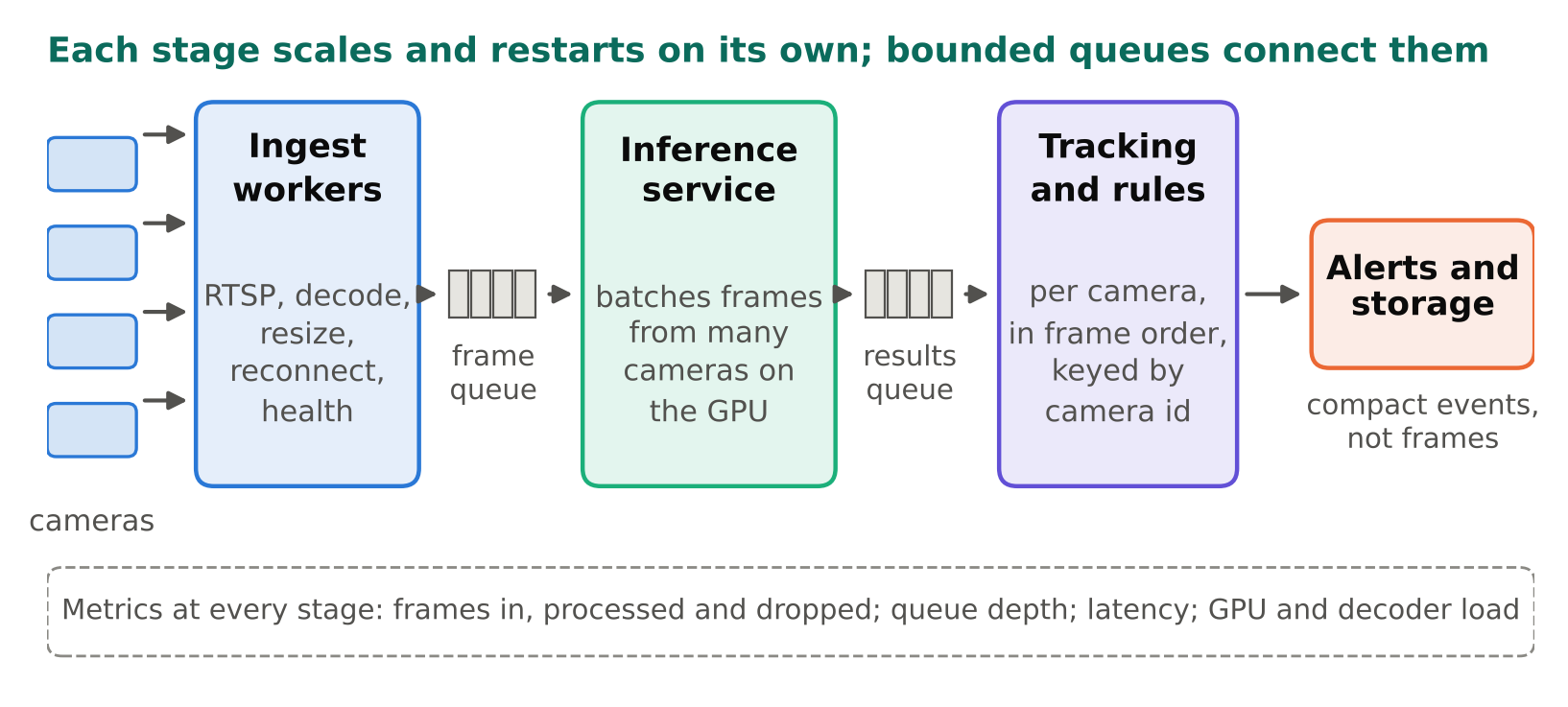
A pattern that scales well separates the stages and connects them with queues:
cameras -> ingest workers -> frame queue -> inference service -> results queue -> tracking/rules -> alerts + storage
- Ingest workers hold the RTSP connections, decode, resize, and push frames with metadata (camera id, timestamp) to a queue. They handle reconnects and health reporting. See Handling RTSP Dropouts: Reconnects and Health Checks.
- Inference service takes frames from many cameras, forms batches, runs the model on the GPU, and returns detections. Tools such as NVIDIA Triton Inference Server can manage batching and multiple models, and they let several workers share one GPU. I have used Triton in production; whether it fits your case depends on your models and team.
- Tracking and rules run per camera, and need ordered frames per camera, so keep one camera's frames on one worker or key the queue by camera.
- Alerts and storage receive only compact events, not frames.
The key benefit is that each stage can be scaled and restarted independently. A crash in a native decoding library kills one ingest worker, not the whole system.
Batching
GPUs are most efficient when given several images at once. A batcher collects frames from different cameras and sends them together. The trade-off is latency: waiting to fill a batch delays the first frame in it. Use a maximum wait time so a half-empty batch is still sent after a short delay. Whether batching helps depends on model size, GPU and how busy the system is, so test your own configuration rather than copying settings. Batching across cameras is natural, because frames from different cameras are independent. Batching frames from one camera adds latency for that camera.
Note that exporting a model with dynamic batch size, or fixed batch size, has consequences for engines such as TensorRT; read TensorRT for YOLO: When and How to Use It.
Queues and back-pressure
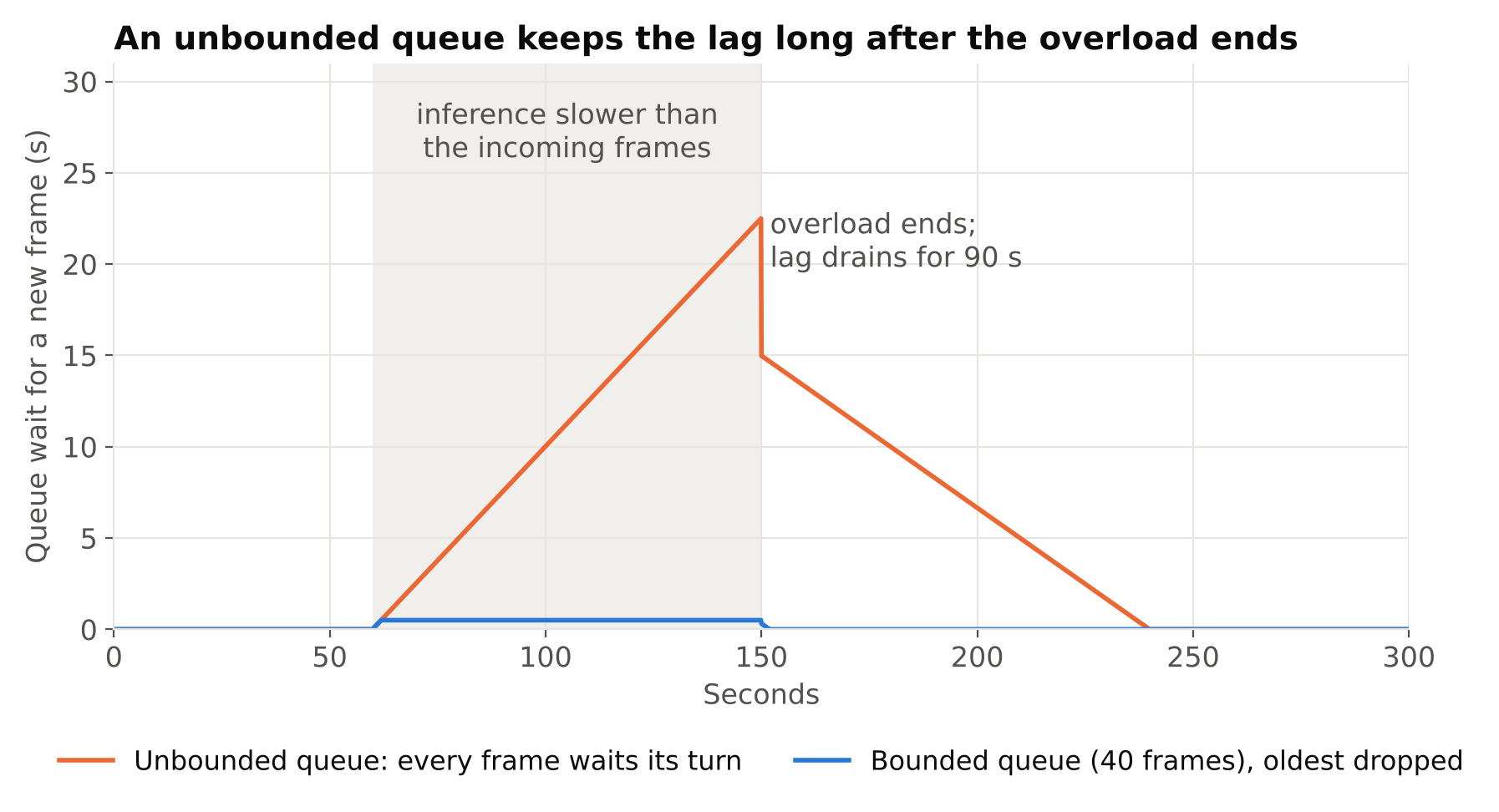
Queues are where overload shows up. Define what should happen when the inference stage cannot keep up. Options:
- Drop oldest frames (keep the queue short). For real-time alerting this is usually right: a fresh frame is worth more than a stale one.
- Block the producer. Suits offline processing of files, where every frame matters, but is wrong for live streams, where it leads to growing latency.
Use bounded queues. Unbounded queues turn an overload into memory exhaustion hours later. Count dropped frames per camera and expose it as a metric; if a camera drops most of its frames, your effective frame rate is lower than you believe, and rules based on timing may misbehave.
Process, thread and GPU considerations
- Python threads share the interpreter lock, which limits CPU-heavy work in pure Python. Native libraries often release it, but for safety and isolation many systems use processes per group of streams.
- Pin worker counts to cores, and avoid oversubscription from libraries that spawn their own thread pools (OpenCV, NumPy builds, PyTorch).
- Keep the pipeline on the GPU where you can. Copying large frames between CPU and GPU repeatedly wastes bandwidth. Do resize and normalisation in a place that avoids needless transfers.
- Memory leaks matter at scale. A small leak per frame becomes a crash after days. Monitor memory per worker and restart workers on a schedule if needed, as a safety net while you fix the leak.
Containers and deployment
Package each stage as a container so that versions of CUDA, drivers, and libraries are controlled; see Dockerize a Computer Vision App for Edge and Cloud. Use an orchestrator or at least a process supervisor with restart policies. Make configuration (camera list, zones, rules) external, loaded at start-up and reloadable, so you can add a camera without a code change.
Plan for the cloud differently from the edge. Sending hundreds of video streams to the cloud costs bandwidth and money, and raises privacy questions. A common design runs ingest and inference near the cameras and sends only events, snapshots and metrics upward. Check egress costs and your data policies before choosing.
Monitoring is part of the product
At hundreds of streams, you cannot watch them. Export metrics per camera and per worker:
| Metric | Why |
|---|---|
| Frames in, frames processed, frames dropped | Shows overload and effective FPS |
| End-to-end latency (capture to event) | Shows lag that breaks real-time rules |
| Seconds since last frame | Detects dead cameras |
| Queue depths | Early warning before drops |
| GPU utilisation and memory | Capacity planning |
| Decoder CPU usage | Finds the real bottleneck |
| Reconnects and errors | Finds unstable cameras |
| Alerts per camera per day | Finds drift and noisy sources |
Dashboards plus alerts on these (not just on detections) give you a system that you can run with a small team. Add a camera status page that is understandable to non-engineers.
Operational habits
- Roll out new models or settings to a few cameras first (canary), and compare the alert rate and operator feedback with the old version before widening.
- Keep a way to roll back quickly.
- Test with a replay of recorded streams at higher multiples to find limits before the real load arrives.
- Document per-camera configuration, including the reason for any special thresholds.
- Plan for growth. If every new site needs hand-edited files, you will fall behind.
Checklist
- Do a per-stream budget for decode, inference, network and rules.
- Reduce work: fewer frames, sub streams, smaller models, crops.
- Separate ingest, inference and rules with bounded queues.
- Batch across cameras with a maximum wait.
- Prefer dropping stale frames on live streams, and count drops.
- Isolate workers in processes and containers; watch for leaks.
- Export per-camera and per-stage metrics; alert on them.
- Roll out changes gradually with a rollback path.
Next steps: tune what your rules do with the output in Designing Alert Rules: Schedules, Cooldowns and Escalation, and review Privacy and Ethics in Camera Analytics before scaling out.