Designing Alert Rules: Schedules, Cooldowns and Escalation
Detection produces events. Alerts are what humans see. The gap between the two is where many video analytics projects succeed or fail. A perfect detector with badly designed alerts overwhelms people with messages until they mute the channel. A mediocre detector with well-designed alerts can still be useful, because the rules filter, group and route what matters.
This article covers the design of the rule layer that sits between detections and people.
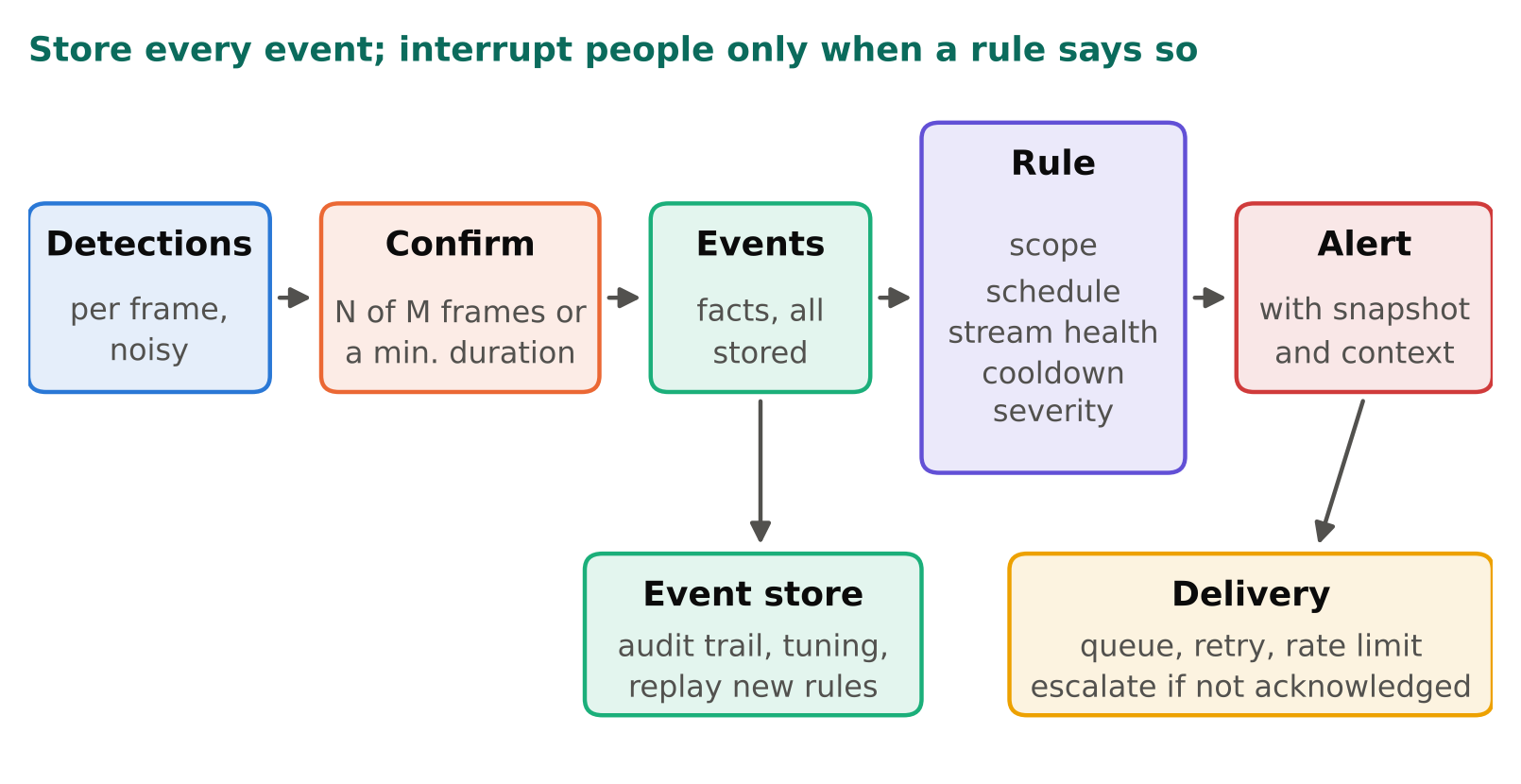
Separate events from alerts
Keep two concepts apart:
- An event is a fact the system observed: "person entered zone A at 22:14:03 on camera 7".
- An alert is a decision to interrupt someone: "send a message to the night supervisor".
Store every event, whether or not it triggers an alert. Events are your audit trail and your data for tuning. You can review them later, change the rules, and replay history to see what the new rules would have done. If you only store alerts, you cannot tune anything.
What a rule should contain
A useful rule definition has these parts:
| Part | Example |
|---|---|
| Condition | Person inside zone "loading dock" |
| Confirmation | Present for at least N seconds |
| Schedule | Only between closing time and opening time, in local time |
| Scope | Which cameras and zones |
| Cooldown | Do not repeat for the same zone for M minutes |
| Severity | Low, medium, high |
| Destination | Which channel or person |
| Escalation | If not acknowledged within T minutes, notify the next level |
Writing rules as data (a config or database row) rather than code makes them reviewable and lets non-engineers adjust them under change control.
Schedules
Many alerts only make sense in a time window: a restricted area after hours, a safety rule during a shift, a machine that must not run unattended. Points to get right:
- Use the site's local time zone and handle daylight saving transitions. Store schedules as local times with a named time zone, not as fixed UTC offsets.
- Support several windows per day and per weekday, and an exceptions list for holidays or maintenance.
- Provide a way to put a camera or zone in maintenance mode for a defined period, with an expiry. Forgotten permanent mutes are a classic source of blind spots.
- Decide what happens at the boundary. If a person is already in the zone when the restricted window starts, should that alert? Define it explicitly.
Cooldowns and de-duplication
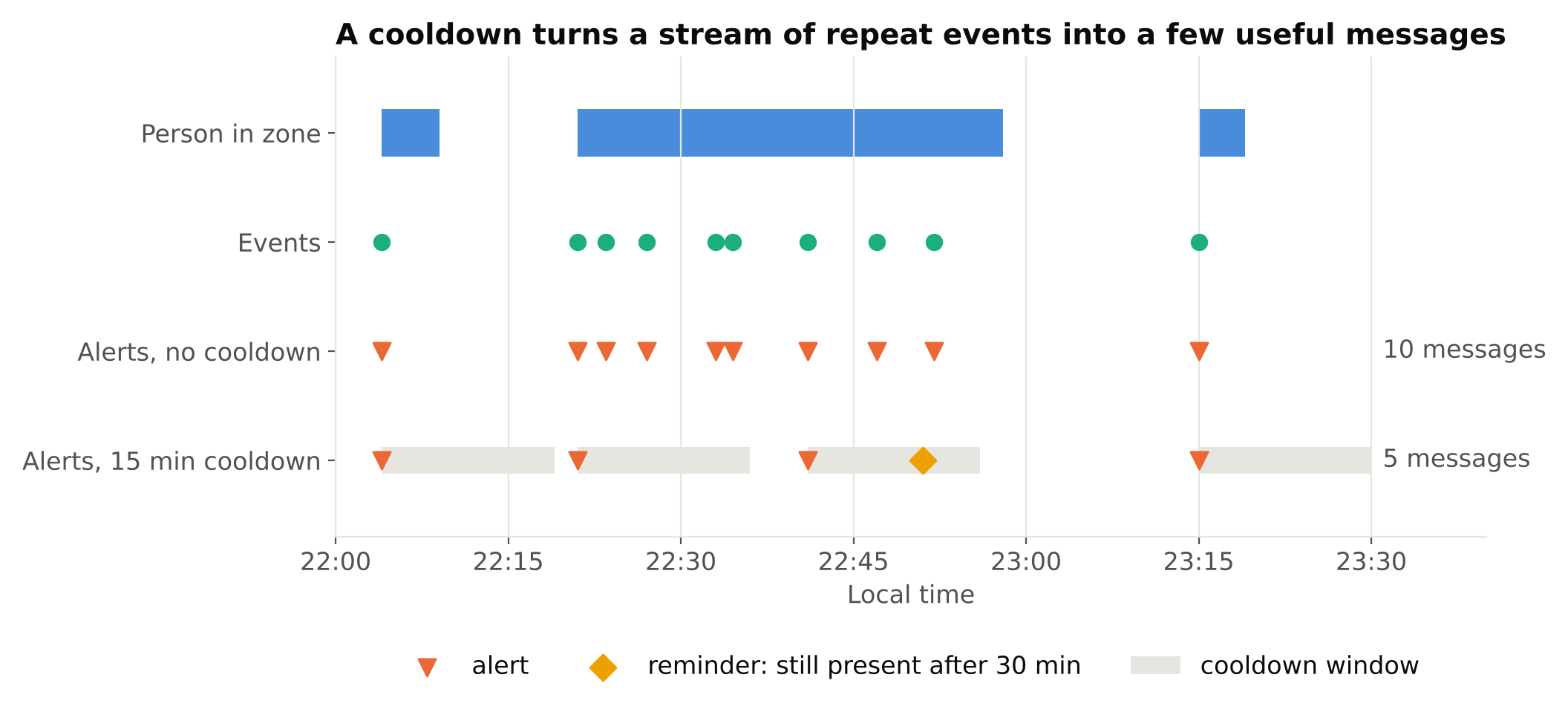
Without a cooldown, one person standing in a zone creates an alert every second. A cooldown suppresses repeats after the first alert for a defined time. Think about what the key of the cooldown should be:
- Per rule and per camera is the usual start.
- Per track ID is more precise, but IDs can change when tracking is interrupted, which would re-fire the alert.
- Per zone is often the best compromise for presence alerts.
Cooldown length is a trade-off. Too short and messages pile up. Too long and a new, different event gets hidden behind the old one. One approach is to suppress repeats but still escalate if the condition persists, for example, send a reminder only if the situation continues beyond a larger threshold.
Also consider grouping: if ten cameras report the same type of problem within a minute, such as a network fault or a lighting change that confuses the detector, send one grouped message rather than ten. A burst across many cameras at once is more often a system problem than ten separate real events, and it is worth flagging as such.
Absence rules
Some of the most valuable rules are about something not happening: "no one has been at the front desk for 20 minutes", "the conveyor has not moved", "the delivery truck did not arrive by 06:00". They are also the riskiest, because a broken camera or stalled pipeline produces exactly the same data as an empty scene: no detections.
To make absence rules safe:
- Require a healthy-stream signal first. If the stream is stale, frozen or blind, the rule state is "unknown", not "absent".
- Raise a separate system alert for the unhealthy stream, so someone fixes the root cause.
- Use a window long enough to ride out normal gaps, such as a person walking out of view briefly.
See Handling RTSP Dropouts: Reconnects and Health Checks for the health signals.
Confirmation and false-alarm control
Confirmation windows turn noisy per-frame detections into stable conditions. Require the condition to hold for a few seconds, or in N of the last M frames, before an event is created. More methods are in Reducing False Alarms in Production Video Analytics. Do the filtering before the alert rule, so rules operate on clean events.
Severity and escalation
Not every event deserves a phone call. Define severity levels with agreed meanings:
- Low: logged and shown in a daily summary.
- Medium: a message in a chat channel or app during working hours.
- High: a notification that demands acknowledgement, with escalation if no one responds.
Escalation means that if nobody acknowledges within a set time, the system tries the next person or group. This needs acknowledgement tracking: the alert has a state (new, acknowledged, resolved), a person who acknowledged it, and a time. Without these, you cannot tell whether anyone saw it.
Keep high severity rare. If most alerts are high, none of them are.
Make alerts self-explanatory
A person receiving an alert at night should not have to log in to understand it. Include:
- What happened, in plain words ("Person in loading dock zone").
- Where: site, camera name, zone.
- When, in the local time zone.
- A snapshot with the detection drawn, and optionally a short clip around the event.
- How long the condition has lasted, if relevant.
- A link or action to acknowledge it, and a way to mark it as false.
The snapshot is the single most useful element. It lets the receiver judge in seconds whether to act. Think about privacy when you decide what to attach and who can see it; see Privacy and Ethics in Camera Analytics.
Delivery must be reliable
An alert system that silently fails is worse than none, because people assume they are covered. Practical measures:
- Use a queue between the analytics and the notifier, so a temporary outage of the messaging service does not lose events. Retry with backoff.
- Monitor the notifier itself. Send a periodic heartbeat message or check that the last successful delivery is recent.
- Have a fallback channel for high severity alerts.
- Rate-limit globally, so a bug or a storm of events cannot send thousands of messages and get your sender blocked.
- Record delivery status for every alert.
Test rules like code
Rules have bugs. Build a replay harness: feed recorded events or clips through the rule engine and check the outputs against expectations. Include edge cases: events across midnight, a daylight saving change, a stream dropping mid-event, two zones triggering at once, the cooldown expiring exactly as a new event arrives. Review the alert history after any rule change, and keep the old version so you can roll back.
Finally, review usage. Ask the people who receive alerts which ones they act on and which they ignore. Rules that nobody acts on should be changed or removed.
Checklist
- Store all events; alert on a subset.
- Define rules as data: condition, confirmation, schedule, scope, cooldown, severity, destination, escalation.
- Handle time zones, daylight saving and maintenance windows.
- Choose the cooldown key and length deliberately; group bursts.
- Gate absence rules on stream health.
- Include a snapshot and context in every alert.
- Queue, retry, monitor and rate-limit delivery.
- Test rules with replayed clips and review alert usage.
Next steps: see Zone Intrusion and Dwell Time Alerts for producing events, and Scaling Video Analytics to Hundreds of Camera Streams for running this at volume.