Measuring Video Analytics by Events, Not Frames
A detector is trained and validated on frames. An operator never sees frames. They see alerts: "person in restricted zone, camera 4, 14:32". The question they care about is whether the alert was real, and whether anything real was missed. Frame-level precision and recall answer a different question, and the two can disagree badly.
This article explains how to evaluate a video analytics system at the event level, which is the level at which it is used, and how to set it up so the numbers are repeatable.
Why frames mislead
Frame metrics treat every frame as a separate test. That has two effects.
First, long events dominate. A person who stands in a zone for five minutes contributes thousands of frames; a person who walks through in three seconds contributes a handful. Frame recall is mostly a measure of how well the model does on the long events.
Second, frame metrics ignore what happens after the detector. In a real system, detections go through a tracker, a temporal filter and alert rules. A detector that finds a person in only half of the frames, scattered through the event, can still produce one clean alert. A brief false detection that the filter removes costs nothing. A false object that persists for three seconds produces a false alert even though it is a tiny share of frames.
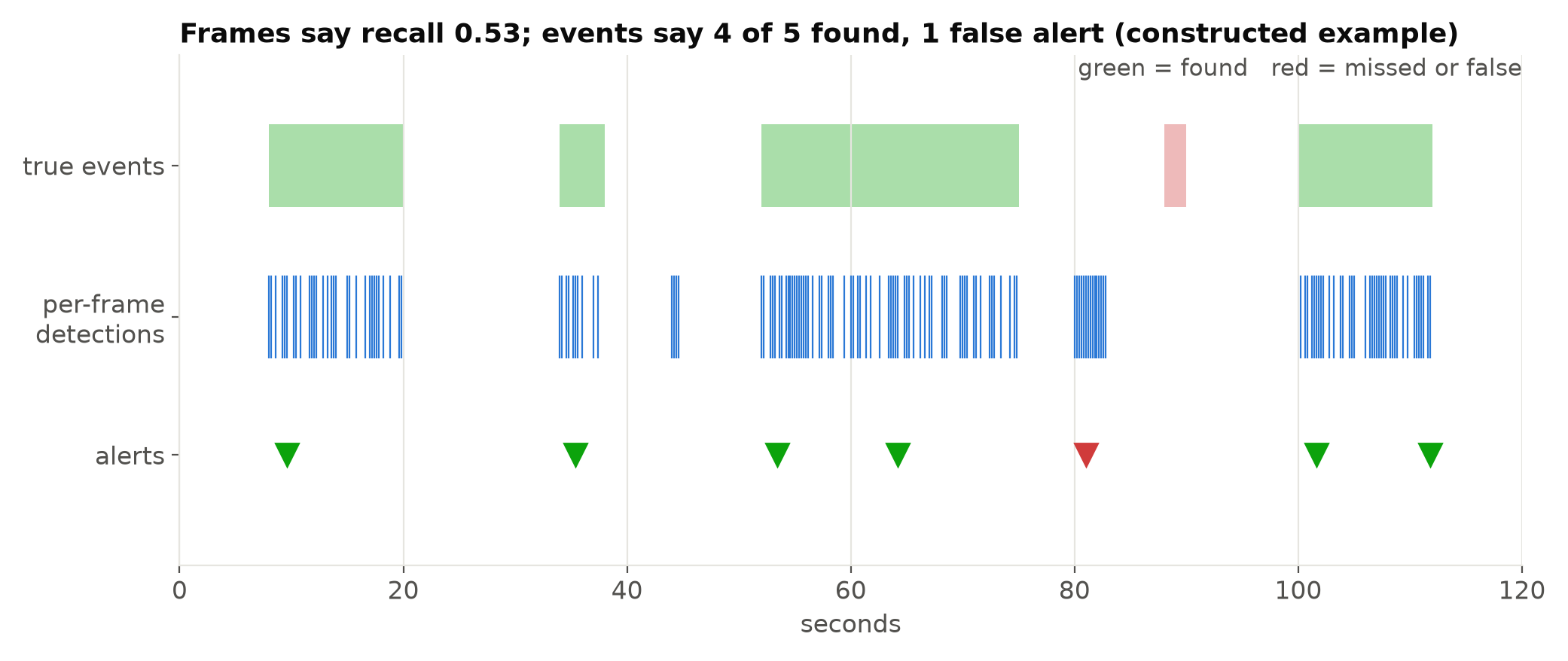
In the constructed example above, frame recall is 0.53, which sounds poor. But four of the five events were caught. The fifth, a two-second event, was missed completely, which frame recall barely registers. And the long event produced a second alert after the cooldown, which an operator may count as a duplicate. None of these facts appear in a frame-level score.
Define the event and the ground truth
Event-level evaluation needs ground truth in the form of events, not boxes: for each event, a camera, a start time, an end time and a type. Labelling events is much faster than labelling boxes, since you mark intervals on a timeline rather than drawing on every frame. Many annotation tools support this, and a spreadsheet works for small sets.
Write a definition of each event type first, with edge cases, and use it consistently. "A person inside the zone" needs answers for a person half inside, a person behind a glass wall, and a reflection. This definition should be the same one agreed with the client; see Agreeing a Measurable Target with a Client.
Match alerts to events
An alert matches an event if it has the same type and camera and its time falls inside the event, allowing a tolerance. The tolerance matters:
- Start tolerance. Allow the alert to fire a little after the event starts, since temporal filters add delay by design. The maximum allowed delay is also a requirement: an alert a minute late may count as a miss for a safety use.
- End tolerance. Allow a short margin after the event ends for alerts fired just as the person leaves.
- Early alerts. An alert slightly before the labelled start usually means the labeller and the system disagree about the exact moment. Allow a second or two.
Each event can be matched by at most one alert for recall. Extra alerts on the same event are duplicates; decide whether they count as false alerts or as a separate category. Operators usually find duplicates annoying but not as harmful as alerts for nothing, so reporting them separately is fairest.
The numbers to report
For each event type and camera:
| Metric | Definition |
|---|---|
| Event recall | Matched events / all events |
| False alerts per camera per day | Alerts that match no event, scaled to 24 hours |
| Duplicates | Extra alerts on events already matched |
| Time to alert | Median and worst-case delay from event start to alert |
| Missed events by cause | Short events, occlusion, night, small size and so on |
False alerts per day is more useful than event precision as a percentage. "Precision 0.9" depends on how many real events happened that day. "Two false alerts per camera per day" is what an operator lives with, and it can be compared across sites with different traffic.
Look at the missed events individually. In small evaluation sets, the list of misses with a reason for each is more informative than the recall number.
A simple scorer
The matching logic fits in a few lines:
def score(events, alerts, max_delay=10.0, early=2.0, late=3.0):
    """events: list of (start, end); alerts: sorted list of times, same camera and type."""
    used, matched, duplicates = set(), 0, 0
    for start, end in events:
        hits = [i for i, t in enumerate(alerts)
                if start - early <= t <= min(end + late, start + max_delay)]
        if any(i not in used for i in hits):
            matched += 1
        later = [i for i, t in enumerate(alerts) if start - early <= t <= end + late]
        duplicates += max(0, len([i for i in later if i not in used]) - 1)
        used.update(later)
    false_alerts = len([i for i in range(len(alerts)) if i not in used])
    return {"recall": matched / len(events) if events else None,
            "false_alerts": false_alerts, "duplicates": duplicates}
Run it per camera and per event type, then scale false alerts by the hours of footage. Keep it simple enough that a client could follow it if asked.
Choose the footage carefully
Event metrics are only as good as the footage behind them.
- Use continuous footage, not clips cut around events. False alerts happen in the quiet hours in between, and cut clips hide them.
- Cover the real conditions: night, rain, busy hours, cleaning shifts.
- Use cameras and periods the model was not trained on. See Why Your Test Set Flatters You.
- Have enough events. With few events, each one changes recall by a lot. Where real events are rare, stage some on purpose.
A few days of continuous footage from each representative camera is usually more informative than hundreds of short clips.
Use it to tune, not only to report
Event scoring is the right tool for tuning the parts after the detector: the N-of-M filter, minimum durations, cooldowns and the confidence threshold. Each of these trades recall against false alerts and delay, and only an event-level score shows all three at once. Change one parameter, re-run the scorer on the same footage, and compare. Reducing False Alarms in Production Video Analytics lists the levers; this is how you measure what each one does.
Keep frame-level metrics for what they are good at: comparing detectors during training. Use event-level metrics for everything that reaches a person.
Checklist
- Label ground truth as events with start, end, type and camera.
- Write event definitions with edge cases before labelling.
- Match alerts with explicit start, end and delay tolerances.
- Report recall, false alerts per camera per day, duplicates and delay.
- Read the list of missed events, not only the recall figure.
- Evaluate on continuous, unseen footage covering real conditions.
- Tune filters and thresholds against event scores.
Next steps: Designing Alert Rules: Schedules, Cooldowns and Escalation and Tracker ID Switches and Double Counting.