Handling RTSP Dropouts: Reconnects and Health Checks
Cameras reboot. Switches lose power. Wi-Fi links drop. A DHCP lease changes. If you run video analytics on more than a couple of streams for any length of time, some stream will fail every day. The question is not whether it happens but whether your system notices, recovers, and tells you. A reader that was written for a demo usually does none of these.
This article describes how to build a stream reader that treats failure as normal.
The failure modes you will actually see
Not all failures look alike, and your code needs to handle each.
- Hard failure.
cap.read()returns(False, None), orisOpened()is False at start. Easy to detect. - Stall. The connection is open but no new frames arrive.
cap.read()blocks, sometimes for a very long time. This is the dangerous one, because a naive loop simply hangs and no exception is raised. - Frozen picture. Frames keep arriving but the content never changes, because the camera's encoder has hung or it is repeating its last frame. The pipeline looks healthy while the output is useless.
- Degraded stream. Frames arrive, but with decoding errors, grey blocks or a much lower frame rate than expected.
- Camera-side limits. The camera refuses new sessions because too many are already open, or because a previous half-dead session has not timed out yet.
A good design handles each with a different mechanism: error checks for the first, a watchdog for the second, a content check for the third, and metrics for the fourth.
Separate reading from processing
Put the capture in its own thread (or process) and keep the processing elsewhere. The reader owns the VideoCapture object and does only three things: read, timestamp, publish the latest frame. This gives you two benefits. Slow inference no longer blocks reading, and the reader can be supervised independently.
The reader should record the time of the last successful frame using a monotonic clock (time.monotonic()), not wall-clock time, which can jump when the system clock is adjusted.
import time
import threading
import cv2

class Reader:
    def __init__(self, url):
        self.url = url
        self.cap = None
        self.frame = None
        self.last_frame_time = 0.0
        self.running = True
        self.lock = threading.Lock()
        threading.Thread(target=self._loop, daemon=True).start()

    def _loop(self):
        delay = 1.0
        while self.running:
            self.cap = cv2.VideoCapture(self.url, cv2.CAP_FFMPEG)
            if not self.cap.isOpened():
                time.sleep(delay)
                delay = min(delay * 2, 30.0)
                continue
            delay = 1.0
            while self.running:
                ok, frame = self.cap.read()
                if not ok:
                    break
                with self.lock:
                    self.frame = frame
                    self.last_frame_time = time.monotonic()
            self.cap.release()
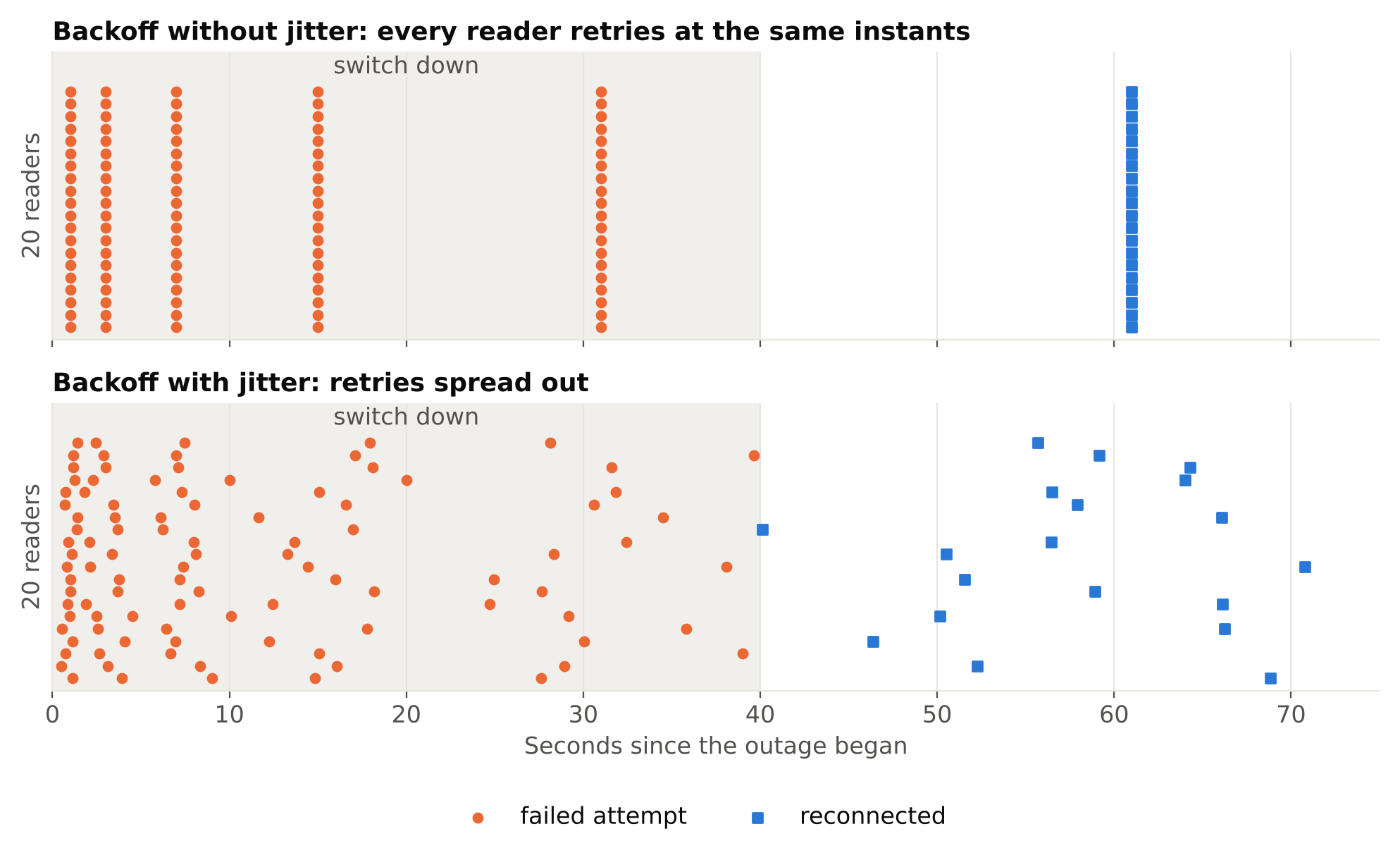
The loop reconnects forever, and the delay doubles after each failed attempt up to a cap. That is exponential backoff. Without it, dozens of readers retrying every second can flood a recovering camera or network and make the outage last longer.
Add some random jitter to the delay in a multi-camera system. If a switch reboots and fifty readers all retry at the same instants, you create a thundering herd.
The watchdog for stalls
The code above does not detect a stall, because read() never returns. You need something outside the reading thread that checks last_frame_time.
A supervisor can poll every few seconds: if time.monotonic() - reader.last_frame_time exceeds a threshold, the stream is considered stalled. Choose a threshold from the camera's frame rate and your tolerance. A few seconds is common, but it depends on how quickly you need to react and how bursty your network is.
What can the supervisor do to a blocked read()? In Python, you cannot safely kill a thread. Two practical options:
- Call
release()on the capture from the supervisor. With some backends this makes the blockedread()return. Behaviour varies, so test it. - Run each reader in a separate process and terminate and restart the process when it stalls. This is heavier but reliable, and it also contains memory leaks and crashes inside native decoding libraries.
Many teams end up at the second option for large deployments. A crash in a native library then takes down one stream's worker rather than the whole service.
You can also set a connection and read timeout in the FFmpeg options, using the same OPENCV_FFMPEG_CAPTURE_OPTIONS mechanism described in Reading RTSP Streams with OpenCV and FFmpeg. Option names and units differ between FFmpeg versions, so check the documentation for the version you ship before relying on a specific one.
Detecting a frozen picture
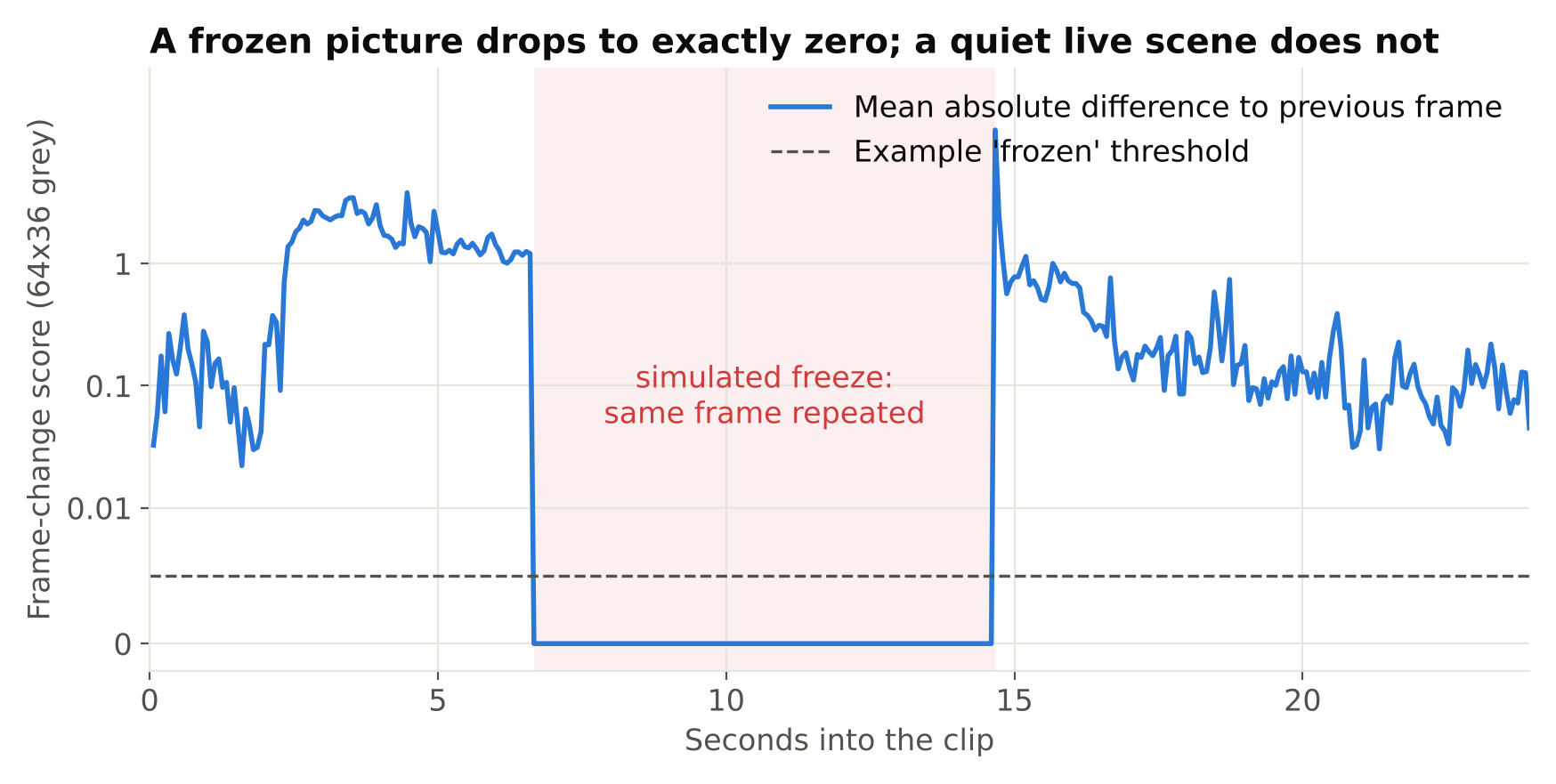
If the encoder hangs and repeats one frame, no transport-level check will catch it. A cheap content check does:
- Downscale the frame to a small grayscale image.
- Compare it with the previous one using
cv2.absdiffand a mean. - If the difference stays at essentially zero for longer than a chosen period, flag the stream.
Be careful with the threshold. A real scene at night with no motion also produces tiny differences, but camera sensor noise normally keeps the difference above exactly zero. A truly frozen stream is usually identical or nearly so. Tune this on recorded examples from your own cameras rather than trusting a number from an article.
Similar content checks can catch other silent failures: an all-black frame (lens covered, IR failure), an all-grey frame, or a sudden large change in sharpness (lens out of focus). These matter because a blind camera produces zero detections, which looks exactly like a quiet scene.
Report health, do not just log
Logs are hard to act on at scale. Expose per-stream state that a dashboard or alert can use:
| Metric | Why it matters |
|---|---|
| Seconds since last frame | Detects stalls and outages |
| Measured input FPS | Detects degraded streams |
| Reconnect count (per hour) | Finds unstable cameras and cables |
| Time connected | Shows flapping |
| Frame-change score | Detects frozen or blind cameras |
| Processing queue length | Shows the pipeline falling behind |
A camera that reconnects five times an hour is a hardware or network problem to fix on site, not something retry logic should hide forever. Alert on a stream being down longer than some period, and separately on reconnect rate.
Also decide what the analytics should do while a stream is down. Silence must not be interpreted as "nothing happened". If you have absence-based rules (alert when nobody is present, for example), a dead camera will trigger or suppress them wrongly. Mark the stream state explicitly as unknown and let alert rules respect it. See Designing Alert Rules: Schedules, Cooldowns and Escalation for how absence rules interact with this.
Clean up on reconnect
Reconnecting is also where state leaks. Make sure that on each reconnect you:
- Release the old
VideoCapturebefore creating a new one. - Reset or deliberately handle tracker state, since object IDs from before the gap are meaningless afterwards.
- Reset timers such as dwell timers, or mark the gap, so a person is not counted as standing still for the whole outage.
- Do not re-send an alert for an event that was already reported before the drop.
Physical causes are common
A lot of dropouts come from cabling and power, not software. Check connectors, use a PoE switch with enough power budget for all cameras, and prefer wired links. If every camera on one switch fails together, look at the switch and uplink first.
Checklist
- Capture in a separate thread or process from inference.
- Reconnect with exponential backoff and jitter.
- Use a watchdog on time since last frame, because
read()can block. - Add a frozen-picture and blind-camera check.
- Export per-stream health metrics and alert on them.
- Treat a down stream as unknown, not as quiet.
- Reset tracker and timer state across reconnects.
Next steps: see how to run many readers at once in Scaling Video Analytics to Hundreds of Camera Streams, and how to cut noisy alerts in Reducing False Alarms in Production Video Analytics.