Reading RTSP Streams with OpenCV and FFmpeg
Most IP cameras and NVRs expose video over RTSP. Reading that stream with OpenCV looks trivial: one call to cv2.VideoCapture and a loop. In production video analytics, that simple loop is also where many of the first problems show up: growing delay, frozen frames, green smears and silent disconnects. This article covers how to open a stream, why latency builds up, and how to debug the common errors.
What RTSP actually is
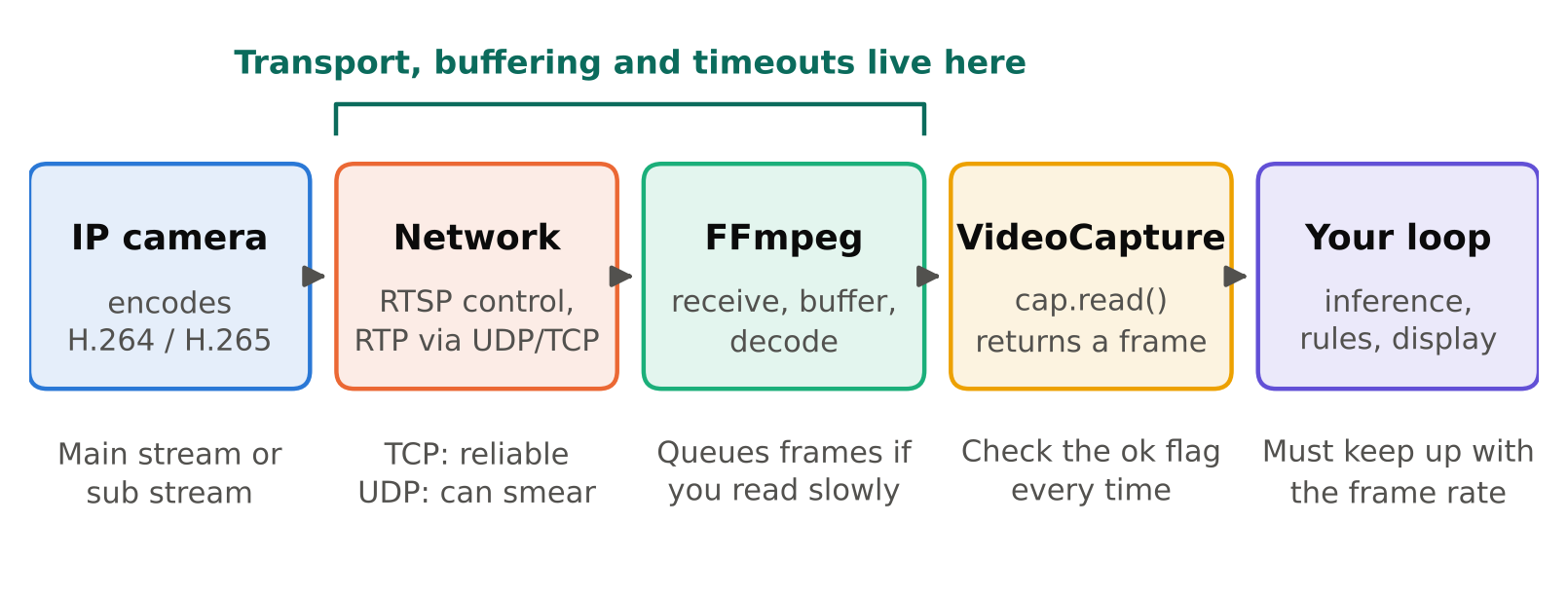
RTSP is a control protocol. It negotiates a session with the camera, and the video itself travels as RTP packets, either over UDP or interleaved inside the same TCP connection. The video is usually H.264 or H.265. OpenCV does not decode this itself. It hands the work to a backend, most often FFmpeg in the pip wheels, and sometimes GStreamer if your build includes it.
That matters because most behaviour you will fight (buffering, timeouts, transport choice) belongs to the backend, not to OpenCV's Python API.
The minimal reader
import cv2

url = "rtsp://user:password@192.168.1.20:554/stream1"
cap = cv2.VideoCapture(url, cv2.CAP_FFMPEG)

if not cap.isOpened():
    raise RuntimeError("Could not open stream")

while True:
    ok, frame = cap.read()
    if not ok:
        break
    # run your model on frame here
    cv2.imshow("stream", frame)
    if cv2.waitKey(1) & 0xFF == ord("q"):
        break

cap.release()
cv2.destroyAllWindows()
The URL path (/stream1 above) differs by manufacturer and model. Look in the camera's documentation or web interface for the exact RTSP path. Many cameras offer a main stream and a lower-resolution sub stream on different paths. For analytics, the sub stream is often enough and is much cheaper to decode.
Two details that trip people up:
cap.read()returns(False, None)when a frame could not be read. Always check the flag before using the frame.- Special characters in the password (such as
@or#) break the URL. Percent-encode them or create a camera user with a simple password for the analytics service.
Why latency keeps growing
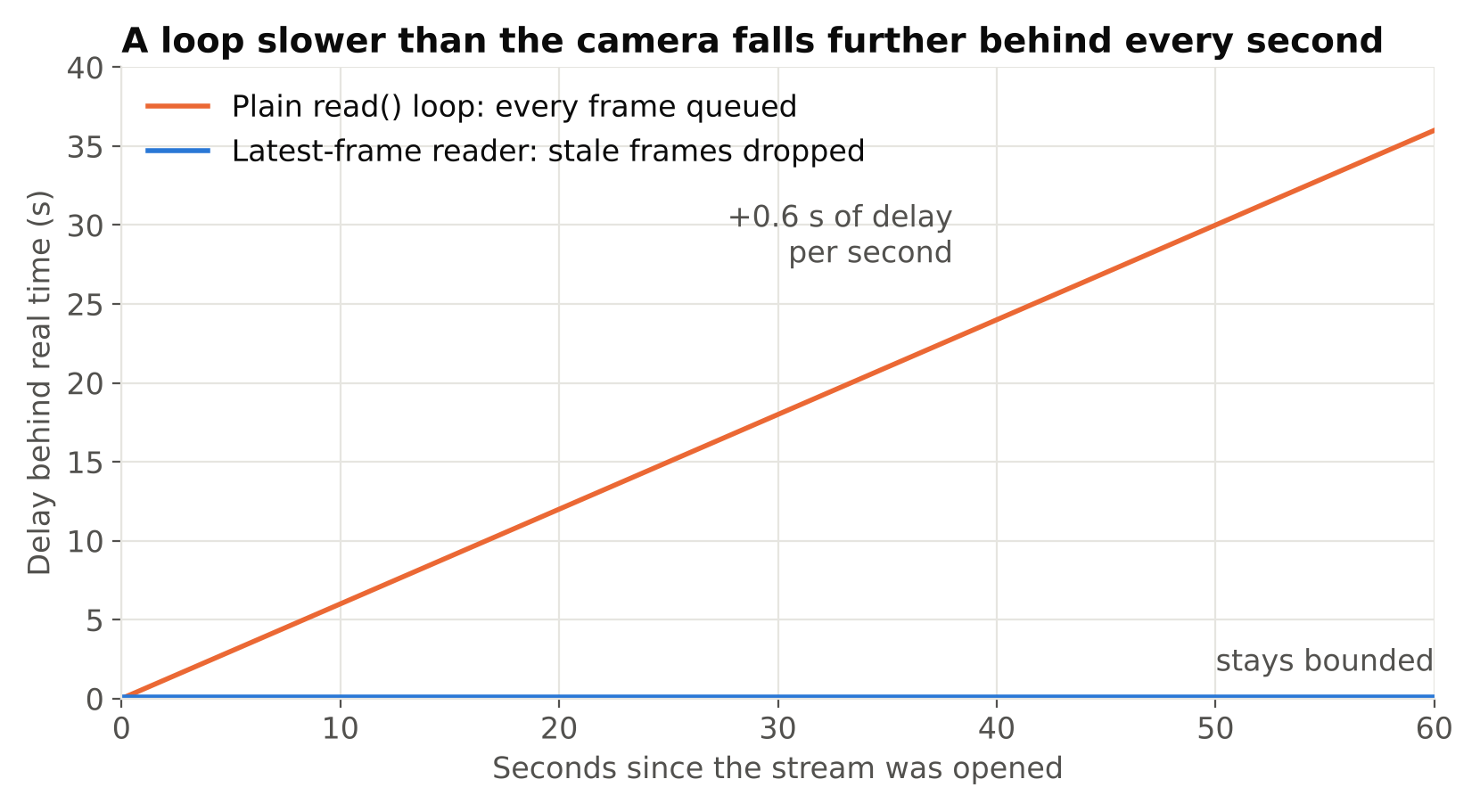
The most common complaint is that the image on screen falls further behind real time the longer the program runs. The cause is almost always the same: your processing loop is slower than the camera's frame rate. The backend keeps receiving and queueing frames while you are busy with inference. cap.read() then returns old frames from that queue instead of the newest.
Suppose the camera sends 25 frames per second and your pipeline handles 10. Every second, 15 frames pile up. Nothing is dropped, so the delay only increases until memory or the backend's buffer limit is hit.
There are three honest fixes:
- Make the pipeline faster than the stream. Use a smaller model, a lower resolution sub stream, or skip frames deliberately (see below).
- Read in a separate thread and keep only the latest frame. The reader thread loops on
cap.read()as fast as frames arrive and overwrites a single shared variable. The processing thread takes whatever is newest. - Grab and discard. Call
cap.grab()several times to drop stale frames, thencap.retrieve()for the one you want.grab()is cheaper thanread()because it skips the conversion into an array, though the decoding still happens.
A latest-frame reader looks like this:
import threading
import cv2

class LatestFrameReader:
    def __init__(self, url):
        self.cap = cv2.VideoCapture(url, cv2.CAP_FFMPEG)
        self.frame = None
        self.ok = True
        self.lock = threading.Lock()
        self.thread = threading.Thread(target=self._run, daemon=True)
        self.thread.start()

    def _run(self):
        while self.ok:
            ok, frame = self.cap.read()
            if not ok:
                self.ok = False
                break
            with self.lock:
                self.frame = frame

    def read(self):
        with self.lock:
            return self.frame

    def release(self):
        self.ok = False
        self.thread.join(timeout=2)
        self.cap.release()
This keeps latency bounded, at the cost of dropping frames your model never sees. For most alerting use cases that is the right trade. If you must process every frame (for example, exact counting with a tracker), you need a pipeline that is fast enough instead, or you should batch and queue frames explicitly and monitor the queue length.
You may see advice to set cv2.CAP_PROP_BUFFERSIZE to 1. Support for that property depends on the backend and build, and with the FFmpeg backend it often has no effect. Test it on your own setup instead of assuming it works.
TCP versus UDP
By default, FFmpeg may try RTP over UDP. On a clean local network this works. On a busy or lossy network, UDP packets are dropped, and you see grey areas, smeared blocks, or errors about missing references in the log. Forcing TCP trades a little latency for reliability.
With the OpenCV FFmpeg backend you can pass options through an environment variable that must be set before the capture is opened:
import os
os.environ["OPENCV_FFMPEG_CAPTURE_OPTIONS"] = "rtsp_transport;tcp"
The format is key;value, and several options are separated by |. If you run in Docker or systemd, set it in the service environment rather than in code, so it is visible and easy to change.
| Symptom | Likely cause | First thing to try |
|---|---|---|
| Smeared or grey patches | UDP packet loss | Force TCP |
| Stream opens, then stalls after some seconds | Firewall or NAT dropping UDP | Force TCP |
| Delay grows over time | Processing slower than stream | Latest-frame reader, sub stream |
isOpened() is False |
Wrong path, credentials, or camera session limit | Test the URL in VLC or ffplay |
| Works in VLC, not in OpenCV | Codec or backend differences | Check FFmpeg build, try the sub stream |
Check the URL outside your code first
Before blaming OpenCV, open the same URL in VLC or with ffplay. If it does not play there, the problem is the camera, network or credentials. Cameras also limit how many simultaneous RTSP sessions they accept. If a colleague has the stream open in a viewer, your service may fail to connect. That is a frequent cause of "it worked yesterday".
Decode cost and frame skipping
Decoding a 1080p H.264 stream on a CPU is not free, and decoding several at once adds up. The actual cost depends on your CPU, resolution, bitrate and codec, so measure it on your own hardware. Ways to reduce it:
- Use the camera's sub stream at a lower resolution if your objects are large enough.
- Lower the camera's frame rate in its settings. Many analytics tasks do not need 25 frames per second.
- Process every Nth frame. Compare against the stream's real frame rate (
cap.get(cv2.CAP_PROP_FPS), which some streams report as zero or wrongly) and choose N from your objects' speed. - On NVIDIA hardware, use hardware decoding through GStreamer or FFmpeg builds that support it. This requires a custom OpenCV or a different library and is beyond a basic setup.
Camera and network choices
A wired connection is much more dependable than Wi-Fi for continuous streams. A PoE IP camera (RTSP) powered through a PoE network switch removes separate power adapters and keeps cabling simple. Reserve static addresses or DHCP leases for cameras so URLs do not change.
Checklist
- Confirm the RTSP path and credentials in VLC or
ffplayfirst. - Prefer the sub stream when resolution allows.
- Force TCP if you see smearing or stalls.
- Keep processing faster than the stream, or use a latest-frame reader.
- Always check the
okflag fromcap.read(). - Remember cameras limit concurrent sessions.
- Measure decode cost on your own hardware.
Next steps: make the reader survive failures with Handling RTSP Dropouts: Reconnects and Health Checks, and learn to measure your pipeline with Measuring FPS and Latency Correctly.