People Counting with Line Crossing: A Practical Tutorial
Counting how many people enter or leave an area is one of the most requested video analytics features. The standard approach is a virtual line drawn across a doorway or corridor. Each time a tracked person crosses the line, a counter changes. It sounds simple, and the geometry is. The difficulty is everything around it: unstable tracks, people lingering on the line, and proving that your numbers are right.
What you need
- A detector for people and a tracker that gives each person a stable ID. If tracking is new to you, read Object Tracking Explained: SORT, ByteTrack and Friends first.
- A line defined by two points in image coordinates.
- A decision on which direction counts as "in" and which as "out".
- A camera position that suits counting. An overhead or steep downward view reduces occlusion compared with a side view at head height.
The geometry: which side of the line
For a line from point A to point B, you can tell which side a point P is on using the sign of a cross product:
def side(a, b, p):
    # returns >0 on one side of the line, <0 on the other, 0 on the line
    return (b[0] - a[0]) * (p[1] - a[1]) - (b[1] - a[1]) * (p[0] - a[0])
If the sign for a track's previous position differs from the sign for its current position, the track moved across the infinite line through A and B. The sign change also tells you direction: positive to negative is one direction, negative to positive is the other. Which one you call "in" is a convention you choose when you set up the camera, so document it.
Because the cross product describes an infinite line, add a check that the crossing happened within the segment between A and B. Otherwise a person walking past the end of your line, far from the door, gets counted. A simple way is to project the point onto the segment and make sure the projection falls between the endpoints.
Which point of the box to use
Do not use the box centre by default. For a person, the bottom centre of the box (roughly the feet) corresponds to a position on the floor, which makes a line on the floor meaningful. Using the centre of a tall box shifts the apparent crossing position depending on the person's distance from the camera. If your view is overhead, the centre may be fine. Pick one point and use it consistently.
The counting loop
For each frame:
- Get tracked boxes with IDs.
- For every ID, compute its reference point and the side value.
- Compare with the side value stored for that ID in the previous frame.
- If the sign changed and the crossing is within the segment, increment the matching counter and record that ID.
- Store the new side value.
last_side = {}
counted = {}   # track id -> frame index of last count
count_in = 0
count_out = 0

def update(tid, point, frame_idx, a, b, cooldown=60):
    global count_in, count_out
    s = side(a, b, point)
    prev = last_side.get(tid)
    last_side[tid] = s
    if prev is None or prev == 0 or s == 0:
        return
    if (prev > 0) != (s > 0):
        if frame_idx - counted.get(tid, -10**9) < cooldown:
            return
        counted[tid] = frame_idx
        if prev > 0:
            count_out += 1
        else:
            count_in += 1
This is a sketch, not a finished product. It leaves out the segment check and cleanup of old IDs, and the cooldown value is in frames, so it depends on your frame rate.
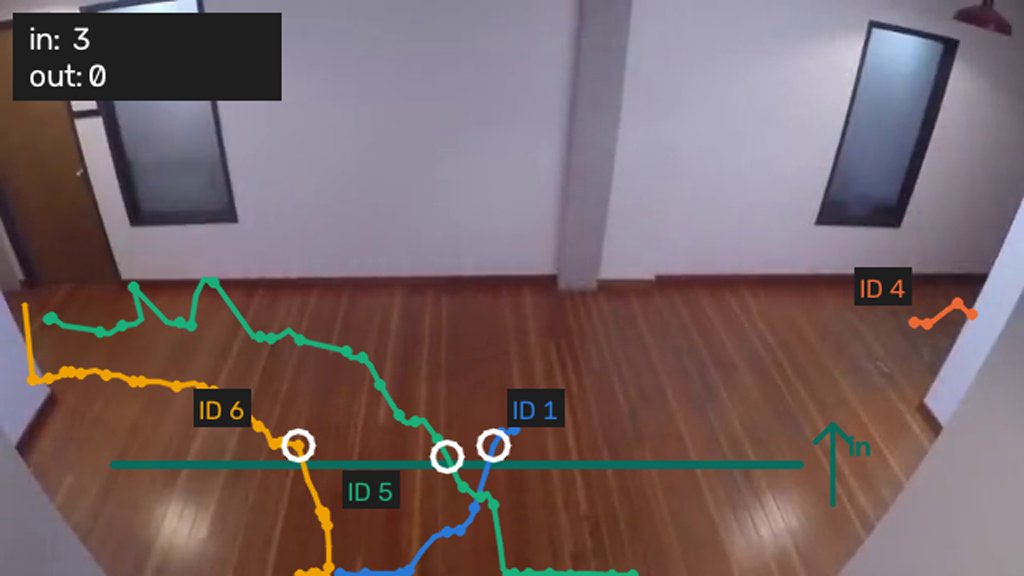
Common double-counting problems
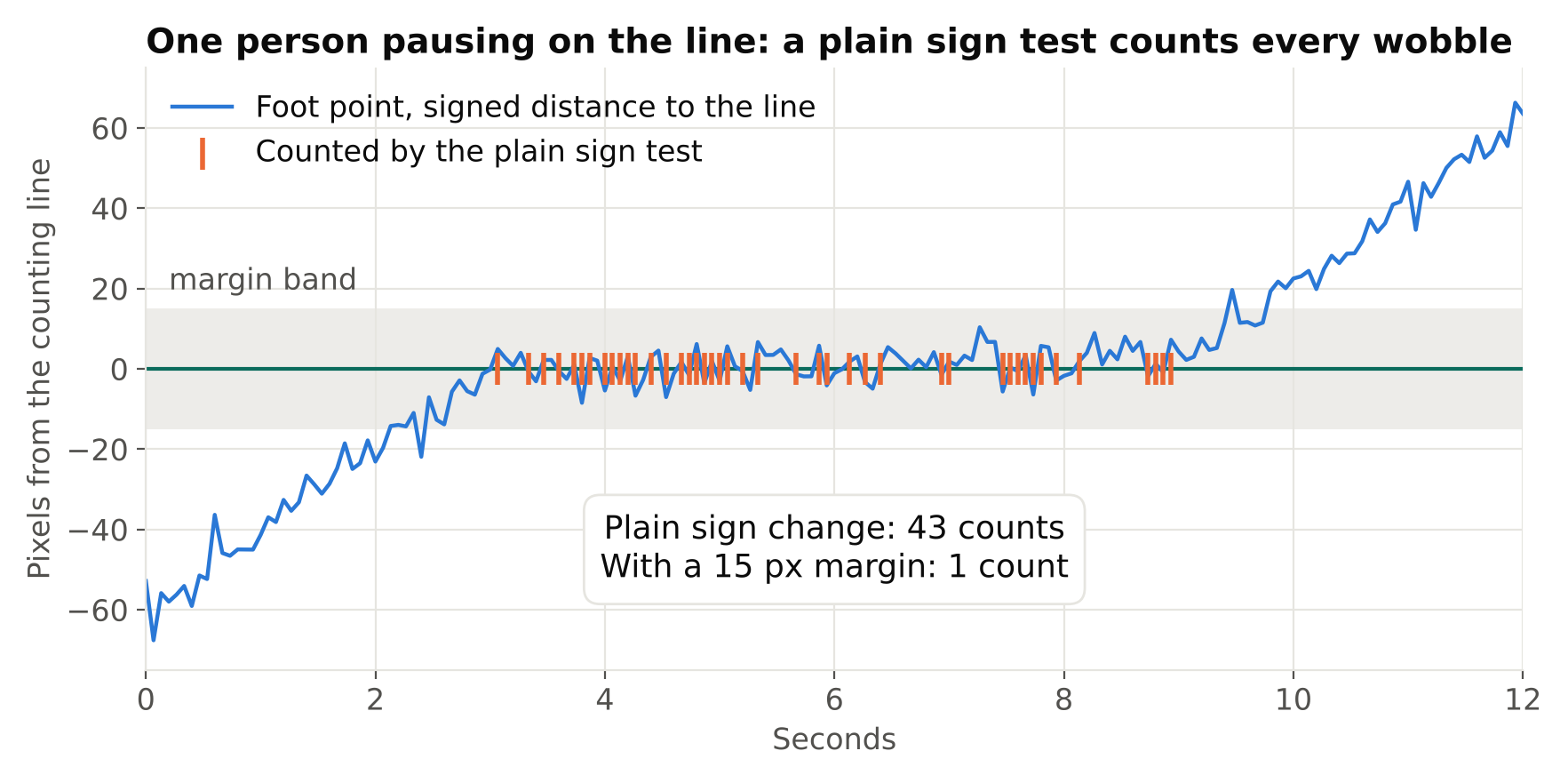
Jitter on the line. A person standing on the line produces boxes that wobble. The reference point crosses back and forth and the counter climbs. Fixes: require the point to move a minimum distance beyond the line before counting (hysteresis, using two parallel lines or a margin), and apply a per-ID cooldown as above.
ID switches. If a person gets a new ID just after crossing, you can count them twice, or not at all. Tracking errors are the largest source of counting error. Reduce them with a good camera angle, a strong detector, and tracker settings that keep lost tracks alive through short occlusions.
Watch the ID label in that clip. It reaches 4 for one person who walked through once, and the naive counter ends on 3.
The per-ID cooldown described above does not save you here, and that is worth understanding. A cooldown is keyed on the ID, and the ID is exactly what keeps changing. The fix has to happen one level down: re-link a track that reappears close in space and time to one that just vanished, so the state survives the blink. Then the margin rule has something stable to work with, and the count comes out at 1.
Groups. Several people walking together can merge into one detection or hide each other. A steeper camera angle helps most. Some systems count by area flow rather than by individual boxes in very dense scenes, but that is a different method.
People who approach and turn back. A person who touches the line and returns should not count as a full pass. Requiring a minimum travel distance on both sides of the line, or confirming that the track existed on one side for several frames before and on the other for several after, handles this.
Staff, prams, trolleys, and bags. Decide in advance what counts as a person and whether children or staff are excluded. A detector class cannot make these business decisions for you.
Direction and net occupancy
With two counters (in and out), you can compute occupancy as in minus out, but errors accumulate. A missed entry and a missed exit do not cancel on average the way people expect, and the drift grows over a day. If occupancy matters, reset against a known value at quiet times, such as when the area is closed, or estimate occupancy independently from a count of people inside the zone. For zone-based logic see Zone Intrusion and Dwell Time Alerts.
Validating the counter
Never ship a counter based on how the demo looks. Validate it like this:
- Record several clips from the real camera in realistic conditions: busy and quiet periods, daylight and night if the site operates then, groups, and unusual cases.
- Count the true crossings by hand, in each direction, for each clip.
- Run your counter and compare in and out separately.
- Look at each error to find its cause: missed detection, ID switch, group, jitter.
Report error as the difference between the system count and the manual count over a meaningful number of crossings, per direction. A single total can hide errors that cancel each other out (one missed in and one false in). Because accuracy depends on camera placement and traffic, a figure from one site does not transfer to another, so validate on each installation.
Also test with the frame rate you will actually use. If you skip frames to save compute, a fast walker may move too far between frames for the tracker to link them.
Placement tips
- Put the line where people have to pass in a clear direction, not where they stop (such as in front of a counter or a door that people hold open).
- Keep the line away from the image edges, where boxes are cut off.
- Make sure lighting is stable. Strong backlight from a glass door can turn people into silhouettes the detector misses.
- Keep the camera mount rigid. A camera that moves a little each time someone slams a door shifts your line relative to the scene.
- Think about privacy: counting does not need face detail, so use a resolution and angle that avoids capturing it. See Privacy and Ethics in Camera Analytics.
Checklist
- Use tracked IDs, not raw detections.
- Use a floor-level reference point such as the bottom centre of the box.
- Detect side changes with a cross product and check the segment bounds.
- Add hysteresis and a per-ID cooldown.
- Define and document the in/out direction.
- Validate against hand-counted clips, per direction.
- Re-validate on every new camera position.
Next steps: look at Zone Intrusion and Dwell Time Alerts for area-based rules, and Reducing False Alarms in Production Video Analytics for keeping counts and alerts trustworthy.