Object Tracking Explained: SORT, ByteTrack and Friends
A detector looks at each frame alone. It can tell you there are three people in the picture, but not that the person at the left in frame 100 is the same person at the right in frame 130. A tracker supplies that continuity by giving each object an ID that persists over time. You need this for counting, dwell time, speed estimation, and any rule that depends on what an object did rather than where it is.
The tracking-by-detection idea
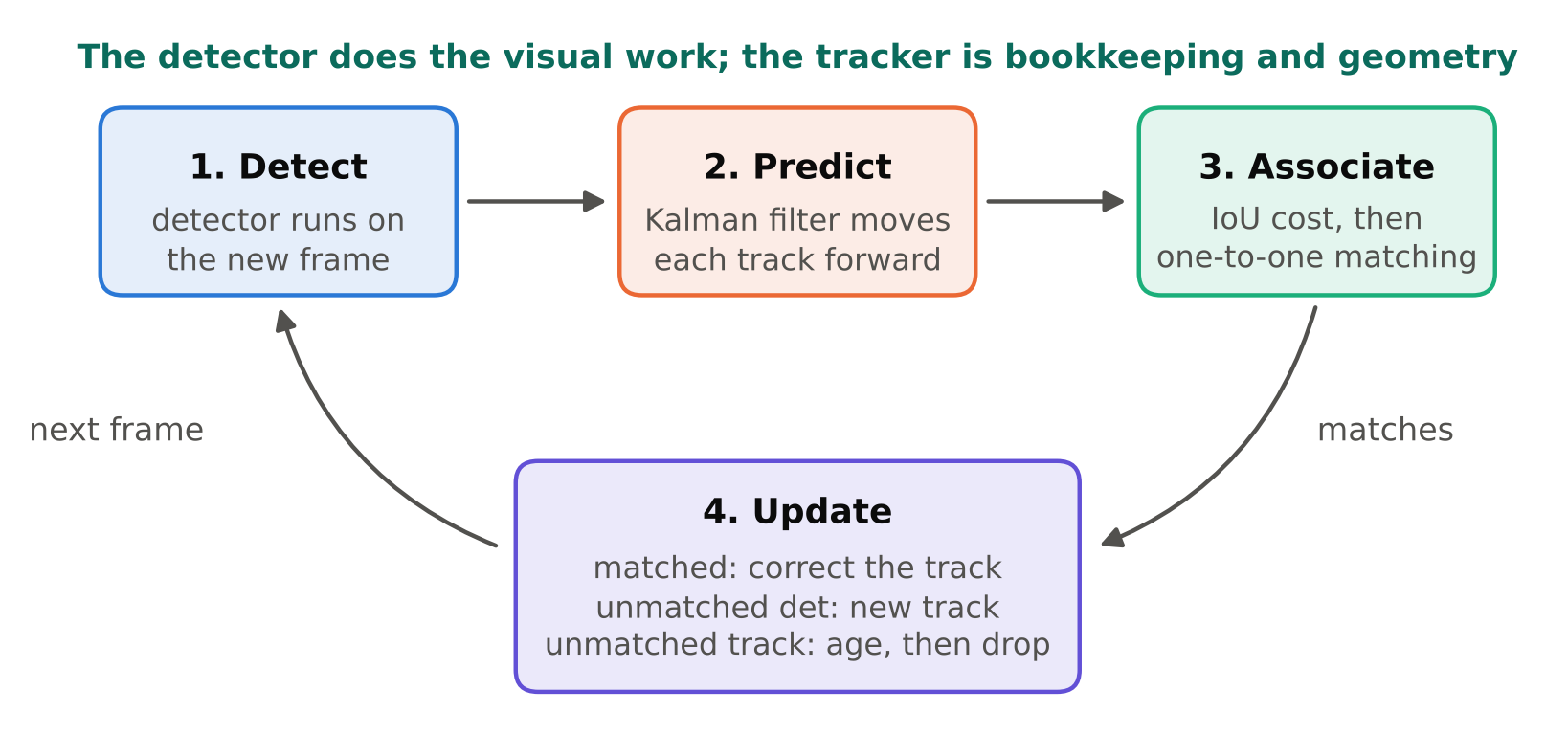
Most practical trackers follow one pattern, called tracking by detection:
- Run the detector on the new frame.
- Predict where each existing track should be in this frame.
- Match detections to predicted tracks.
- Update matched tracks, start new tracks for unmatched detections, and age out tracks that have not been matched for a while.
The detector does the hard visual work. The tracker is mostly bookkeeping and geometry, which is why it is cheap compared with the detector.
Prediction: the Kalman filter
To predict where an object will be, SORT-style trackers use a Kalman filter. The state includes the box position, size, and their rates of change. Between frames, the filter assumes roughly constant velocity and projects the box forward. When a detection is matched, the filter corrects its estimate. In plain terms, it is a smoothed guess of motion that also tells the tracker how uncertain it is.
This prediction is why a tracker can keep following a person who is briefly missed by the detector: the track coasts on its predicted motion for a few frames and reconnects when the detection returns.
Association: matching boxes
Matching needs a cost between every track and every detection. SORT uses IoU (intersection over union) between the predicted box and the detected box. If you need a refresher on IoU, read IoU and Non-Maximum Suppression, Explained with Examples. A solver for the assignment problem (the Hungarian algorithm) then finds the best one-to-one matching, and pairs below a minimum IoU are rejected.
This works well when objects move modestly between frames and do not overlap much. It struggles when the camera frame rate is low (objects jump far between frames), when objects cross each other, and when detections flicker.
What ByteTrack changes
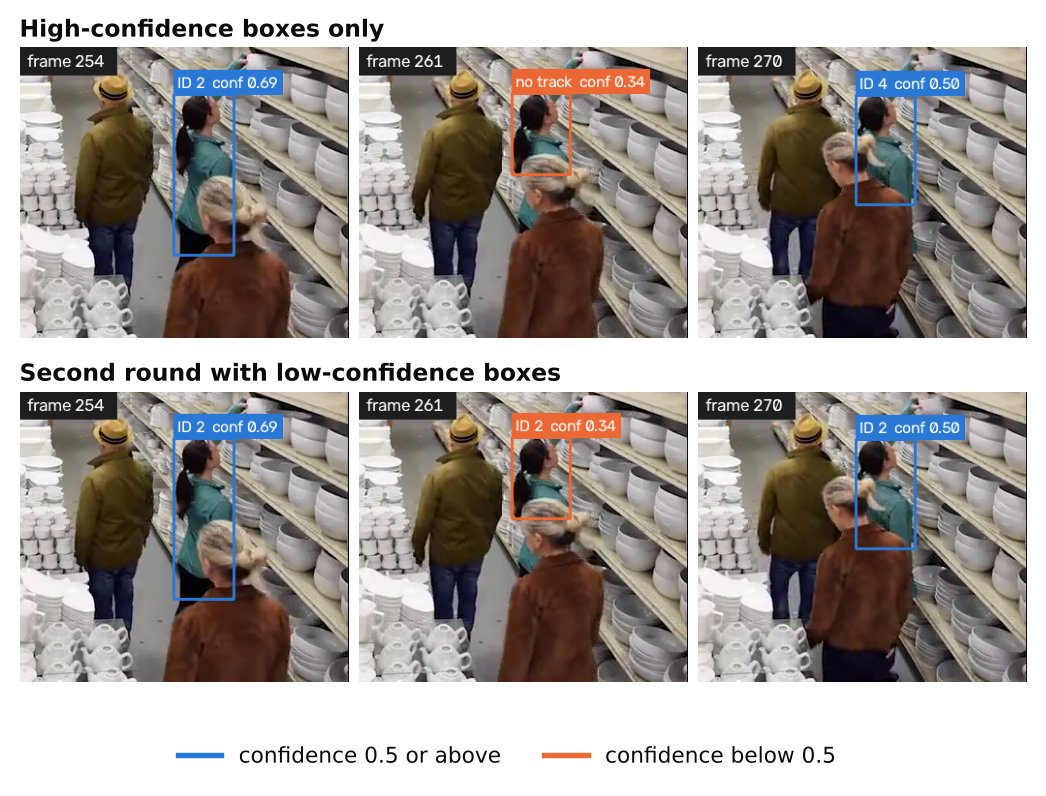
Older approaches threw away low-confidence detections before tracking. The ByteTrack idea is to keep them for a second round of matching. Low-score boxes often are real objects that are partly occluded or blurred. The method works in two steps:
- Match high-confidence detections to tracks first.
- Take the tracks that remain unmatched and try to match them to the low-confidence detections.
A low-confidence box that fits an existing track's predicted location is probably a real, partly hidden object, so it keeps the track alive. A low-confidence box that matches nothing is treated as noise and discarded. This recovers many tracks that would otherwise break during occlusion, without adding a separate appearance model.
SORT and ByteTrack use motion and box overlap only. Other trackers, such as those in the DeepSORT family, also compare appearance using a small re-identification network. Appearance helps when objects cross paths or leave and re-enter, but it costs more compute and needs a re-ID model that suits your objects. Which is better depends on the scene, so test on your own footage.
Using a tracker with Ultralytics
Ultralytics ships tracker configurations, and tracking is a single call:
from ultralytics import YOLO

model = YOLO("yolo11n.pt")  # any detection weights you have

results = model.track(
    source="video.mp4",
    tracker="bytetrack.yaml",
    persist=True,
    stream=True,
)

for r in results:
    if r.boxes.id is None:
        continue
    ids = r.boxes.id.int().tolist()
    boxes = r.boxes.xyxy.tolist()
    # use ids and boxes
Notes:
persist=Truetells the tracker that frames belong to one continuing sequence. This matters when you calltrackframe by frame in your own loop. Without it, the tracker state may reset each call and IDs restart.r.boxes.idcan beNonewhen nothing is tracked in that frame, so check before using it.- The tracker settings live in a YAML file (the built-in
bytetrack.yaml). You can copy it, edit values, and pass the path. Open the file in your installed version to see the parameter names and defaults, because they can change between releases.
The parameters you will typically see cover the confidence level that separates "high" from "low" detections, the threshold for starting a new track, how many frames a lost track is kept before removal, and the matching threshold. Their exact names and defaults depend on the version, so read the file rather than relying on memory.
Remember the licence point: Ultralytics YOLO models are AGPL-3.0, with a commercial licence available from Ultralytics. Check the current licence before using them in a product. See YOLO Licenses Explained: AGPL, GPL and Commercial Use.
Why IDs switch
An ID switch happens when one real object receives a new ID, or two objects swap IDs. Common causes:
- Occlusion. A person walks behind a pole or another person for longer than the track's patience. The track is deleted, and a new ID is created when they reappear.
- Crowding. Overlapping boxes make IoU matching ambiguous.
- Detector flicker. Missed detections for several frames let a track expire.
- Low frame rate. Large jumps between frames break the overlap that matching needs.
- Camera motion. A panning camera moves every box at once, which the simple motion model does not expect.
- Unstable boxes. Boxes that change size from frame to frame reduce IoU even for a stationary object.
Tuning approach
Tune on a short clip that contains your hard cases, and review it visually with IDs drawn on the frames. Do not tune only on a summary metric.
| Problem | Direction to try |
|---|---|
| IDs break during short occlusions | Keep lost tracks longer |
| Many short-lived ghost tracks | Raise the threshold to start a track |
| Two nearby objects merge or swap | Stricter matching threshold, better detector |
| Tracks stay on after the object left | Shorten the lost-track buffer |
| Detector misses objects for many frames | Fix the detector first (more data, better threshold) |
Keeping lost tracks longer helps with occlusion but raises the risk of linking a new object to an old track. Every setting trades one error for another.
The best improvement usually comes from a better detector and a sensible camera angle, not from tracker tuning. A camera that looks down at a steep angle has fewer occlusions than one at head height in a crowd.
What to do about it downstream
Design your logic to tolerate imperfect IDs. For counting, count crossings of a line by a track and de-duplicate within a short window rather than trusting that an ID never changes. For dwell time, allow short gaps. The tutorial People Counting with Line Crossing: A Practical Tutorial shows how to do this.
To evaluate a tracker, compare against hand-labelled sequences and look at identity-focused metrics such as IDF1 and the count of ID switches, along with the standard MOTA. Do not report a tracker as good because the demo video looks fine.
Checklist
- Use tracking when your logic needs identity over time.
- Start with ByteTrack in Ultralytics and
persist=Truefor frame-by-frame use. - Check for
NoneIDs before reading them. - Draw IDs on a clip and review failures by eye.
- Keep the detector strong, since tracking depends on it.
- Design downstream logic to tolerate ID switches.
Next steps: apply tracks to counting in People Counting with Line Crossing: A Practical Tutorial and to areas in Zone Intrusion and Dwell Time Alerts.