Zone Intrusion and Dwell Time Alerts
Zone rules are the workhorse of video analytics. "Alert if a person enters this area." "Alert if a vehicle stays here longer than ten minutes." "Alert if nobody is at the station." In workplace safety, traffic, retail and waste management, many requirements reduce to these ideas: an object, a region, and sometimes a time. The geometry is easy. The reliability comes from handling the details.
Define zones as polygons
A zone is a polygon in image coordinates: a list of points in order around the area. Draw zones on a real frame from the actual camera, not on a guess. Store them in a config file together with the image size they were drawn at, because if the stream resolution changes your coordinates are wrong unless you scale them. Storing normalised coordinates (0 to 1 of width and height) avoids this problem.
Name each zone and give it a type: intrusion, dwell, or exclusion (an area to ignore, such as a TV screen or a public road behind a fence).
Point-in-polygon
To decide if an object is inside a zone, you test one point of its box against the polygon. OpenCV has a function for this:
import cv2
import numpy as np

zone = np.array([[100, 400], [600, 400], [650, 700], [80, 700]], dtype=np.int32)

def inside(zone, point):
    # measureDist=False returns +1 inside, -1 outside, 0 on the edge
    return cv2.pointPolygonTest(zone, (float(point[0]), float(point[1])), False) >= 0
cv2.pointPolygonTest takes the contour, the point as a tuple of floats, and a flag for whether to return a signed distance. With False, the result is positive inside, negative outside, and zero on the edge.
Choosing the test point
Which point of the bounding box you test changes behaviour a lot.
| Point | Good for | Weakness |
|---|---|---|
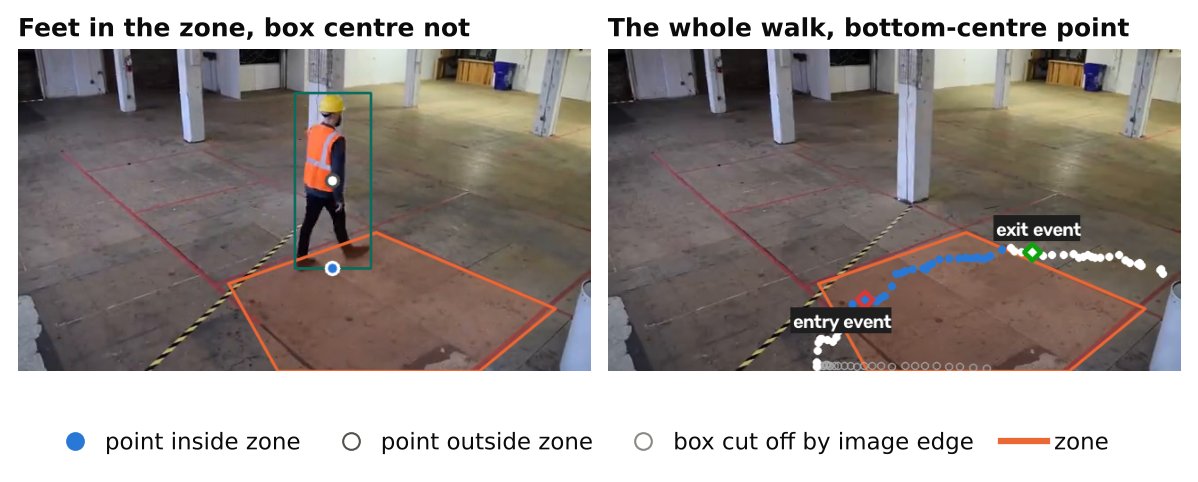
| Bottom centre (feet) | People and vehicles on a floor or ground plane | Misleading if the box is cut off at the image bottom |
| Box centre | Overhead cameras, items without a clear ground contact | Tall objects appear in the zone before their feet are |
| Any overlap with the zone | Strict safety areas where touching is enough | More false triggers from boxes grazing the edge |
| Fraction of box area inside | Large objects, partial entry | Needs a threshold and more computation |
For a floor-marked danger area, the bottom centre matches what people mean by "standing in the area". For a hanging machine arm or an overhead hazard, any overlap may be more appropriate. Choose by asking what the safety or business rule actually states.
Intrusion alerts: entry events, not states
An intrusion alert should fire on the transition from outside to inside, not on every frame that someone is inside. Keep per-track state: was the track inside last frame? If not, and it is inside now, that is an entry event. You can also generate an exit event on the opposite change.
This needs stable IDs. See Object Tracking Explained: SORT, ByteTrack and Friends. Without tracking, you can still raise a state-based alert ("at least one person in zone for N consecutive frames"), but you cannot tell a new arrival from someone who has been there for an hour.
Add a short confirmation requirement. Instead of alerting on the first frame inside, require the object to be inside for a number of consecutive frames or a short duration. This removes alerts from one-frame false detections and boxes that briefly clip a corner.
Dwell time
Dwell alerts answer "how long has this object been in the zone?". The implementation is a dictionary of timers:
import time

entered_at = {}   # track id -> monotonic time of entry

def update_dwell(tid, is_inside, now=None):
    now = now if now is not None else time.monotonic()
    if is_inside:
        entered_at.setdefault(tid, now)
        return now - entered_at[tid]
    entered_at.pop(tid, None)
    return 0.0
When the returned duration exceeds the limit, raise the alert once, then suppress repeats for that track (see Designing Alert Rules: Schedules, Cooldowns and Escalation).
Use video timestamps or a monotonic clock for durations, not frame counts, unless your frame rate is fixed and known. A pipeline that drops frames under load would otherwise stretch time. Using wall time, however, has its own problem when you process recorded files faster than real time. For file testing, derive time from the frame index and the video's frame rate.
Edge cases that cause most bugs
Track loss inside the zone. If a person is hidden for a moment or the tracker drops the ID and creates a new one, the timer restarts and the dwell alert is delayed or missed. Add a grace period: do not delete a timer the moment the track disappears. Keep it for some seconds, and if a new track appears near the same spot, consider merging. This is a heuristic, so test it on real footage.
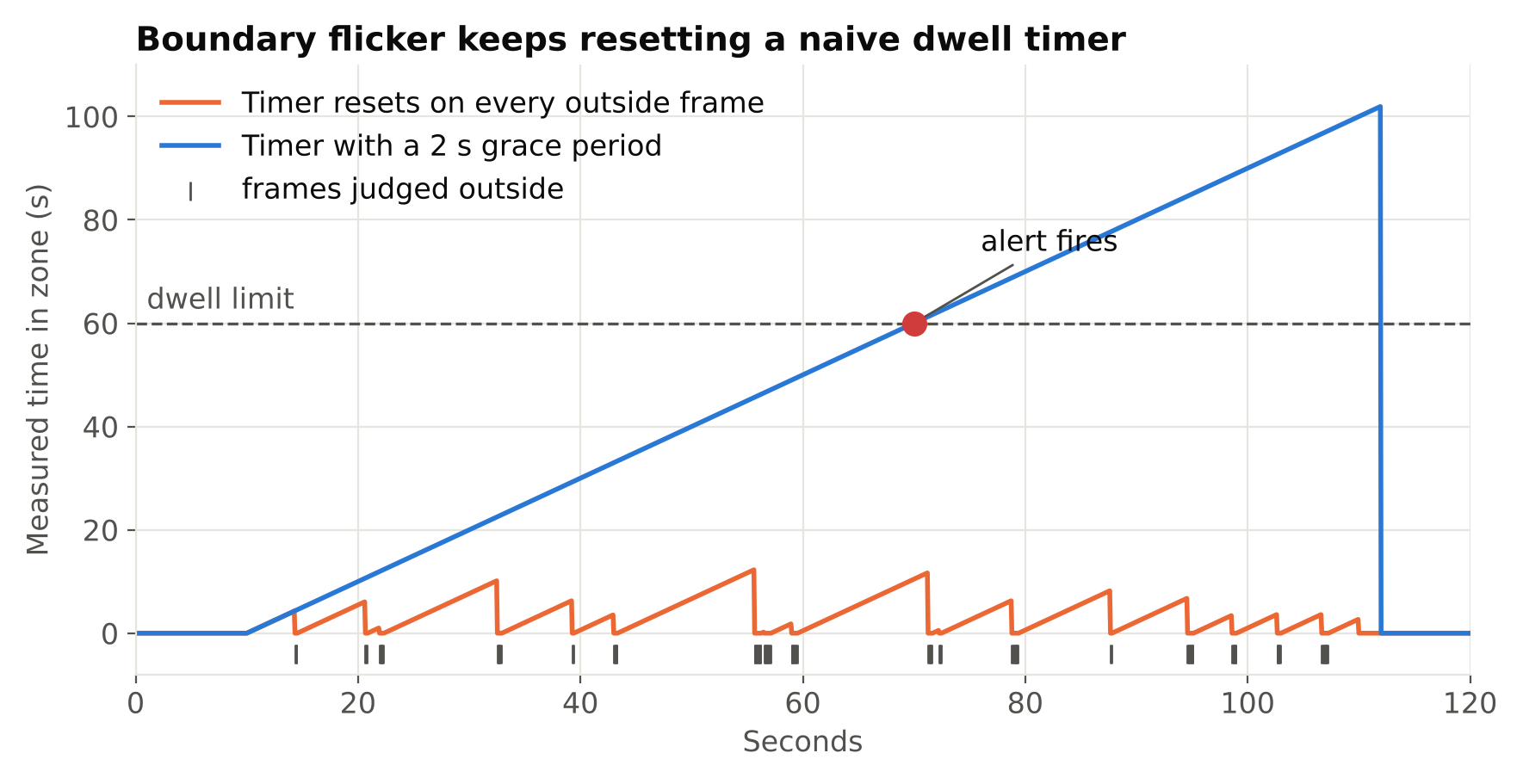
Flicker at the boundary. A person standing near the edge of a zone toggles between inside and outside as the box jitters. This resets the dwell timer and generates repeated entry events. Use hysteresis: require being clearly outside (for example, outside for a number of frames, or beyond a margin from the edge) before treating it as an exit.
Stationary non-targets. Parked vehicles, a mannequin, a coat on a chair, or a poster of a person can be detected continuously and trigger dwell alerts. Handle them with exclusion zones, class filters, and, where appropriate, ignoring detections whose box has not moved in a very long time if that fits the rule.
Stream gaps. If the camera drops and reconnects, timers should not keep running through the outage, and a person who was in the zone should not be counted as dwelling during the gap. Reset or pause state on reconnect. See Handling RTSP Dropouts: Reconnects and Health Checks.
Perspective. A zone drawn on the image maps to a ground area that depends on camera angle. Objects far from the camera are small, and zone edges near the horizon cover a large real-world distance per pixel. Draw zones with this in mind and do not expect equal sensitivity everywhere.
Overlapping zones. One object can be in several zones. Decide whether rules are independent or whether one zone takes priority.
Schedules. A rule that applies only outside working hours should compare against local time, including time zone and daylight saving changes. Keep schedule logic out of the geometry code.
Testing zone rules
Make a test set of short clips: someone walking through the zone, standing at the edge, standing in the middle for a long time, two people overlapping, someone passing behind a pillar, and an empty scene at night. Define the expected events for each and run them as automated tests whenever you change the config or the tracker. Rule bugs are easy to introduce and hard to notice by eye.
Also review real alerts for a while after deployment. Many of the false alarms in a new zone rule come from conditions you did not think of, such as reflections, shadows or animals. For approaches to handle them, see Reducing False Alarms in Production Video Analytics.
Checklist
- Draw zones on real frames; store normalised coordinates.
- Pick the test point that matches the written rule.
- Alert on transitions, with a short confirmation period.
- Use time, not frame counts, for dwell, and a monotonic clock.
- Add hysteresis at the boundary and a grace period for lost tracks.
- Reset state when the stream drops.
- Test with scripted clips and review real alerts after launch.
Next steps: shape how these events reach people with Designing Alert Rules: Schedules, Cooldowns and Escalation, and see People Counting with Line Crossing: A Practical Tutorial for flow-based rules.