Detecting a Dirty, Blocked or Moved Camera Automatically
A camera that is blind produces no detections. So does a camera watching an empty room. From inside the analytics, the two look the same. A lens covered in dust, a camera knocked a few degrees by a cleaner, or a spider web lit by infrared at night can all leave the stream running while the results quietly stop meaning anything.
Dead and frozen feeds are covered in Handling RTSP Dropouts. This article is about the harder case: the stream is fine, the picture is not. It gives three cheap checks, explains why fixed thresholds fail, and shows how to run them without creating a new source of false alarms.
What goes wrong with the picture
The failures fall into a few groups, and each needs a different check:
| Failure | What it does to the image | Check |
|---|---|---|
| Dust, smudge, condensation, out of focus | Edges soften across the whole frame or part of it | Sharpness, global and per region |
| Lens covered, camera facing a wall, IR failure | Frame becomes nearly uniform, very dark or very bright | Brightness and contrast |
| Camera knocked or re-aimed | Same scene, shifted or rotated | Position against a reference frame |
| Spider web, insects or rain drops near the lens at night | Bright blobs and streaks close to the lens, often moving | Local brightness and sharpness changes, mostly in night mode |
None of these needs a neural network. They are classic image measures that cost almost nothing on a downscaled frame once a minute.
Check 1: sharpness
The usual measure is the variance of the Laplacian. The Laplacian responds to edges; a sharp image has strong responses and a high variance, a blurred one has weak responses and a low variance.
import cv2

def sharpness(frame, width=640):
    h, w = frame.shape[:2]
    small = cv2.resize(frame, (width, int(h * width / w)), interpolation=cv2.INTER_AREA)
    gray = cv2.cvtColor(small, cv2.COLOR_BGR2GRAY)
    return cv2.Laplacian(gray, cv2.CV_64F).var()
Always resize to a fixed width first. The score depends on resolution, so a value from the main stream cannot be compared with one from the substream, or with the same camera after someone changes its resolution.
Why a single threshold fails
The tempting approach is one threshold for every camera: below some number, the lens is dirty. It does not work, because the score measures how much edge content the scene has as much as how sharp the image is.
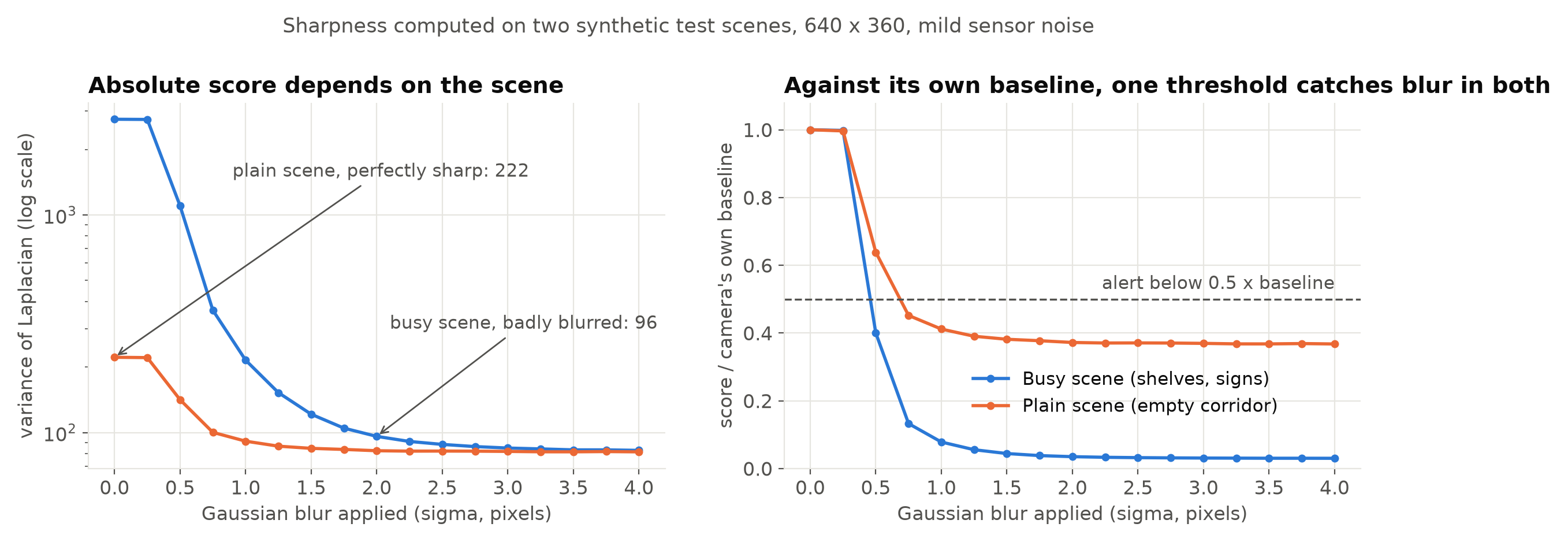
In the synthetic example above, the busy scene scores more than ten times the plain one when both are perfectly sharp. Any fixed number is either too strict for the corridor or too loose for the shelves.
The fix is a baseline per camera. Record the sharpness when the camera is known to be clean and in focus, over a day or so to cover changing light, and alert on the ratio to that baseline instead of the raw value.
Note the right-hand panel: the plain scene levels off near 0.37 of its baseline however much it is blurred. Sensor noise has edges too, and it sets a floor under the score. Scenes with little texture therefore have less room between sharp and blurred, so their threshold needs to sit closer to the baseline, and they are the cameras where this check is weakest.
Night mode breaks the baseline
Noise is also why one baseline per camera is not enough. At night a camera raises its gain, and the extra noise adds Laplacian response that has nothing to do with focus. For the simple 3 x 3 Laplacian OpenCV uses by default, independent noise with standard deviation σ adds about 20σ² to the variance, so doubling the noise roughly quadruples its contribution.
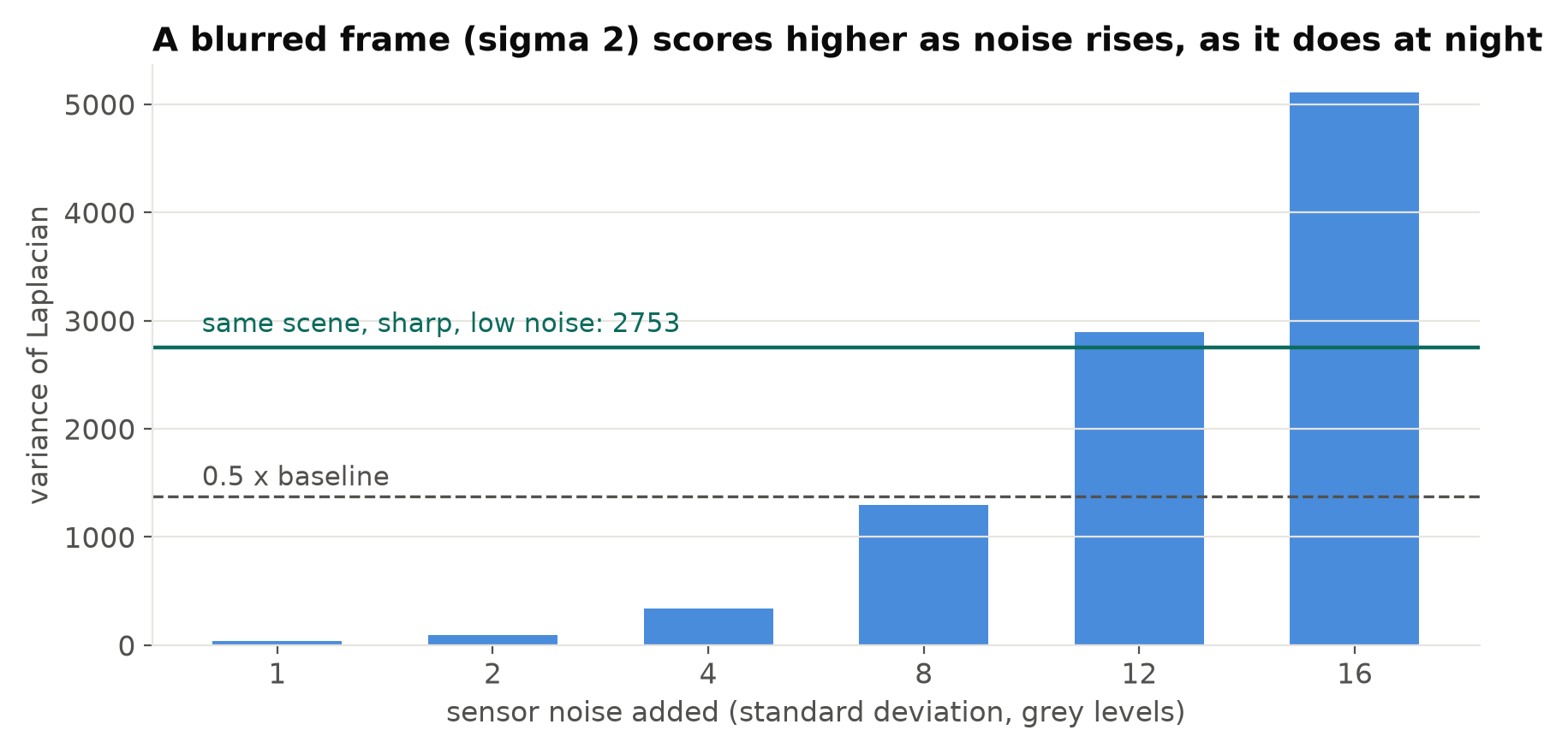
So keep separate baselines for day and night. In infrared mode most cameras deliver a monochrome image, which is easy to detect: the colour channels become almost identical, so mean saturation drops close to zero. Use that to pick the baseline, and re-measure night baselines after any change to IR illumination.
Partial dirt
A drop of water or a bird dropping may cover one corner and leave the global score almost unchanged. Split the frame into a grid, for example 4 x 4, and keep a baseline per cell. Alert when several neighbouring cells fall well below their own baseline while the rest of the frame is normal. Ignore cells that are mostly sky or a blank wall; they have too little texture to measure.
Check 2: covered or blinded
A hand over the lens, tape, a bag hung on the camera, or a camera turned to face a wall gives a frame with very little variation. Two numbers catch most of these:
- Mean brightness. Very dark (covered, IR failed at night) or very bright (pointed at a light, sun directly in the lens).
- Standard deviation of grey levels. A uniform frame has a low value whatever its brightness.
Again, compare with the camera's own day and night baselines rather than fixed numbers. A camera that watches a dark car park at night is supposed to be dark.
Check 3: the view has moved
A camera that has turned by a few degrees still produces a good, sharp image. Sharpness and brightness checks miss it completely. But every zone and line drawn on that camera is now in the wrong place, and zone intrusion and line-crossing counts go wrong without any visible error.
To catch it, keep a reference frame from when the zones were drawn and compare the current view with it:
import numpy as np

orb = cv2.ORB_create(1000)

def view_shift(reference_gray, current_gray):
    k1, d1 = orb.detectAndCompute(reference_gray, None)
    k2, d2 = orb.detectAndCompute(current_gray, None)
    if d1 is None or d2 is None:
        return None
    matches = cv2.BFMatcher(cv2.NORM_HAMMING, crossCheck=True).match(d1, d2)
    if len(matches) < 30:
        return None  # too few matches: view changed a lot, or the frame is unusable
    src = np.float32([k1[m.queryIdx].pt for m in matches])
    dst = np.float32([k2[m.trainIdx].pt for m in matches])
    M, inliers = cv2.estimateAffinePartial2D(src, dst, method=cv2.RANSAC)
    if M is None:
        return None
    h, w = current_gray.shape[:2]
    cx, cy = w / 2, h / 2  # how far the centre of the view moved
    dx = M[0, 0] * cx + M[0, 1] * cy + M[0, 2] - cx
    dy = M[1, 0] * cx + M[1, 1] * cy + M[1, 2] - cy
    shift_px = float(np.hypot(dx, dy))
    angle_deg = float(np.degrees(np.arctan2(M[1, 0], M[0, 0])))
    return shift_px, angle_deg, float(inliers.mean())
estimateAffinePartial2D fits translation, rotation and uniform scale, which describes a bumped camera well enough. The shift is measured at the centre of the frame, because the raw translation term mixes in the rotation. RANSAC ignores matches on people and vehicles that moved between the two frames. Treat a None result as a finding in its own right, not as "no change": if the current frame cannot be matched to the reference at all, either the view changed completely or the image is unusable.
Pick a reference frame without crowds or parked vehicles that will later leave, and express the allowed shift relative to your smallest zone, not as a fixed number of pixels; a ten-pixel shift is irrelevant for a large intrusion zone and serious for a counting line near a doorway.
Run the checks so they do not cry wolf
Health checks have their own false alarms. A person close to the camera blocks most of the frame, a parked bus hides the scene, headlights blind a camera for a few seconds. If each of these raises a ticket, the maintenance team stops reading them.
What keeps them useful:
- Check slowly. Once a minute is plenty. Lens dirt does not appear in a second.
- Use a median of a few frames. Take three to five frames a few seconds apart and use the median score, which removes single bad frames.
- Require persistence. Raise a problem only after the condition has held for a sustained period, for example fifteen to thirty minutes, and clear it automatically when it recovers. Choose the duration per check: a moved camera is worth reporting sooner than a slow drop in sharpness.
- Send it to the right people. A dirty lens is a maintenance task, not a security event. Route it to whoever cleans cameras, not to the operators watching alerts. Designing Alert Rules covers routing and cooldowns.
- Mark the camera as degraded. While a camera fails a health check, flag its analytics output as unreliable, so that a blind camera's zero count is not reported as a quiet day.
Many IP cameras also have built-in tampering or scene-change alarms. They are worth enabling as an extra signal, but behaviour varies between models, so test them before relying on them.
Test the checks before trusting them
Treat health checks like any other detector: you need to know their misses as well as their false alarms. Before rollout, record clips from a few real cameras while you cause the faults on purpose: grease on a spare lens cover, a card over the lens, a slightly turned mount, and the same views at night. Run the checks on these clips and on a normal day of footage from the same cameras. A check that fires on the normal day is not ready, and neither is one that misses the card. The pre-deployment testing checklist has a section on camera changes that fits here.
On large deployments, keep the checks out of the inference path: a separate low-priority job that samples one frame a minute per stream is enough. See Scaling Video Analytics to Hundreds of Camera Streams.
Checklist
- Resize to a fixed width before measuring anything.
- Keep per-camera baselines, separately for day and night mode.
- Alert on the ratio to the baseline, not on raw values.
- Use a grid of regions to catch partial dirt.
- Check brightness and contrast for covered or blinded cameras.
- Compare the view against a reference frame to catch a moved camera.
- Sample slowly, take a median, and require the fault to persist.
- Route health problems to maintenance and mark affected analytics as degraded.
- Test the checks on recorded faults and on normal footage before relying on them.
Next steps: Handling RTSP Dropouts: Reconnects and Health Checks and Reducing False Alarms in Production Video Analytics.