Dockerize a Computer Vision App for Edge and Cloud
"It works on my machine" is a bigger problem in computer vision than in most fields. Your app depends on OpenCV builds, codec libraries, Python packages, CUDA versions and drivers. A container packages the user-space parts of that stack, so the same image runs on your laptop, a cloud server and an edge device.
This article gives practical Dockerfile patterns for vision apps, explains GPU access and shows how to keep images small and reproducible.
What Docker does and does not solve
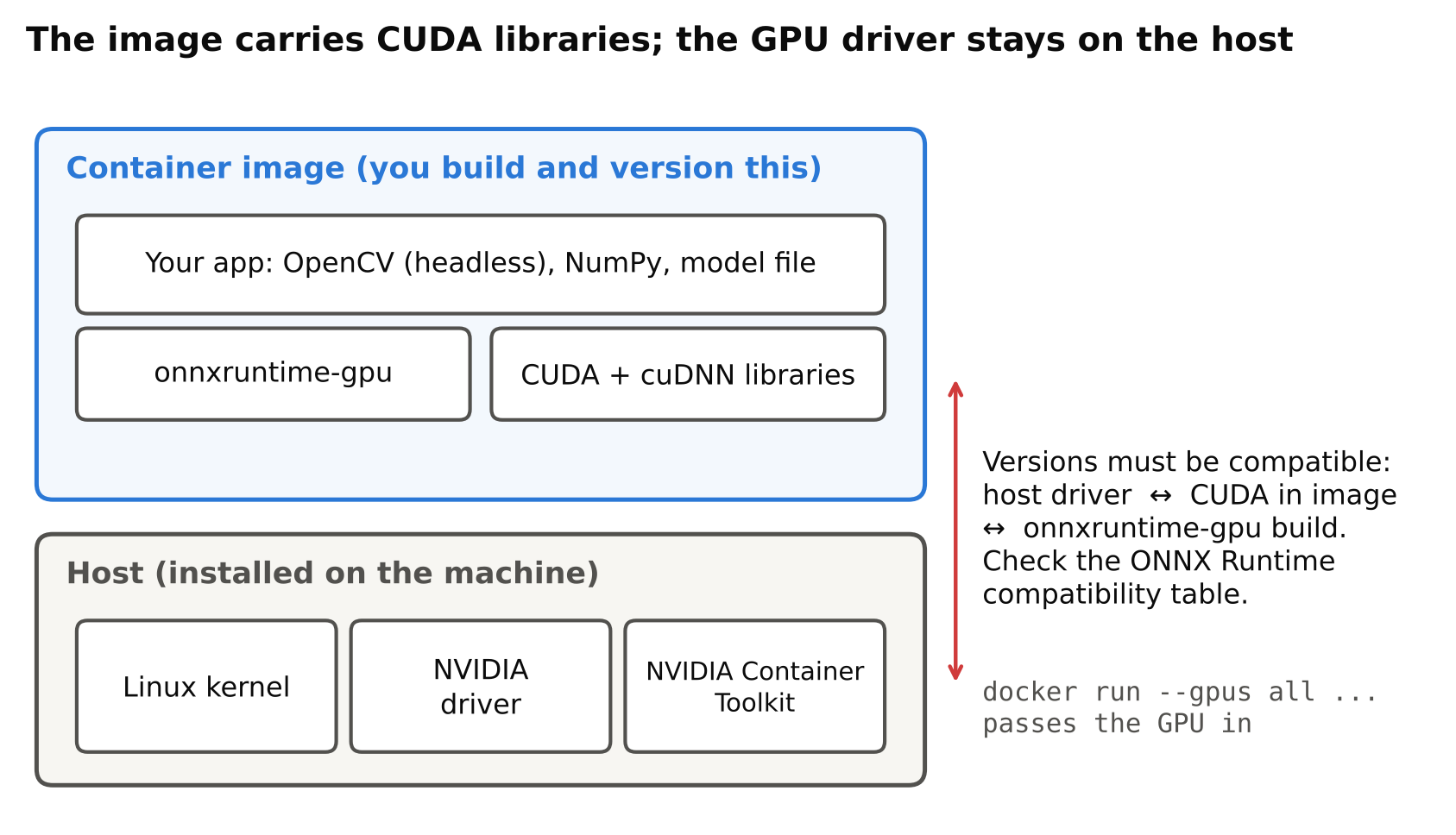
A container shares the host's kernel. It packages your code, Python, libraries and system packages. It does not package the GPU driver. For GPU use, the host needs a compatible NVIDIA driver, and a runtime component passes the GPU into the container.
Docker also does not make a model faster. It makes deployment repeatable, simplifies rollbacks and isolates apps from each other on a shared device.
A minimal CPU image
For an app using OpenCV and ONNX Runtime on CPU, start from a slim Python image:
FROM python:3.11-slim

ENV PYTHONUNBUFFERED=1 \
    PIP_NO_CACHE_DIR=1

WORKDIR /app

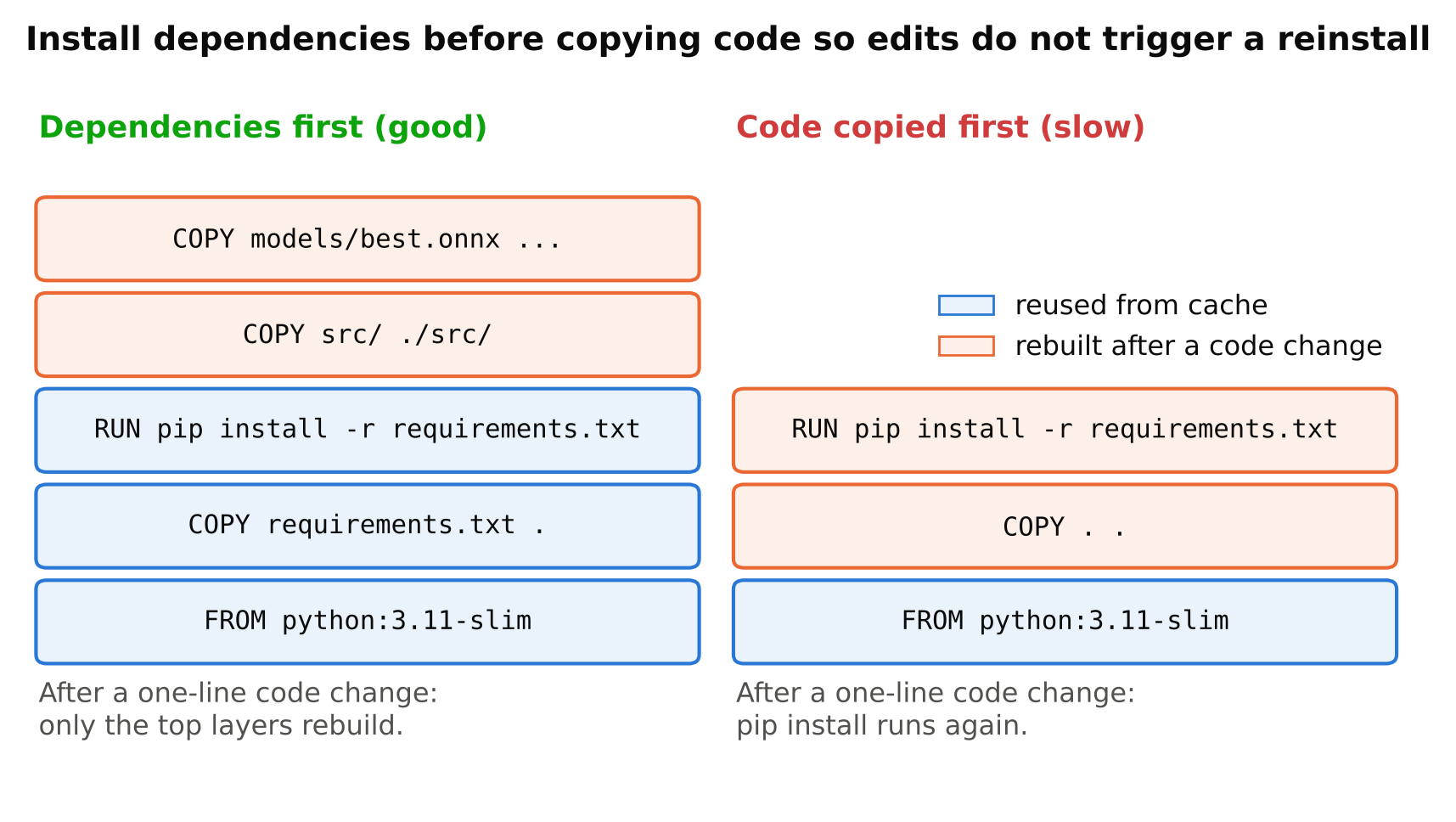
COPY requirements.txt .
RUN pip install -r requirements.txt

COPY src/ ./src/
COPY models/best.onnx ./models/best.onnx

CMD ["python", "src/main.py"]
With a requirements.txt such as:
opencv-python-headless==<pinned version>
onnxruntime==<pinned version>
numpy==<pinned version>
Replace the placeholders with the exact versions you tested. Pinning is the key to reproducibility, and pip freeze from a working environment is a good source.
Use the headless OpenCV package
The standard opencv-python wheel expects GUI libraries that a slim image does not include, and you may see errors about missing shared libraries such as libGL. In a container with no display, use opencv-python-headless. You cannot call cv2.imshow in it, which is fine for a server or edge device. Save frames or stream results instead.
Layer order matters
Docker caches layers. Copy requirements.txt and install dependencies before copying your source code. Then a code change does not trigger a slow reinstall. This single habit saves a lot of time.
Video input inside a container
How the container gets frames depends on the source:
- RTSP or network streams: nothing special. The container needs network access to the camera. See reading RTSP streams with OpenCV and FFmpeg. Make sure the OpenCV build you use has FFmpeg support, which the standard pip wheels normally include.
- USB cameras: pass the device into the container with the
--deviceoption, for example--device /dev/video0. - Files: mount a directory with
-vfor test videos and outputs.
Example run command:
docker run --rm --device /dev/video0 -v "$PWD/out:/app/out" cv-app:latest
GPU access
For NVIDIA GPUs on a Linux host:
- Install the NVIDIA driver on the host.
- Install the NVIDIA Container Toolkit.
- Run containers with
--gpus all, or the subset you need.
docker run --rm --gpus all cv-app-gpu:latest
For the image, choose a base that matches your needs:
- Official CUDA images from NVIDIA give you CUDA libraries, in "runtime" or "devel" variants. Runtime variants are smaller and enough to run apps; development variants include compilers and headers for building things.
- Framework images such as the PyTorch images bundle CUDA with the framework, and are convenient but large.
- ONNX Runtime GPU needs the
onnxruntime-gpupackage, and its version must match the CUDA and cuDNN versions it was built for. Check the compatibility table in the current ONNX Runtime documentation instead of guessing.
The usual failure is a version mismatch between the host driver, the CUDA version in the image and the library you installed. When the GPU is not used, check this first. You can confirm in code: ONNX Runtime's ort.get_available_providers() lists providers, and torch.cuda.is_available() tells you about PyTorch.
Jetson devices
Jetson boards use NVIDIA's JetPack stack and require container images built for that Arm platform. Use the base images NVIDIA publishes for Jetson, and match them to your JetPack version. You cannot use ordinary x86 CUDA images there. See TensorRT for YOLO for notes on engines, which should be built on the target.
Raspberry Pi
Pi images are Arm builds. Most Python wheels for Arm exist, but check availability for each package. Build for the right platform. On a laptop you can use docker buildx to build multi-platform images, although building on the target is simpler for small projects.
Keep images small
Smaller images pull faster over weak connections and start sooner. Practical steps:
- Use slim bases rather than full ones.
- Install only what you need. Avoid pulling PyTorch into an image that only runs ONNX Runtime.
- Use
pip --no-cache-dir, as in the example. - Use a
.dockerignorefile to keep datasets, notebooks,.gitand virtual environments out of the build context. - Use multi-stage builds when you must compile something: build in one stage, copy only the result into the final stage.
- Do not bake large training datasets into images. Mount them.
Should the model be inside the image? For small models, including them gives a self-contained, versioned unit. For larger or frequently updated models, mounting a volume or downloading at start avoids rebuilding. Choose based on how often models change. Whatever you choose, log the model's file name and hash at startup so you know what is running.
Reproducibility
- Pin the base image.
python:3.11-slimstill moves with updates. For strict reproducibility, pin to a specific tag or digest. - Pin Python packages with exact versions, as above.
- Record versions in logs at start: OpenCV, ONNX Runtime and model hash.
- Tag images with a version or commit, not just
latest. This makes rollbacks possible. - Keep the build in version control with the Dockerfile and requirements file next to the code.
For local environment setup outside containers, see setting up a clean Python environment for computer vision.
Runtime settings that matter on the edge
- Restart policy.
--restart unless-stoppedrestarts after crashes and reboots. - Resource limits. Memory limits stop a leaking process from taking down the device. Test them, because a limit set too low causes the process to be killed.
- Logs. Docker's default logging can grow without limit. Configure log rotation.
- Non-root user. Create a user in the image and run as that user where possible, except where device access requires otherwise.
- Health checks. A
HEALTHCHECKcan test that the app is producing results, not only that the process exists. - Time zone and clock. Containers use the host clock; make sure the host has correct time.
Common mistakes
- Using the non-headless OpenCV package and getting missing library errors.
- Not matching CUDA, cuDNN and library versions.
- Copying all code before installing dependencies, which defeats caching.
- Using the
latesttag in production. - Forgetting to mount persistent storage for outputs, then losing them when the container is removed.
- Running as root without needing to.
- Not rotating logs, and filling the disk.
Checklist
- Dockerfile uses a slim or matching CUDA base, pinned.
- Requirements pinned with exact versions; headless OpenCV used.
- Dependencies installed before code is copied.
.dockerignoreexcludes data and virtual environments.- Camera device, network and volumes configured at run time.
- GPU access tested with a real inference call.
- Restart policy, log rotation and health check set.
- Image tagged with a version; model hash logged at start.
Next steps
Read Setting Up a Clean Python Environment for Computer Vision, then Power, Cooling and Storage for a Reliable Edge AI Box.