Updating Models on Edge Devices Without Bricking Them
Shipping a new model to a server in your own rack is easy: copy, restart, watch, and roll back by hand if needed. Shipping it to forty boxes in ceiling voids across six sites, some on unreliable connections, is not. A failed update on a box you cannot reach means a site visit. A subtle failure, where the box runs but detects worse, means a client finds out before you do.
This article describes how to update models on edge devices so that a bad update is caught early and undone automatically.
What can go wrong
- Interrupted download or power loss leaves a half-written model file.
- Incompatible file: a TensorRT engine built for a different GPU or software version, an ONNX model needing an operator the runtime lacks.
- Config mismatch: a new model with different class names or input size, but the old configuration.
- Runs, but worse: a model that loads and produces detections, but with a lower score distribution, so thresholds no longer fit.
- Resource problems: a bigger model that does not fit in memory alongside everything else, or runs too slowly when all cameras are connected.
The update process should survive the first three automatically and make the last two visible quickly.
Package model and configuration together
A model is not just a weights file. It comes with class names, input size, pre-processing settings and thresholds. Ship them as one versioned package, for example a folder or archive containing the model file, a manifest with its version and hash, the class list, and the per-class thresholds. Never update the model and its thresholds separately. See Versioning Datasets and Models Together.
The update sequence
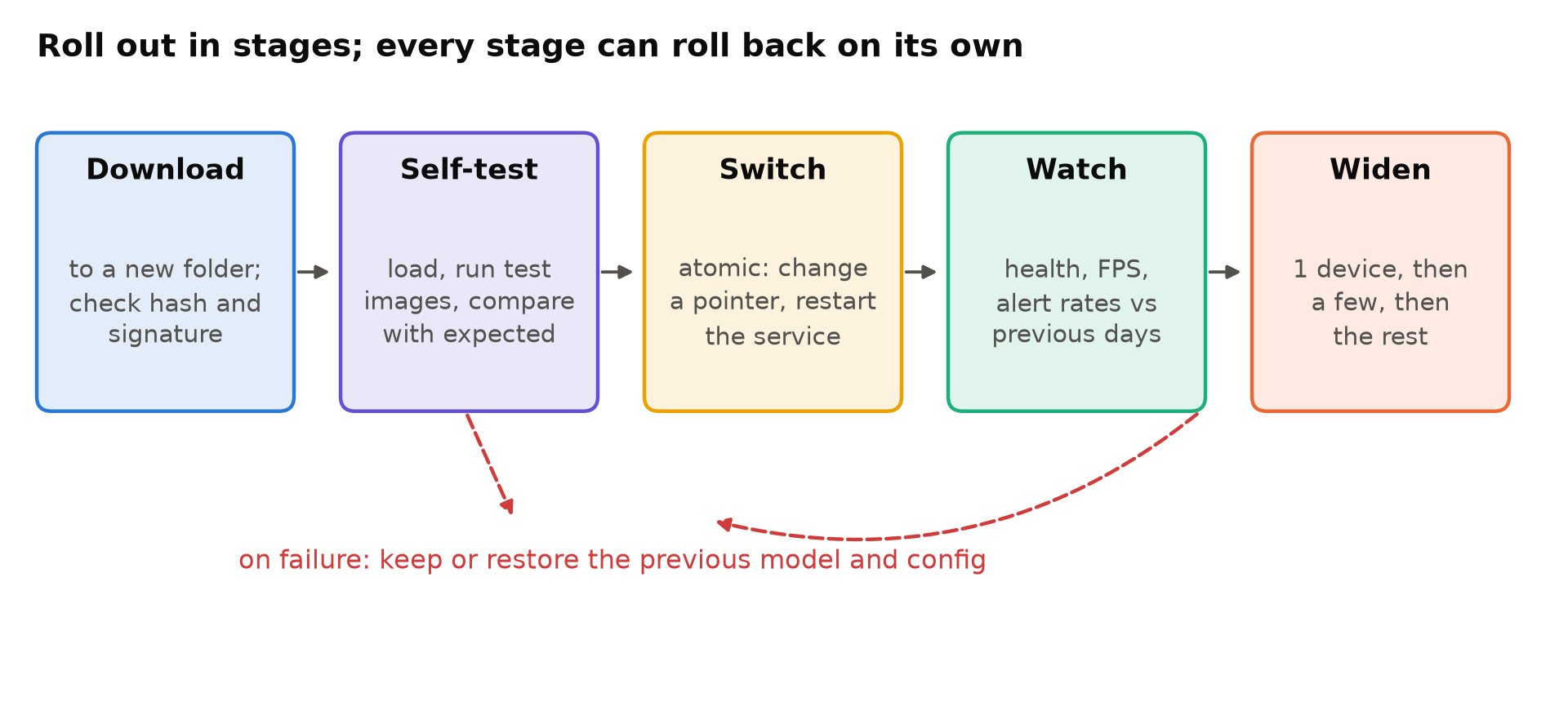
1. Download beside, never over
Download the new package into a new folder, leaving the running version untouched. Verify a hash of every file against the manifest. If you can, sign packages and verify the signature, so a device only runs models you produced.
Write files to a temporary name and rename when complete; a rename within the same filesystem is atomic, so a power cut leaves either the old file or the new one, never half of each.
2. Self-test before switching
Before switching, the device should load the new model in a separate process and run it on a few bundled test images, checking that:
- It loads with the installed runtime and hardware.
- Output shapes and class count match the manifest.
- Detections on the test images match the expected results within tolerances.
- Inference time is within an acceptable range on this device.
This catches incompatible engines and missing operators without touching the live service. For TensorRT, build the engine on the device (or on an identical device and software version) and treat any build failure as a failed update. See TensorRT for YOLO.
3. Switch atomically
Point the service at the new version with one atomic step, typically a symbolic link such as current -> releases/1.8.0, replaced by creating a new link and renaming it over the old one. Then restart the service. The previous version stays on disk. Keep at least one, preferably two, previous versions.
4. Health check with automatic rollback
After the switch, the service must prove it is healthy within a time limit: all cameras connected, frames processed at the expected rate, no crash loop, memory stable. If it fails, the device switches the link back and restarts on its own, then reports the failure. No human, no site visit.
A watchdog that restarts a crashed service is part of this; see Watchdogs and Self-Recovery for Unattended Edge Boxes.
5. Watch behaviour, not just health
A healthy service can still be a worse detector. After an update, compare per camera:
- Detections per hour by class, against the same hours on previous days.
- Alerts per day, and the share marked false by operators.
- Mean confidence of detections.
A large shift in any of these deserves a look before rolling out further. Metrics and Logging for a Vision Service covers collecting them.
6. Roll out in stages
Update one device first, ideally one with typical cameras and an operator who gives feedback. Wait long enough to cover a day and a night. Then a few more devices across different sites, then the rest. If something looks wrong at any stage, stop and roll back only the devices already updated.
Keep the old model ready
The fastest fix for a bad model is the previous one. Keeping it on the device makes rollback a link change rather than a download. Your central deployment record should show which version each device runs and allow rolling back a group with one command.
Tools
You can build this with a small agent script, systemd, and a package server. Device management tools and container platforms provide parts of it out of the box: shipping versioned containers, health checks, and rollback. Containers also keep the runtime and its libraries consistent with the model, which avoids a whole class of compatibility failures; see Dockerize a Computer Vision App. Whatever you use, test the failure paths deliberately: pull the power during an update, ship a broken model to a test device, and check the device recovers on its own.
Updating the operating system
Operating system and driver updates are riskier than model updates, because a failure can stop the device from booting or break GPU drivers. Treat them separately, less often, and with the same staging. On Jetson, the TensorRT and CUDA versions come with the system software release, so a system update can invalidate engine files; plan engine rebuilds as part of it.
Checklist
- Model, class list, settings and thresholds shipped as one versioned package.
- Downloads go to a new folder, verified by hash (and signature if possible).
- Atomic writes and an atomic switch of the active version.
- Self-test on the device before switching.
- Health check after switching, with automatic rollback.
- Behaviour compared with previous days after each update.
- Staged rollout covering a day and a night.
- Previous versions kept on the device.
- Failure paths tested deliberately.
Next steps: Watchdogs and Self-Recovery for Unattended Edge Boxes and Power, Cooling and Storage for a Reliable Edge AI Box.