Watchdogs and Self-Recovery for Unattended Edge Boxes
An edge box in a ceiling void or a roadside cabinet will, sooner or later, hang. The pipeline deadlocks on a stuck stream, a driver crashes, memory runs out, or the operating system freezes. In a server room someone notices and presses a button. On a remote site, nobody notices until the client asks why there have been no alerts since Saturday.
The goal is a box that recovers from almost everything on its own and tells you when it could not. This article describes the layers that make that possible and the mistakes that turn recovery into a reboot loop.
Layers of recovery
No single mechanism catches everything. Each layer covers failures the one below cannot see.
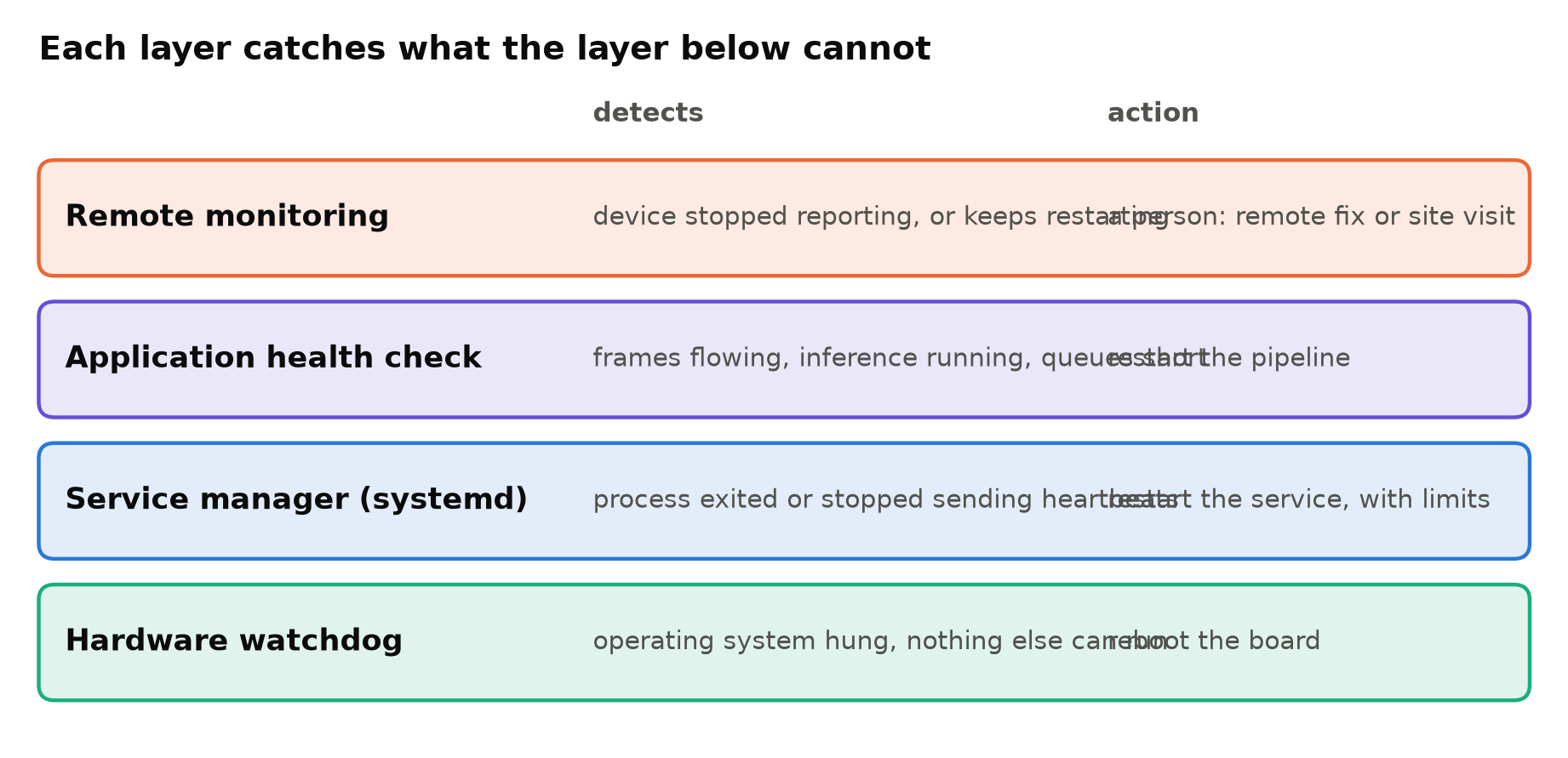
Layer 1: the hardware watchdog
Most single-board computers and many industrial PCs have a hardware watchdog: a timer that reboots the board unless software resets it regularly. If the operating system hangs completely, nothing resets the timer, and the board reboots on its own. It is the last line of defence, and the only one that works when the kernel itself is stuck.
On Linux, systemd can drive the hardware watchdog directly. In /etc/systemd/system.conf:
[Manager]
RuntimeWatchdogSec=30s
systemd then resets the watchdog while the system is responsive. If the system hangs for longer than the timeout, the board reboots. Check that your board's watchdog driver is present (a /dev/watchdog device) and test it once, deliberately, on a bench unit.
Layer 2: the service manager
Run the pipeline as a systemd service, not from a terminal or a cron job, so that it starts at boot and restarts when it exits:
[Unit]
Description=Video analytics pipeline
After=network-online.target time-sync.target
Wants=network-online.target
StartLimitIntervalSec=600
StartLimitBurst=5

[Service]
Type=notify
ExecStart=/opt/analytics/current/run.sh
Restart=always
RestartSec=10
WatchdogSec=60
MemoryMax=2G

[Install]
WantedBy=multi-user.target
What the settings do:
Restart=alwaysandRestartSec: restart after any exit, after a short pause.StartLimitIntervalSecandStartLimitBurst: if it fails five times in ten minutes, stop trying, instead of restarting forever. That state must be visible to your monitoring.Type=notifywithWatchdogSec: the service must send a "still alive" message to systemd at least every 60 seconds, or systemd kills and restarts it. This catches a process that is running but stuck, whichRestartalone cannot.MemoryMax: a leaking process is killed and restarted before it takes the whole system down.After=time-sync.target: wait for the clock, so early events do not get wrong timestamps. See Alerts at the Wrong Time of Day.
Layer 3: application health
The process can be alive and even sending heartbeats while doing nothing useful: all cameras disconnected, the inference thread stuck, a queue growing without limit. So send the heartbeat only when the pipeline is actually working.
A simple rule: the main loop sends the systemd heartbeat only if, in the last interval, frames arrived from a reasonable share of cameras and inference completed. If not, the heartbeat stops and systemd restarts the service.
import time
from systemd import daemon   # python-systemd; the sdnotify package works too

def maybe_heartbeat(stats, now):
    healthy = (now - stats.last_inference < 30 and
               stats.cameras_with_frames_last_minute >= 0.5 * stats.cameras_total)
    if healthy:
        daemon.notify("WATCHDOG=1")

daemon.notify("READY=1")   # after models are loaded and streams opened
Choose the rule carefully. If one camera is down, the pipeline should handle it on its own with reconnects, not restart everything; see Handling RTSP Dropouts. Restart the whole service only for failures that a restart can fix.
Layer 4: remote monitoring
Automation cannot fix a dead power supply, a disconnected network or a corrupted disk. The device should report regularly to a central system, and that system should alert a person when:
- A device has not reported for some minutes.
- A service has restarted many times in an hour, or hit its start limit.
- The board has rebooted unexpectedly, especially repeatedly.
- Health signals are bad for a sustained period: cameras offline, throttling, disk nearly full.
Restart counts are the key signal. A box that restarts its pipeline every 20 minutes looks "up" most of the time but is not working properly. Metrics and Logging for a Vision Service covers what to send.
Things that defeat recovery
Reboot loops
If the cause of a failure survives a reboot, the box will reboot forever. A corrupted model file, a full disk, a bad configuration, a camera that crashes the decoder on connect. Defences: start limits on services, a counter of recent reboots that switches the box to a safe mode (stop the pipeline, keep reporting), and keeping the previous model and configuration to fall back to. See Updating Models on Edge Devices Without Bricking Them.
Full disks
Logs, snapshots and core dumps fill disks slowly, and many programs fail in strange ways when the disk is full. Rotate logs with size limits, cap snapshot storage, and alert well before the disk is full.
Storage corruption
Sudden power loss can corrupt an SD card or a filesystem, especially with heavy writes. Reduce writes, use good-quality industrial storage, consider a read-only root filesystem with a separate data partition, and use a UPS where power is unreliable. Power, Cooling and Storage for a Reliable Edge AI Box goes into detail.
Silent network loss
If the box loses its network, it cannot report, and on some sites the cause is a switch that needs a power cycle. Log locally so you can see what happened afterwards, and make sure the box keeps analysing and buffering alerts while offline if the use case allows.
Test the failures
Recovery that has never been tested does not work. On a bench unit, deliberately:
- Kill the pipeline process. It should restart within seconds.
- Freeze it (for example with
kill -STOP). The watchdog should restart it. - Disconnect all cameras. The pipeline should keep reconnecting without restarting the box.
- Fill the disk. Monitoring should alert; the box should not loop.
- Ship a broken model. The device should fall back to the previous one.
- Pull the power during heavy writes, several times. The box should boot and recover.
Checklist
- Hardware watchdog enabled and tested.
- Pipeline runs as a systemd service with restart and start limits.
- Heartbeats sent only when frames and inference are flowing.
- Memory limit on the service.
- Remote alerts for silence, restart counts and reboots.
- Safe mode after repeated failures; previous model kept.
- Log rotation and snapshot caps; disk alerts.
- Storage protected against power loss.
- Every failure path tested on a bench unit.
Next steps: Power, Cooling and Storage for a Reliable Edge AI Box and Thermal Throttling on Edge Devices.