Thermal Throttling on Edge Devices: Detecting It and Planning for It
An edge box that runs at full speed on the desk can run slower in the field. Small boards protect themselves from heat by lowering clock speeds, and when the clocks drop, inference takes longer. If the pipeline was sized for the desk number, frames start to queue or drop, and nothing in the application log says why.
This article explains how throttling shows up, how to detect it on a Raspberry Pi and on NVIDIA Jetson, and how to test and size a device so it does not catch you out.
What throttling looks like from the application
Throttling rarely announces itself. What you see instead:
- Latency per frame rises after some minutes of sustained load, while the code and input are unchanged.
- Throughput falls in the afternoon or in summer, and recovers at night.
- A box in an enclosure performs worse than an identical box on a bench.
- Results vary between runs of the same benchmark.
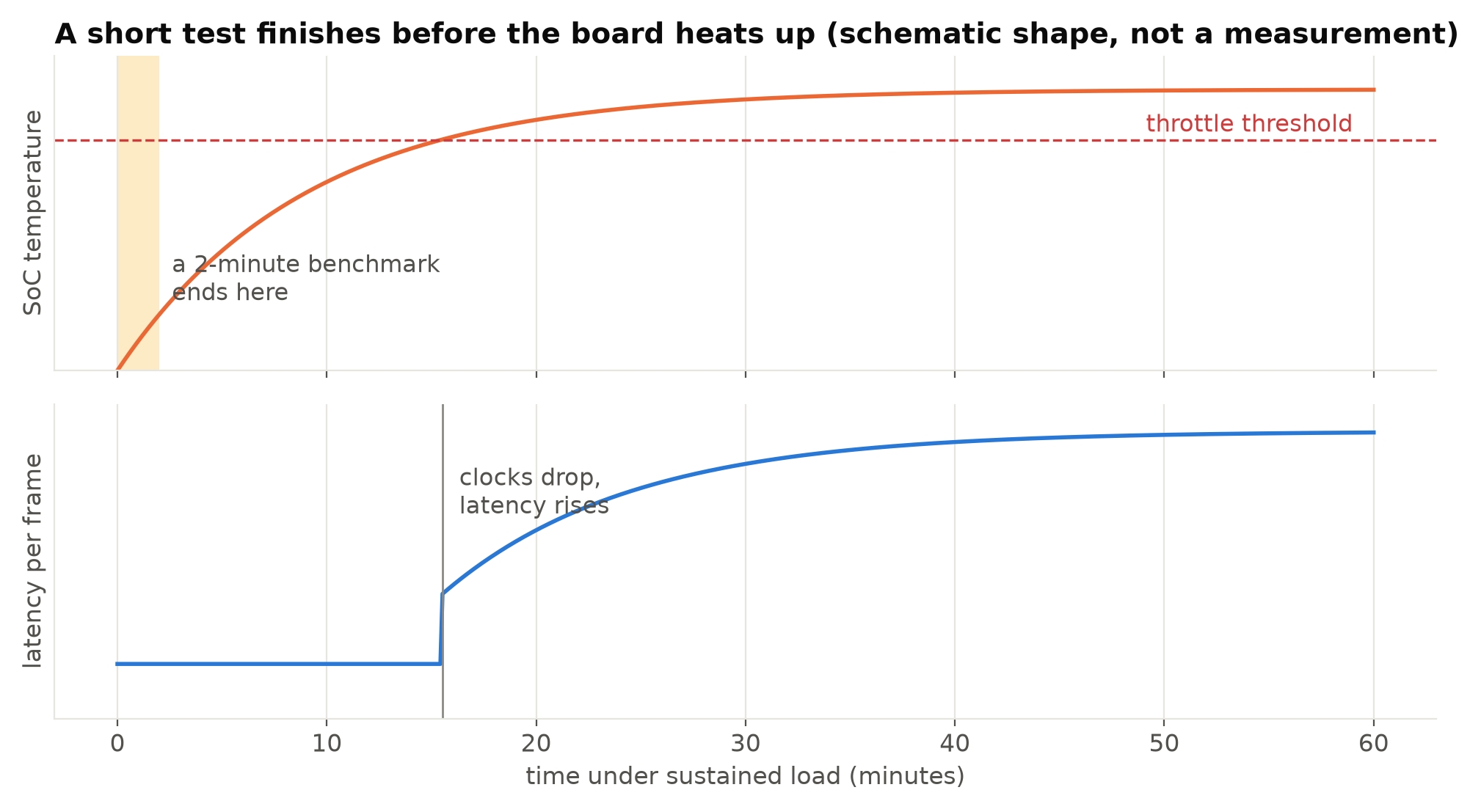
The key point is the time scale. A board can take many minutes to reach its limit, especially with a heatsink. A benchmark of a minute or two measures a cool board and tells you little about sustained speed. See Measuring FPS and Latency Correctly for the rest of the benchmarking method.
Detecting it on a Raspberry Pi
Raspberry Pi firmware reports both temperature and throttling state:
vcgencmd measure_temp
vcgencmd get_throttled
get_throttled returns a bit field. The bits that matter most:
| Bit | Meaning |
|---|---|
| 0 | Under-voltage detected now |
| 1 | ARM frequency capped now |
| 2 | Currently throttled |
| 3 | Soft temperature limit active now |
| 16 to 19 | The same four conditions, but "has occurred since boot" |
A value of 0x0 means none of these has happened. A value like 0x80000 means the soft temperature limit was hit at some point since boot, even if it is not active now. Log this value periodically; the "has occurred" bits are what catch an episode that happened at 3 p.m. while nobody was watching.
Note that under-voltage also causes throttling. A weak power supply or a long thin cable can look exactly like a heat problem. If bit 0 or bit 16 is set, fix the power before looking at cooling. Power, Cooling and Storage for a Reliable Edge AI Box covers both.
On any Linux board you can also read the kernel's view directly:
cat /sys/class/thermal/thermal_zone*/temp           # millidegrees Celsius
cat /sys/devices/system/cpu/cpu*/cpufreq/scaling_cur_freq   # current CPU clock in kHz
A CPU clock that falls under steady load is the clearest sign.
Detecting it on Jetson
On Jetson boards, tegrastats prints CPU and GPU load, clock frequencies, temperatures and power rails once per interval. The community tool jtop (from the jetson-stats package) shows the same in a friendlier view. Watch the GPU frequency under load: if it falls while load stays high, the board is being limited, by temperature or by the power budget of the current mode.
Jetson also has power modes, set with nvpmodel, that cap clocks and power by design. A benchmark in one mode is not comparable with another, so record the mode with every result. jetson_clocks pins clocks at the maximum for the current mode, which is useful for repeatable benchmarks, but a box in a hot enclosure may not be able to sustain it.
Testing properly
To know what a box will sustain in the field:
- Run the real pipeline, with the real number of streams, not the model alone. Decoding and pre-processing heat the CPU too.
- Run it for long enough. At least until temperature has been flat for a good while; an hour is a reasonable minimum, and an overnight run is better.
- Run it in the real enclosure. A sealed plastic box on a wall in the sun is a very different environment from an open desk.
- Match the ambient temperature. If the site is a warehouse without air conditioning, test somewhere similar, or at least note the room temperature with the results.
- Log temperature, clocks and throttle flags alongside latency, so you can line them up afterwards.
Report the steady-state number, after the board has warmed up, as the capacity of the box.
Planning for it
Even with good cooling, leave headroom. A box that needs 100% of its sustained capacity on a cool day will fall behind on a hot one. Some practical habits:
- Size on sustained, warm numbers, not desk benchmarks. Then keep a margin on top. How much depends on how variable the site is; a box outdoors in the tropics needs more margin than one in an air-conditioned server room.
- Cool actively where you can. On a Raspberry Pi 5, the official active cooler makes a large difference under sustained load. On Jetson, keep the fan profile appropriate for continuous inference.
- Keep the enclosure from becoming an oven. Vents, shade, and a metal enclosure that conducts heat away all help.
- Degrade gracefully. When the pipeline cannot keep up, drop frames on purpose (process the latest frame, discard old ones) rather than letting a queue grow and latency climb without limit. Analysing fewer frames per second is usually acceptable for a while; seconds of delay often are not. How Many Frames per Second Does Your Analytics Need? helps you know how far you can drop.
- Monitor in production. Send temperature, clock speed and throttle flags to your monitoring with the other health signals. An alert on "throttled in the last hour" catches a failed fan or a blocked vent before analytics quality drops.
Cheaper fixes before buying hardware
If a box throttles, a few changes can bring the load down without new hardware:
- Lower the analysis frame rate, if the use case allows.
- Use the camera's substream at a lower resolution instead of decoding the main stream and resizing. See Main Stream or Substream.
- Use hardware video decoding if the board has it, instead of software decoding on the CPU.
- Use a smaller model or a lower input size, after checking accuracy.
- Move work that is not time-critical, such as uploading snapshots, out of the busiest moments.
Each of these reduces heat as well as compute, because the board does less work per second.
Checklist
- Benchmark for long enough to reach a stable temperature.
- Test in the real enclosure at a realistic ambient temperature.
- Log temperature, clocks and throttle flags with latency.
- Rule out under-voltage before blaming heat.
- Record the power mode on Jetson.
- Size on sustained warm numbers, with margin.
- Drop frames deliberately when overloaded.
- Monitor throttling in production.
Next steps: Power, Cooling and Storage for a Reliable Edge AI Box and Raspberry Pi vs Jetson Orin Nano for Object Detection.