Power, Cooling and Storage for a Reliable Edge AI Box
A model that works on your desk can still fail in the field. When an edge AI device goes down, the cause is rarely the neural network. It is usually a weak power supply, heat, a worn-out SD card or a process that nobody restarted. This article covers the basics that make an edge box run for months without a visit.
The examples use Raspberry Pi hardware because it is common, but the principles apply to any small computer.
Power
Use a proper supply
Small boards are sensitive to supply quality. A cheap charger or thin cable can drop voltage under load, especially when the board is busy with inference and USB devices. The result may be random crashes, corrupted files or throttled performance.
Practical rules:
- Use the manufacturer's recommended supply. For a Raspberry Pi 5, that means the official power supply or one that meets the current specification. Check the board's documentation for the required rating.
- Use a short, good-quality cable.
- Count peripherals. USB cameras, SSDs and accelerators all draw from the same supply.
- If the board reports under-voltage, treat it as a real problem and not as a warning to ignore.
On Raspberry Pi OS you can check throttling and under-voltage flags with vcgencmd get_throttled. Look this up in the current documentation to interpret the bit flags, and log the value over time in your health checks.
Power loss
Sudden power loss is the most common cause of file system corruption. Options to reduce risk:
- Use a UPS or a battery-backed supply for important installations.
- Reduce writes so there is less to corrupt (see storage below).
- Use a journaling file system and avoid heavy writes at the moment of failure.
- For appliances, consider a read-only root file system with a separate writable data partition.
Power over Ethernet
For IP cameras, PoE removes the need for a separate power cable at the camera. A PoE switch supplies power and data on one cable. Check the switch's total power budget against the number of cameras, because exceeding it causes cameras to drop out.
Cooling
Why heat matters
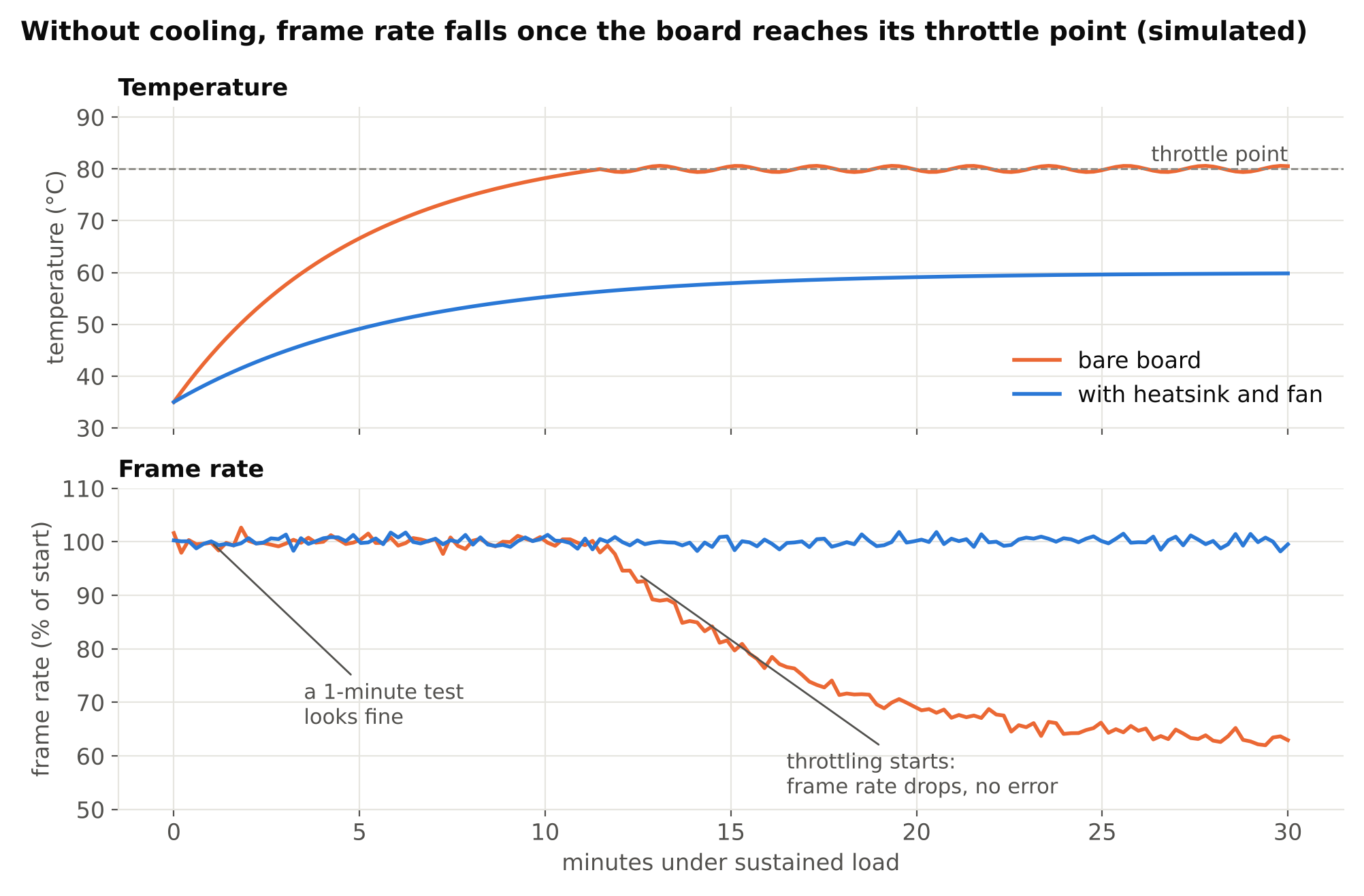
When a processor gets too hot, it lowers its clock speed to protect itself. This is thermal throttling. Your detection frame rate then falls without any error message. A device may seem fast in a short test and slow after ten minutes.
How to check
On Raspberry Pi OS, vcgencmd measure_temp reports the temperature, and vcgencmd get_throttled shows whether throttling has occurred. On other platforms, look for thermal zone files or vendor tools. Do this:
- Run your real workload, not an idle system.
- Let it run for a long time, at least until the temperature levels off.
- Log temperature and frame rate together.
- If frame rate falls as temperature rises, you have a cooling problem.
What to do
- Add a heatsink and fan. An active cooler or fan case is inexpensive for a Pi and removes most throttling problems.
- Mind airflow. A fan inside a sealed box only circulates hot air. The heat has to leave the enclosure.
- Plan for the hottest day. An enclosure in direct sun can be much hotter than your lab.
- Use a lower-power mode or smaller model if you cannot cool well. Reducing input size or analysis rate cuts heat too. See choosing a YOLO model size.
- Keep dust in mind. Filters or sealed designs with proper heat sinking last longer in dirty places.
Storage
SD card wear
MicroSD cards are convenient, but they are the weakest part of many small deployments. Flash storage wears with writes, and cheap cards can fail or corrupt data, especially with frequent small writes such as logs and databases.
Reduce the risk:
- Choose a high-endurance microSD card designed for continuous writing, and buy from a reliable seller to avoid fakes.
- Reduce writes. Send logs to memory or a remote server, limit debug output and avoid saving every frame.
- Keep the operating system on the card and write data elsewhere.
- Make a backup image of a working card so a replacement takes minutes.
SSD instead of SD
For heavier or long-lived use, an SSD is usually more robust and faster. With the Raspberry Pi 5, you can attach an NVMe drive through a HAT or base on the PCIe interface. Benefits: better sustained write performance and typically better endurance for write-heavy work. Costs: extra hardware, more power draw and a bit more setup. Check that the HAT and drive are compatible, and follow the current instructions for booting from NVMe.
| Option | Good for | Watch out for |
|---|---|---|
| Standard SD card | Prototypes, light use | Wear, corruption, fakes |
| High-endurance SD card | Light logging, appliance-style devices | Still limited write endurance |
| NVMe SSD | Video clips, databases, heavy logging | Power, cost, compatibility |
What to store
Decide what the device keeps and for how long.
- Frames and clips: only save what you need, such as the seconds around an event, not continuous video, unless that is the product.
- Retention: delete old files automatically. A full disk is a classic cause of failures at 3 a.m. Set a maximum disk usage and a cleanup job.
- Privacy: stored footage may contain people. Keep only what is needed and for the shortest time. See privacy and ethics in camera analytics.
Uptime practices
Hardware is half the story. Software must also recover by itself.
Run as a service
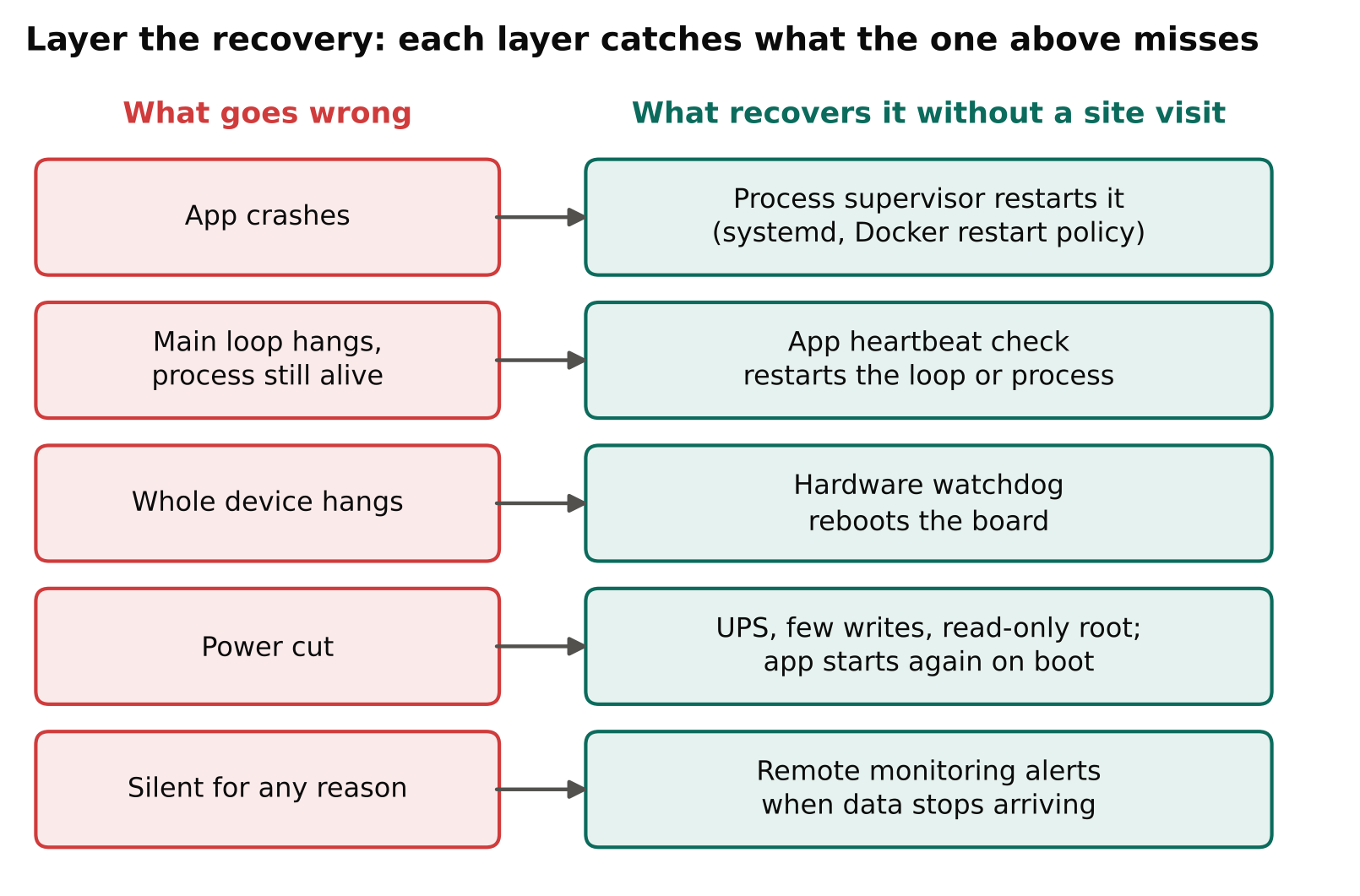
Use a process supervisor such as systemd or a container restart policy, so the application restarts after a crash or reboot. In Docker, a restart policy like unless-stopped does this. See Dockerize a computer vision app for container patterns.
Use a watchdog
A hardware or software watchdog reboots the device if it hangs. Many boards have a hardware watchdog. Combine it with an application-level heartbeat: if your main loop stops producing results, restart it.
Health checks and monitoring
Track a few signals and send them somewhere you will see them:
- Frames processed per minute, and time since the last frame.
- Temperature and throttling flags.
- Free disk space.
- Memory use over time, to catch leaks.
- Camera connection state.
Alert on the absence of data, not just on errors. A device that is silent is often a device that has failed. Camera reconnection logic is covered in handling RTSP dropouts.
Time and logs
Keep the clock correct with network time, since wrong timestamps make events hard to trust. Rotate logs and cap their size.
Updates
Automatic updates can break a working system, and no updates can leave security holes. Pick a policy: test updates on a spare device first, pin versions and keep a way to roll back. Remote access should use keys, not default passwords.
A burn-in test
Before you ship a box, run it for several days under realistic load in the enclosure it will live in. Include a power-cut test and a network-cut test. Confirm that it recovers without a person touching it. The pre-deployment testing checklist lists more checks.
Key points
- A good power supply and cable prevent many mysterious faults.
- Test cooling under real, sustained load and log temperature next to frame rate.
- Reduce SD card writes; use high-endurance cards or an SSD for heavy use.
- Set retention rules so the disk never fills.
- Run the app as a service with a watchdog and health checks.
- Alert when data stops, not only when errors appear.
- Do a multi-day burn-in in the real enclosure.
Next steps
Continue with Dockerize a Computer Vision App for Edge and Cloud, then A Pre-Deployment Testing Checklist for Vision Models.