Building a Replay Set of Recorded Footage
Every change to a video analytics system is a guess until it has run on real footage: a new model, a different threshold, a tracker upgrade, a new N-of-M filter. Testing on live cameras is slow, unrepeatable and risky. Testing on a validation set of still images misses everything that happens over time.
A replay set fills the gap: a library of recorded clips with known events, run through the full pipeline exactly as if they were live. This article covers what goes in one, how to label and store it, and how to keep it useful as the system evolves.
What a replay set is for
It answers one question before every release: did this change break anything that used to work, or fix what it was meant to fix? It does this at the level the client experiences, with decoding, tracking, rules and alerts all included, scored as events. It complements the faster unit and golden-image tests described in Regression Tests for a Vision Pipeline.
It is not a training set and not a model test set. It tests the whole system, and it is chosen to cover cases, not to be statistically representative.
What to include
Plan coverage before collecting. A grid of cameras against conditions makes gaps obvious.
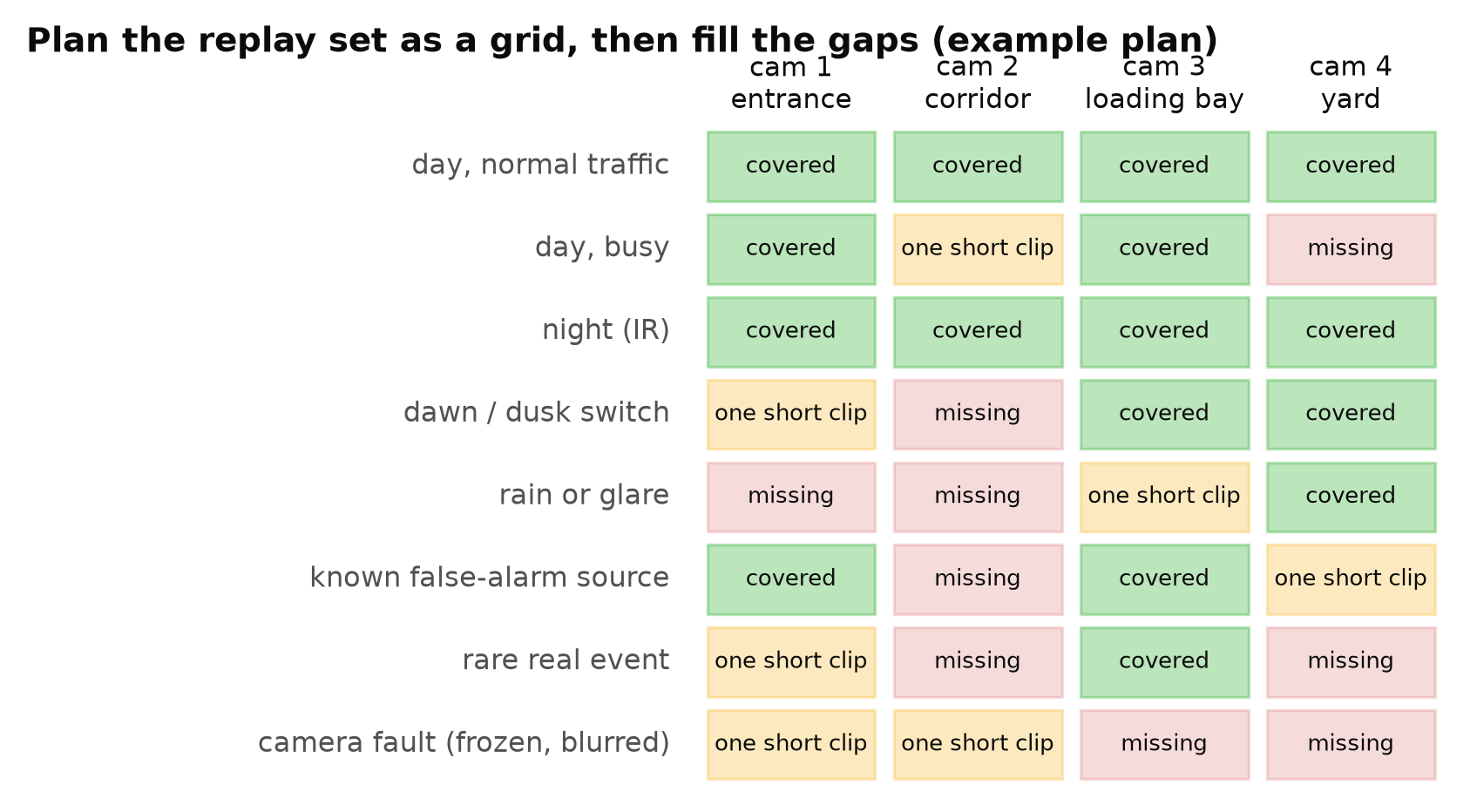
Useful categories:
- Typical operation on each camera type: an ordinary hour, day and night.
- Busy periods: crowds, shift changes, deliveries.
- Mode switches: dusk and dawn, where infrared switches on and off. See Day/Night Switching.
- Weather and light: rain, glare, low sun, headlights.
- Known false-alarm sources: the reflective window, the mannequin, the swaying flag.
- Rare real events: the ones the system exists to catch, including staged ones.
- Long quiet periods: an hour with nothing happening, to count false alerts.
- Faults: a frozen stream, a reconnect, a blurred lens, a frame-rate change.
Each production incident should end up as a clip. When a client reports a missed event or a false alert, save the footage, label it, and add it. Over time the replay set becomes a record of everything that has gone wrong, and a guarantee that it does not go wrong the same way twice.
How much footage
Enough to run in reasonable time before a release, small enough to curate. A few hours in total is a good range for many systems. Faster than real time is possible when decoding and inference allow, so a few hours of footage may run in less than an hour on a server.
Prefer several medium clips over many very short ones. Short clips cut around events hide the false alerts that happen between events, and give trackers no time to settle. A clip of a few minutes around each event, plus some long quiet stretches, works well.
Labels: events, not boxes
Label each clip with the events that should be raised: type, start time, end time, and any notes. This is far quicker than boxing every frame. Also record what should not happen: "no alert should fire on the window reflection at 02:10".
Use the same event definitions as your acceptance tests, so a pass on the replay set means the same thing as a pass with the client. Measuring Video Analytics by Events, Not Frames describes event labels and scoring.
Store it properly
- Keep the original encoded video. Do not re-encode clips into a different codec or bitrate, because compression artefacts are part of what you are testing. If you must convert, keep the original as well.
- Store per-clip metadata: camera, site, date, time zone, resolution, frame rate, day or night, and the camera configuration (zones, lines, thresholds) needed to run the rules.
- Version the set. Adding clips creates a new version. Results are only comparable on the same version. See Versioning Datasets and Models Together.
- Respect privacy. These are recordings of real people. Limit access, record the purpose, and follow the same retention rules as other footage. See Privacy and Ethics in Camera Analytics.
Run it like live
The value of a replay set comes from running the real pipeline, not a test harness that skips parts. Feed clips through the same input path as live streams. One way is to serve the files as RTSP streams locally, for example with a small media server, so the pipeline cannot tell the difference. Another is a file input mode that preserves real timing, releasing frames at their original timestamps.
Pay attention to time. If the pipeline runs faster than real time, timestamps must still come from the clip, or durations, cooldowns and dwell rules will behave differently. Running at real speed is simpler and catches timing bugs, at the cost of a longer run.
Compare, do not just score
For each run, save the full list of alerts with times, not only the summary numbers. Then compare with the previous release:
- New alerts that did not fire before: are they real events caught, or new false alerts?
- Alerts that disappeared: were they false alerts removed, or real events now missed?
- Timing changes: did alerts become later?
A summary such as "recall unchanged, false alerts down by two" can hide a swap: one real event newly missed and one newly caught. The diff shows it.
Keep it healthy
- Review the set every few months. Remove clips from cameras that no longer exist, add clips for new cameras and new conditions.
- Keep some clips fixed. A stable core lets you compare across long periods.
- Note when expectations change. If a rule changes on purpose, update the expected events and record why.
- Do not train on it. Clips used for training no longer test anything. If you want to use a replay clip for training, move it out of the replay set and replace it.
Checklist
- Plan coverage as a grid of cameras and conditions.
- Include typical hours, busy periods, mode switches, weather, false-alarm sources, rare events, quiet periods and faults.
- Turn every production incident into a clip.
- Label expected events and expected non-events.
- Keep original encoding and per-clip configuration.
- Version the set and control access.
- Run through the real input path with real timing.
- Diff alert lists between releases.
- Never train on replay clips.
Next steps: Regression Tests for a Vision Pipeline and A Pre-Deployment Testing Checklist for Vision Models.