Day/Night Switching: Why Detections Change When the IR Filter Flips
Many security cameras lead two lives. By day they deliver a colour image. At dusk a small mechanical filter moves, infrared lights switch on, and the image turns monochrome, with a different look to skin, clothing, glass and shadows. To a detector trained mostly on daytime colour images, the night camera is a different camera.
This article explains what happens at the switch, what it does to detection, why some cameras flip back and forth at dusk, and how to make a pipeline that works in both modes.
What the switch does
Image sensors are sensitive to near-infrared light, which the human eye cannot see. In daylight, that infrared would distort colours, so day/night cameras put an IR-cut filter in front of the sensor. When the scene gets dark:
- The filter moves out of the light path (you can sometimes hear a click).
- The camera usually switches to monochrome output, because colours are no longer meaningful.
- Built-in infrared illuminators, if the camera has them, switch on.
- Exposure, gain and noise reduction settings change.
In the morning the process reverses. The decision is made by a light sensor or by the image brightness, depending on the camera, with settings for the switching point and a delay.
What changes for the model
The night image differs from the day image in several ways at once:
- No colour. Any cue that depends on colour is gone: a high-visibility vest, a red fire extinguisher, a coloured uniform. A model that learned "orange means vest" has nothing to use.
- Different reflectance. Materials reflect infrared differently from visible light. Some dark fabrics look light; some bright ones look dark. Retroreflective strips on vests and signs glow strongly under the camera's own illuminator.
- Uneven light. Built-in illuminators light the area close to the camera brightly and fall off with distance. Near objects can be overexposed while far ones are dark.
- More noise and smearing. Higher gain adds noise; stronger noise reduction and longer exposures smear moving objects.
- New false alarm sources. Insects, spider webs and rain drops near the lens reflect the illuminator and appear as bright moving shapes. These are a classic cause of night-time false alarms.
The result is a domain shift that happens twice a day, on every camera. A detector can be strong by day and noticeably weaker at night, and an average over 24 hours hides it.
Flapping at dusk
The switch is supposed to happen once in the evening and once in the morning. Sometimes it happens many times. At dusk the light level hovers near the threshold, and small changes, such as a passing cloud, car headlights, or the camera's own infrared reflecting off a nearby wall, push it back and forth.
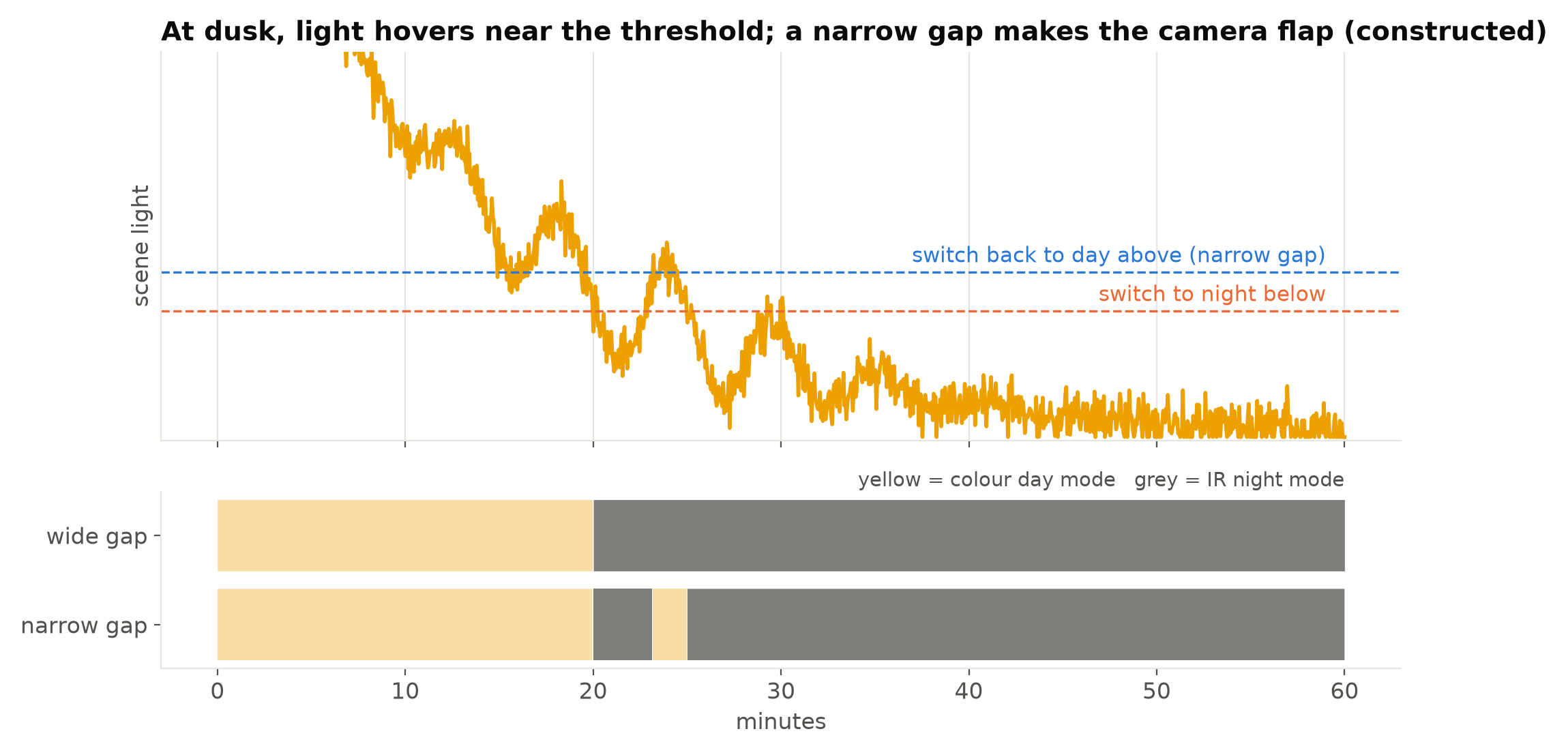
Each switch causes a few seconds of disturbance: the image changes brightness and colour suddenly, exposure readjusts, and the frame may briefly be over- or underexposed. To a detector that can look like a scene change. To a frame-change health check it can look like tampering. And the camera's own infrared reflecting off a close surface can make the scene look bright enough to switch back to day, which then darkens it again.
Most cameras have settings for this: the switching thresholds, the gap between them, and a delay before switching. If a camera flaps, widening the gap or lengthening the delay usually fixes it. Removing the reflecting surface from the view, or moving the camera, fixes the cause.
Handling both modes in the pipeline
Know which mode you are in
Some cameras report their day/night state through their API; many integrations do not expose it. The image tells you anyway: in night mode the colour channels become almost identical, so mean saturation drops close to zero. A simple check on a downscaled frame once a minute is enough:
import cv2

def is_night_mode(frame, max_saturation=12):
    small = cv2.resize(frame, (160, 90), interpolation=cv2.INTER_AREA)
    s = cv2.cvtColor(small, cv2.COLOR_BGR2HSV)[..., 1]
    return float(s.mean()) < max_saturation
The threshold here is a starting point; check it on your cameras, since some day scenes are naturally grey. Log the mode per camera. It explains many patterns in alert rates.
Train and test on both
The most effective fix is data. Include night-mode images from your own cameras in training, in proportion to how much of the day the system runs at night, and label them with the same guide. A model trained only on colour images may detect people at night, but it will usually be less confident and miss more at a distance.
Report results separately for day and night. A dedicated night test set makes the gap visible; see Building a Night and Bad-Weather Test Set.
Use per-mode settings where needed
If the model's scores are systematically lower at night, a single threshold is a compromise in both modes. Per-mode thresholds, chosen on validation data from each mode, are a legitimate fix. The same goes for health-check baselines; Detecting a Dirty, Blocked or Moved Camera explains why sharpness baselines must be separate for day and night.
Ride out the switch
For a few seconds around a mode change, results are unreliable. Suppress new alerts and health-check triggers briefly after a detected switch, and reset any per-camera baselines that compare against recent frames. The delay costs little, and it removes a whole category of false events that appear exactly at dusk and dawn.
Rethink colour-based rules
If a rule depends on colour, such as "person without a high-visibility vest", decide what it should do at night. Options include a separate model trained on night images (the retroreflective strips are often visible), a different rule at night, or disabling it and saying so. Write the decision down; see Agreeing a Measurable Target with a Client.
Lighting can beat the switch
Where possible, consider adding visible lighting so the camera stays in colour mode. A well-lit area gives a better image than infrared in many scenes, avoids the switch entirely, and helps human viewers too. Where visible light is not acceptable, external infrared illuminators placed away from the camera light the scene more evenly and attract fewer insects to the lens than built-in ones. Choosing a Camera for Computer Vision Projects covers lighting choices.
Checklist
- Know when each camera switches, and log the mode.
- Include night-mode images from your cameras in training.
- Report day and night results separately.
- Use per-mode thresholds and baselines where they help.
- Suppress alerts and checks briefly around a switch.
- Widen hysteresis or add delay on cameras that flap.
- Decide what colour-based rules do at night.
- Consider lighting before accepting infrared.
Next steps: When the Camera Changes Its Frame Rate at Night and Building a Night and Bad-Weather Test Set.