Comparing Two Detectors Fairly
"Model B scores two points higher than model A, so we switch." This is one of the most common decisions in applied computer vision, and one of the most often wrong. The two points may come from a different image size, a different evaluation setting, a lucky training run or a test set too small to tell the difference.
This article lists what must be held equal for a comparison to mean anything, and how to tell whether the remaining difference is real.
Hold everything equal except the thing you test
A comparison answers one question: does changing X improve the result? Everything other than X must stay the same. In practice, these are the things that drift:
Evaluation data. Same test images, same labels, same version of the labels. A relabelled test set is a different test set.
Evaluation settings. Same image size at validation, same confidence and IoU thresholds for the validator, same tool and version. A model validated at 640 and another at 1280 are not being compared on the model alone. See What mAP Hides for how much the computation can differ between tools.
Pre-processing. Same resize method, letterbox, colour order and normalisation. Models from different code bases often differ here without anyone noticing. Preprocessing Mismatches That Silently Cost Accuracy lists the usual suspects.
Training budget. If one model trained for 300 epochs and the other for 100, you are partly comparing epochs. Same epochs (or same wall-clock time, if that is your constraint), same augmentations, same pretrained starting point or none for both.
Training data. Same training images and labels. It sounds obvious, but a comparison run a month apart often uses a dataset that has grown in between.
Write these settings down with each result. If you cannot say what was held equal, the comparison is not finished.
Noise from the test set
Even with everything held equal, a test score is an estimate. The test set is a sample of the world, and a different sample would give a different number.
For a simple proportion such as recall, the size of this noise is easy to estimate. If the true recall is p and the test set has n objects, the standard error is about √(p(1 − p)/n), and a 95% interval is roughly 1.96 standard errors on each side.
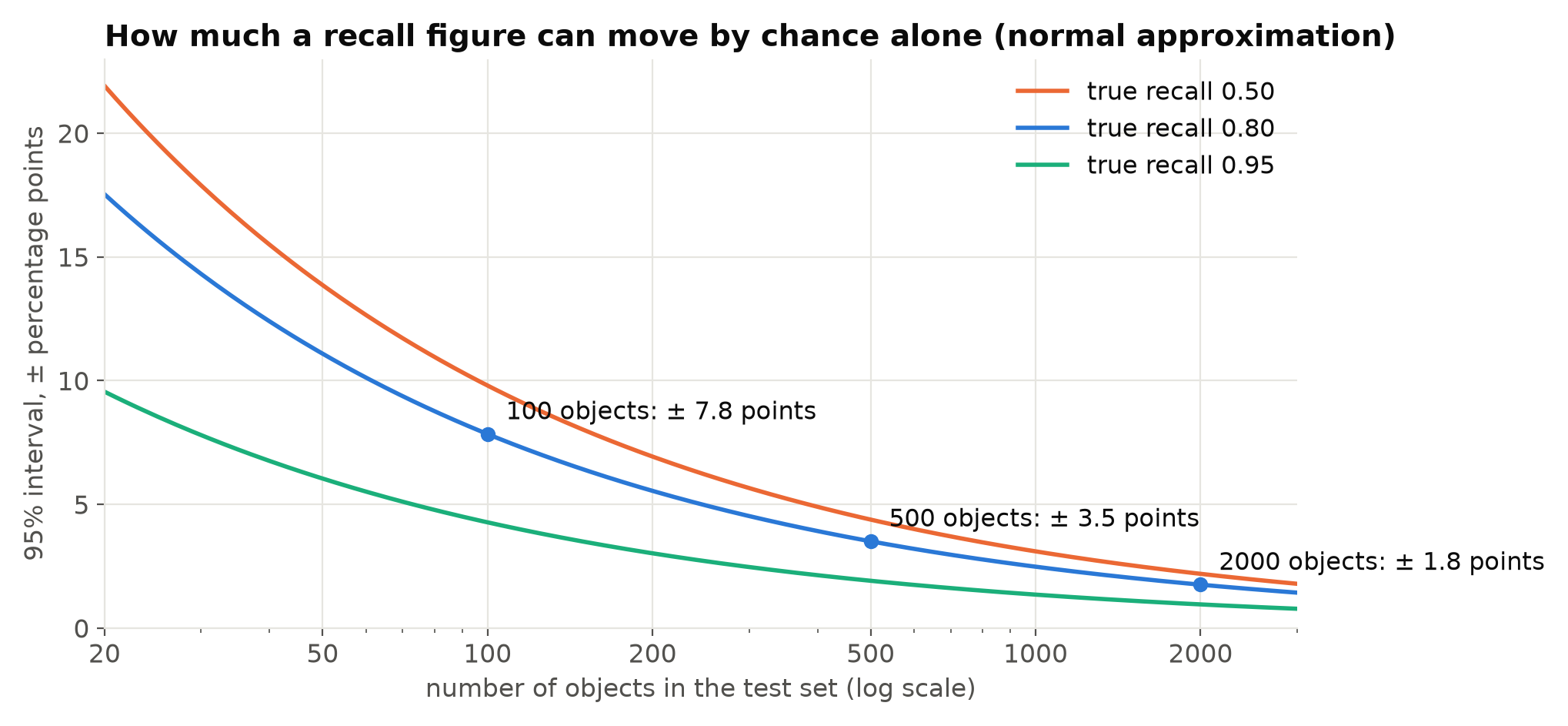
So with 100 objects of a class, a difference of a few points in that class's recall says almost nothing. mAP is more complicated than a single proportion, but the lesson carries over: small test sets, and especially small classes, produce noisy numbers.
A paired comparison is sharper
The interval above is for one model on its own. When you compare two models on the same test images, you can do better, because both models face the same easy and hard images. Much of the noise is shared and cancels out.
A practical method is the paired bootstrap:
- Run both models on the test set and keep per-image results.
- Draw a random sample of images, with replacement, of the same size as the test set.
- Compute the metric for both models on that sample, and the difference.
- Repeat a thousand times or more.
- Look at the spread of the differences. If most of them are above zero, model B is probably better; if the spread straddles zero, you cannot tell.
import numpy as np

def paired_bootstrap(metric, per_image_a, per_image_b, n_boot=2000, seed=0):
    """metric(list_of_per_image_results) -> float. Returns the 2.5, 50 and 97.5 percentiles of B - A."""
    rng = np.random.default_rng(seed)
    n = len(per_image_a)
    diffs = []
    for _ in range(n_boot):
        idx = rng.integers(0, n, n)
        diffs.append(metric([per_image_b[i] for i in idx]) - metric([per_image_a[i] for i in idx]))
    return np.percentile(diffs, [2.5, 50, 97.5])
Here metric can be recall at your operating threshold, a count error, or mAP computed with your own evaluation code. Resample whole images, or better, whole clips or cameras if the test set comes from video, because neighbouring frames are not independent.
Noise from training
The other source of noise is training itself. The same model, the same data and the same settings, trained twice with different random seeds, give different final scores. Data order, augmentations and initialisation of new layers all depend on the seed. The spread between seeds can be comparable to the difference you are trying to measure.
The honest way to handle it is to train each configuration several times with different seeds and compare the averages and spreads. Three runs each is a common minimum when training is cheap enough. If training is expensive, at least run the baseline twice: the gap between those two runs is your estimate of seed noise, and any improvement smaller than that is not established.
Compare at the point you will use
Even a real difference in mAP does not mean a difference that matters for you. Compare the models at your operating constraint, for example recall at a precision of at least 0.9, per class, and on event-level results from real footage if the system raises alerts. See Measuring Video Analytics by Events, Not Frames.
Also compare cost. Measure speed and memory on the target hardware with the same method for both models, as described in Measuring FPS and Latency Correctly. A model that is one point better and twice as slow may not be the better choice.
A fair comparison, in short
| Step | Done when |
|---|---|
| Same test data and labels | Both evaluated on the identical file list |
| Same evaluation settings | Image size, thresholds, tool version recorded |
| Same pre-processing | Checked, not assumed |
| Same training budget and data | Epochs, augmentations, dataset version recorded |
| Seed noise estimated | At least the baseline trained twice |
| Paired bootstrap on the difference | Interval reported, resampled by clip or camera |
| Operating-point comparison | Per class, at your threshold |
| Cost measured | Same hardware, same method |
Checklist
- Change one thing at a time and record what was held equal.
- Use the same evaluation tool, version and settings.
- Check pre-processing matches.
- Match training budget and dataset version.
- Estimate seed noise by retraining the baseline.
- Use a paired bootstrap, resampling clips or cameras.
- Compare at your operating point and on target hardware.
Next steps: Why Your Test Set Flatters You and Reproducible Training Runs.