Experiment Tracking: TensorBoard, Weights & Biases and MLflow
After a few weeks of training detectors, you will have a folder full of runs called exp, exp2, exp3, final, final_v2 and final_really. One of them is the best. You do not remember which settings made it, which dataset version it saw, or whether it was trained before or after you fixed the labels.
Experiment tracking solves this. It is not about dashboards. It is about being able to answer, months later, "how exactly did we get this model?"
What to track
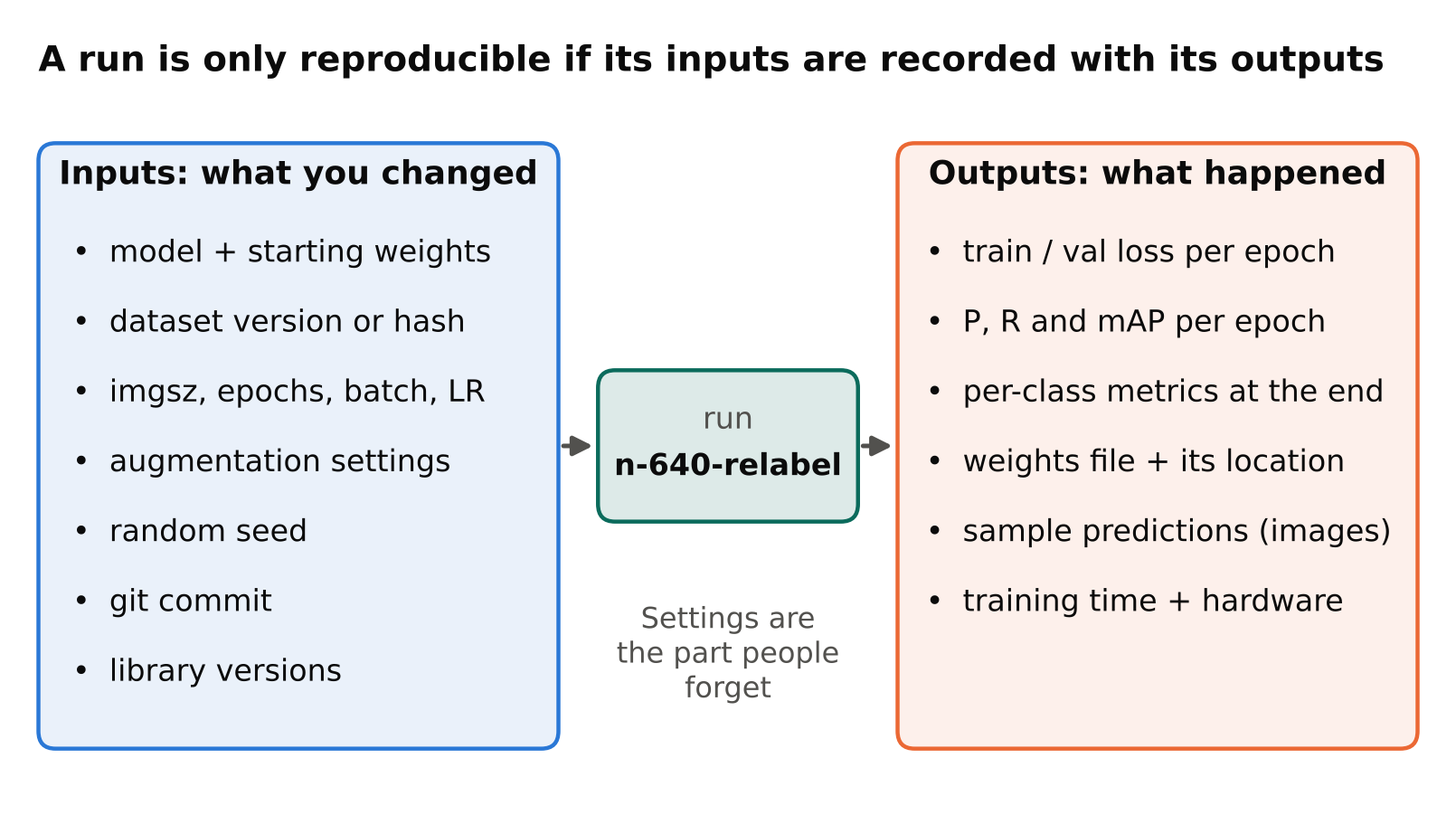
A tracker is only useful if you log the right things. For a detection project, write down these items for every run.
Inputs (what you changed):
- Model and starting weights (for example, which pretrained checkpoint).
- Dataset version. A name or a hash of the file list is better than "latest".
- Image size, epochs, batch size, learning rate settings.
- Augmentation settings.
- Random seed, if you set one.
- Code version, for example the git commit.
- Library versions (PyTorch, Ultralytics, CUDA).
Outputs (what happened):
- Training and validation loss per epoch.
- Precision, recall, mAP50 and mAP50-95 per epoch, and per class at the end. If these terms are new, read mAP, precision and recall first.
- The final weights file and where it is stored.
- A few prediction examples on validation images. Numbers hide failures that a quick look reveals.
- Training time and the hardware used.
Most of the value comes from the input list. Metrics are easy to keep, because training tools print them. Settings are the part people forget.
The three tools
TensorBoard
TensorBoard reads log files from a folder and shows curves in a browser. It is free and open source, and it works offline. With PyTorch you can write scalars like this:
from torch.utils.tensorboard import SummaryWriter

writer = SummaryWriter("runs/exp1")
writer.add_scalar("val/map50", 0.0, 0)  # tag, value, step
writer.close()
Then run tensorboard --logdir runs and open the address it prints.
Strengths: simple, local, no account, widely supported. Weaknesses: it is a viewer for curves, not a full record of an experiment. Comparing settings across many runs is awkward, and sharing results means sharing log files or running a server.
Weights & Biases
Weights & Biases (often called W&B) is a hosted service. You log settings and metrics from your code, and it stores them online with a comparison interface.
import wandb

run = wandb.init(project="helmet-detector", config={"imgsz": 640, "epochs": 100})
wandb.log({"val/map50": 0.0})
run.finish()
Strengths: easy comparison tables, easy sharing through a link, good for teams and for remote training where you cannot reach the machine. Weaknesses: it is an external service, so your data goes to a third party unless you arrange otherwise. That matters when footage or metadata is sensitive. Plans, limits and pricing change, so check the current terms.
MLflow
MLflow is open source and can run entirely on your own machine or server. It has a tracking component for parameters, metrics and files, and it can also store and version models.
import mlflow

mlflow.set_experiment("helmet-detector")
with mlflow.start_run():
    mlflow.log_param("imgsz", 640)
    mlflow.log_metric("map50", 0.0)
    mlflow.log_artifact("runs/exp1/weights/best.pt")
Run mlflow ui to browse results locally.
Strengths: self-hosted, so data stays with you; logs files as well as numbers; a model registry for promoting versions. Weaknesses: you run and maintain the server if you want sharing, and the interface is plainer.
Which one to choose
| Situation | A reasonable choice |
|---|---|
| Solo, learning, one machine | TensorBoard, or just the CSV Ultralytics already writes |
| Solo or small team, training on rented GPUs | Weights & Biases, if sending metrics to a hosted service is acceptable |
| Team with privacy or on-premise rules | MLflow, self-hosted |
| Need a record of which model is deployed | MLflow's model registry, or a simple spreadsheet and naming convention |
Do not let the choice slow you down. Any one of them beats no tracking. You can also switch later, because the thing that matters is the habit of logging settings and results.
Using trackers with Ultralytics
Ultralytics already saves useful output for each run: a results.csv with per-epoch metrics, the training curves as images, a copy of the arguments used, and the weights. For many solo projects, keeping these run folders organised and named well is a good start.
Ultralytics also has built-in integrations with some logging tools. Which ones are available, and how to turn them on, depends on your installed version, so check the Ultralytics documentation for your version rather than relying on memory. When an integration exists, you often only need to install the tool and log in; training then reports to it automatically.
A tracking routine that works without any tool
If you do not want another service yet, a plain approach is enough:
- Give each run a name that includes the model, image size and a short purpose, such as
n-640-relabel. - Keep one spreadsheet or text file with a row per run: date, run name, dataset version, what changed, headline metrics, and a one-line verdict.
- Store the exact
data.yamland the training arguments with the weights. - Commit the training script. Record the commit in your notes.
This costs a few minutes per run and saves hours later.
Common mistakes
- Changing two things at once. If you change the dataset and the learning rate together, you cannot tell which caused the difference. Change one thing per run when you can.
- Comparing runs on different validation sets. A metric is only comparable when the validation data is the same. Keep a fixed validation set, and see train/validation split for video frames to avoid leakage.
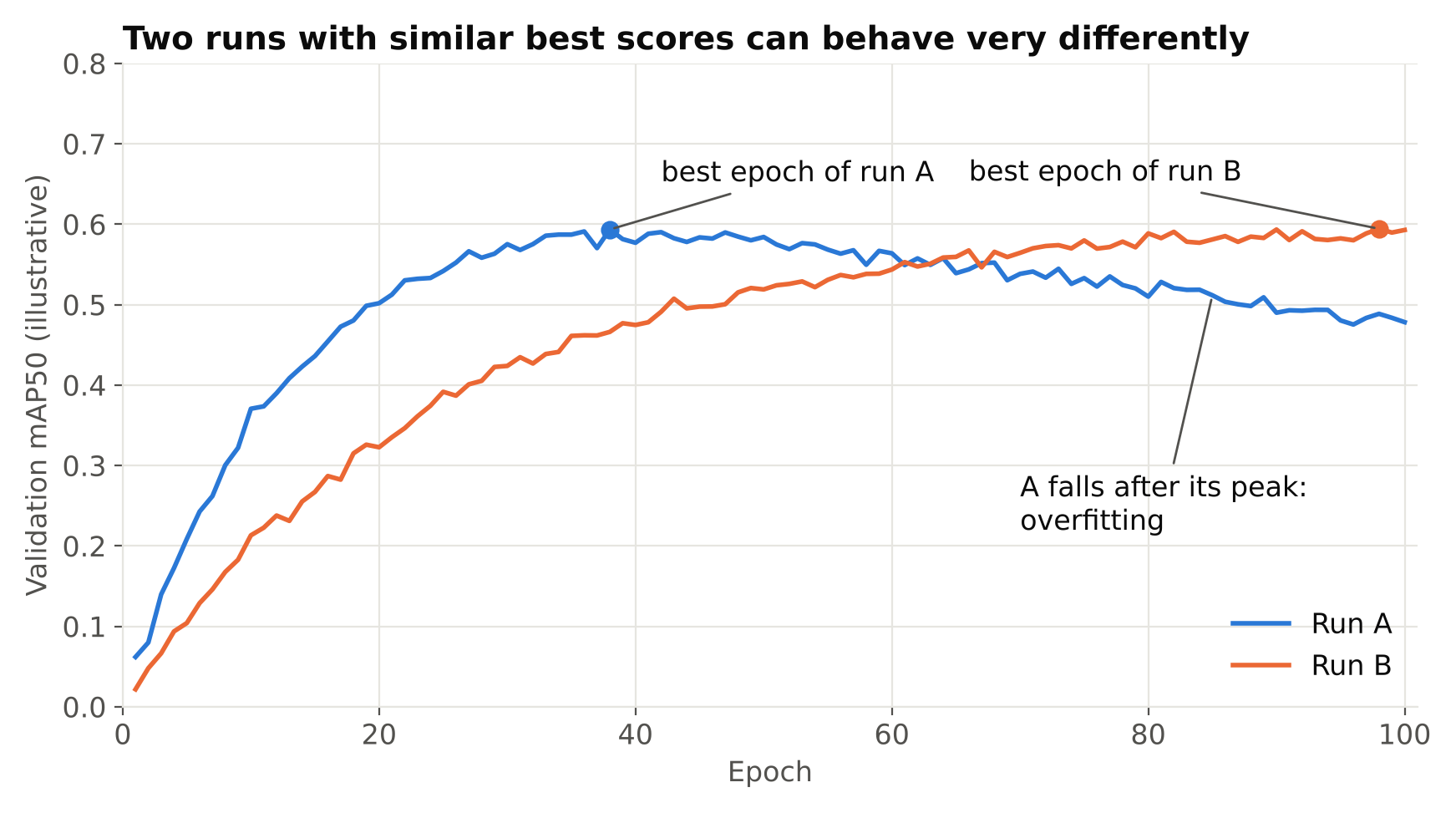
- Logging only the best number. Keep the full curve. A model whose validation metric peaks early and then drops is overfitting. See how to spot overfitting in object detection.
- Not logging dataset changes. Relabelling, adding images or removing bad frames all change results. Give each dataset version a name.
- Trusting one run. Training has randomness. If two runs differ by a small amount, it may be noise. Repeat important comparisons, or treat small differences with caution.
- No link between weights and settings. A
best.ptfile with no record of how it was made is hard to trust and hard to reproduce.
Checklist
- Log inputs (model, dataset version, image size, augmentation, seed, code and library versions) as well as metrics.
- Keep per-class metrics and a few prediction images, not just one summary number.
- Use a fixed validation set when comparing runs.
- Pick one tool: TensorBoard for local simplicity, W&B for hosted sharing, MLflow for self-hosting.
- If you use no tool, keep a run table and store the config with each set of weights.
- Change one variable at a time, and repeat comparisons that matter.
Next steps: train YOLO on a custom dataset, fine-tuning YOLO and transfer learning.