Hard Negative Mining from Production Footage
Every false alarm a live system produces is a free example of exactly what the model gets wrong, on exactly the cameras it has to work on. Collected and used carefully, these examples are some of the most valuable training data you will ever have. Used carelessly, they make the model timid and it starts missing real objects.
This article covers how to build a hard negative loop: capturing false positives from production, reviewing them, adding them to training, and checking that the cure did not cost recall.
What a hard negative is
A hard negative is an image region the model confidently detects as an object when it is not. In a person detector: a coat on a hook, a mannequin, a person on a poster, a reflection in a window, a shadow. Easy negatives, such as empty floor, teach the model little because it already ignores them. Hard negatives sit right at the model's confusion.
In training, a hard negative is usually added as an image in which that region is not labelled. For YOLO-style training, an image with no objects can be included with an empty label file (or no label file); the model learns that nothing in it is a target. If the image also contains real objects, they must be labelled, or the model will learn to ignore them too.
Step 1: capture the evidence
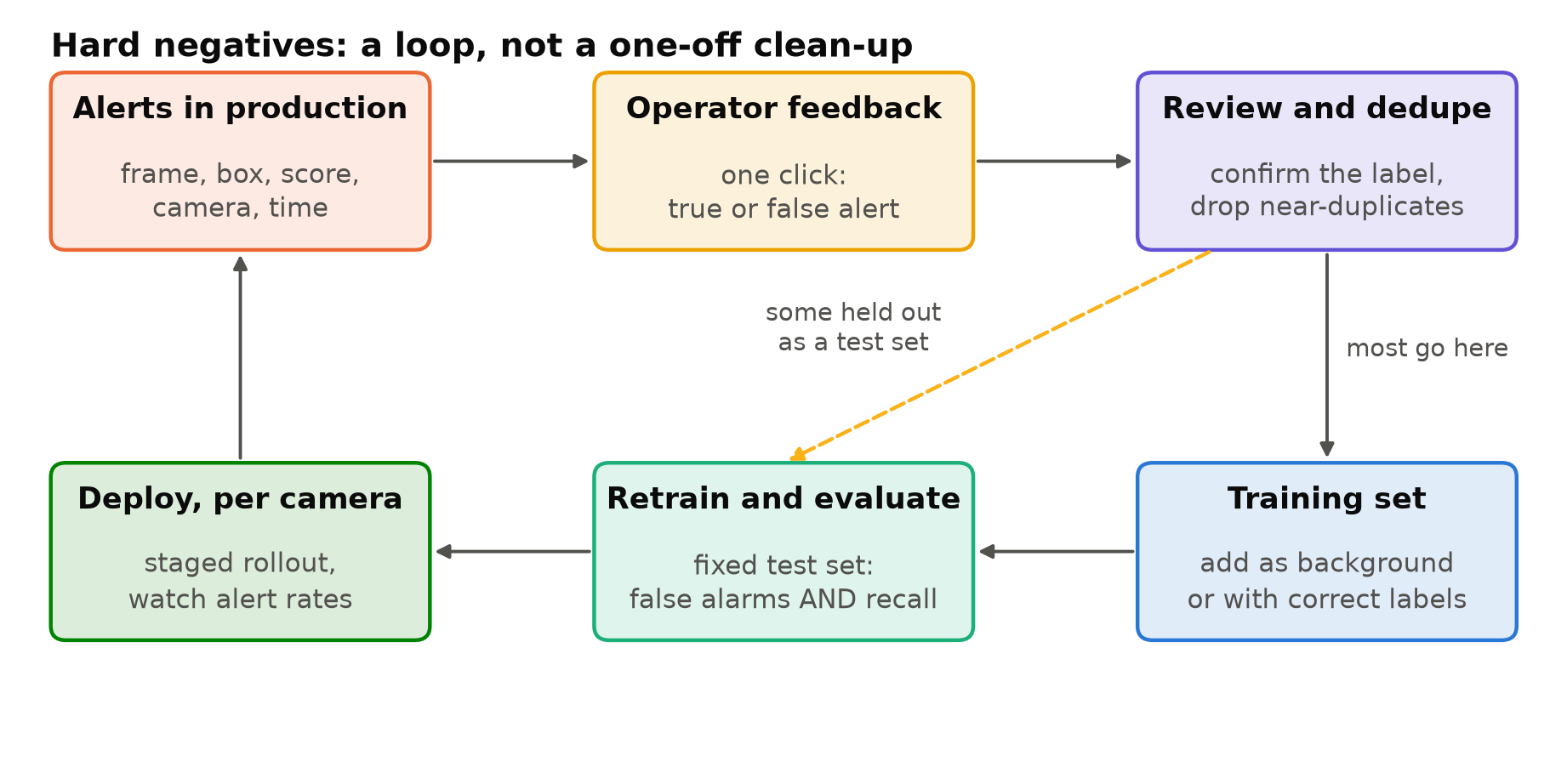
The loop starts with logging. For every alert, save:
- The full frame (not only the crop), at the resolution the model saw.
- The box, class and confidence.
- Camera ID, timestamp, and the model version that produced it.
Then give operators a way to mark an alert as false with one click. Without that feedback you have a pile of alerts and no idea which are wrong. With it, you have a labelled stream of candidates. Reducing False Alarms in Production Video Analytics covers why this feedback is worth building early.
Store with care. These frames often show people, so the same privacy rules apply as for any footage: limited access, defined retention and blurring where possible. See Privacy and Ethics in Camera Analytics.
Step 2: review before you trust
Operator feedback is useful but noisy. People mark alerts false because the event was real but unimportant, because they were busy, or by mistake. Before anything enters the training set, have someone who knows the labelling rules confirm each one:
- Is there really no target object at that location?
- Are there other real objects in the frame that need labels?
- Is the false alarm a model error, or a rule error (a real person in a zone that should not have been active)? Rule errors do not belong in training data.
Step 3: remove near-duplicates
A coat hanging on a hook produces a false alert every few minutes, all day. If you add every one of them, the training set gains hundreds of almost identical images of one coat, and the model overfits to that coat at that angle.
Keep a few examples per distinct cause per camera, spread over different times of day, and drop the rest. Simple similarity checks work well for this; Deduplicating Video Frames Before Labelling shows how.
Step 4: hold some out
Do not put every hard negative into training. Set aside a share of them, from different days than the training ones, as a hard negative test set. Without it, you cannot tell whether retraining fixed the problem or only memorised the specific frames you added.
Keep the split by time or by camera, not by random frame, for the same reasons as any video data. See Train/Validation Split for Video Frames.
Step 5: add them in proportion
This is where the loop most often goes wrong. Add too many negatives and the model learns that "nothing" is usually the right answer, and its confidence on real objects drops. Recall falls, sometimes on exactly the hard real cases that look like the negatives, such as a person standing still next to a coat rack.
Some guidance:
- Ultralytics' training tips suggest background images of roughly 0 to 10% of the dataset, noting that COCO's background images are about 1% of the total. That is a reasonable starting range for images with no objects at all.
- Hard negatives that also contain real labelled objects carry less risk, because they teach the model the distinction rather than "nothing here".
- Add a batch, retrain, measure, then add more. Do not add six months of negatives at once.
Step 6: check both sides
After retraining, measure on fixed test sets:
| Test | Question |
|---|---|
| Held-out hard negatives | Did the false alarms we targeted go away? |
| The normal test set | Did recall and precision on ordinary data hold? |
| Hard positives | Did recall hold on real objects that look like the negatives? |
| Event-level replay | Do alerts per camera per day fall without losing real events? |
The third row needs deliberate effort. Collect real examples that resemble your negatives: people standing near mannequins, people partly hidden by coats. These are the cases a model trained on many negatives starts to miss.
If false alarms fall and recall holds, deploy to a few cameras first and watch the alert rates before rolling out. Measuring Video Analytics by Events, Not Frames gives the event-level scoring.
Do not forget the misses
Production gives you false positives for free, because they produce alerts. Misses produce nothing. Nobody clicks a button for an event the system never reported. A loop that only mines false positives gradually trades recall for precision without anyone noticing.
Two ways to find misses:
- Review random clips. Regularly sample short clips from each camera, including quiet hours, and check for events the system missed.
- Look below the threshold. Log detections slightly below the alert threshold. Real objects that the model saw but doubted are often there, and they are good training examples.
When not to retrain
Not every false alarm source should be fixed with data. A television showing people, a poster of a person, or a mirror is often better handled with a mask, a size filter or a camera adjustment, because these are fixed features of one camera. Retraining is for patterns that appear across cameras, such as a type of reflective jacket, a common mannequin, or a type of shadow. Fix the cheap things first.
Checklist
- Save full frames, boxes, scores, camera and model version for every alert.
- Collect operator feedback with one click.
- Review every candidate against the labelling rules; label any real objects in it.
- Separate model errors from rule errors.
- Remove near-duplicates.
- Hold out some hard negatives, by time or camera.
- Add negatives in small batches and in proportion.
- Measure false alarms, normal recall and hard positives after each round.
- Actively look for misses as well.
Next steps: Reducing False Alarms in Production Video Analytics and Pseudo-Labelling with a Larger Model.