Data Augmentation for Object Detection: What Helps and What Hurts
Augmentation creates new training examples by changing existing ones: flipping, scaling, shifting colour, and so on. Done well, it makes a model more robust and stretches a small dataset. Done badly, it teaches the model things that are never true in your deployment.
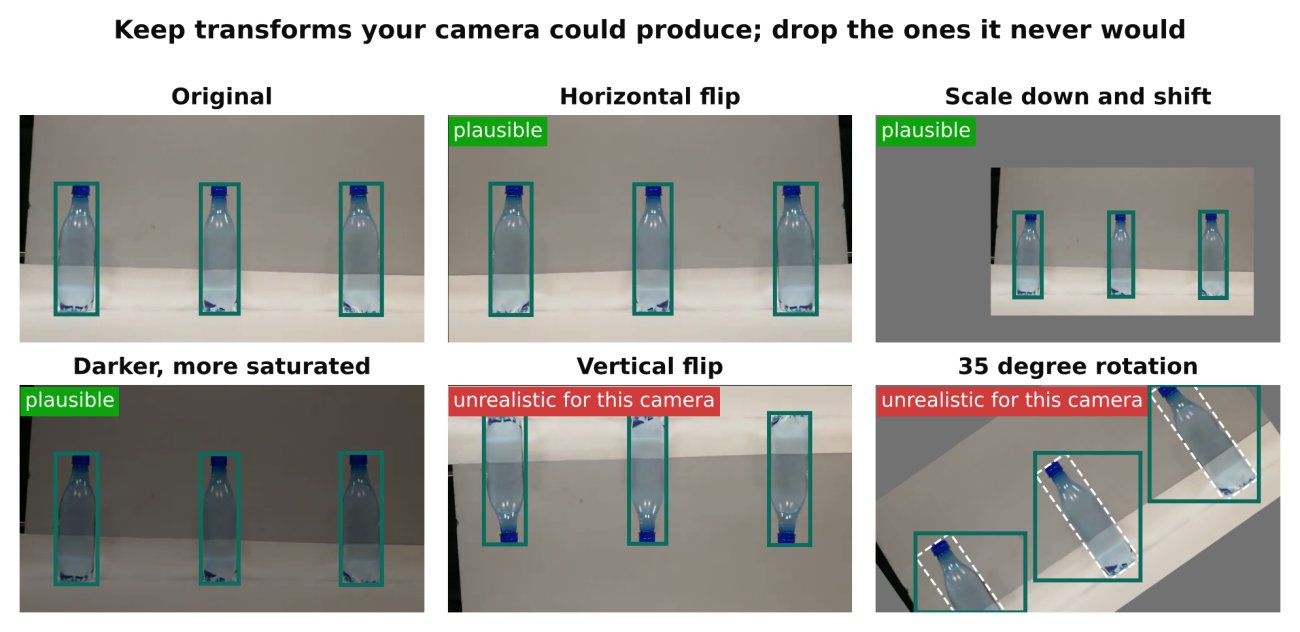
The key idea is simple. Every augmentation should produce an image that could plausibly come from your real camera. If it could not, it is probably hurting you.
Why detection is different from classification
In classification, an augmentation changes the image and the label stays the same. In detection, the boxes must change along with the image. A horizontal flip must flip the box coordinates. A crop must clip or drop boxes. A rotation must recompute the box, and a rotated box becomes larger than the object because the new box must still be axis-aligned.
Good libraries handle this for you, and Ultralytics applies box-aware augmentation during training by default. Your job is to choose which transforms and how strong they are.
The main families
Geometric
- Horizontal flip. Usually safe and useful. Unsafe when left and right carry meaning: text, a traffic direction that is always the same, or a layout where the object only appears on one side and you want the model to learn that.
- Vertical flip. Rarely correct. Most cameras do not see the world upside down. Leave it off unless your data is genuinely overhead or orientation-free, such as aerial or microscope images.
- Scale and translate. Useful, because objects appear at different distances and positions. Very strong scaling can shrink objects below the size the model can detect, which adds noise instead of signal.
- Rotation. Small angles may help if your camera mount can tilt. Large rotations rarely match reality and enlarge the boxes. Use gently, or not at all.
- Perspective and shear. Useful only if your cameras vary in angle. Keep small.
Photometric
- Brightness, contrast, saturation and hue changes. Helpful for lighting variation across the day. Hue shifts are risky when colour is the class signal, for example distinguishing a red object from a green one, or colour-coded safety gear.
- Blur and noise. Useful if your footage is compressed, low light or has motion blur. Do not add noise your camera never produces.
Compositional
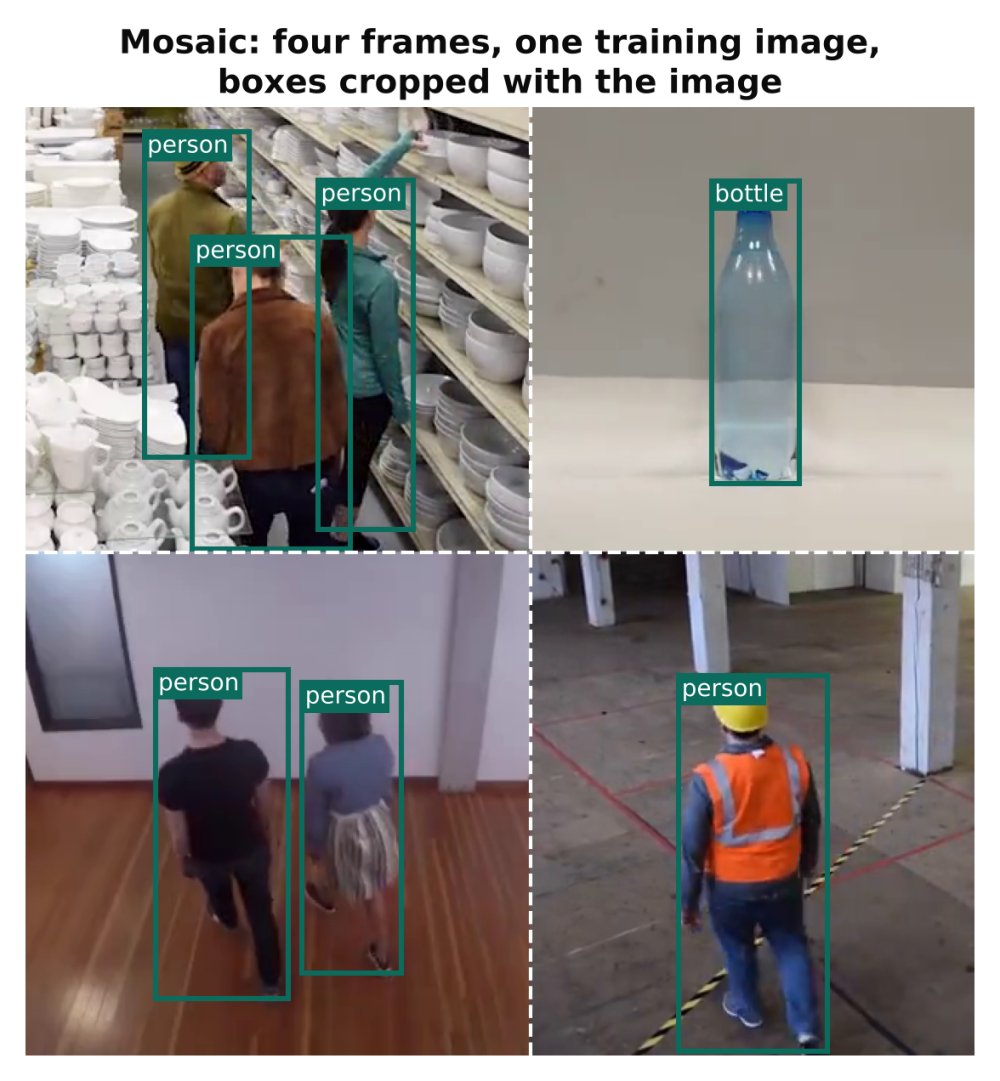
- Mosaic. Combines four training images into one. It exposes the model to more objects, more backgrounds and more scales per step, and objects appear in unusual positions. It is a default in many YOLO training pipelines and is generally helpful, but see the note on turning it off near the end of training below.
- Mixup. Blends two images. Occasionally helpful on larger datasets, often unnecessary on small ones.
- Copy-paste. Cuts objects and pastes them into other images. Helpful for rare classes, but only if pasted objects look natural in scale, lighting and context.
Which settings to use in Ultralytics
Ultralytics exposes augmentation as training arguments. You can pass them to train:
from ultralytics import YOLO

model = YOLO("yolo11n.pt")
model.train(
    data="data.yaml",
    epochs=100,
    imgsz=640,
    fliplr=0.5,     # horizontal flip probability
    flipud=0.0,     # vertical flip off
    mosaic=1.0,     # mosaic probability
    degrees=0.0,    # no rotation
    hsv_h=0.015,    # small hue shift
    hsv_s=0.7,
    hsv_v=0.4,
    close_mosaic=10 # turn mosaic off for the final epochs
)
The values above are examples. Check the current Ultralytics documentation for the defaults and the full list of arguments in your installed version, since defaults can change between releases.
About close_mosaic: mosaic images look unlike real frames. Turning mosaic off for the last few epochs lets the model finish training on images that look like your actual data. This is a commonly used setting in Ultralytics training; check that it exists in your version.
A decision approach
Instead of copying a recipe, reason from your deployment:
| Question | If yes | If no |
|---|---|---|
| Does the camera ever see mirrored scenes? | Keep horizontal flip | Turn it off if direction matters |
| Is the scene ever upside down? | Consider vertical flip | Leave it at zero |
| Does lighting change a lot? | Keep brightness changes | Reduce them |
| Is colour the class signal? | Reduce hue shift to near zero | Small hue shift is fine |
| Are objects at varying distances? | Keep scale augmentation | Reduce it |
| Is the camera fixed and the scene constant? | Use lighter geometric augmentation | Use more |
For a fixed camera with a stable view, heavy geometric augmentation can even hurt: you are teaching invariances the deployment never needs, which uses up model capacity. For a model that must generalise across many cameras, stronger augmentation is more valuable.
How to test whether an augmentation helps
Do not guess. Run a controlled comparison:
- Pick a fixed training set and a fixed validation set that is split properly. See Train/Validation Split for Video Frames: Avoid Data Leakage.
- Train a baseline with your current settings.
- Change exactly one augmentation, such as turning off flips, and train again with the same seed and epochs.
- Compare validation metrics, and also look at predictions on real footage from the target camera.
Differences between runs can be small and noisy. If two settings are within the run-to-run variation, prefer the simpler one. Repeat with a different seed if the decision matters.
Always inspect the augmented images themselves. Ultralytics saves sample training batches as images at the start of training, in the run folder. Open them and ask: could my camera produce this? If boxes are misplaced or objects look impossible, fix the settings before spending hours training.
Common mistakes
- Augmenting the validation set. Validation should reflect real data. Augmentation applies to training only.
- Augmenting before splitting. If you save augmented copies of an image and then split randomly, copies of the same source land in both train and validation. Split first, then augment the training side only.
- Unrealistic transforms. Upside-down people, extreme colour shifts, heavy rotation for a fixed camera.
- Stacking everything at maximum strength. Strong settings combine multiplicatively. Many strong transforms at once can create images where objects are unrecognisable.
- Using augmentation to compensate for bad labels or too little variety. Augmentation helps with variation you can imagine. It cannot invent a night scene you never collected. See How Many Images Do You Need to Train an Object Detector?.
- Destroying small objects. Aggressive scale-down and blur can erase tiny targets entirely. Check Class Imbalance and Small Objects: Practical Fixes.
- Forgetting the box. In custom pipelines, make sure every geometric transform updates the boxes. Draw boxes on augmented samples to verify.
Checklist
- Ask of every transform: could my real camera produce this?
- Keep horizontal flip only if left-right orientation carries no meaning.
- Leave vertical flip and large rotation off unless the data demands them.
- Avoid hue shifts when colour defines the class.
- Keep mosaic for training, and consider closing it for the final epochs.
- Augment training data only, and split before augmenting.
- Look at the saved training batch images before a long run.
- Compare one change at a time against a baseline.
Next steps: put these settings into a full run with Train YOLO on a Custom Dataset: A Step-by-Step Guide, then check for overfitting with How to Spot Overfitting in Object Detection.