OpenCV Essentials Every Computer Vision Engineer Needs
OpenCV is large, but a working computer vision engineer uses a small part of it most days: read frames, resize and convert them, draw results, write video, and apply a few geometric transforms. Deep learning libraries handle the models. OpenCV handles everything around them.
This article covers that daily core, with the mistakes that cause quiet bugs. All examples use the Python package cv2.
Install the right package
There are several pip packages. The main ones are opencv-python (with window display support) and opencv-python-headless (no GUI, meant for servers and containers). Install only one of them in an environment. Having both can cause confusing import errors. If you run in Docker or on a server with no display, use the headless build. cv2.imshow will not work there. See how to dockerize a computer vision app for container patterns.
Reading and writing images
import cv2

img = cv2.imread("photo.jpg")
if img is None:
    raise FileNotFoundError("could not read photo.jpg")
print(img.shape)   # (height, width, channels)
cv2.imwrite("copy.jpg", img)
Two facts cause most beginner bugs:
imreadreturnsNoneon failure. It does not raise an error. A wrong path givesNone, and the next line fails with a confusing message. Always check.shapeis (height, width, channels). But many functions, such ascv2.resize, take sizes as (width, height). Mixing these up produces stretched or transposed images.
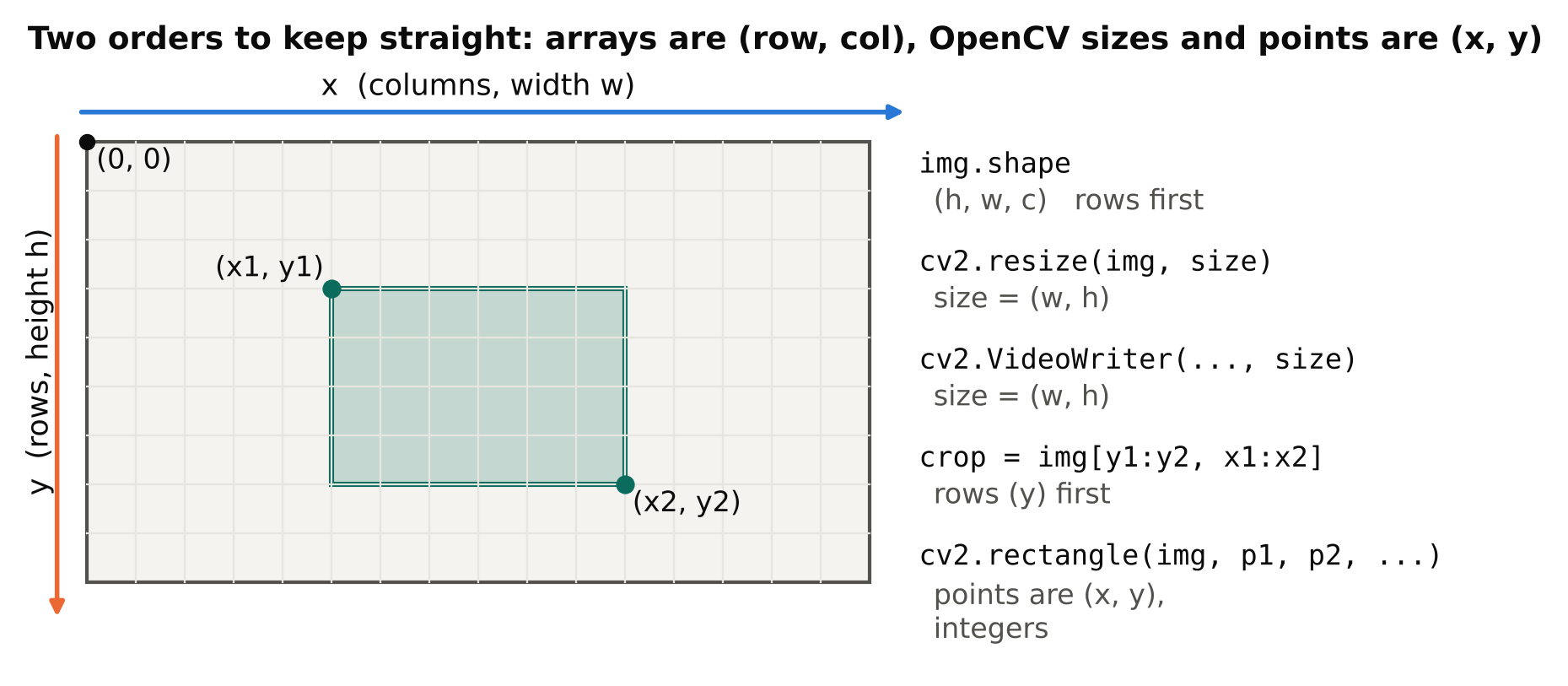
An image is a NumPy array. An 8-bit colour image has values from 0 to 255 and dtype uint8. Be careful with arithmetic on uint8: values wrap around instead of going below zero or above 255. Convert to float32 before doing maths, and convert back at the end.
Colour order: BGR, not RGB
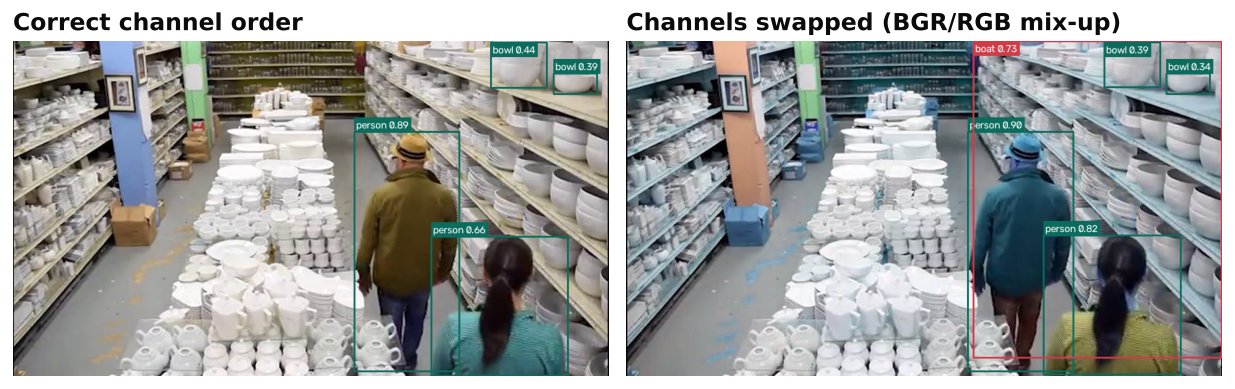
OpenCV loads colour images in BGR order. Most other libraries, such as Matplotlib, PIL and most model preprocessing code, expect RGB. Convert explicitly:
rgb = cv2.cvtColor(img, cv2.COLOR_BGR2RGB)
If an image looks oddly blue or orange, the channel order is wrong. For detection models, check what your model expects. Feeding BGR into a model trained on RGB does not crash. It quietly lowers accuracy, which is worse. The same issue shows up when you move a model from Ultralytics to a hand-written ONNX pipeline, as covered in exporting YOLO to ONNX.
Reading video and cameras
cap = cv2.VideoCapture("clip.mp4")   # a file path, a camera index like 0, or a stream URL
if not cap.isOpened():
    raise RuntimeError("cannot open source")

while True:
    ok, frame = cap.read()
    if not ok:
        break
    # process frame here
cap.release()
read() returns two values: a success flag and the frame. When reading a file, ok becoming False usually means the end of the file. When reading a live camera or stream, it can mean the connection failed, and you need reconnect logic. The details for network cameras are in reading RTSP streams with OpenCV and FFmpeg and handling RTSP dropouts.
You can query properties with cap.get(cv2.CAP_PROP_FPS), cv2.CAP_PROP_FRAME_WIDTH and cv2.CAP_PROP_FRAME_HEIGHT. For some sources these values are zero or wrong, so do not trust them blindly. For live streams the real frame rate depends on the camera and network; measure it.
Always call release() when finished, or the camera or file stays locked.
Writing video
fourcc = cv2.VideoWriter_fourcc(*"mp4v")
out = cv2.VideoWriter("out.mp4", fourcc, 25.0, (width, height))
out.write(frame)
out.release()
The size passed to VideoWriter must match the frames you write, as (width, height). If it does not, you often get an empty or unplayable file with no error. Codec support varies between systems and builds, so test that the output file plays.
Resizing and cropping
small = cv2.resize(img, (640, 360))                      # (width, height)
crop = img[y1:y2, x1:x2]                                 # rows first, then columns
Cropping uses NumPy slicing, with the row (y) range first. A crop is a view into the original array, so editing it changes the original. Use .copy() if you need a separate image.
For interpolation, cv2.INTER_AREA is a common choice when shrinking and cv2.INTER_LINEAR is the default and fine for most other cases.
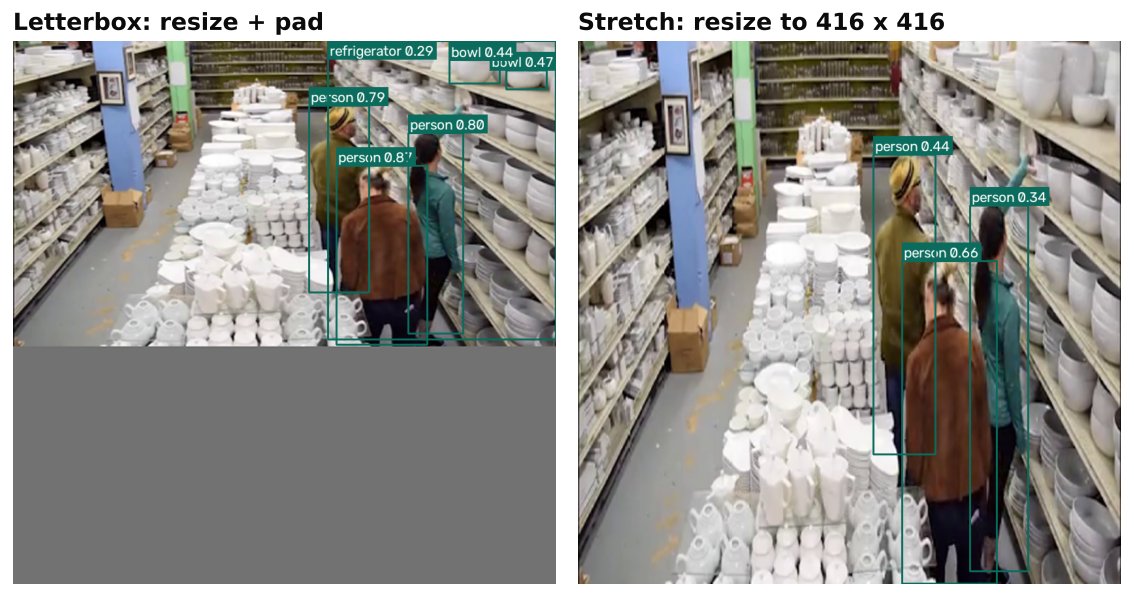
Resizing without keeping the aspect ratio distorts objects. Detection pipelines usually resize with padding (often called letterboxing) to keep proportions. If you write your own preprocessing, copy the exact method the model was trained with.
Drawing results
cv2.rectangle(frame, (x1, y1), (x2, y2), (0, 255, 0), 2)
cv2.putText(frame, "person 0.91", (x1, y1 - 5),
            cv2.FONT_HERSHEY_SIMPLEX, 0.6, (0, 255, 0), 2)
Points are (x, y), colours are BGR tuples, and coordinates must be integers. Convert float box coordinates with int() before drawing. Drawing modifies the frame in place, so draw on a copy if you still need the clean frame, for example to save a training example.
For zones, cv2.polylines draws an outline and cv2.fillPoly fills a region. To test whether a point is inside a polygon, cv2.pointPolygonTest is available, which is useful for zone intrusion and dwell time alerts.
Colour spaces
Convert to grayscale with cv2.COLOR_BGR2GRAY when colour is not needed. HSV (cv2.COLOR_BGR2HSV) separates hue from brightness, which makes simple colour filtering easier. For 8-bit images OpenCV stores hue from 0 to 179, not 0 to 360, so ranges from other tools must be halved.
Use cv2.inRange on an HSV image to build a mask for a colour range. This is handy for quick checks, but it is fragile under changing light. For anything that must work across day and night, a trained model is more reliable.
Geometric transforms
cv2.warpAffinehandles rotation, scaling and shifting with a 2x3 matrix.cv2.getRotationMatrix2Dbuilds a rotation matrix.cv2.getPerspectiveTransformandcv2.warpPerspectivemap four points to four points. This is how you create a top-down view of a road or floor from a camera at an angle.
Remember that the output size argument is again (width, height).
Windows and keys
cv2.imshow("view", frame)
if cv2.waitKey(1) & 0xFF == ord("q"):
    break
imshow shows nothing without a waitKey call, which also processes window events. Use cv2.destroyAllWindows() at the end. None of this works in a headless build.
Performance habits
- Do not do heavy work you do not need on every frame. Resize early, skip frames when the task allows it, and keep model input at the smallest size that works.
- Avoid copying frames more than needed.
- When measuring speed, time the whole loop, not just the model. See measuring FPS and latency correctly.
Checklist
- Install one OpenCV package; use headless on servers.
- Check
imreadandVideoCaptureresults for failure. - Remember:
shapeis (h, w, c), size arguments are (w, h), crops are[y1:y2, x1:x2]. - Convert BGR to RGB when a library or model expects RGB.
- Match
VideoWritersize to the frames; test the output plays. - Convert box coordinates to integers before drawing.
- Release captures and writers.
Next steps: reading RTSP streams with OpenCV and FFmpeg, setting up a clean Python environment for computer vision.