Build a Computer Vision Portfolio That Gets Clients
A computer vision portfolio has one job: to help a stranger believe you can solve their problem. Most portfolios fail at this because they show a list of tutorials, a pile of notebooks, or a headline number with no context.
A good portfolio shows a few projects, each explained clearly and honestly, in a way that a non-specialist can follow in a couple of minutes. This article covers what to include, how to present results without overstating them, and how to make demos that people actually open.
Who is reading
Think about the people who will look at your work.
- A business owner or manager wants to know if you understand their problem and can finish things. They will not read code.
- A technical lead wants to see sound method: how you split data, how you measured, what failed.
- A recruiter or a platform client will skim. They will spend seconds on a project before deciding to read more.
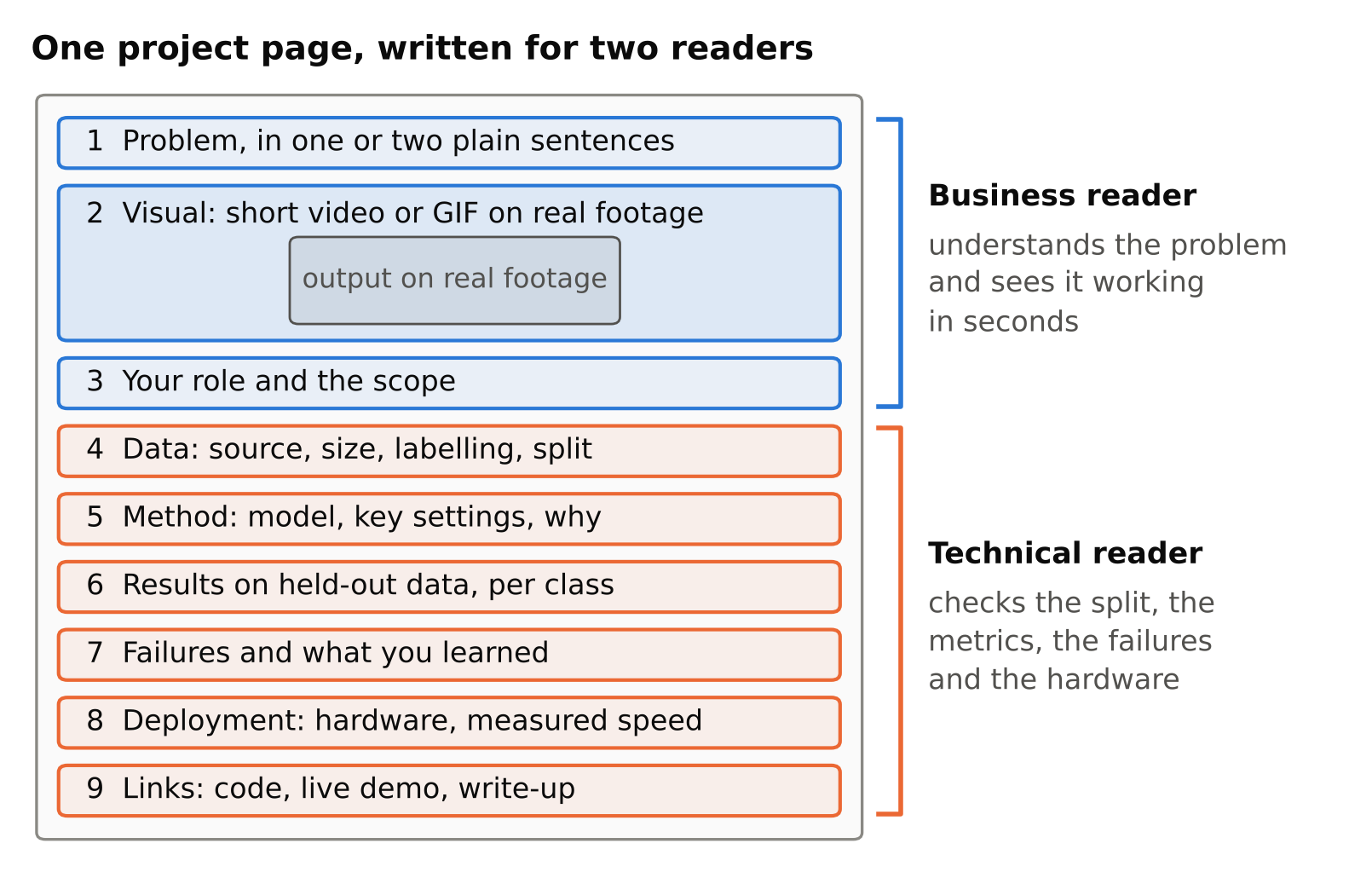
Write each project page so the top answers the first reader, and the lower sections answer the second.
Choose projects that look like real work
Three to five strong projects beat fifteen weak ones. Prefer projects that look like paid work:
- Detecting and counting objects in video, such as people, vehicles or items on a conveyor.
- Zone-based alerts, such as entry into a restricted area or time spent in an area.
- A pipeline that reads a camera stream, handles failures, and sends an alert.
- A model deployed to a small device, with honest notes on speed and limits.
- A tool that helps others test or label models.
For example, the author built CV Test Bench, a tool to test detection models on camera feeds with alerts and zones. A tool like that shows that you think about the whole workflow and not just a model file.
Avoid making your portfolio only well-known tutorial datasets and standard exercises. They show you can follow instructions, but many other people show the same thing. If you do use a public dataset, add something of your own: a new test, a deployment, a clear error analysis, or a realistic use case.
If you have no client work yet, create your own scenario and be clear it is a self-initiated project. That is acceptable. Pretending it was client work is not.
What each project page should contain
Use the same structure every time, so readers know where to look.
- The problem, in one or two plain sentences. What was the goal and who would use the result?
- A visual. A short video or GIF of the output on real footage is the most convincing thing you can show. Before-and-after helps.
- Your role and the scope. What you did, and what you did not do.
- Data. Where it came from, how many images or clips, how it was labelled, and how it was split. Say that you split by video or scene, not randomly by frame, if you did. See train/validation split for video frames.
- Method. Model, key settings, and why you chose them. Keep it short.
- Results, honestly. Metrics on held-out data, per-class where it matters, and what the numbers mean in practical terms. See mAP, precision and recall.
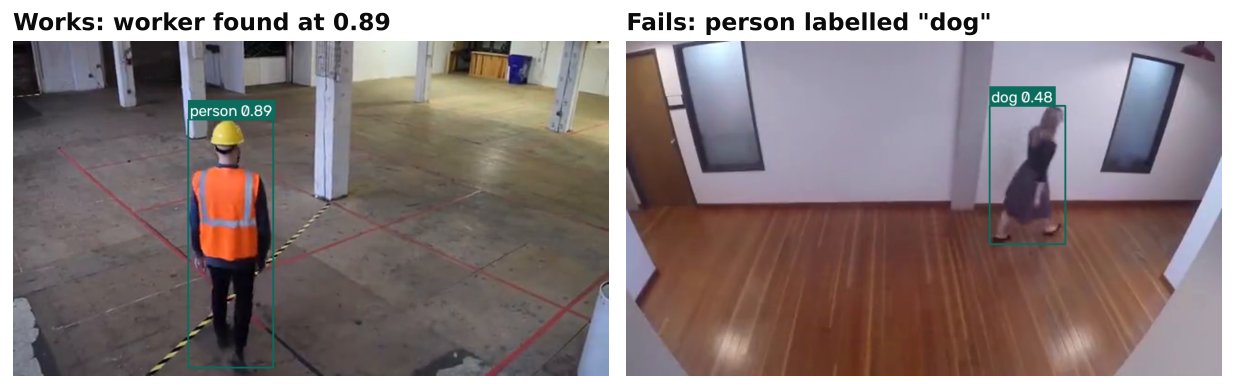
- Failures. Show where it goes wrong and what you learned. This builds trust more than a flawless demo.
- Deployment. How it runs, on what hardware, and what you measured. Use real measurements only. See measuring FPS and latency correctly.
- Links. Code, a live demo, and a write-up.
Present results honestly
Clients with experience have seen inflated claims. Honest reporting sets you apart.
- Do not quote a number you cannot trace. Every figure should come from a run you can reproduce, on data you can describe.
- Never evaluate on training data. And watch for leakage between near-identical frames from the same video.
- Say what the number is measured on. "Detects people well" means little. "On held-out footage from a different day, the model found most people at the chosen threshold, with false alarms mostly from reflections" says much more, once you add your real figures.
- Show the trade-off. Precision and recall move in opposite directions as you change the threshold. Explain which you chose and why. See confidence thresholds.
- Do not hide limitations. Night footage, small objects, crowds and unusual camera angles are common weak spots. If your project does not cover them, say so.
- Do not claim speed from a different machine. State the hardware, input size and what was timed.
- Credit sources. Name the datasets, pretrained models and libraries you used, and respect their licences. Several popular detectors are AGPL-3.0 or GPL-3.0, so check the current licence and see YOLO licences explained before you present a project as a product.
Never invent a client, a case study or a result. If a client was involved but their name is confidential, say that the work was for a client in a certain sector and that details are private, and only if it is true.
Make demos people will open
A demo that works with one click is worth more than a long description.
- A short video (under a couple of minutes) of the system running on realistic footage is the minimum.
- A hosted browser demo lets visitors try the model on an image. Small models can run client-side. See host computer vision demos for free on GitHub Pages and running object detection in the browser.
- A clean repository with a README that explains what it is, how to install it, how to run it, and what to expect. Pin dependencies. See setting up a clean Python environment for computer vision.
- Sample data that visitors may legally use.
Test the demo from a fresh machine or a fresh environment. A demo that breaks on first click does more harm than having none.
If your projects need a hosted site, a domain and hosting for a personal page is optional. A GitHub profile and a simple page are enough to start.
Privacy and rights
Do not publish footage of identifiable people without permission. Blur or avoid faces and number plates in public material, or use footage you recorded with consent or that has a licence permitting reuse. Do not publish anything covered by a client's confidentiality terms. When in doubt, ask. See privacy and ethics in camera analytics. This is not legal advice.
Write a clear profile
Besides project pages, your front page or profile needs:
- One sentence on what you do and for whom.
- Your three best projects, linked.
- Your tools in a short list (only ones you have really used).
- Contact details and how you like to start a conversation.
- Optionally, a few short articles that show how you think.
Keep it short. A visitor should understand in under a minute what to do next.
Keep improving it
Review the portfolio every few months. Remove old projects that no longer represent you. Replace weak visuals. Add what you learned from real work, within confidentiality limits. If you take on freelance work, use the lessons to improve your pitch. See freelancing in computer vision.
Checklist
- Three to five projects that resemble real work, each with a clear problem statement.
- A video or live demo for each, on realistic footage.
- Data source, size, labelling and split described.
- Metrics on held-out data, with per-class results and a note on limits.
- A section on failure cases.
- Hardware stated for any speed claims; no numbers you cannot reproduce.
- Licences and credits checked.
- No private footage, no invented clients, no overstated claims.
- A clean README and a demo tested on a fresh setup.
Next steps: host computer vision demos for free on GitHub Pages, freelancing in computer vision.