Running Object Detection in the Browser with ONNX Runtime Web
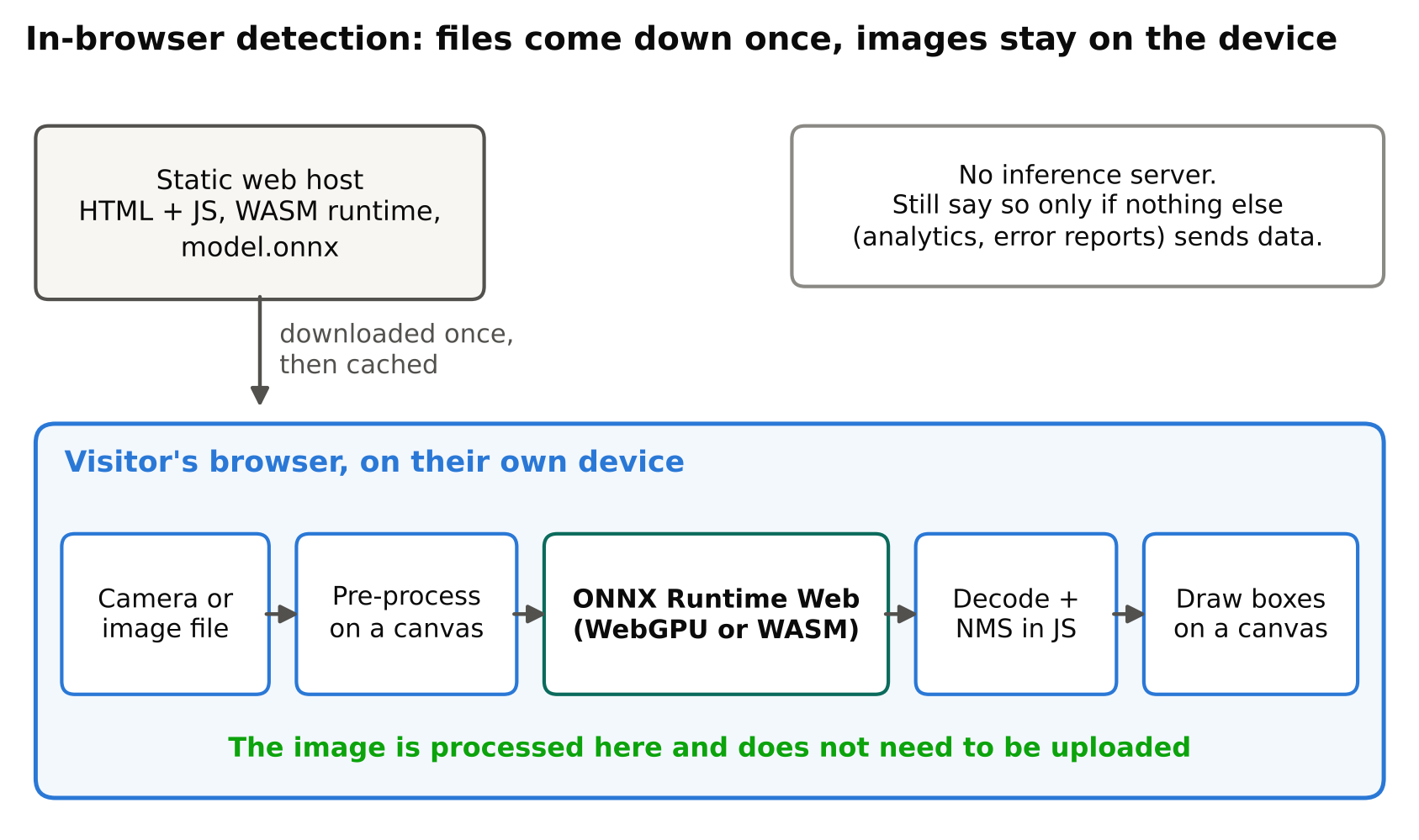
You can run a trained detector entirely inside a web page. The model file downloads to the visitor's browser, and inference runs on their device. No server receives the images. This is useful for demos, privacy-sensitive tools and cheap hosting. It also has real limits, which you should know before you start.
This article explains how ONNX Runtime Web works, what to expect, how to prepare a model and what can go wrong.
How it works
ONNX Runtime Web (the onnxruntime-web package) is a JavaScript build of ONNX Runtime. It loads an .onnx model and runs it using one of several execution backends:
- WASM (WebAssembly): runs on the CPU. It works in almost every modern browser and is the safest default. It can use multiple threads and SIMD where the browser supports them.
- WebGL: an older GPU path using graphics shaders.
- WebGPU: a newer GPU path. It can be much faster on supported browsers and devices, but support varies, so check the current browser compatibility and the ONNX Runtime Web documentation.
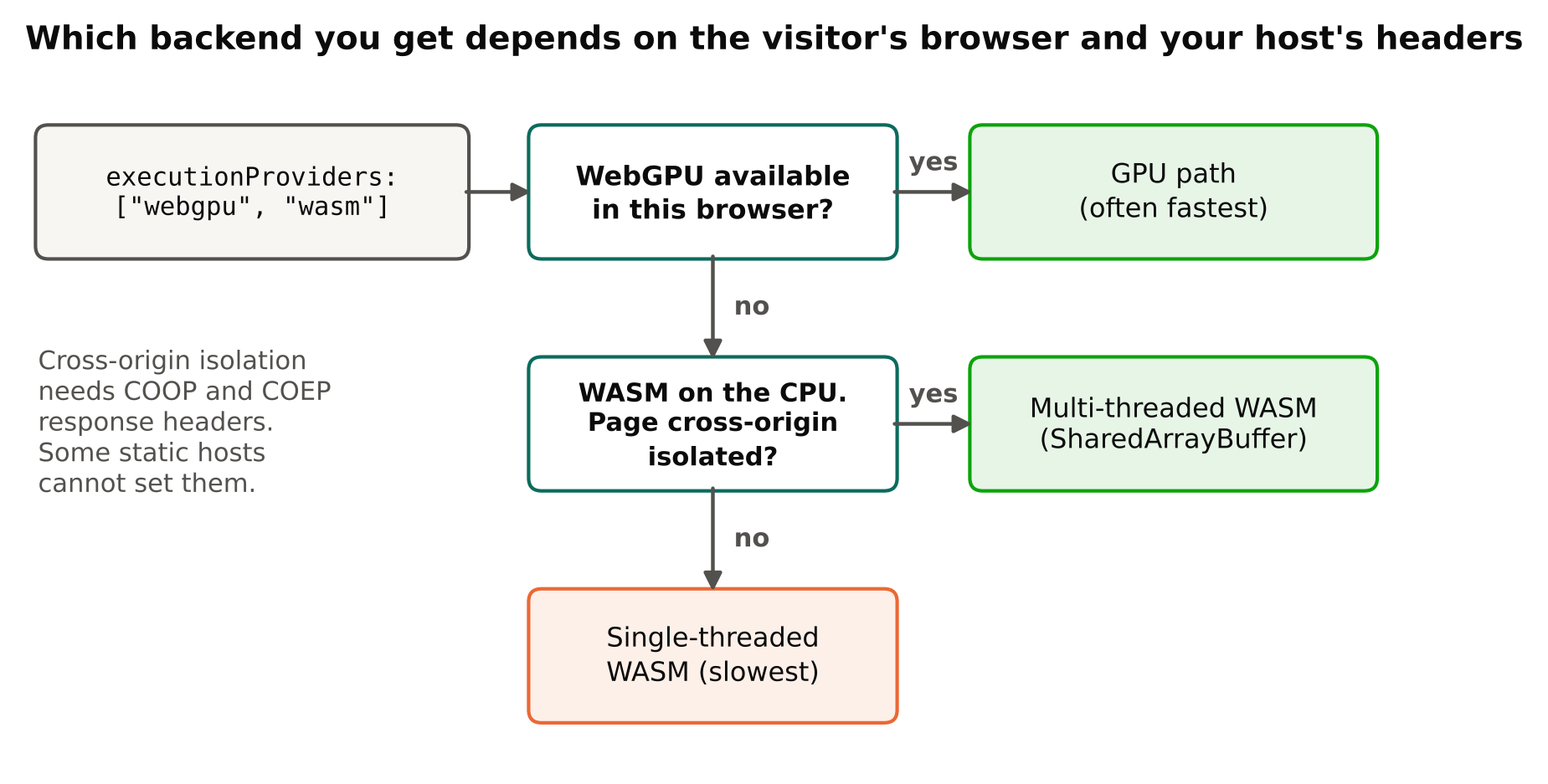
You choose providers in order of preference, and the runtime falls back if one is unavailable. Which one wins depends on the browser, device and model, so test on the devices your users have.
The pipeline
The steps are the same as in any ONNX deployment:
- Get an image from a file input, an image element or the camera.
- Pre-process it: letterbox resize, RGB, scale to 0-1, channel-first layout.
- Run the model.
- Decode the output and apply non-maximum suppression.
- Draw boxes on a canvas.
The model export and decoding details are the same as in exporting YOLO to ONNX and running it with ONNX Runtime. The big difference is that you now write pre- and post-processing in JavaScript, with no NumPy or OpenCV. Canvas APIs handle resizing and pixel access, and you write NMS yourself or use a small library.
A skeleton for loading and running a model:
import * as ort from "onnxruntime-web";

const session = await ort.InferenceSession.create("model.onnx", {
  executionProviders: ["wasm"],
});

// input: Float32Array in NCHW order, e.g. [1, 3, 640, 640]
const tensor = new ort.Tensor("float32", input, [1, 3, 640, 640]);
const results = await session.run({ [session.inputNames[0]]: tensor });
const output = results[session.outputNames[0]];
Read session.inputNames and session.outputNames instead of hard-coding names, and check output.dims against what you expect. You can put "webgpu" before "wasm" in the provider list to try the GPU path first.
Preparing the model
Keep it small
The visitor must download the model. A large file means a slow first load and a poor experience on mobile data. Options:
- Use the smallest YOLO size that meets your accuracy target. See choosing a YOLO model size.
- Use a smaller input size, such as a lower
imgsz, if the objects are large enough. - Consider FP16 or quantized models. Support depends on the backend, and some operators may not be available in every provider, so test each option in the browsers you target.
- Serve the file with compression where your host supports it, and rely on browser caching so the download happens once.
Browsers also limit memory per tab. Very large models can fail on phones. Test on a low-end device, not just your laptop.
Export settings
Use a fixed input shape unless you need otherwise, since fixed shapes are simpler and often better supported. Check that the exported graph uses only operators that the web runtime supports. If a model fails to load, the error message usually names the unsupported operator or shape problem.
Limits to expect
- Speed varies a lot. Phones, laptops and desktops differ widely. WASM on a modest phone may give a low frame rate with a medium model. Do not promise real-time on all devices. For image upload demos this rarely matters; for live camera input it does.
- First load cost. The runtime files and the model both download. Show a loading indicator.
- Threading needs a special setup. Multi-threaded WASM relies on
SharedArrayBuffer, which browsers enable only on cross-origin isolated pages, using specific HTTP headers (COOP and COEP). Some static hosts do not let you set custom headers. Without them, the runtime falls back to a single thread and runs slower. Check your host's capabilities. - No built-in video decoding for RTSP. Browsers do not play RTSP streams directly. Use the device camera or an uploaded video file.
- Camera access needs HTTPS and user permission.
- Your code is public. Anyone can download the model. Do not ship a model you cannot share. Remember licence terms: Ultralytics YOLO models are AGPL-3.0, with a commercial licence available from Ultralytics, so check the current licence before publishing a model in a public page.
Privacy benefits
Client-side inference means the image never leaves the device. For tools that handle photos of people, documents or private spaces, this is a strong benefit and a simple thing to explain to users: "Your image is processed in your browser and is not uploaded."
Be accurate about it, though. State this only if it is true. If your page also sends analytics, error reports or results to a server, say so. Loading the page itself still lets the host see ordinary web traffic. For the wider picture on responsible camera systems, see privacy and ethics in camera analytics.
Performance tips
- Create the session once and reuse it.
- Run a warm-up inference before showing results, because the first call includes setup cost.
- Resize with a canvas at the model input size to avoid processing large images.
- Run inference off the main thread, for example in a Web Worker, so the interface stays responsive.
- Limit analysis rate for live video. Processing every third frame may be fine and saves battery.
- Test with the browser's performance tools and not only a stopwatch. See measuring FPS and latency correctly for the general method; the same ideas apply.
Hosting
Because everything is static files (HTML, JavaScript, the runtime's WASM files and the model), you can host it on static hosting. A free option is described in hosting computer vision demos on GitHub Pages. If you want your own address, a domain name and hosting service can serve the same files. Check file size limits and header options on any host you choose.
When to use something else
Browser inference is a poor fit when you need to process many camera streams, run large models, keep strict accuracy on small objects or control the hardware. In those cases, run inference on a server or an edge device. Use the browser for demos, education, lightweight tools and privacy-first apps.
Key points
- ONNX Runtime Web runs ONNX models in the browser with WASM, and with GPU backends where supported.
- You write pre-processing, decoding and NMS in JavaScript.
- Model size drives load time and memory use, so pick the smallest model that works.
- Speed depends heavily on the user's device; test on weak hardware.
- Multi-threading needs cross-origin isolation headers.
- Client-side processing helps privacy, but describe your data flow accurately.
- Check the model licence before publishing it in a public page.
Next steps
Read Host Computer Vision Demos for Free on GitHub Pages to publish your demo, and Export YOLO to ONNX for the model side.