INT8 Quantization for Detectors: Benefits and Risks
Quantization stores a model's numbers with fewer bits. Instead of 32-bit floating point values, an INT8 model uses 8-bit integers for weights and often for activations. On hardware that supports it, this can reduce model size and memory traffic and increase speed. It can also quietly reduce accuracy, and detectors are more sensitive to this than many people expect.
This article explains how INT8 quantization works in practice, the two main approaches, how to pick calibration data and how to check that the result is still good enough.
The basic idea
A floating-point number can represent a huge range with fine precision. An 8-bit integer has only 256 possible values. To map floats to integers, quantization uses a scale (and sometimes a zero point):
integer = round(float / scale) + zero_point
If the scale is chosen well, most values map with small error. If it is chosen badly, for example because one outlier stretches the range, many values collapse to the same integer and information is lost.
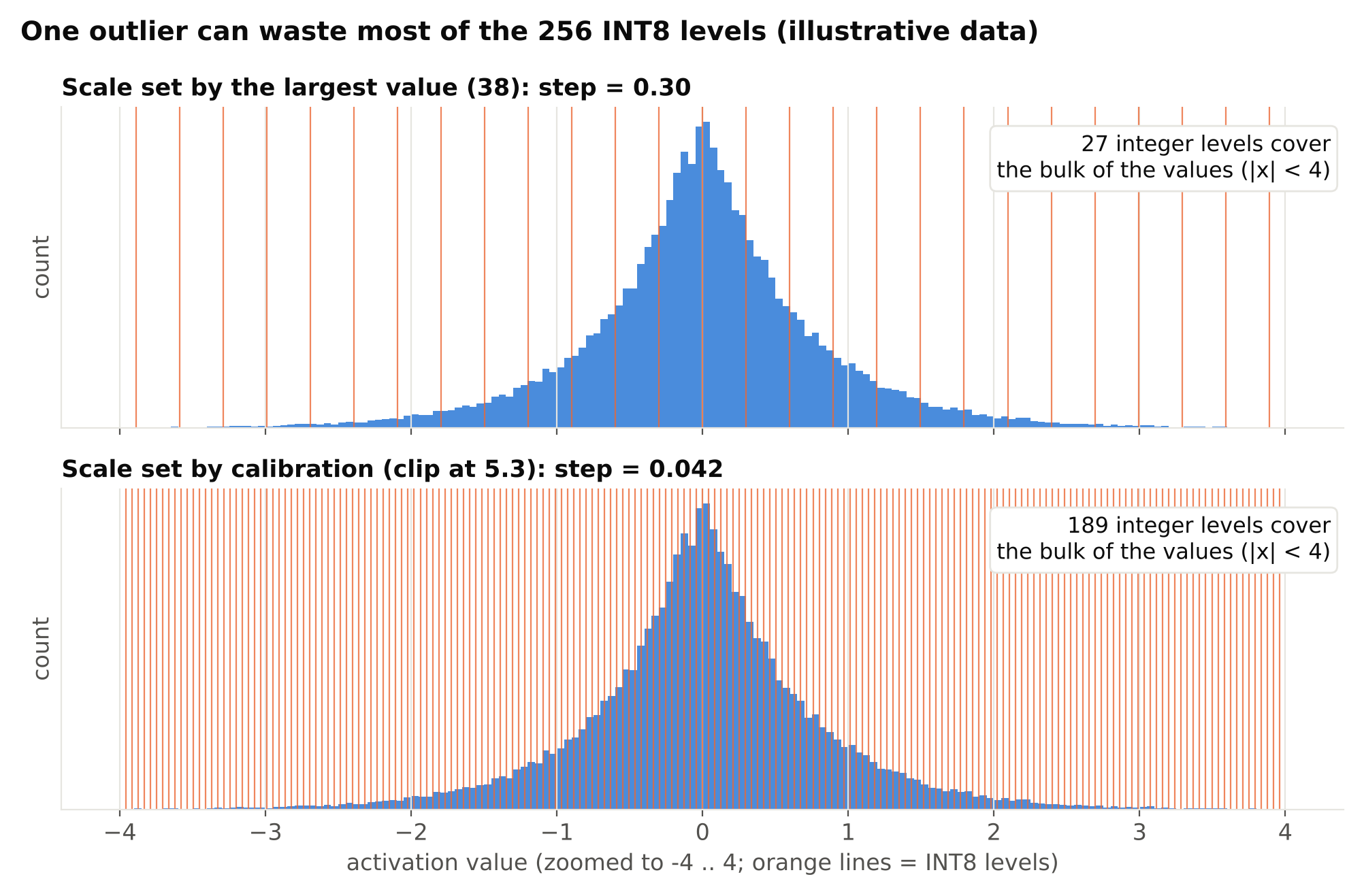
For weights, the ranges are known from the trained model. For activations, the values depend on the input data, so the ranges must be estimated by running sample images through the network. That step is called calibration.
Why bother
Potential benefits:
- Smaller model files. Weights take roughly a quarter of the space of FP32.
- Less memory bandwidth. This often matters more than raw compute on edge devices.
- Faster inference on supported hardware. Many accelerators and some CPUs have fast integer paths. Others do not, and then INT8 gives little or no gain.
- Lower power use. Less data movement usually means less energy.
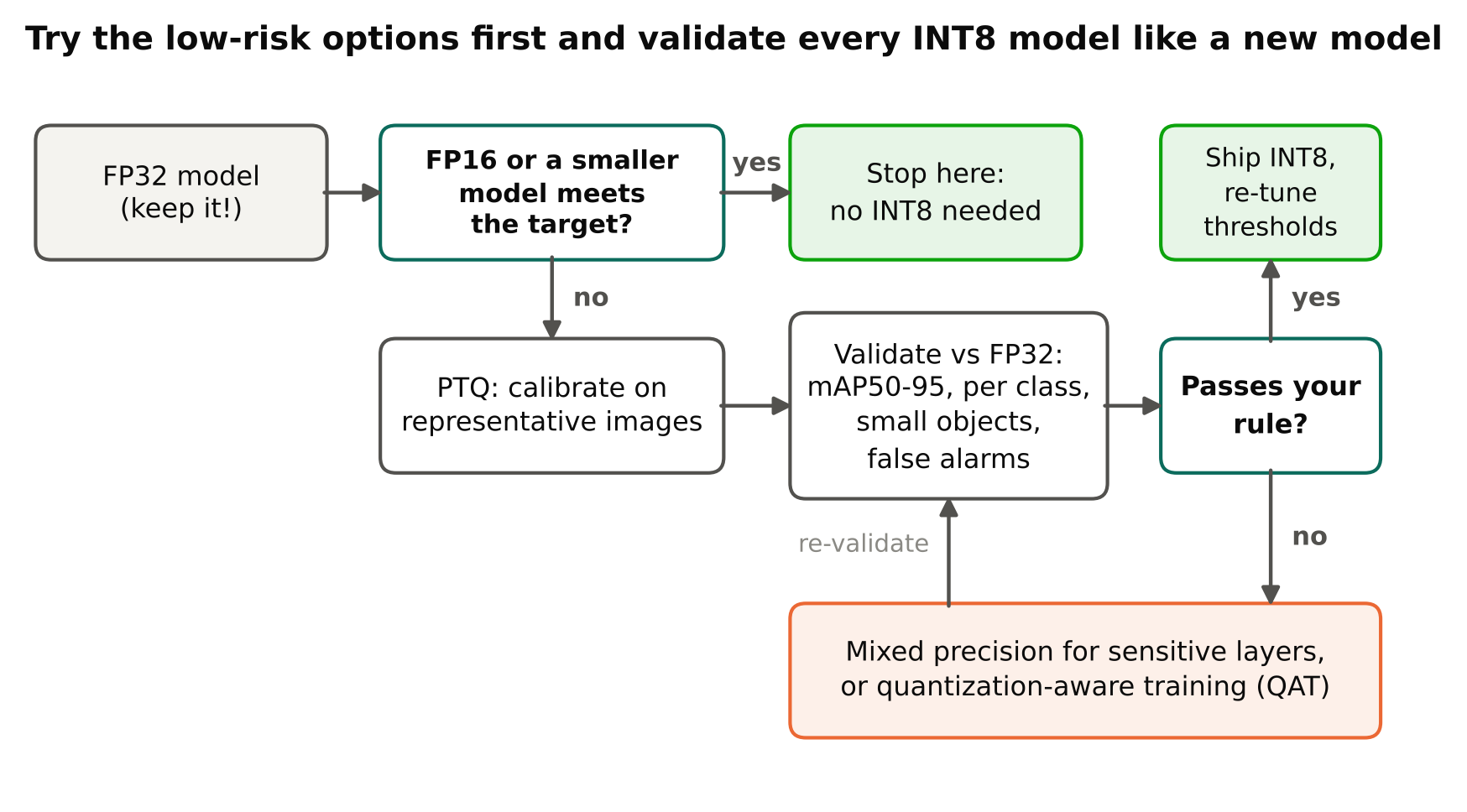
The speed benefit is hardware-specific. Do not assume INT8 is faster everywhere; measure on your target. Also try FP16 first on devices that support it, because it often gives a good part of the benefit with much lower risk.
Two approaches
Post-training quantization (PTQ)
You take a trained FP32 model, run a calibration set through it to collect activation ranges and convert it. No retraining is needed. This is the common starting point.
Pros: fast, simple, no training code. Cons: accuracy loss can be noticeable, especially for small models, and for some layers or classes.
Quantization-aware training (QAT)
You simulate quantization during training or fine-tuning. The network sees rounding effects and learns to cope with them. Then you convert for deployment.
Pros: usually recovers more accuracy than PTQ. Cons: needs a training setup, support in your framework, more time, and the training must match what the deployment toolchain does.
A sensible plan: try PTQ first. If accuracy is acceptable, stop. If not, look at which layers or classes suffer, and consider mixed precision (keeping sensitive layers at higher precision) or QAT.
Calibration data
Calibration is where most INT8 projects succeed or fail.
Rules that work:
- Use real, representative images. They should come from the same cameras, lighting and scenes as production. Do not calibrate on random web images if you deploy on a dark warehouse camera.
- Cover the variety. Include day and night, near and far, busy and empty scenes, if all of them occur in production.
- Use enough images, but not necessarily thousands. Several hundred varied images is a common range, and tools document their own recommendations. More is not always better; variety matters more than count.
- Do not use test images. Calibrate with training or separate data and keep your validation and test sets clean for evaluation.
- Apply the exact same pre-processing as in inference: letterbox, colour order and scaling.
A calibration set made of mostly empty frames can lead to poor ranges for the activations that matter when objects appear. Make sure objects are present in a good share of the images.
How detectors suffer
Detectors have properties that make quantization more delicate than plain classification:
- Box regression needs precision. Small errors in the box output layers shift coordinates. Localisation quality, seen in the stricter mAP50-95 metric, often drops before mAP50 does.
- Small objects are fragile. Their features are subtle, and rounding noise can erase them.
- Rare classes are fragile. Overall mAP can look fine while a rare class loses recall.
- The output head is sensitive. Some toolchains keep the last layers in higher precision for this reason.
So never judge INT8 by overall mAP alone.
How to test the result
Treat the quantized model as a new model that needs validation.
- Run the same validation set through the FP32 and INT8 models.
- Compare mAP50 and mAP50-95, then precision and recall at your chosen confidence threshold. See mAP, precision and recall for how to read these.
- Compare per-class results, especially rare and small-object classes.
- Compare the number of false alarms at your operating threshold. A small shift in confidence scores can change alert counts, so you may need to re-tune thresholds; see confidence threshold tuning.
- Run on real footage from the target cameras and look at failures with your own eyes.
- Measure speed and memory on the target hardware, with warm-up, using the method in measuring FPS and latency correctly.
Define an acceptance rule before you start, for example "no class loses more than a set amount of recall." Deciding afterwards invites wishful thinking.
Practical paths
The tooling depends on the target:
- NVIDIA GPUs and Jetson: TensorRT supports INT8 with a calibration step. See TensorRT for YOLO.
- CPU with ONNX Runtime: it offers quantization tools for ONNX models, both static (with calibration) and dynamic. Check the current ONNX Runtime documentation for the supported operators and options.
- Accelerators such as Hailo: the vendor toolchain quantizes during model compilation and asks for a calibration set. See Raspberry Pi AI Kit and Hailo accelerators.
- Ultralytics export: several export formats accept an
int8option with calibration data. The exact behaviour and arguments differ by format and version, so read the current docs for your target.
In every case, the pattern is the same: export, calibrate with representative images, validate, benchmark.
Common mistakes
- Calibrating on the wrong data. The most frequent cause of unexplained accuracy drops.
- Comparing speed but not accuracy. A fast model that misses objects is not an improvement.
- Assuming INT8 helps on every device. Some hardware has no fast INT8 path.
- Forgetting to re-tune thresholds. Score distributions change after quantization.
- Quantizing too early. Fix data and training first. Quantization should be one of the last steps.
- Not keeping the FP32 model. You need it as the reference and for retraining.
Should you use it
Use INT8 when you have a clear need: the model does not fit in memory, the accelerator requires it, or you cannot reach the required throughput otherwise. Skip it when FP16 or a smaller model already meets your requirements. Fewer moving parts mean fewer surprises in production.
Checklist
- FP16 or a smaller model considered before INT8.
- Calibration set is representative, varied and separate from test data.
- Same pre-processing used for calibration and inference.
- FP32 and INT8 compared on mAP50, mAP50-95, precision and recall.
- Per-class and small-object results checked.
- Thresholds re-tuned and false alarms counted.
- Speed measured on the target device.
- FP32 model kept as a reference.
Next steps
Read TensorRT for YOLO for the NVIDIA workflow, and Reducing False Alarms in Production Video Analytics for what to watch after deployment.